
Notion vs Microsoft OneNote: Which is better in 2026?
The split is structure against freedom: do your notes need fields and views, or a page you can write on anywhere?
Tested hands-on: 3 tests on a MacBook Pro (M1 Pro), October 23, 2026. How we tested
Some links on this page are affiliate links. If you buy through them we may earn a commission at no extra cost to you. This never affects our verdicts.
Quick answer
- Choose Notion if: You want notes that turn into shared, structured work: meeting notes, task lists and a team wiki.
- Choose Microsoft OneNote if: You want a notebook that feels like paper: sections and pages where you can type anywhere, write or draw with a pen, and add pictures, files and recordings.
- Price at a glance: Notion: Free plan; paid from $12/mo · Microsoft OneNote: Free plan; paid from $9.99/mo
At a glance
 Notion |  Microsoft OneNote | |
|---|---|---|
| Free plan | Yes | Yes |
| Paid plans | From $12/mo | From $9.99/mo |
| Our tests | Won 1 of 3 | Won 2 of 3 |
| Best for | Teams and individuals who want notes, wikis and project tracking in one shared workspace, and who value real-time collaboration and databases over local files. | Students, pen and tablet users, and Microsoft 365 households who want a free, free-form notebook on every device and do not need databases or backlinks. |
Notion and Microsoft OneNote are both free to start, but they shape notes in different ways. Notion is a cloud workspace where every note is a page and any page can hold a database, viewed as a table, board, list, calendar or gallery. OneNote is a digital notebook of sections and pages, and each page is a free-form canvas for typing, handwriting, drawing, pictures and recordings, with free apps on Windows, Mac, iPhone, iPad, Android and the web. This comparison sets their plans and US prices, offline use, sharing, linking, encryption and AI features side by side, using each company's own pricing, help and app store pages as of October 2026.
Pricing
| Plan | Monthly | Yearly (12-month total) |
|---|---|---|
| Notion | ||
| FreeFor individuals; limited trial of Notion AI; 5 MB per file upload, 7-day page history | Free Free plan | |
| PlusPer member/month; $10/month billed yearly ($120/year), $12 billed monthly; Notion AI trial only | $12/mo | $120/yr ($10/mo) |
| BusinessPer member/month; $20/month billed yearly ($240/year), $24 billed monthly; includes Notion AI (Notion Agent, AI Meeting Notes, Enterprise Search beta), SAML SSO | $24/mo | $240/yr ($20/mo) |
| EnterpriseCustom pricing; contact sales | Custom | |
| Microsoft OneNote | ||
| FreeFree apps for Windows, Mac, iOS, Android and the web; a Microsoft account with 5 GB of free OneDrive storage; no Copilot in OneNote | Free Free plan | |
| Microsoft 365 PersonalFor 1 person; $99.99 billed yearly, $9.99 billed monthly; 1 TB OneDrive storage; Copilot in OneNote (Windows app); 1-month free trial | $9.99/mo | $99.99/yr ($8.33/mo) |
| Microsoft 365 FamilyFor 1 to 6 people; $129.99 billed yearly, $12.99 billed monthly; 2 TB shared OneDrive storage; AI for the subscription owner only | $12.99/mo | $129.99/yr ($10.83/mo) |
| Microsoft 365 PremiumFor 1 to 6 people; $199.99 billed yearly, $19.99 billed monthly; Family plus extensive Copilot usage and agentic AI features; AI for the owner only | $19.99/mo | $199.99/yr ($16.67/mo) |
Prices checked on .
Features compared
| Feature | Notion | Microsoft OneNote |
|---|---|---|
| Offline use | Partial · Desktop/mobile apps only; downloaded pages; first 50 rows of a database's first view | Yes · Windows app keeps a local copy for offline edits and merges them when back online; iPhone/iPad sync pending changes too |
| Local-first files | No · Cloud workspace; export to Markdown, CSV, HTML, PDF | Partial · Windows app can store a notebook on This PC; Mac app keeps all notes in OneDrive |
| Databases | Yes · Table, board, list, calendar, gallery, timeline, chart, map, feed and form views (1 chart on Free); dashboard view on Business and Enterprise | No · Plain tables; a table can be converted to an Excel spreadsheet; no database views |
| Backlinks | Yes · Created automatically by @-mentions | No · Links to notebooks, sections, pages and paragraphs are copied and pasted; no backlinks list |
| Real-time collaboration | Yes · No limit on simultaneous editors | Yes · Shared notebooks on OneDrive or SharePoint can be co-authored by several people at the same time |
| API | Yes · REST API and webhooks | Yes · Microsoft Graph OneNote REST API; delegated sign-in only (no app-only access) |
| Publish to web | Yes · Notion Sites; custom domain on paid plans, $8/month per domain billed yearly | Partial · View-only or edit links to a whole notebook on OneDrive or SharePoint; single-page sharing was removed |
| Encryption | Partial · AES-256 at rest, TLS 1.2+ in transit | Partial · Password-protected sections only (not pages or notebooks), 128-bit AES; no password recovery |
| AI features | Yes · Business plan and up; limited trial on Free and Plus | Yes · Copilot in OneNote with Microsoft 365 Personal, Family, Premium (Windows only) or a Copilot work license |
How we tested
We gave Notion and Microsoft OneNote the same 3 tasks on the same MacBook Pro (M1 Pro). Each test below lists the task, how we judged it, both results and screenshots; select a screenshot to see it at full size.
- Device
- MacBook Pro (M1 Pro) · macOS 26.6.2 · Chrome 155
- Tested
- October 23, 2026
- Plans used
- Notion: Free · Microsoft OneNote: Free
- App versions
- Notion: Web app, database with a Date property, Web app, Search (no AI), Web app, Code block (Mermaid) · Microsoft OneNote: OneNote for the web, Table > Sort, OneNote for the web, Search (Section), OneNote for the web, Draw tab (pen)
| Test | Notion | Microsoft OneNote | Winner |
|---|---|---|---|
| Build a task table and sort it by due date (timed) | Pass2.94 min | Pass0.77 min | Microsoft OneNoteby Time to a sorted table |
| Find a page by a word inside it (timed) | Pass4.4 s | Pass4.5 s | Notionby Time to open the right page |
| Sketch a labeled diagram on a page | Partial | Pass | Microsoft OneNote |
| Tests won | 1 | 2 | 0 ties |
Test 1: Build a task table and sort it by due date (timed)
The task
In each tool, on a new page, build a table with the columns Task, Owner and Due and the five FICTIONAL rows below, typed in this order, then sort the rows by Due, earliest first, with the tool's own features:
- Print labels / Sam / 2026-11-06
- Order boxes / Dana / 2026-11-02
- Book courier / Lee / 2026-11-09
- Update stock sheet / Ana / 2026-11-04
- Call the printer / Kim / 2026-11-03
How we judged it
The right order is Order boxes, Call the printer, Update stock sheet, Print labels, Book courier.
Pass: all five rows and three columns in the right order, sorted with a built-in sort (no rows moved by hand), within 10 minutes.
Partial: the table is right, but rows had to be moved by hand, or it took more than 10 minutes.
Fail: a row or value is missing or changed, or no table could be made.
The time is measured from opening the empty page until the table is sorted.
Notion
Pass 2.94 min
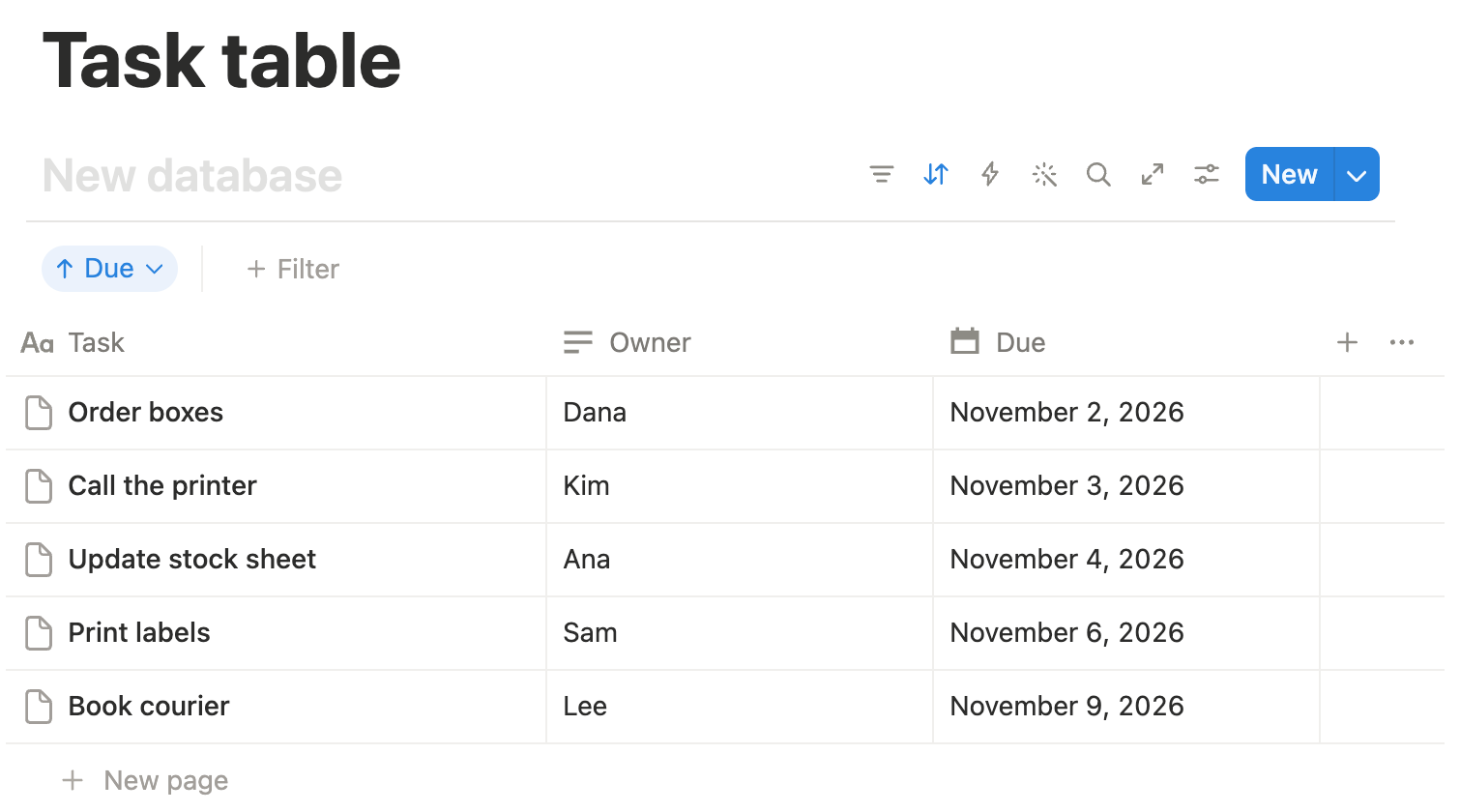
A database table with a Date column; Sort old to new put the rows in the right order without moving any by hand.
Microsoft OneNote: Winner
Pass 0.77 min
A table made with Tab; sorting with the five Due cells selected gave the right order and kept the header. A first sort moved the header and was undone.
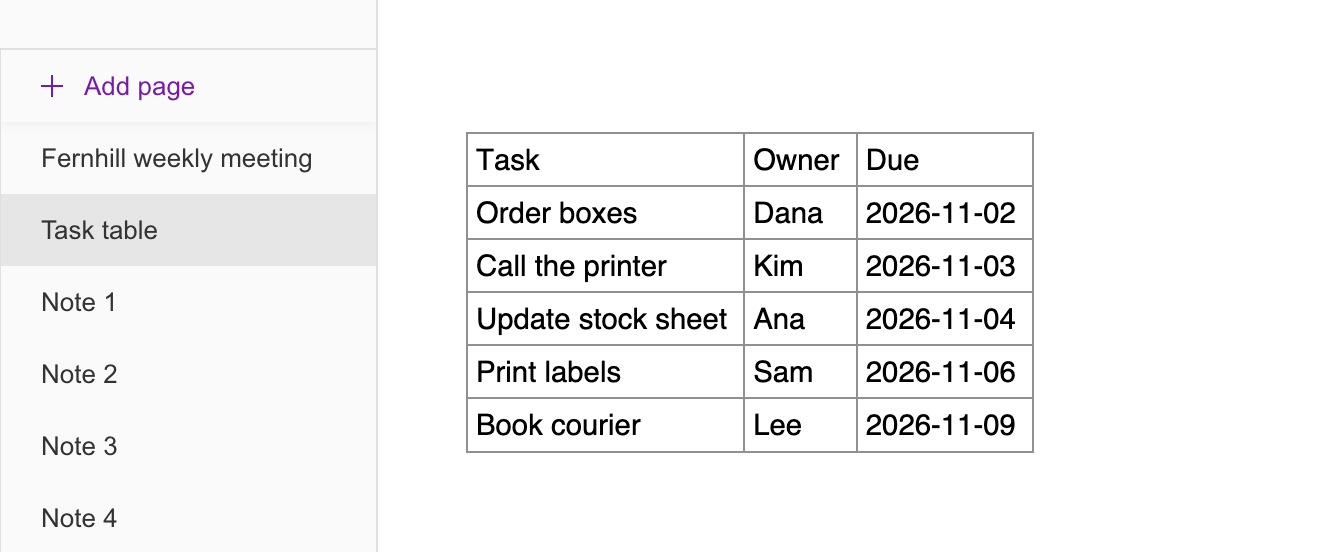
OneNote's Sort on the web has only Ascending and Descending: with the cursor in one cell it sorted the header row too, so the Due cells were selected first. Both times were taken with screenshot checks between steps and include small automation slips (OneNote: a first sort undone; Notion: one row's Owner and Due re-entered and the first column rename redone); the gap is more than two minutes.
Test 2: Find a page by a word inside it (timed)
The task
In each tool, create five short FICTIONAL pages titled Page 1 to Page 5; only Page 3 contains the word "greenhouse" (in its second sentence). Then, starting from the tool's main screen, use search to find and open the page that mentions "greenhouse".
How we judged it
Pass: search finds Page 3 by the word inside it, and it opens.
Partial: it finds Page 3 only after changing a search option or scope (for example from the current section to all notebooks).
Fail: search does not find Page 3.
The time is measured from starting to type the search until Page 3 is open.
Notion: Winner
Pass 4.4 s
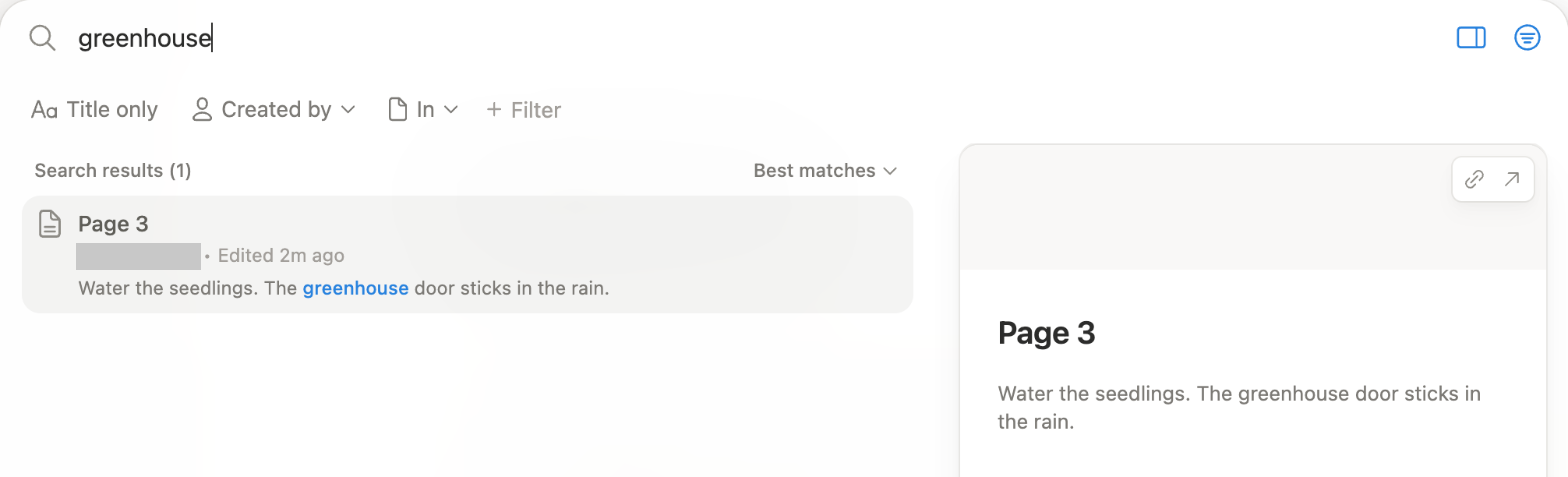
Search for "greenhouse" listed Page 3 first; Enter opened it.
Microsoft OneNote
Pass 4.5 s
Search for "greenhouse" listed Page 3 first; one click opened it with the word highlighted.
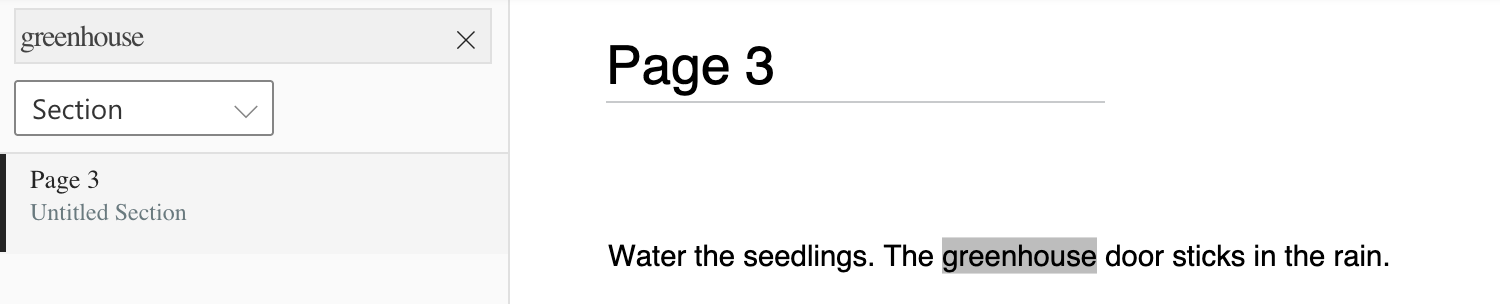
Both were scripted runs from a page outside the test set, with the same fixed waits (1 s after opening the search box, before the timer started; then 3 s for the results and 1 s for the page), so the gap of under a tenth of a second (4.42 s against 4.47 s unrounded) is too small to tell the tools apart. In both tools Page 3 was in the default search scope (OneNote: the current section, which held all five pages).
Test 3: Sketch a labeled diagram on a page
The task
On a new page in each tool, draw a simple diagram with the mouse or trackpad: a box, a circle and an arrow from the box to the circle. Then type the label "Seed tray" next to the box and "Greenhouse" next to the circle, reload the page, and check that the drawing and both labels are still in place.
How we judged it
Pass: the box, circle and arrow are drawn directly on the page with the tool's own drawing features, both labels are next to their shapes, and all of it is still there after the reload.
Partial: the sketch works only through typed diagram code, an embed from another service or an image made in another app, or one part is missing after the reload.
Fail: no sketch can be added on the plan used.
Notion
Partial
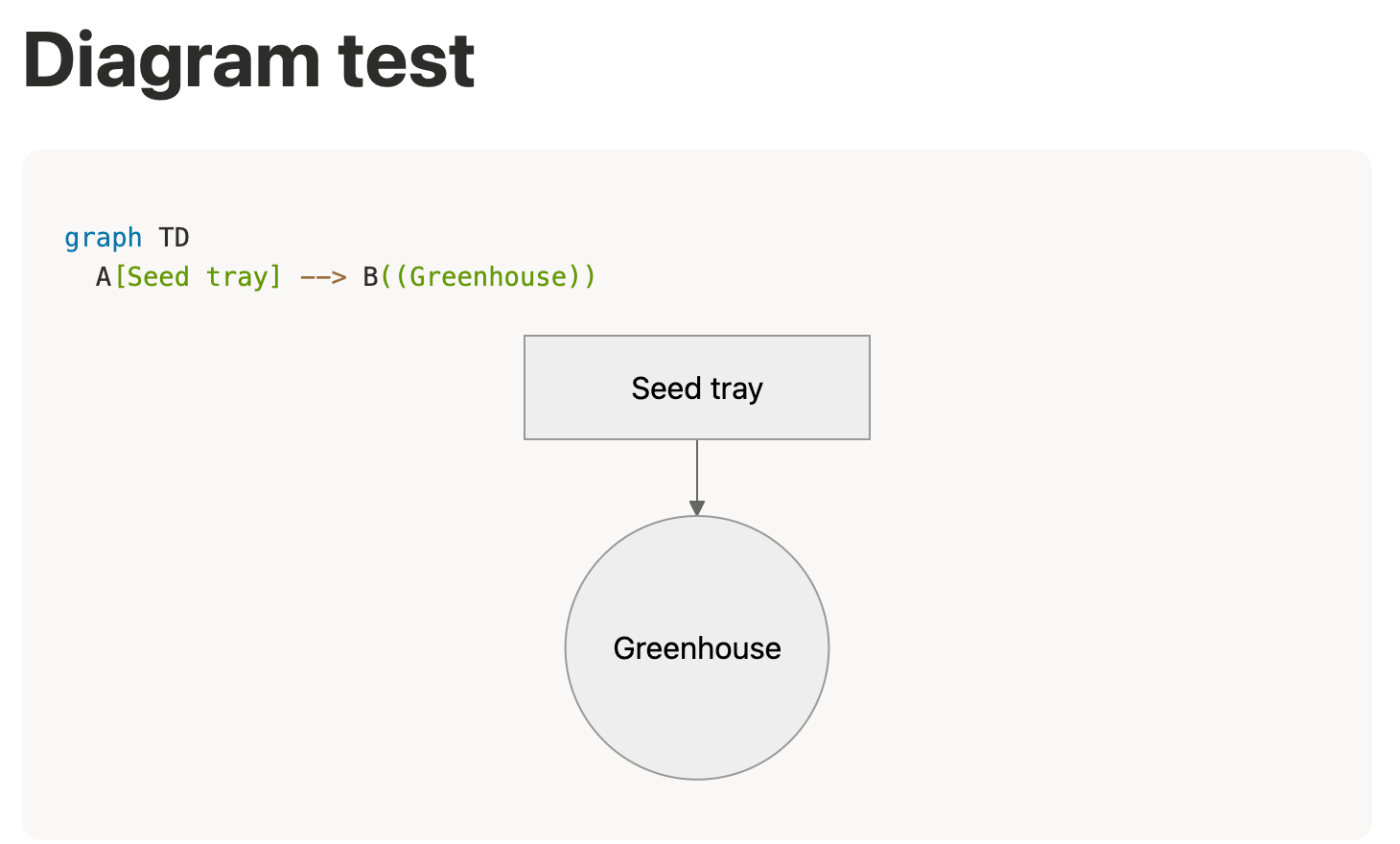
Notion has no on-page drawing tool; a Mermaid code block drew a "Seed tray" box, an arrow and a "Greenhouse" circle, kept after a reload.
Microsoft OneNote: Winner
Pass
Box, arrow and circle drawn with the pen and the labels typed under them; all still there after a reload. The simplified Draw ribbon showed no shape tool.
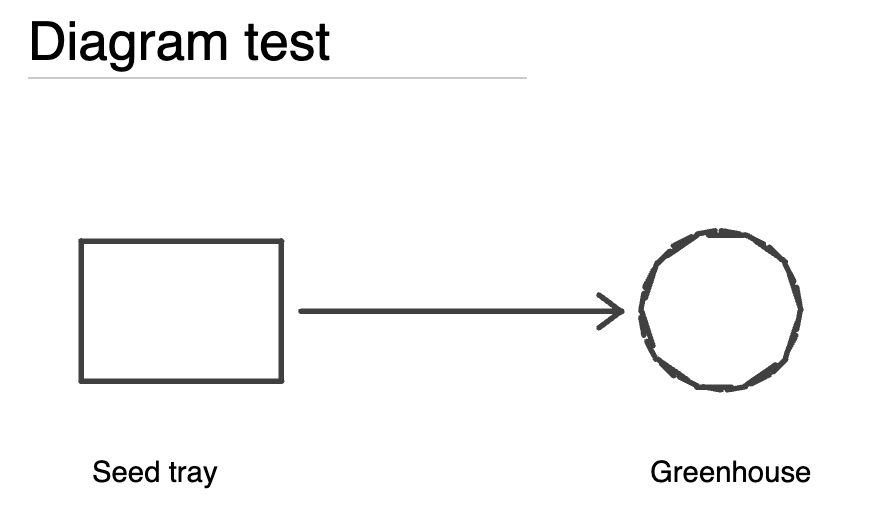
Notion's /draw offers only an Excalidraw embed from another service, not used here. The OneNote strokes were drawn with mouse drags by the assistant, so the circle is made of short strokes.
Our verdict
The split is structure against freedom: do your notes need fields and views, or a page you can write on anywhere?
Notion suits teams and anyone whose notes double as a tracker. Any page can hold a database with table, board, list, calendar or gallery views, @-mentions add backlinks automatically, Notion Sites puts pages on the web, and there is no limit on simultaneous editors. The trade-offs: everything lives in Notion's cloud, offline access covers only pages downloaded in the desktop or mobile app, Free caps uploads at 5 MB per file, and full Notion AI starts with Business at $20 per member a month billed yearly.
OneNote suits students, pen and tablet users, and Microsoft 365 households. Pages behave like paper: type anywhere, write or draw with a pen, and in the Windows app search finds handwriting and text in pictures. The apps cost nothing, you can make as many notebooks as you like, and the Windows app can keep a notebook on your PC. What you give up: database views, backlinks, sharing a single page, and Copilot, which needs a paid plan (Microsoft 365 Personal is $9.99 a month) and on home plans runs only in the Windows app.
Pick Notion for a team wiki or project hub; pick OneNote for lecture notes, sketches and handwriting.
Choose Notion if
You want notes that turn into shared, structured work: meeting notes, task lists and a team wiki. Any page can hold a database you view as a table, board, list, calendar or gallery, any number of people can edit a page at once, with comments and @-mentions, and backlinks appear on their own when you mention a page. It also fits if you want to publish pages with Notion Sites, connect tools through a REST API and webhooks, or use Notion AI on the Business plan.
Choose Microsoft OneNote if
You want a notebook that feels like paper: sections and pages where you can type anywhere, write or draw with a pen, and add pictures, files and recordings. The apps are free on Windows, Mac, iPhone, iPad, Android and the web, with as many notebooks as you like and 5 GB of free OneDrive storage. On Windows you can also keep a notebook on your PC and search your handwriting, and Microsoft 365 Personal, from $9.99 a month, adds Copilot there for summaries and task lists.
Frequently asked questions
Is OneNote free?
Yes. OneNote is a free app for Windows, Mac, iPhone, iPad, Android and the web, and you can create as many notebooks as you want. A free Microsoft account includes 5 GB of OneDrive storage, where notebooks sync. Paying adds storage and Copilot in OneNote for Windows, which the free app does not have: Microsoft 365 Personal costs $99.99 a year or $9.99 a month with 1 TB, Family $129.99 a year or $12.99 a month for up to 6 people with 2 TB shared, and Premium $199.99 a year or $19.99 a month. On Family and Premium, only the subscription owner gets the AI features. These are the US prices Microsoft listed in October 2026.
How much does Notion cost?
Notion's Free plan costs nothing and has no block limit for individuals, but caps file uploads at 5 MB each and page history at 7 days. Plus is $10 per member a month billed yearly ($120 a year) or $12 billed monthly. Business is $20 per member a month billed yearly ($240 a year) or $24 monthly and includes Notion AI with Notion Agent and AI Meeting Notes; Free and Plus get only a limited trial. Enterprise is priced by sales. OneNote itself needs no subscription at all.
Can several people edit the same notes at once?
Yes, in both. Notion sets no limit on how many people can edit a page at the same time, with comments and @-mentions, and Notion Sites can publish pages to the web. In OneNote, a notebook stored on OneDrive or SharePoint can be shared by invitation or with a view or edit link, and several people can co-author it at once. OneNote shares whole notebooks: Microsoft has removed the option to share a single page from personal notebooks on OneDrive.
Do Notion and OneNote work offline?
OneNote's Windows app keeps a local copy of your notebooks, so you can edit offline and the changes merge when you reconnect; the iPhone and iPad apps sync pending changes too. The Windows app can also keep a notebook on your PC instead of OneDrive, while the Mac app keeps all notes in OneDrive. Notion works offline only in its desktop and mobile apps, for pages you download, and saves only the first 50 rows of a database's first view.
Can I move my notes from OneNote to Notion?
Notion's import help page does not list OneNote among the apps it imports from (it names Evernote, Confluence, Google Docs and others), but it does import files, including Word (.docx), HTML, Markdown and PDF. A PDF becomes a Notion page, though formatting may change, and each PDF can be up to 5 MB on the Free plan (20 MB on paid plans). Microsoft's help describes exporting a OneNote page, section or notebook from the File menu in a format such as PDF, but says exporting a page isn't possible yet in OneNote for Mac or on the web. Check the imported pages before you delete anything in OneNote.
Compare with others
- Superhuman Docs vs Notion
- Evernote vs Notion
- Evernote vs Microsoft OneNote
- Goodnotes vs Microsoft OneNote
- Google Keep vs Microsoft OneNote
- Notion vs Obsidian
- Obsidian vs Microsoft OneNote
More about: Notion · Microsoft OneNote · Best Notes and knowledge