
Evernote vs Notion: Which is better in 2026?
It comes down to whether you mostly collect notes or organize and share them.
Tested hands-on: 2 tests on a MacBook Pro (M1 Pro), October 23, 2026. How we tested
Some links on this page are affiliate links. If you buy through them we may earn a commission at no extra cost to you. This never affects our verdicts.
Quick answer
- Choose Evernote if: You want one place to save what you read and hear: web pages through the Web Clipper, scanned documents, annotated PDFs and meetings turned into text with AI Transcribe.
- Choose Notion if: You want notes that grow into shared, structured work.
- Price at a glance: Evernote: Free plan; paid from $14.99/mo · Notion: Free plan; paid from $12/mo
At a glance
 Evernote |  Notion | |
|---|---|---|
| Free plan | Yes | Yes |
| Paid plans | From $14.99/mo | From $12/mo |
| Our tests | Won 2 of 2 | Won 0 of 2 |
| Best for | People who already keep years of notes in Evernote, or anyone who mainly captures, clips and searches information and wants AI search on every plan. | Teams and individuals who want notes, wikis and project tracking in one shared workspace, and who value real-time collaboration and databases over local files. |
Evernote and Notion both keep your notes in their own cloud, yet they are built for different jobs. Evernote is a capture app: it saves web pages, scanned documents, PDFs and recorded meetings, then helps you find them again with advanced and semantic search. Notion is a workspace where every note is a page, any page can hold a database, and there is no limit on how many people can edit a page at the same time. Below, their US prices, free-plan limits, offline use, sharing, AI features and exports are set side by side, taken from each company's own pricing and help pages as of October 2026.
Pricing
| Plan | Monthly | Yearly (12-month total) |
|---|---|---|
| Evernote | ||
| Free50 notes, 1 notebook, 1 device, 1 GB storage | Free Free plan | |
| StarterPer month; $99 billed yearly (about $8.25/month), $14.99 billed monthly; 1,000 notes, 20 notebooks, 3 devices, 5 GB storage | $14.99/mo | $99/yr ($8.25/mo) |
| AdvancedPer month; $249.99 billed yearly (about $20.83/month), $24.99 billed monthly; unlimited notes, notebooks and devices | $24.99/mo | $249.99/yr ($20.83/mo) |
| EnterpriseTalk to sales; for organizations with 10+ seats; SSO and SCIM | Custom | |
| Notion | ||
| FreeFor individuals; limited trial of Notion AI; 5 MB per file upload, 7-day page history | Free Free plan | |
| PlusPer member/month; $10/month billed yearly ($120/year), $12 billed monthly; Notion AI trial only | $12/mo | $120/yr ($10/mo) |
| BusinessPer member/month; $20/month billed yearly ($240/year), $24 billed monthly; includes Notion AI (Notion Agent, AI Meeting Notes, Enterprise Search beta), SAML SSO | $24/mo | $240/yr ($20/mo) |
| EnterpriseCustom pricing; contact sales | Custom | |
Prices checked on .
Features compared
| Feature | Evernote | Notion |
|---|---|---|
| Offline use | Yes · Offline notes on all plans, incl. Free | Partial · Desktop/mobile apps only; downloaded pages; first 50 rows of a database's first view |
| Local-first files | No · Cloud sync; export to ENEX or HTML (desktop app) | No · Cloud workspace; export to Markdown, CSV, HTML, PDF |
| Databases | No · In-note tables sort and filter rows (no formulas or nested tables); tasks can be viewed by note, assignment or due date, with filters; no database or table views listed | Yes · Table, board, list, calendar, gallery, timeline, chart, map, feed and form views (1 chart on Free); dashboard view on Business and Enterprise |
| Backlinks | Yes · Lists notes that link to the open note | Yes · Created automatically by @-mentions |
| Real-time collaboration | Yes · Team members can edit notes simultaneously; invite with Can edit access or share an "anyone with the link can edit" link (no account needed); which plans get live editing is not stated | Yes · No limit on simultaneous editors |
| API | Partial · MCP server in beta (Starter and up); legacy API deprecated | Yes · REST API and webhooks |
| Publish to web | Partial · Public note links, view or edit | Yes · Notion Sites; custom domain on paid plans, $8/month per domain billed yearly |
| Encryption | Partial · In-note encryption (Mac & Windows), Starter and up | Partial · AES-256 at rest, TLS 1.2+ in transit |
| AI features | Yes · AI Assistant, semantic search, AI Transcribe, AI Edit on all plans | Yes · Business plan and up; limited trial on Free and Plus |
How we tested
We gave Evernote and Notion the same 2 tasks on the same MacBook Pro (M1 Pro). Each test below lists the task, how we judged it, both results and screenshots; select a screenshot to see it at full size.
- Device
- MacBook Pro (M1 Pro) · macOS 26.6.2 · Chrome 155
- Tested
- October 23, 2026
- Plans used
- Evernote: Free · Notion: Free
- App versions
- Evernote: Web app, note editor (Markdown shortcuts), Web app, main search (Everywhere) · Notion: Web app, page editor (simple table), Web app, Search (no AI)
| Test | Evernote | Notion | Winner |
|---|---|---|---|
| Build the same meeting note with a table and a checklist (timed) | Pass0.08 min | Pass0.12 min | Evernoteby Time to build the note |
| Find a note by a word inside it, then by a related word (timed) | Pass7.2 s | Partial9.8 s | Evernote |
| Tests won | 2 | 0 | 0 ties |
Test 1: Build the same meeting note with a table and a checklist (timed)
The task
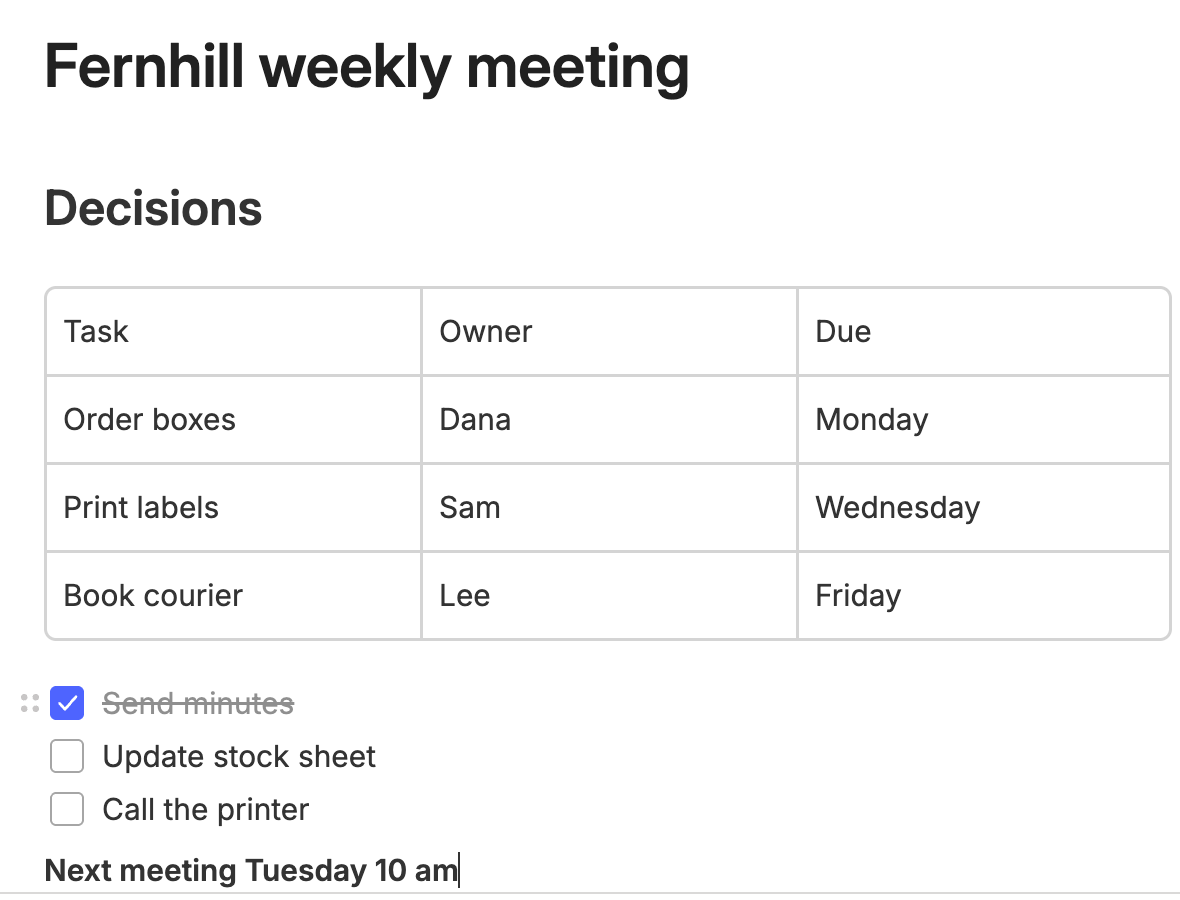
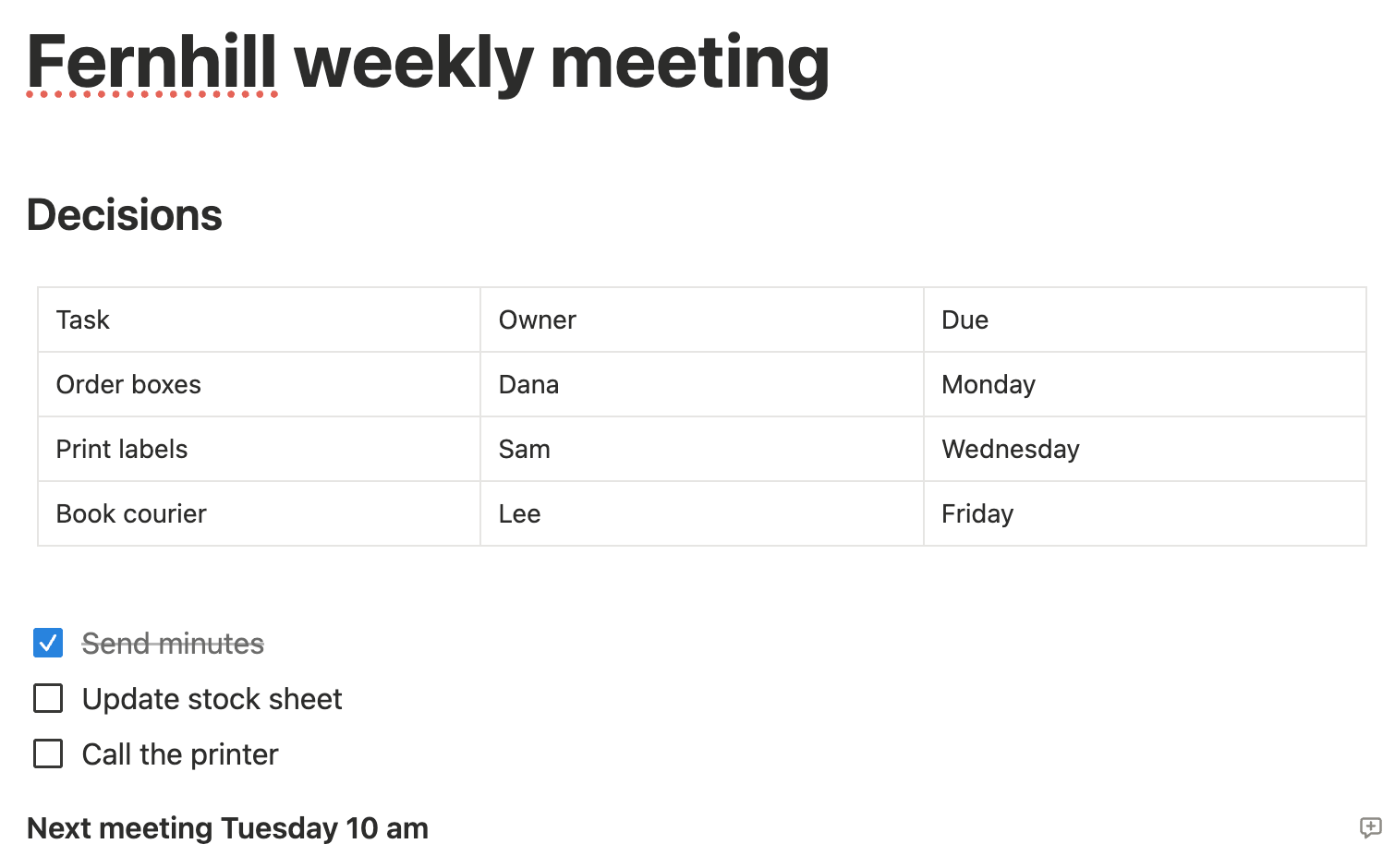
In each tool, create a new note or page titled "Fernhill weekly meeting" (FICTIONAL) and build it with the tool's own editor: a heading "Decisions", a table with the columns Task, Owner and Due and three rows, a checklist of three items with the first one ticked, and one bold line.
How we judged it
Pass: every element of the brief is there and formatted (heading, a three-column table with three rows, the checklist with one item ticked, the bold line), within 10 minutes.
Partial: one element missing or wrongly formatted, or it took more than 10 minutes.
Fail: two or more elements missing.
The time is measured from opening the empty note until the last element is done.
Evernote: Winner
Pass 0.08 min
A ## heading, a /table table with a header row and three rows (Tab added the fourth), a [] checklist with Send minutes ticked and a Cmd+B bold line.
Notion
Pass 0.12 min
Heading, a simple table with a header row and three rows (the + bar added the fourth), a to-do list with Send minutes ticked and a bold line; cells clicked.
Both were scripted runs by the assistant using each editor's quickest route: the ## and [] Markdown shortcuts and the /table menu, with the same four 1-second waits (note, title, table menu, table). The times count steps more than typing speed. Notion selects the whole table right after inserting it, and Tab from the automation was unreliable in its tables, so each cell was clicked; Evernote's cells took Tab.
Test 2: Find a note by a word inside it, then by a related word (timed)
The task
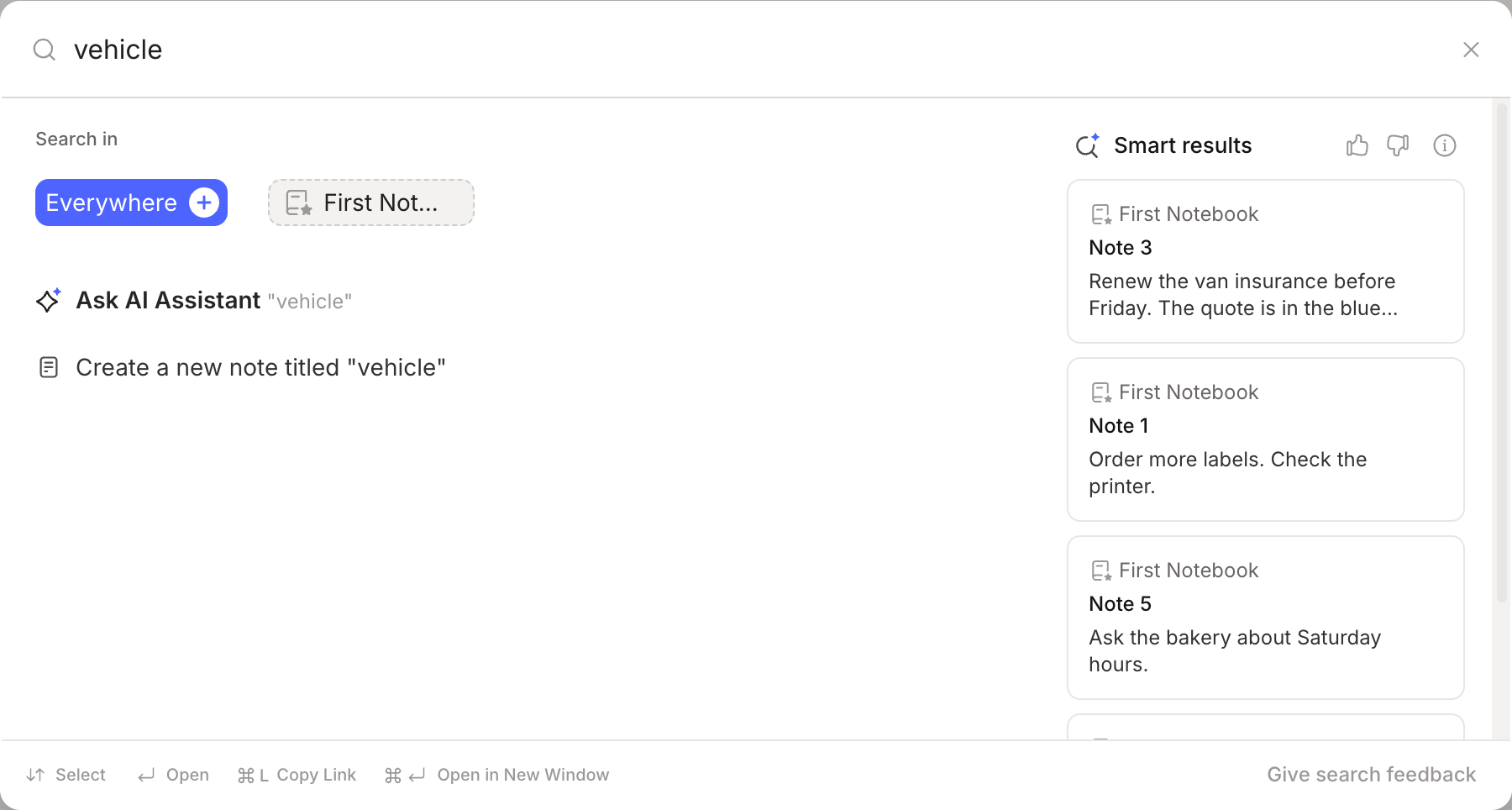
In each tool, create five short notes titled Note 1 to Note 5 (FICTIONAL texts below); only Note 3 mentions the van. From the start screen, search for the word "insurance" and open Note 3. Then search for "vehicle", a word that is in none of the notes, and see whether Note 3 comes up.
How we judged it
Pass: the search for "insurance" opens Note 3, and the search for "vehicle" lists Note 3 among its first three results.
Partial: only the exact word finds Note 3.
Fail: neither search finds Note 3.
The time is measured from starting to type "insurance" until Note 3 is open.
Evernote: Winner
Pass 7.2 s
"insurance" listed Note 3 as the best match and opened it; "vehicle" (in no note) showed Note 3 first under Smart results.
Notion
Partial 9.8 s
"insurance" found and opened Note 3; "vehicle" gave "No results". Only the exact word found it.
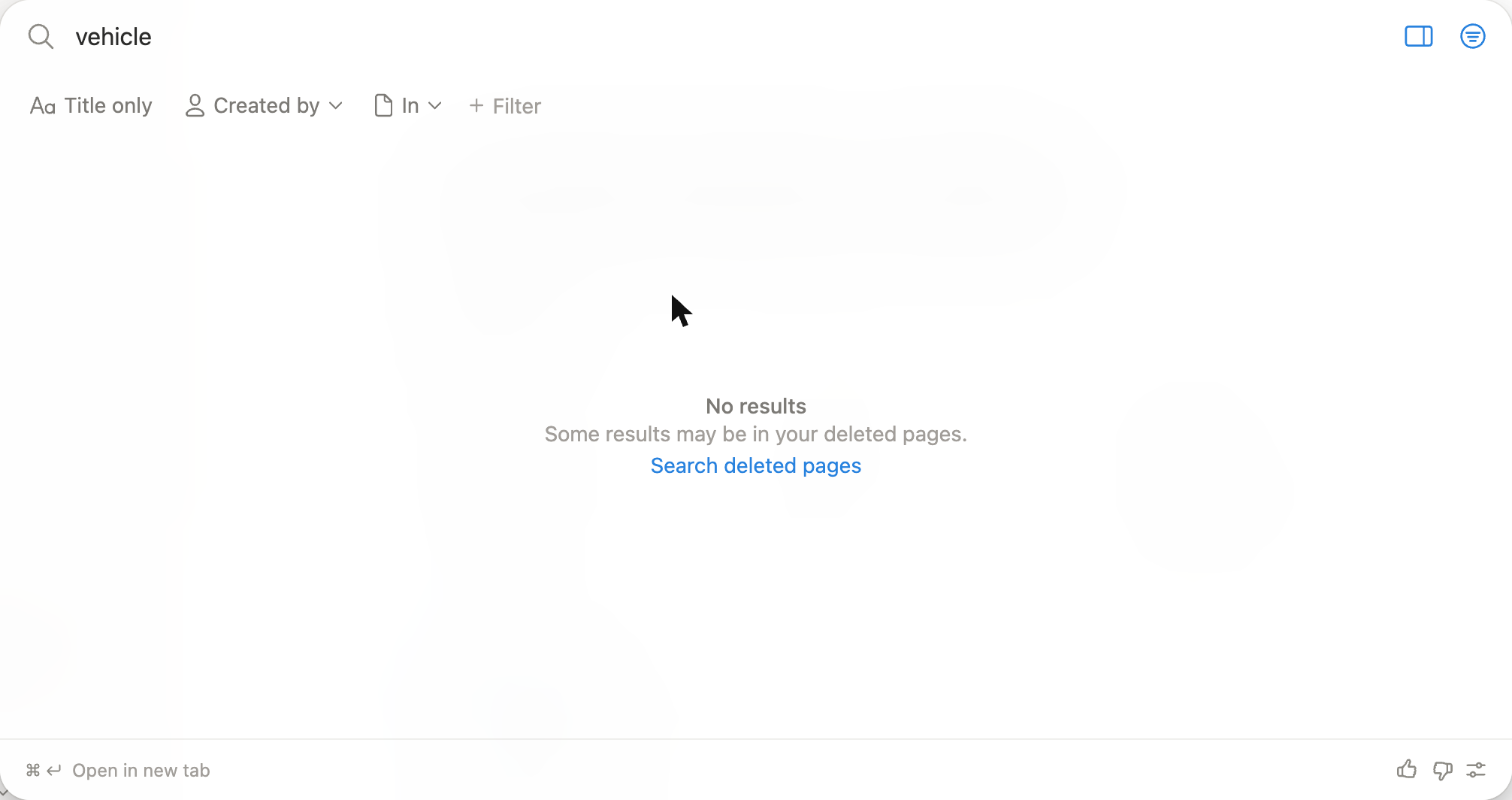
Evernote shows its Smart results automatically in the same search panel, without switching modes. Notion's search also offers "Search all sources with AI", an AI answer rather than a results list, which was not used here. The times were taken with screenshot checks between steps, from the click that opened the search box; the outcomes decide this test.
Our verdict
It comes down to whether you mostly collect notes or organize and share them.
Evernote is the stronger pick for capturing and finding. The Web Clipper, document scanning, PDF annotation and AI Transcribe for recorded meetings feed one archive, and its advanced search takes Boolean and filtered queries. Its AI Assistant, semantic search and offline notes are listed on every plan, Free included. The limit is volume: Free holds 50 notes in one notebook on one device, Starter ($99 a year or $14.99 a month) holds 1,000 notes on 3 devices, and Advanced lists unlimited notes for $249.99 a year.
Notion is the stronger pick for structured, shared work. Any page can hold a database with table, board, list, calendar or gallery views, several collaborators can edit one page simultaneously, and a REST API with webhooks connects outside tools. Its Free plan has no block limit for individuals, and Plus is $10 per member a month billed yearly. The weak spots: offline use covers only pages downloaded in the desktop or mobile app, and full Notion AI starts with Business at $20 per member a month billed yearly.
For a personal archive you clip, scan and search, pick Evernote; for projects, trackers and a team wiki, pick Notion.
Choose Evernote if
You want one place to save what you read and hear: web pages through the Web Clipper, scanned documents, annotated PDFs and meetings turned into text with AI Transcribe. Evernote lists its AI Assistant, semantic search and offline notes on every plan, so even the Free plan lets you search by meaning and open notes without a connection. It also fits if you already keep years of notes there: Advanced lists unlimited notes, notebooks and devices for $249.99 a year.
Choose Notion if
You want notes that grow into shared, structured work. In Notion any page can hold a database you view as a table, board, list, calendar or gallery, several people can edit the same page at once with comments and @-mentions, and Notion Sites puts pages on the web. The Free plan has no block limit for individuals, Plus is $10 per member a month billed yearly, and a REST API with webhooks links other tools. Notion's own Evernote importer can bring your notebooks across.
Frequently asked questions
How do the Evernote and Notion free plans compare?
Evernote Free is limited to 50 notes, 1 notebook, 1 device and 1 GB of storage, but it lists the AI Assistant, semantic search, AI Transcribe, AI Edit and offline notes. Notion Free is meant for individuals and has no block limit when you use the workspace alone, with file uploads capped at 5 MB each, 7 days of page history, basic web publishing and only a limited trial of Notion AI. For a large personal archive, Notion's free plan has far more room; for free AI search, Evernote's covers more.
Which costs less, Evernote or Notion?
Evernote Starter costs $99 a year (about $8.25 a month) or $14.99 billed monthly, and Advanced $249.99 a year (about $20.83 a month) or $24.99 monthly. Notion charges per member: Plus is $10 a month billed yearly ($120 a year) or $12 monthly, and Business is $20 billed yearly ($240 a year) or $24 monthly. For one person paying yearly, Evernote Starter ($99) costs less than Notion Plus ($120), while Evernote Advanced ($249.99) costs a little more than Notion Business ($240). Both sell an Enterprise plan through sales; Evernote's is aimed at organizations with 10 or more seats. These are the US dollar prices both vendors listed in October 2026.
Can I move my notes from Evernote to Notion?
Yes. Notion has an Evernote importer (Settings, then Import, then Evernote under Third party imports, or the /evernote command): you sign in to Evernote, choose the notebooks, and each notebook becomes a page with its notes as items in a list database. Notion's help page says the importer is reliable up to about 5,000 notes and does not bring over Evernote Teams content; images may need cleanup, and created and updated dates can be wrong. Evernote itself exports notes as ENEX or HTML files from its Mac and Windows apps, on every plan including Free, up to 100 notes or whole notebooks at a time.
Which plans include AI features?
Evernote lists its AI Assistant, semantic search, AI Transcribe and AI Edit on every plan, including Free, and Starter and higher add an MCP connection, in beta, that lets AI tools such as Claude and ChatGPT read and create notes. Notion includes Notion AI, with Notion Agent, AI Meeting Notes and Enterprise Search (beta), from the Business plan at $20 per member a month billed yearly; Free and Plus get a limited trial.
Do Evernote and Notion work offline?
Evernote lists offline notes on every plan, including Free. Notion works offline only in its desktop and mobile apps, not in a web browser, and only for pages you download (paid plans also download recent and favorite pages automatically); for a database, only the first 50 rows of its first view are saved.
Compare with others
More about: Evernote · Notion · Best Notes and knowledge