
Google Keep vs Microsoft OneNote: Which is better in 2026?
Both apps are free, so pick by the kind of note you take most often.
Tested hands-on: 2 tests on a MacBook Pro (M1 Pro), October 23, 2026. How we tested
Some links on this page are affiliate links. If you buy through them we may earn a commission at no extra cost to you. This never affects our verdicts.
Quick answer
- Choose Google Keep if: You want a free place for quick notes, checklists and reminders that syncs between your phone, your computer and a Wear OS watch.
- Choose Microsoft OneNote if: You want a notebook for long or mixed notes, such as lectures, meetings or research, or pages you write and draw on with a pen.
- Price at a glance: Google Keep: Free plan; paid from $8.40/mo · Microsoft OneNote: Free plan; paid from $9.99/mo
At a glance
 Google Keep |  Microsoft OneNote | |
|---|---|---|
| Free plan | Yes | Yes |
| Paid plans | From $8.40/mo | From $9.99/mo |
| Our tests | Won 2 of 2 | Won 0 of 2 |
| Best for | People who want free, quick notes, checklists and reminders that sync between phone and computer and can be shared with family or coworkers, especially if they already use Google's apps. | Students, pen and tablet users, and Microsoft 365 households who want a free, free-form notebook on every device and do not need databases or backlinks. |
Google Keep and Microsoft OneNote are both free, both sync between phone and computer, and both let several people edit at once, yet they are built for different kinds of notes. Keep is made for quick notes, checklists, photos, drawings and voice memos, sorted with labels, colors and pins and backed by reminders. OneNote is a digital notebook: notes go into notebooks, sections and pages, and each page is a free-form canvas for typing, handwriting, drawing, pictures and recordings. Below, their free plans, paid options, offline use, sharing, storage, privacy and AI are set side by side, taken from Google's and Microsoft's own pages as of October 2026.
Pricing
| Plan | Monthly | Yearly (12-month total) |
|---|---|---|
| Google Keep | ||
| FreeWith a personal Google Account; web, Android, iPhone and iPad, and Wear OS apps | Free Free plan | |
| Business StarterPer user/month for all of Google Workspace; $7 with a 1-year commitment ($84/year), $8.40 on the Flexible Plan; 30 GB pooled storage per user; up to 300 users | $8.40/mo | $84/yr ($7/mo) |
| Business StandardPer user/month for all of Google Workspace; $14 with a 1-year commitment ($168/year), $16.80 on the Flexible Plan; 2 TB pooled storage per user; up to 300 users | $16.80/mo | $168/yr ($14/mo) |
| Business PlusPer user/month for all of Google Workspace; $22 with a 1-year commitment ($264/year), $26.40 on the Flexible Plan; 5 TB pooled storage per user, Vault; up to 300 users | $26.40/mo | $264/yr ($22/mo) |
| EnterpriseContact sales; no minimum or maximum number of users; 5 TB pooled storage per user, more on request | Custom | |
| Microsoft OneNote | ||
| FreeFree apps for Windows, Mac, iOS, Android and the web; a Microsoft account with 5 GB of free OneDrive storage; no Copilot in OneNote | Free Free plan | |
| Microsoft 365 PersonalFor 1 person; $99.99 billed yearly, $9.99 billed monthly; 1 TB OneDrive storage; Copilot in OneNote (Windows app); 1-month free trial | $9.99/mo | $99.99/yr ($8.33/mo) |
| Microsoft 365 FamilyFor 1 to 6 people; $129.99 billed yearly, $12.99 billed monthly; 2 TB shared OneDrive storage; AI for the subscription owner only | $12.99/mo | $129.99/yr ($10.83/mo) |
| Microsoft 365 PremiumFor 1 to 6 people; $199.99 billed yearly, $19.99 billed monthly; Family plus extensive Copilot usage and agentic AI features; AI for the owner only | $19.99/mo | $199.99/yr ($16.67/mo) |
Prices checked on .
Features compared
| Feature | Google Keep | Microsoft OneNote |
|---|---|---|
| Offline use | Yes · Edit notes offline; changes sync when you reconnect | Yes · Windows app keeps a local copy for offline edits and merges them when back online; iPhone/iPad sync pending changes too |
| Local-first files | No · Notes stored in your Google Account; export through Google Takeout | Partial · Windows app can store a notebook on This PC; Mac app keeps all notes in OneDrive |
| Databases | No · Notes, lists, photos, drawings and audio; no tables or database views listed | No · Plain tables; a table can be converted to an Excel spreadsheet; no database views |
| Backlinks | No · No note-to-note links listed; notes are organized by labels, colors and pins | No · Links to notebooks, sections, pages and paragraphs are copied and pasted; no backlinks list |
| Real-time collaboration | Yes · Several people can edit the same note in real time | Yes · Shared notebooks on OneDrive or SharePoint can be co-authored by several people at the same time |
| API | Partial · REST API for apps that let enterprise admins manage notes (domain-wide delegation) | Yes · Microsoft Graph OneNote REST API; delegated sign-in only (no app-only access) |
| Publish to web | No · Shared with named people, email addresses, Google Groups or a family group; no public link listed | Partial · View-only or edit links to a whole notebook on OneDrive or SharePoint; single-page sharing was removed |
| Encryption | Partial · Encrypted at rest and in transit; Keep is not covered by Workspace client-side encryption | Partial · Password-protected sections only (not pages or notebooks), 128-bit AES; no password recovery |
| AI features | Partial · Gemini list and title help in the Android app (AI Pro/Ultra or Pixel); Gemini app can create and find notes | Yes · Copilot in OneNote with Microsoft 365 Personal, Family, Premium (Windows only) or a Copilot work license |
How we tested
We gave Google Keep and Microsoft OneNote the same 2 tasks on the same MacBook Pro (M1 Pro). Each test below lists the task, how we judged it, both results and screenshots; select a screenshot to see it at full size.
- Device
- MacBook Pro (M1 Pro) · macOS 26.6.2 · Chrome 155
- Tested
- October 23, 2026
- Plans used
- Google Keep: Free · Microsoft OneNote: Free
- App versions
- Google Keep: Web app, New list, Web app, main search box · Microsoft OneNote: OneNote for the web, To Do tag (Ctrl+1), OneNote for the web, Search (Section)
| Test | Google Keep | Microsoft OneNote | Winner |
|---|---|---|---|
| Make a five-item checklist and tick the first item (timed) | Pass1.3 s | Pass1.6 s | Google Keepby Time to build the list |
| Find a note by a word that appears only in a picture | Pass | Fail | Google Keep |
| Tests won | 2 | 0 | 0 ties |
Test 1: Make a five-item checklist and tick the first item (timed)
The task
In each tool's web app, create a new note or page titled "Fernhill packing list" (FICTIONAL) and build a five-item checklist with the tool's own checklist or to-do feature, then tick the first item.
How we judged it
Pass: the title and all five items are there as checkboxes, with the first one ticked, within 3 minutes.
Partial: the list is complete but took more than 3 minutes, or one item is plain text instead of a checkbox.
Fail: the web app has no checkable list, or two or more items are missing or plain text.
The time is measured from opening the empty note or page until the first item is ticked.
Google Keep: Winner
Pass 1.3 s
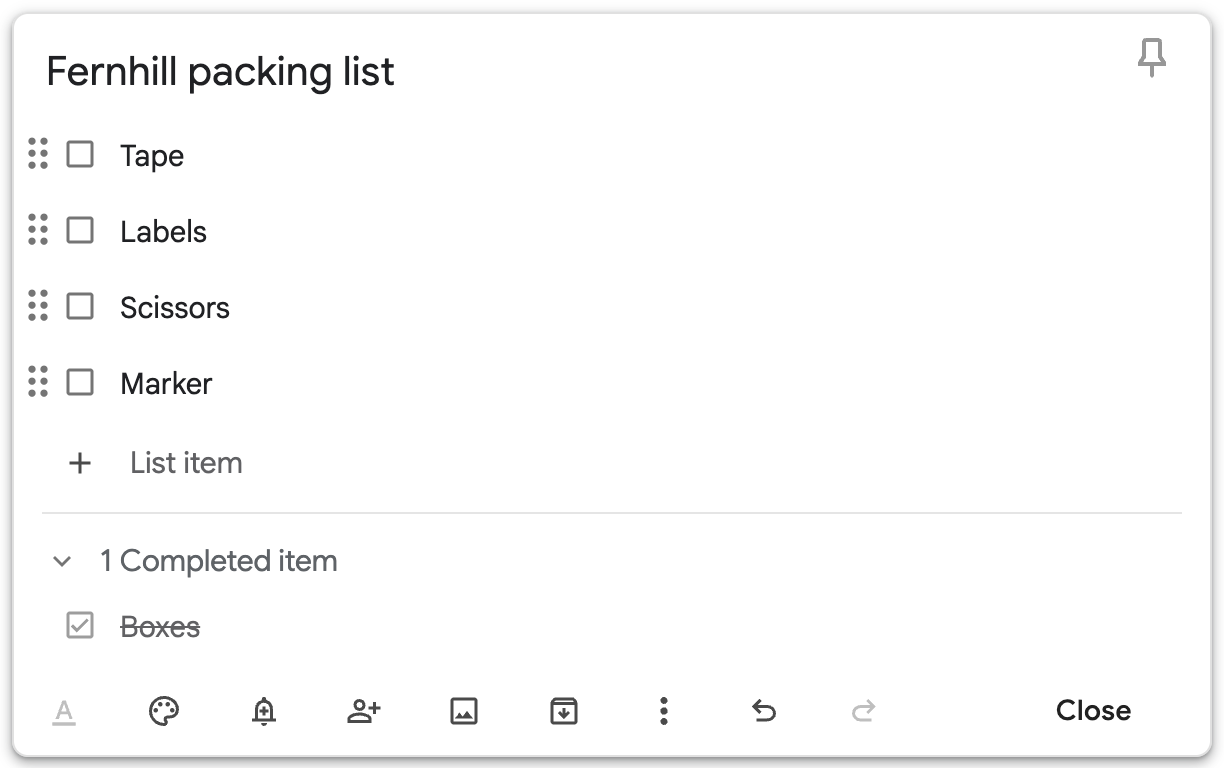
New list: five checkbox items and the title; ticking Boxes moved it under "1 Completed item".
Microsoft OneNote
Pass 1.6 s
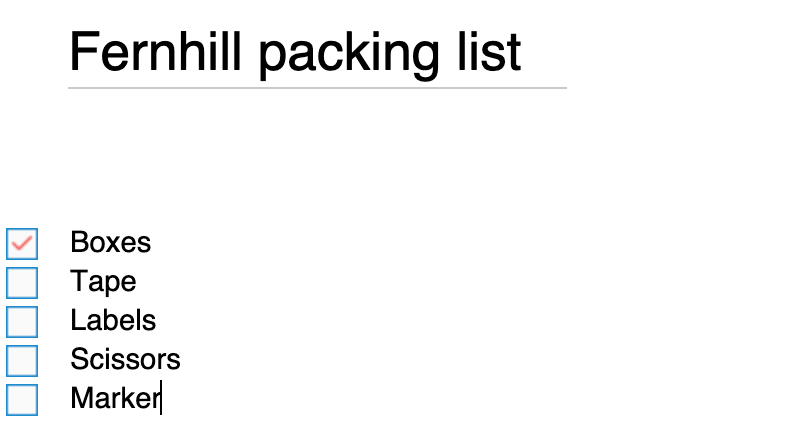
Ctrl+1 set the To Do tag, which carried to each new line, so all five items are checkboxes; Boxes ticked.
Both were scripted runs by the assistant with one 1-second wait after the note or page opened, so the times count steps more than typing speed. Keep's New list opens as a checklist; OneNote needs a click into the page and its Ctrl+1 To Do shortcut.
Test 2: Find a note by a word that appears only in a picture
The task
In each tool's web app, add the same FICTIONAL image (fernhill-sign.png: the words "Refill day is Thursday" in large black letters on white) to a new note or page titled "Shop sign", with no typed text other than the title. Then search for the word "Thursday" with the tool's main search and see whether the note comes up.
How we judged it
Pass: at the search 10 minutes after adding the image, the note comes up for "Thursday" through the text in the image.
Partial: the note comes up only at the 30-minute search, or only after changing a search option or filter.
Fail: the note has not come up at the 30-minute search.
Google Keep: Winner
Pass
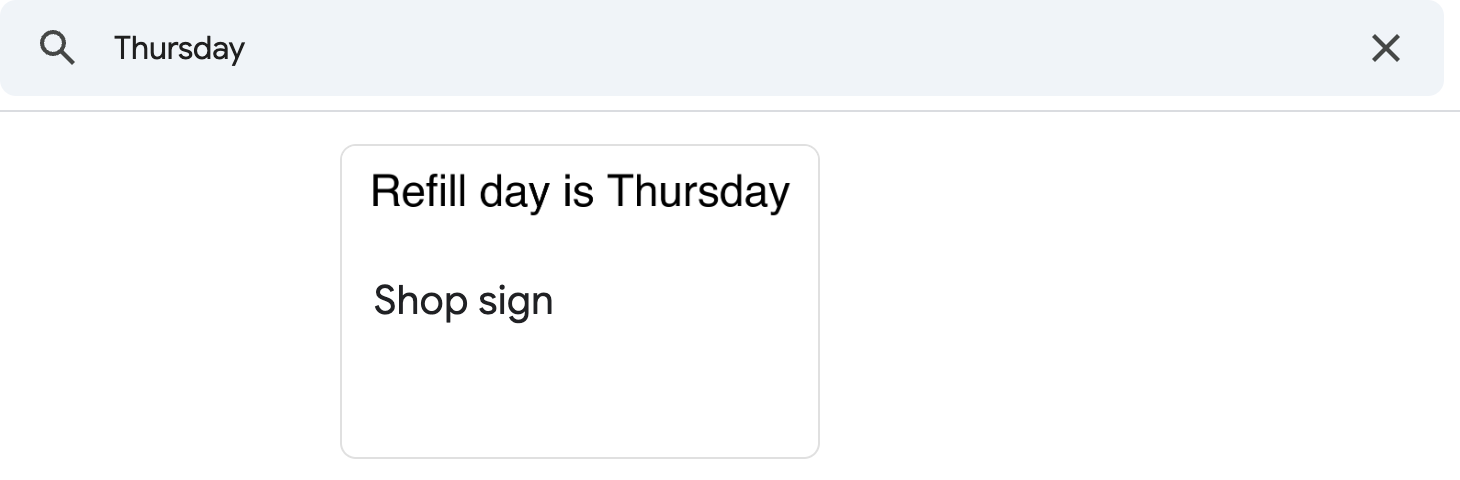
At the 10-minute search, "Thursday" listed the "Shop sign" note, found through the words in its picture.
Microsoft OneNote
Fail
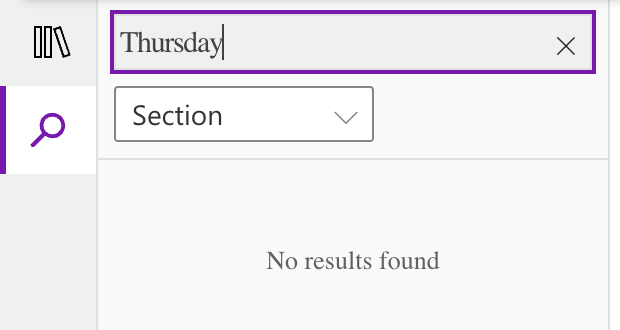
"Thursday" gave "No results found" at 10 and at 30 minutes; the page was not found through its picture.
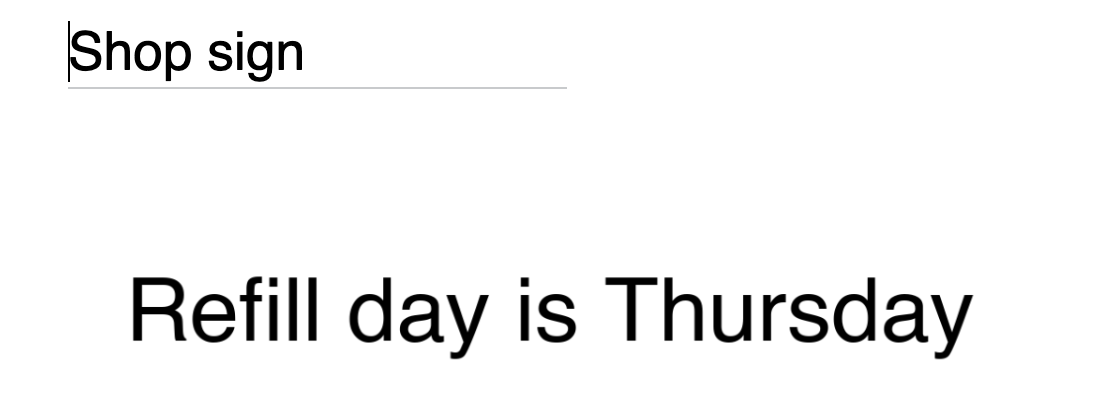
Keep's insert-picture button opens the Mac file picker, which the automation cannot use, so the picture was pasted from the clipboard in both tools. OneNote's search scope menu offers only Section and Page; the page was in the searched section.
Our verdict
Both apps are free, so pick by the kind of note you take most often.
Google Keep is the better fit for lists, reminders and quick capture. It holds notes, checklists, photos, drawings and voice memos, transcribes the memos, and its search finds text in images. Reminders go off at a set time or place, and Keep runs on the web and on Android, iPhone, iPad and Wear OS watches. Several people can edit a shared note at once. The trade-offs: notes are organized by labels, colors and pins, Keep's help pages describe no links between notes and no public link, and a full export goes through Google Takeout.
OneNote is the better fit for long, structured notes and pen input. Notebooks hold sections and pages, and each page is a free-form canvas for typing, handwriting, drawing, pictures, files and recordings. Whole notebooks can be co-edited or shared with a view or edit link, sections can be locked with a password, and the Windows app can store a notebook on your PC. Free OneDrive storage is 5 GB. Copilot needs Microsoft 365 Personal ($9.99 a month), Family or Premium, in the Windows app only, or a Copilot work license.
For shopping lists and reminders shared with a household, use Keep; for class, meeting or research notebooks, use OneNote.
Choose Google Keep if
You want a free place for quick notes, checklists and reminders that syncs between your phone, your computer and a Wear OS watch. Keep saves text, photos, drawings and voice memos, transcribes the memos, reminds you at a set time or place, and finds text inside images when you search. It suits families and small teams sharing grocery, packing or to-do lists, since several people can edit one note at once, and anyone who works in Google Docs and Slides, which have a Keep side panel.
Choose Microsoft OneNote if
You want a notebook for long or mixed notes, such as lectures, meetings or research, or pages you write and draw on with a pen. OneNote sorts notes into notebooks, sections and pages, lets you put text, handwriting, pictures, files and recordings anywhere on a page, and is free on Windows, Mac, iPhone, iPad, Android and the web. It also suits Microsoft 365 subscribers: Personal, at $9.99 a month, adds 1 TB of OneDrive storage and Copilot summaries, task lists and rewrites in the Windows app.
Frequently asked questions
Are Google Keep and Microsoft OneNote free?
Yes. Keep is free with a personal Google Account on the web, Android, iPhone and iPad, and Wear OS watches; businesses get it as part of Google Workspace, from $7 per user a month with a 1-year commitment ($8.40 on the Flexible Plan) for all of Workspace. OneNote is free on Windows, Mac, iPhone, iPad, Android and the web, and you can create as many notebooks as you want. Its notebooks sync through OneDrive, where a Microsoft account gets 5 GB free; Microsoft 365 Personal ($9.99 a month or $99.99 a year) raises that to 1 TB and adds Copilot in OneNote for Windows. These are the US dollar prices listed in October 2026.
Which is better for handwriting and drawing?
OneNote gives pen input more room: each page is a free-form canvas where you can write or draw with a pen next to typed text, pictures, files and recordings, and in the Windows app search also finds handwriting and text in pictures. Keep offers drawings as one of its note types, alongside text notes, checklists, photos and voice memos, and its search finds text in images.
Do Google Keep and OneNote work offline?
Both do. Keep lets you edit notes offline and syncs the changes when you reconnect. OneNote's Windows app keeps a local copy for offline edits and merges them when you are back online, and the iPhone and iPad apps sync pending changes too. If you want a notebook stored on your computer rather than in OneDrive, you need OneNote's Windows app; the Mac app keeps all notes in OneDrive. Keep stores notes in your Google Account, and a full export goes through Google Takeout.
How does sharing work in Keep and OneNote?
Keep shares a single note with named people, email addresses, a Google Group or your family group, and they can all edit it at the same time; Keep's help pages list no public link. OneNote shares whole notebooks stored on OneDrive or SharePoint, by invitation or with a view-only or edit link, and several people can edit at once. Microsoft has removed single-page sharing, and even a link to one section lets people see the whole notebook.
Which one has AI features?
OneNote has Copilot, which summarizes notes, creates task lists and rewrites text, with Microsoft 365 Personal, Family or Premium (in the Windows app only, and on Family and Premium for the subscription owner only) or a Microsoft Copilot work license; the free app has no Copilot. In Keep, Gemini can draft lists and note titles in the Android app with a Google AI Pro ($19.99 a month) or Ultra plan, or on a Pixel device, and the Gemini app can create and find Keep notes.
Compare with others
- Evernote vs Microsoft OneNote
- Goodnotes vs Microsoft OneNote
- Notion vs Microsoft OneNote
- Obsidian vs Microsoft OneNote
More about: Google Keep · Microsoft OneNote · Best Notes and knowledge