
Goodnotes vs Microsoft OneNote: Which is better in 2026?
The deciding question is how you write: mostly by hand on a tablet, or typing and ink mixed across devices.
Tested hands-on: 2 tests on a MacBook Pro (M1 Pro), October 24, 2026. How we tested
Some links on this page are affiliate links. If you buy through them we may earn a commission at no extra cost to you. This never affects our verdicts.
Quick answer
- Choose Goodnotes if: You want to write by hand with Apple Pencil or another stylus as if on paper, and to mark up imported PDFs.
- Choose Microsoft OneNote if: You want a free notebook app with no cap on how many notebooks you make, on Windows, Mac, iPhone, iPad, Android and the web.
- Price at a glance: Goodnotes: Free plan; paid from $1/mo, billed yearly · Microsoft OneNote: Free plan; paid from $9.99/mo
At a glance
 Goodnotes |  Microsoft OneNote | |
|---|---|---|
| Free plan | Yes | Yes |
| Paid plans | From $1/mo, billed yearly | From $9.99/mo |
| Our tests | Won 1 of 2 | Won 1 of 2 |
| Best for | Students and professionals who write by hand on an iPad or another tablet, mark up PDFs, and want searchable handwritten notes, with paid plans from $11.99 a year. | Students, pen and tablet users, and Microsoft 365 households who want a free, free-form notebook on every device and do not need databases or backlinks. |
Goodnotes and Microsoft OneNote both let you write notes by hand, yet they are built around different ideas. Goodnotes treats each page as digital paper for a stylus such as Apple Pencil: you write, mark up imported PDFs, and search your handwriting or convert it to text. OneNote is a free digital notebook whose pages are open canvases for typing, pen ink, pictures, files and recordings, organized into notebooks and sections and synced through OneDrive. Both run on iPad, iPhone, Mac, Android, Windows and the web. This page lines up their US prices, free-plan limits, offline use, sharing and AI features, using each vendor's own pricing, app store and help pages as of October 2026.
Pricing
| Plan | Monthly | Yearly (12-month total) |
|---|---|---|
| Goodnotes | ||
| Free3 notebooks, 3 text documents, 3 whiteboards; 100 MB storage; 5 MB imports; watermarked exports; 10 AI credits a month | Free Free plan | |
| EssentialBilled yearly only ($11.99/year); unlimited files, 5 GB storage, basic Goodnotes AI; 7-day free trial; AI Pass add-on +$9.99/month | no monthly price | $11.99/yr, billed yearly ($1/mo) |
| ProBilled yearly only ($35.99/year); hosts real-time collaboration, private link sharing, Goodnotes Cloud sync (rolling out gradually), Create Mode, Meeting AI; 7-day free trial | no monthly price | $35.99/yr, billed yearly ($3/mo) |
| TeamsPer seat, billed yearly only ($120/seat/year); admin console, SAML SSO, domain control, consolidated billing; 30-day free trial | no monthly price | $120/yr, billed yearly ($10/mo) |
| EnterpriseCustom price; contact sales; for 25 seats and up; AI permissions, Microsoft Intune App SDK, custom contract | Custom | |
| Microsoft OneNote | ||
| FreeFree apps for Windows, Mac, iOS, Android and the web; a Microsoft account with 5 GB of free OneDrive storage; no Copilot in OneNote | Free Free plan | |
| Microsoft 365 PersonalFor 1 person; $99.99 billed yearly, $9.99 billed monthly; 1 TB OneDrive storage; Copilot in OneNote (Windows app); 1-month free trial | $9.99/mo | $99.99/yr ($8.33/mo) |
| Microsoft 365 FamilyFor 1 to 6 people; $129.99 billed yearly, $12.99 billed monthly; 2 TB shared OneDrive storage; AI for the subscription owner only | $12.99/mo | $129.99/yr ($10.83/mo) |
| Microsoft 365 PremiumFor 1 to 6 people; $199.99 billed yearly, $19.99 billed monthly; Family plus extensive Copilot usage and agentic AI features; AI for the owner only | $19.99/mo | $199.99/yr ($16.67/mo) |
Prices checked on .
Features compared
| Feature | Goodnotes | Microsoft OneNote |
|---|---|---|
| Offline use | Yes · Notebooks live on the device on Apple; Android, Windows and Web keep a limited set of recent documents (last 30 days) offline | Yes · Windows app keeps a local copy for offline edits and merges them when back online; iPhone/iPad sync pending changes too |
| Local-first files | Partial · Library kept inside the app, not as browsable files; export to .goodnotes or PDF; Auto Backup copies to cloud storage on iPhone and iPad | Partial · Windows app can store a notebook on This PC; Mac app keeps all notes in OneDrive |
| Databases | No · Tables in Text Documents; no database feature documented | No · Plain tables; a table can be converted to an Excel spreadsheet; no database views |
| Backlinks | No · One-way links from typed text to a notebook or whiteboard page; no backlinks documented | No · Links to notebooks, sections, pages and paragraphs are copied and pasted; no backlinks list |
| Real-time collaboration | Yes · Live cursors for up to 50 people at once; needs one Pro subscriber in the document | Yes · Shared notebooks on OneDrive or SharePoint can be co-authored by several people at the same time |
| API | No · No public API documented; the ChatGPT app and Claude connector only create new documents | Yes · Microsoft Graph OneNote REST API; delegated sign-in only (no app-only access) |
| Publish to web | Partial · Public share link: anyone with it can view and comment in a browser; Essential and up | Partial · View-only or edit links to a whole notebook on OneDrive or SharePoint; single-page sharing was removed |
| Encryption | Partial · Encryption at rest and in transit (no detail given); Password Protection does not encrypt notebooks | Partial · Password-protected sections only (not pages or notebooks), 128-bit AES; no password recovery |
| AI features | Yes · Goodnotes AI on every plan (10 credits a month on Free); Create Mode and Meeting AI on Pro or AI Pass | Yes · Copilot in OneNote with Microsoft 365 Personal, Family, Premium (Windows only) or a Copilot work license |
How we tested
We gave Goodnotes and Microsoft OneNote the same 2 tasks on the same MacBook Pro (M1 Pro). Each test below lists the task, how we judged it, both results and screenshots; select a screenshot to see it at full size.
- Device
- MacBook Pro (M1 Pro) · macOS 26.6.2 · Chrome 155
- Tested
- October 24, 2026
- Plans used
- Goodnotes: Free · Microsoft OneNote: Free
- App versions
- Goodnotes: Web app, Text Document (beta), Web app, search inside the document · Microsoft OneNote: Web app, page in a test notebook, Web app, Draw pen and Search
| Test | Goodnotes | Microsoft OneNote | Winner |
|---|---|---|---|
| Type a class note with a heading, a table and a checklist (timed) | Pass0.1 min | Pass0.04 min | Microsoft OneNoteby Time to build the note |
| Write a word by hand and find it with search (timed) | Partial4.2 s | Fail | Goodnotes |
| Tests won | 1 | 1 | 0 ties |
Test 1: Type a class note with a heading, a table and a checklist (timed)
The task
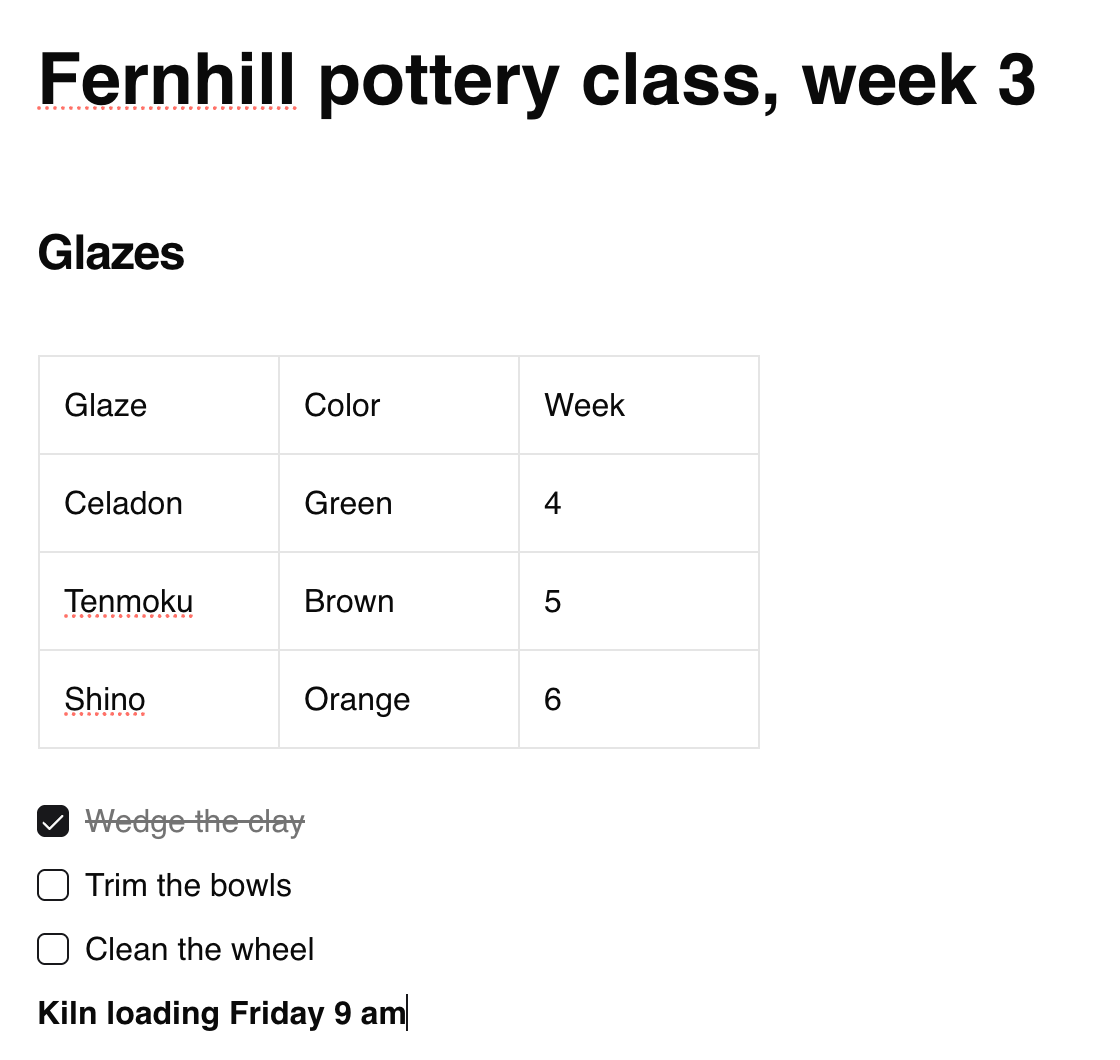
In each tool's web app, create a new typed note titled "Fernhill pottery class, week 3" (FICTIONAL) and build it with the tool's own editor: a heading "Glazes", a table with the columns Glaze, Color and Week and three rows, a checklist of three items with the first one ticked, and one bold line. In Goodnotes use a Text Document; in OneNote use a page in a test notebook.
How we judged it
Pass: every element of the brief is there and formatted (the heading, a three-column table with three rows, the checklist with one item ticked, the bold line), within 10 minutes.
Partial: one element missing or wrongly formatted, or it took more than 10 minutes.
Fail: two or more elements missing, or the web app cannot create the note on the plan used.
The time is measured from opening the empty note until the last element is done.
Goodnotes
Pass 0.1 min
A new Text Document built with ## for the heading, Add Table plus the table toolbars for a third column and two rows, [] for the checklist and Cmd+B; everything was in place.
Microsoft OneNote: Winner
Pass 0.04 min
A new page built from the keyboard: Cmd+Option+2 for the heading, Tab to make the table and Enter for rows, Ctrl+1 for the To Do list (pressed again to tick) and Cmd+B.
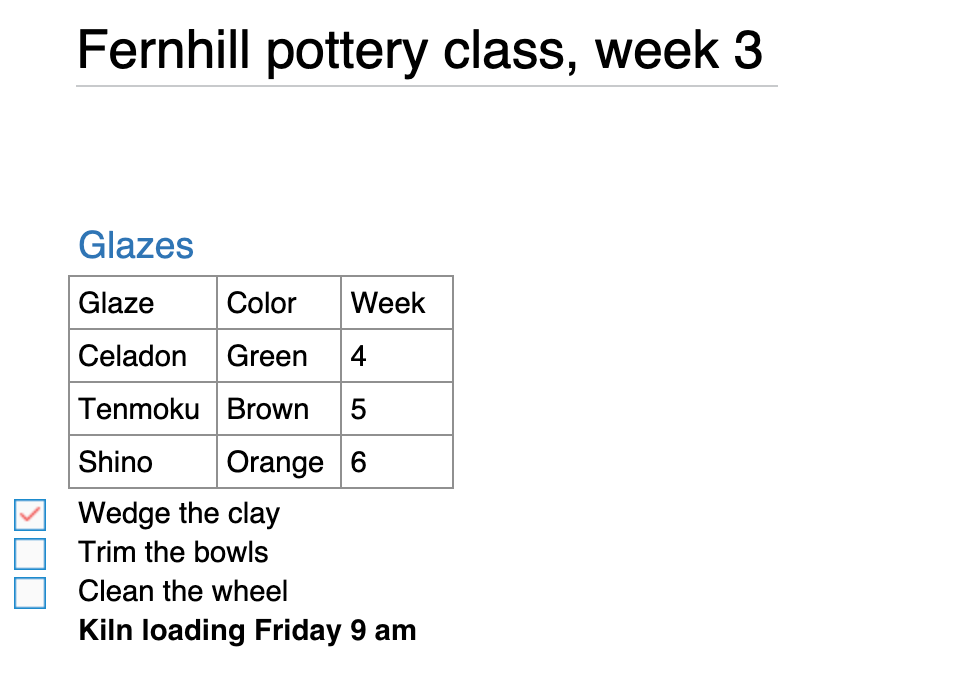
Both were scripted runs by the assistant using each editor's quickest route, with a 1-second wait each time the page, a table or a toolbar opened: four in Goodnotes, which added the third column and two rows from its column and row toolbars (Tab or Enter in the last cell adds no row, and no other insert control was found), and two in OneNote, which makes the table and its rows from the keyboard. The times count steps more than typing speed. Goodnotes Free allows 3 documents and counts those in its Trash.
Test 2: Write a word by hand and find it with search (timed)
The task
In each tool, on one new blank page, write three short lines by hand: "Order more clay", "Book the kiln for Friday" and "Call the glaze supplier". Type nothing on the page. Wait for the tool to index it, then from the tool's start screen or notebook list search for the word "kiln" and open the page from the results.
How we judged it
Pass: search finds the handwritten word "kiln" and opens the page, with no extra step.
Partial: it finds the page only on the second try (after 5 more minutes), or only after you convert the handwriting to text or change a search option.
Fail: search does not find the handwritten word.
The time is measured from starting to type the search until the page is open.
Goodnotes: Winner
Partial 4.2 s
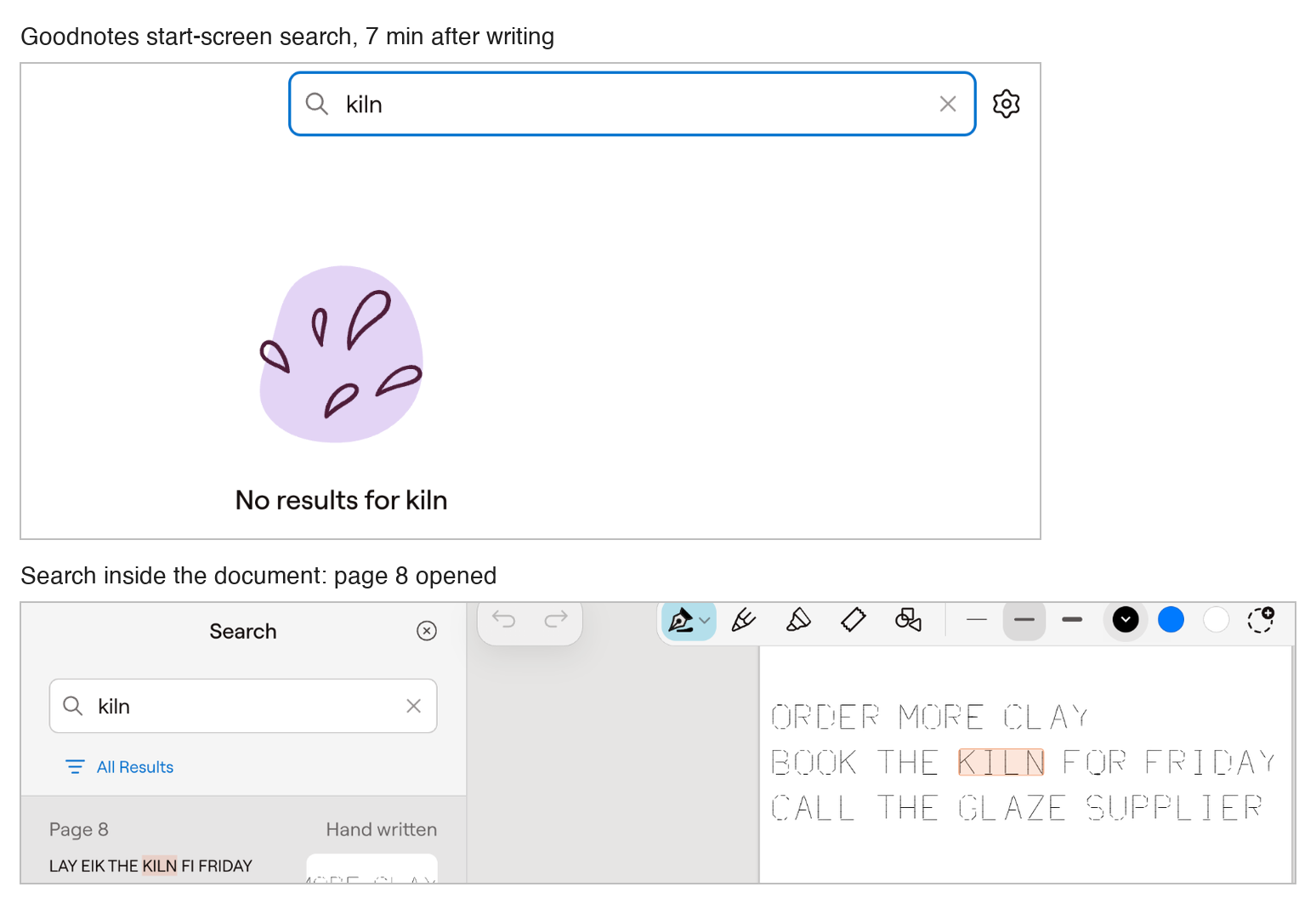
The start-screen search found nothing at 2 and 7 minutes (it matched titles only); the search inside the document found kiln in the handwriting and opened page 8.
Microsoft OneNote
Fail
The handwritten lines show on the page, but search found nothing for kiln at 2 and 7 minutes, in the section or on the page itself.
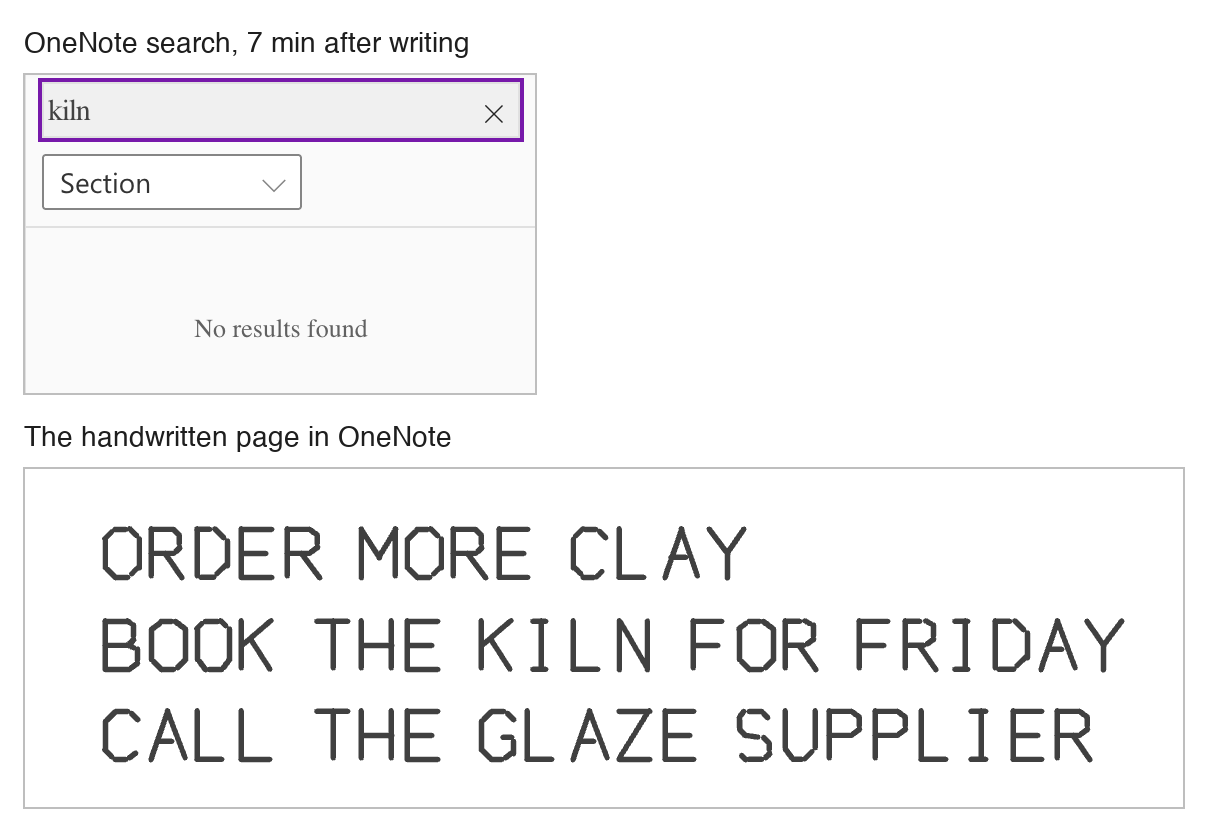
Written in each web app with the mouse: the assistant drew the three lines as the same straight pen strokes in block capitals (no iPad). Goodnotes read KILN but misread other words ("LAY EIK THE KILN FI FRIDAY"); on the web its start-screen search matched titles only, and its settings have no search options. Goodnotes Free was at its 3-document limit, so the page went into an existing document. Goodnotes' time is a scripted search inside the open document (opening it was not timed); 4 s of it are fixed waits. Not counted: two days later, OneNote for Mac's search found the handwritten kiln.
Our verdict
The deciding question is how you write: mostly by hand on a tablet, or typing and ink mixed across devices.
Goodnotes is the specialist for handwriting and PDFs. Handwriting is searchable and can be converted to text, shapes are recognized, and imported PDFs can be marked up. Notebooks work offline on iPad, iPhone and Mac, and the Free plan includes handwriting spellcheck, Math Assist, and AI Q&A and quizzes (five a month each). The catch on Free: 3 notebooks, 100 MB of storage and watermarked exports. Essential lifts the file limit for $11.99 a year; Pro ($35.99 a year) adds one library across Apple and non-Apple devices (still rolling out) and hosts live collaboration for up to 50 people.
OneNote is the free generalist. Its apps cost nothing on Windows, Mac, iPhone, iPad, Android and the web, with no cap on notebooks, and each page is a free-form canvas for typing, ink, pictures, files and recordings. Several people can co-author a shared notebook at once. The catches: storage is OneDrive's free 5 GB, and Copilot for home users needs Microsoft 365 Personal, Family or Premium (from $99.99 a year) and then runs only in the Windows app.
For handwriting and PDF markup, Goodnotes fits better; for unlimited free notebooks on every device, start with OneNote.
Choose Goodnotes if
You want to write by hand with Apple Pencil or another stylus as if on paper, and to mark up imported PDFs. Your handwriting stays searchable and can be converted to text, shapes are recognized, and on iPad, iPhone and Mac your notebooks work with no connection. Paid plans are billed yearly: Essential ($11.99 a year) lifts the Free plan's three-notebook limit, and Pro ($35.99 a year) adds Create Mode, cloud meeting transcription with live summaries and one library across Apple and non-Apple devices (still rolling out).
Choose Microsoft OneNote if
You want a free notebook app with no cap on how many notebooks you make, on Windows, Mac, iPhone, iPad, Android and the web. Every page is a free-form canvas for typed text, pen ink, pictures, files and recordings, and notebooks sync through OneDrive, whose free 5 GB grows to 1 TB with Microsoft 365 Personal at $99.99 a year or $9.99 a month. It also fits a family or study group that shares one notebook and edits it at the same time.
Frequently asked questions
Which costs less, Goodnotes or OneNote?
Both can be used for free. OneNote's apps cost nothing on Windows, Mac, iPhone, iPad, Android and the web, with as many notebooks as you want; the limit is storage, since a Microsoft account comes with 5 GB of free OneDrive space. Goodnotes Free allows 3 notebooks, 3 text documents and 3 whiteboards, 100 MB of storage and 5 MB imports, and its exports are watermarked. Paid plans cost less at Goodnotes: Essential is $11.99 a year and Pro $35.99, billed yearly only, and the optional AI Pass adds $9.99 a month on top of a paid plan. Microsoft 365 Personal, which adds 1 TB and Copilot in OneNote for Windows, costs $99.99 a year or $9.99 a month; Family is $129.99 a year and Premium $199.99. These are the US prices both vendors listed in October 2026.
Which one is better for handwritten notes?
Goodnotes is built around handwriting: you write on digital paper with a stylus such as Apple Pencil, handwritten notes are searchable and can be converted to text, shapes are recognized, and even the Free plan includes handwriting spellcheck and Math Assist. OneNote lets you write or draw with a pen anywhere on a free-form page, next to typed text, pictures and files, and in its Windows app search also finds handwriting and text in pictures. If most of your notes are written by hand on a tablet, Goodnotes is the more specialized tool; if you mix typing and ink on the same page, OneNote's canvas handles both.
Do Goodnotes and OneNote work offline?
Yes, with differences by device. On iPad, iPhone and Mac, Goodnotes notebooks live on the device and work with no connection; the Android, Windows and web apps keep only a limited set of recent documents, from the last 30 days, offline. OneNote's Windows app keeps a local copy of each notebook for offline editing and merges your changes when you are back online, and the iPhone and iPad apps sync pending changes too. The Windows app can also store a notebook on your PC rather than in OneDrive; the Mac app keeps all notes in OneDrive.
Which plans include AI features?
Goodnotes has AI on every plan. Free includes handwriting spellcheck, Math Assist, and AI Q&A and quiz generation (five uses a month each); Create Mode and cloud meeting transcription with live summaries need Pro ($35.99 a year) or the AI Pass, which adds $9.99 a month on top of a paid plan. OneNote's free app has no Copilot. Copilot in OneNote summarizes notes, creates task lists and rewrites text; it comes with Microsoft 365 Personal, Family or Premium, where it works only in the Windows app and, on Family and Premium, only for the subscription owner, or with a Microsoft Copilot work license.
Can several people edit the same notes at the same time?
Yes, in both. Goodnotes supports real-time collaboration with live cursors for up to 50 people at once, as long as one Pro subscriber has the document open, and from Essential up you can share a public link that anyone can open in a browser to view and comment. OneNote notebooks stored on OneDrive or SharePoint can be shared by invitation or with a view or edit link, and several people can co-author them at once. OneNote shares whole notebooks: Microsoft removed the option to share single pages.
Compare with others
- Evernote vs Microsoft OneNote
- Goodnotes vs Notability
- Google Keep vs Microsoft OneNote
- Notion vs Microsoft OneNote
- Obsidian vs Microsoft OneNote
More about: Goodnotes · Microsoft OneNote · Best Notes and knowledge