
Notion vs Obsidian: Which is better in 2026?
Choose based on where your notes should live and who needs to edit them.
Tested hands-on: 4 tests on a MacBook Pro (M1 Pro), October 24, 2026. How we tested
Some links on this page are affiliate links. If you buy through them we may earn a commission at no extra cost to you. This never affects our verdicts.
Quick answer
- Choose Notion if: Several people need to work in the same notes.
- Choose Obsidian if: You want to own your notes as plain files.
- Price at a glance: Notion: Free plan; paid from $12/mo · Obsidian: Free plan; paid from $5/mo
At a glance
 Notion |  Obsidian | |
|---|---|---|
| Free plan | Yes | Yes |
| Paid plans | From $12/mo | From $5/mo |
| Our tests | Won 1 of 43 ties | Won 0 of 43 ties |
| Best for | Teams and individuals who want notes, wikis and project tracking in one shared workspace, and who value real-time collaboration and databases over local files. | Individuals who want private, offline notes they own as plain files, and who are comfortable adding sync or plugins themselves. |
Notion and Obsidian are often compared, yet they take opposite approaches to notes. Notion is a cloud workspace: notes, wikis and databases live on Notion's servers, and any number of people can edit the same page at once. Obsidian is a local-first app: notes are Markdown files in a folder on your device, the app works offline, and the core app is free. This comparison covers pricing, offline use, databases, collaboration, publishing, encryption and AI, based on each company's own pricing and help pages as of October 2026, so you can decide which model fits the way you work.
Pricing
| Plan | Monthly | Yearly (12-month total) |
|---|---|---|
| Notion | ||
| FreeFor individuals; limited trial of Notion AI; 5 MB per file upload, 7-day page history | Free Free plan | |
| PlusPer member/month; $10/month billed yearly ($120/year), $12 billed monthly; Notion AI trial only | $12/mo | $120/yr ($10/mo) |
| BusinessPer member/month; $20/month billed yearly ($240/year), $24 billed monthly; includes Notion AI (Notion Agent, AI Meeting Notes, Enterprise Search beta), SAML SSO | $24/mo | $240/yr ($20/mo) |
| EnterpriseCustom pricing; contact sales | Custom | |
| Obsidian | ||
| FreeFull app, no sign-up; commercial license optional | Free Free plan | |
| Sync StandardPer user/month; $4/month billed yearly ($48/year), $5 billed monthly; 1 synced vault, 1 GB, 1-month version history | $5/mo | $48/yr ($4/mo) |
| Sync PlusPer user/month; $8/month billed yearly ($96/year), $10 billed monthly; 10 synced vaults, 10 GB, 12-month version history | $10/mo | $96/yr ($8/mo) |
| PublishPer site/month add-on; $8/month billed yearly ($96/year), $10 billed monthly; hosting up to 4 GB, custom domain | $10/mo | $96/yr ($8/mo) |
Prices checked on .
Features compared
| Feature | Notion | Obsidian |
|---|---|---|
| Offline use | Partial · Desktop/mobile apps only; downloaded pages; first 50 rows of a database's first view | Yes · Local app, works without internet |
| Local-first files | No · Cloud workspace; export to Markdown, CSV, HTML, PDF | Yes · Markdown files in a local folder (vault) |
| Databases | Yes · Table, board, list, calendar, gallery, timeline, chart, map, feed and form views (1 chart on Free); dashboard view on Business and Enterprise | Yes · Bases core plugin: table, cards, list, kanban views; map via official Maps plugin |
| Backlinks | Yes · Created automatically by @-mentions | Yes · Core plugin; linked and unlinked mentions |
| Real-time collaboration | Yes · No limit on simultaneous editors | Partial · Shared vaults via Sync (up to 20); no live co-editing |
| API | Yes · REST API and webhooks | Partial · TypeScript plugin API and CLI; no hosted web API |
| Publish to web | Yes · Notion Sites; custom domain on paid plans, $8/month per domain billed yearly | Add-on · Obsidian Publish, $8/site/month billed yearly |
| Encryption | Partial · AES-256 at rest, TLS 1.2+ in transit | Yes · AES-256 end-to-end for Sync by default; standard encryption is optional |
| AI features | Yes · Business plan and up; limited trial on Free and Plus | Partial · Web Clipper Interpreter (own provider key or local Ollama); community plugins |
How we tested
We gave Notion and Obsidian the same 4 tasks on the same MacBook Pro (M1 Pro). Each test below lists the task, how we judged it, both results and screenshots; select a screenshot to see it at full size.
- Device
- MacBook Pro (M1 Pro) · macOS 26.6.2 · Chrome 155 (Notion)
- Tested
- October 24, 2026
- Plans used
- Notion: Free · Obsidian: Free
- App versions
- Notion: Web app, Settings > Import (Text & Markdown), Web app, @ mention and backlinks, Web app, Search, Web app, Export (Markdown & CSV) · Obsidian: Obsidian 1.14.5 for Mac, Markdown file copied into a new vault, Obsidian 1.14.5 for Mac, [[ ]] link and Backlinks, Obsidian 1.14.5 for Mac, Search (Cmd+Shift+F), Obsidian 1.14.5 for Mac, the note's stored Markdown file
| Test | Notion | Obsidian | Winner |
|---|---|---|---|
| Import a Markdown file with a table and a checklist | Pass | Pass | Tie |
| Link two notes and find the backlink | Pass | Pass | Tie |
| Find a note by a word inside it (timed) | Pass4.1 s | Pass4.2 s | Notionby Time to open the right note |
| Export the imported page back to Markdown | Pass | Pass | Tie |
| Tests won | 1 | 0 | 3 ties |
Test 1: Import a Markdown file with a table and a checklist
The task
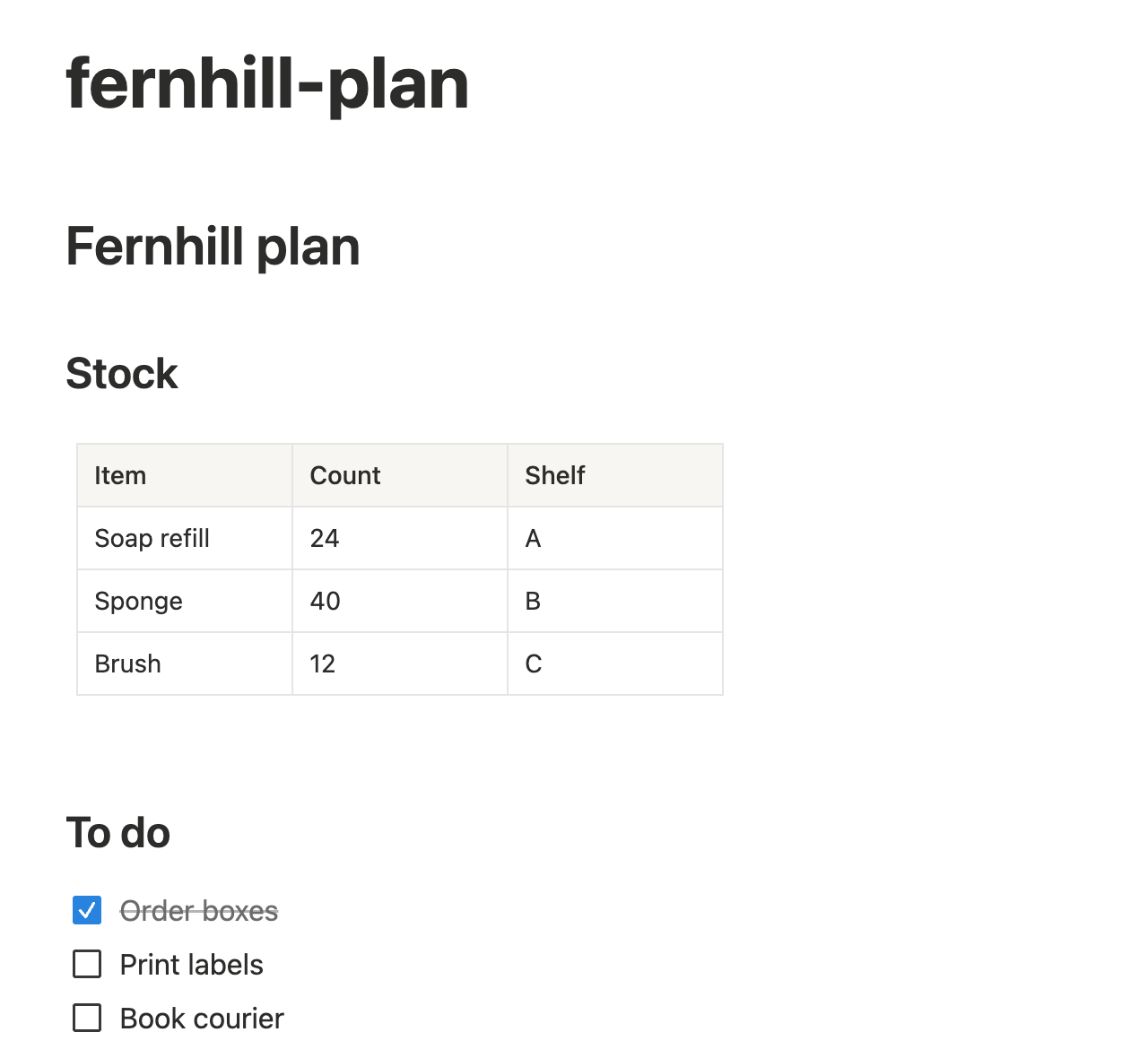
Import the same FICTIONAL Markdown file (fernhill-plan.md: two headings, a three-column table and a three-item checklist) into each tool with its own import feature, then open the result.
How we judged it
Pass: both headings, the whole table (three columns, three rows) and the checklist (one item ticked) keep their formatting.
Partial: one of the three loses its formatting.
Fail: two or more lose their formatting, or text is missing.
Notion
Pass
The import made a page with both headings, the 3-column table with its 3 rows and the checklist with Order boxes ticked; the page took the file name as its title.
Obsidian
Pass
The file opened as a note with both headings, the 3-column table with its 3 rows and the checklist with Order boxes ticked; the note keeps the file name as its title.
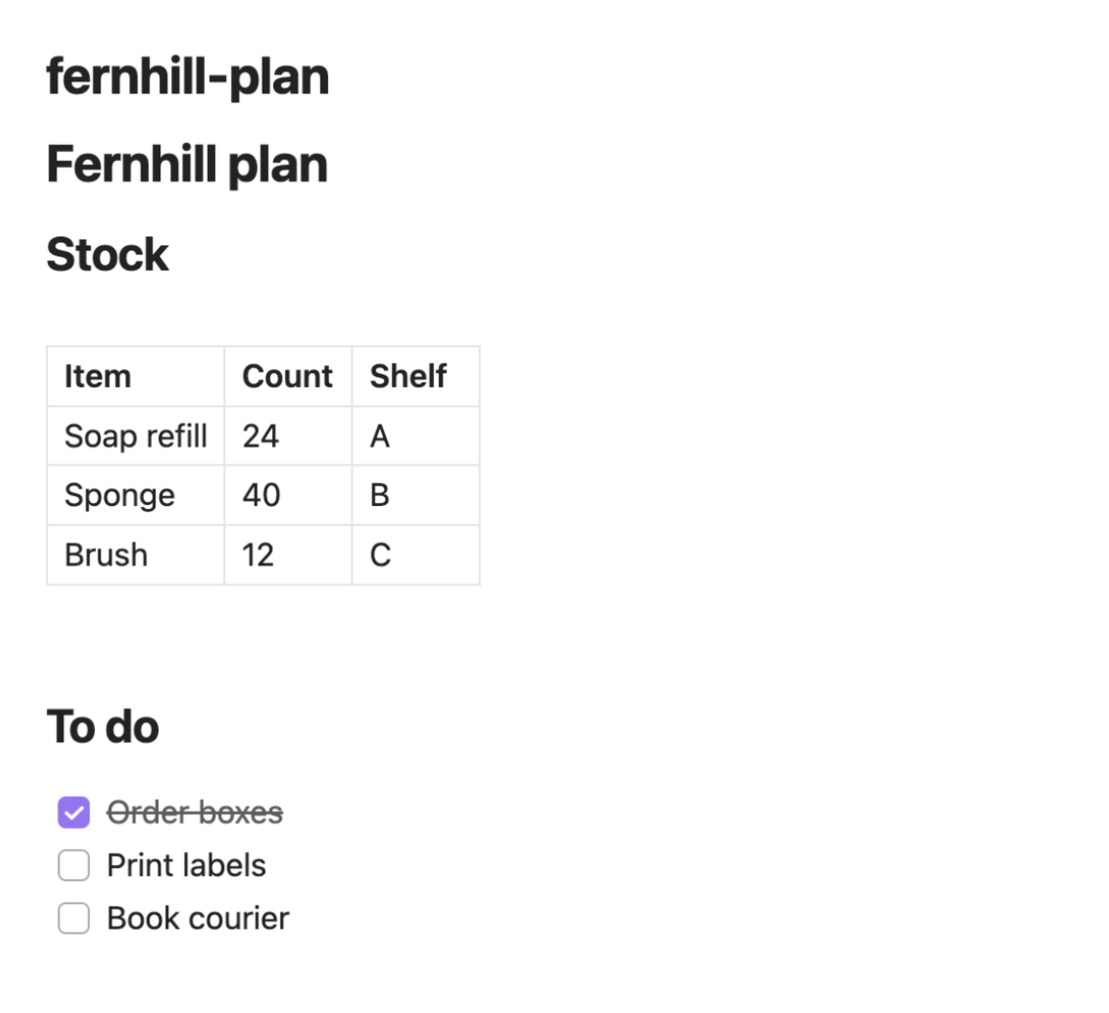
Notion's import used Settings > Import (Text & Markdown) with the plan's 11-line file; it names the page after the file (fernhill-plan) and keeps the # Fernhill plan line as a heading inside it. In Obsidian the same file was copied into a new test vault's folder, one of the ways its help lists (with dragging into the file explorer and the official Importer plugin), and the note is that file. The vault was added to Obsidian's vault list in its settings file with the app closed, because creating a vault opens the Mac folder picker, which the assistant could not operate.
Test 2: Link two notes and find the backlink
The task
In each tool, create two notes, "Project Fernhill" and "Meeting 14 October". In the meeting note, link to the project note by typing. Then open the project note and look for the link back to the meeting.
How we judged it
Pass: the link is made by typing in the note, and the project note shows the backlink without extra setup.
Partial: it works, but needs a setting, a plugin or a manual step.
Fail: there is no way to see the backlink.
Notion
Pass
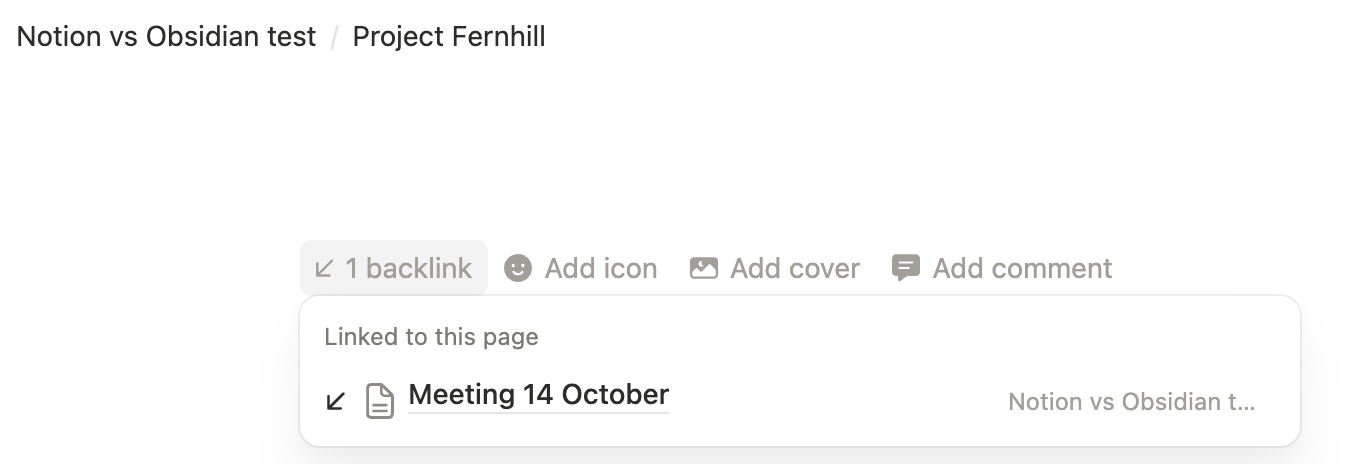
Typing @Project Fernhill in the meeting page made the link; pointing at the project page's header shows "1 backlink" above its title, which lists Meeting 14 October. No setup.
Obsidian
Pass
Typing [[Project Fernhill in the meeting note and picking the suggestion made the link; the project note's status bar shows 1 backlink, which opens the Backlinks pane. No setup.
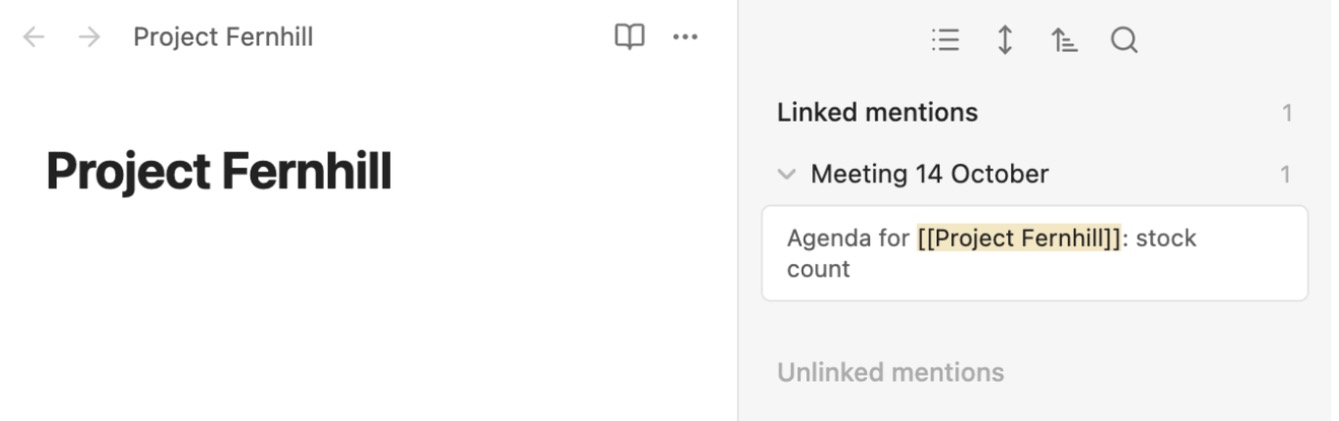
Both used default settings. In Obsidian the Backlinks pane is a core plugin that is on by default; in Notion the backlink count appears when the pointer is over the page header.
Test 3: Find a note by a word inside it (timed)
The task
In each tool, create five short notes titled Note 1 to Note 5; only Note 4 contains the word "kiln" (in its second sentence). Then, from the app's start screen, use search to find and open the note that mentions "kiln".
How we judged it
Pass: search finds Note 4 by the word inside it, and it opens.
Partial: it finds the note only after changing a search option or filter.
Fail: search does not find it.
The time is measured from starting to type the search until Note 4 is open.
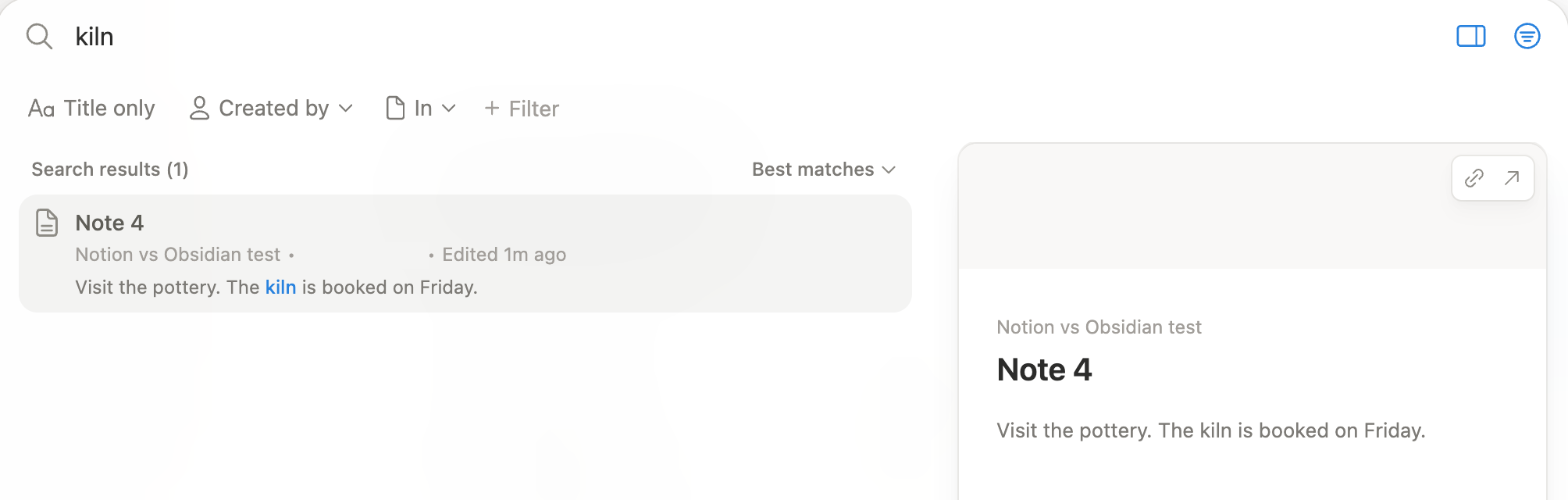
Notion: Winner
Pass 4.1 s
Search found Note 4 by the word kiln, showed the matching sentence, and Enter opened it.
Obsidian
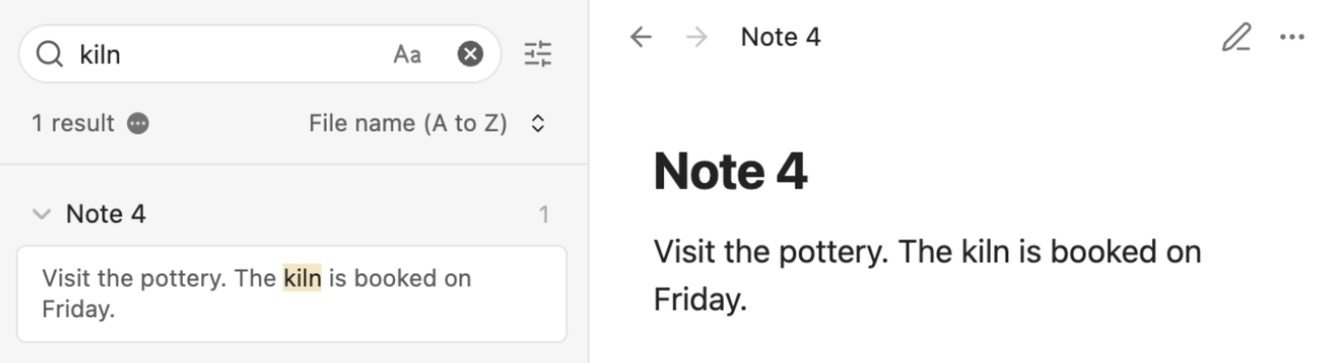
Pass 4.2 s
Search found Note 4 by the word kiln, showed the matching sentence, and one click opened it.
Both runs were scripted by the assistant from a note outside the test set (Notion 75 s, Obsidian 2 minutes after the notes were made). In both the timer started as the typing began, after the search box had opened, and included the same fixed waits: 3 s for the results and 1 s for the note, so the times count steps more than speed. Notion's note opened with Enter, Obsidian's with a click; the gap (4.12 s against 4.25 s unrounded) comes from that automation and is too small to tell the tools apart.
Test 4: Export the imported page back to Markdown
The task
Export the page or note imported in the first test back to a Markdown file with each tool's own export, and compare the file with the original fernhill-plan.md.
How we judged it
Pass: the headings, the table and the checklist (with its ticked item) come back unchanged.
Partial: one of the three changes (for example the table becomes a list).
Fail: the export is not possible, or two or more change.
Notion
Pass
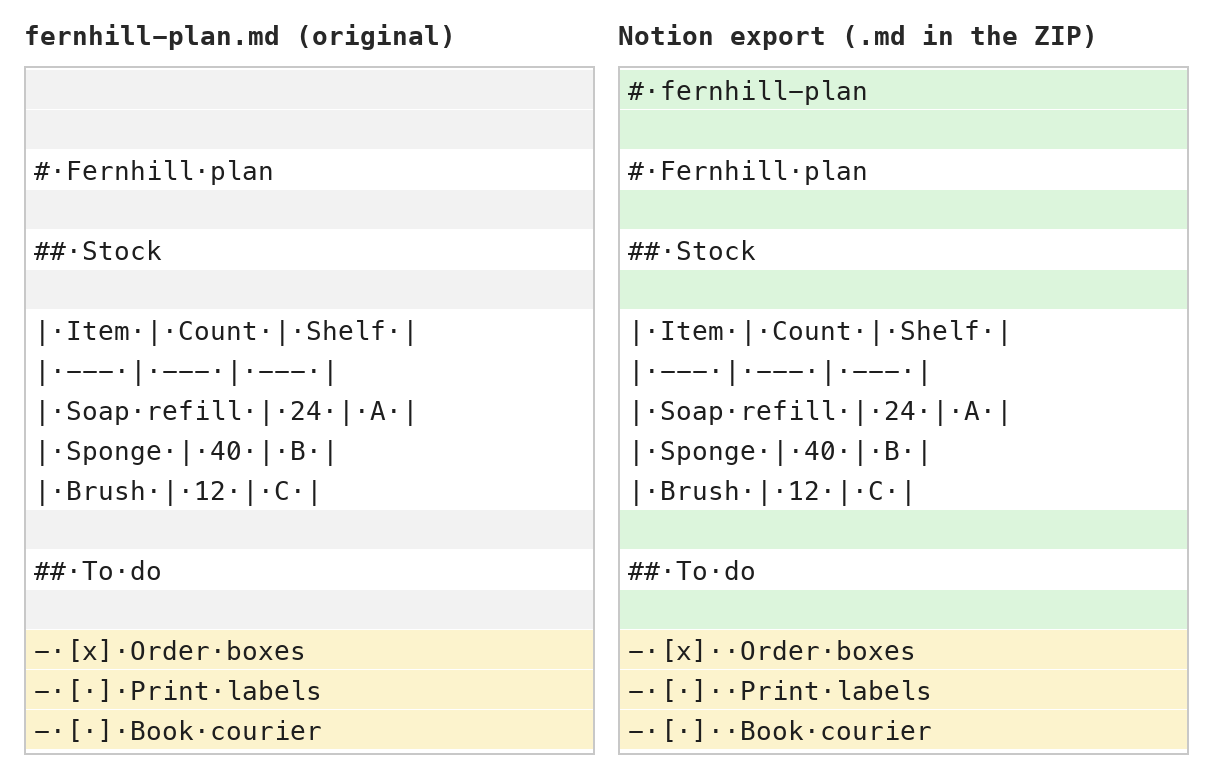
The export gave back the headings, the table and the checklist with its tick; Notion added a title line from the page name, blank lines and a second space after each checkbox.
Obsidian
Pass
The note's own file matched the original byte for byte: headings, table and checklist with its tick unchanged, nothing added. No export step is needed.
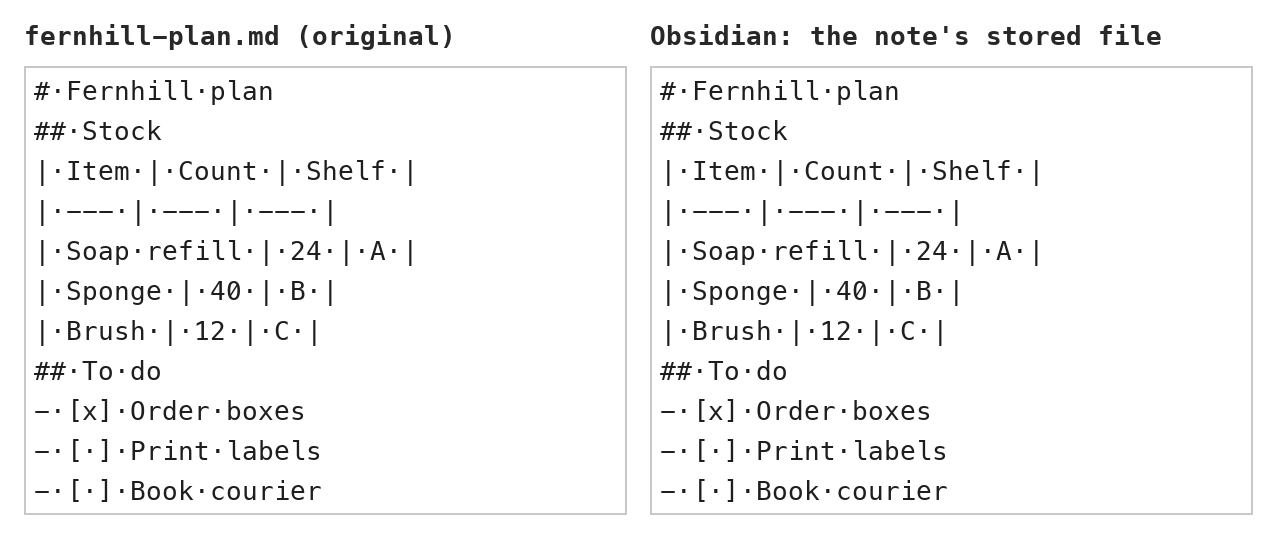
Notion's export is a ZIP holding one .md file. Obsidian keeps each note as a Markdown file and has no separate Markdown export, so the note's stored file was compared: the test counts a stored Markdown file as the export. The assistant drew both compare views from the files (they are not app screenshots); middle dots mark spaces.
Our verdict
Choose based on where your notes should live and who needs to edit them.
Notion is the better fit for shared work. There is no limit on how many people can edit a page at once, databases turn notes into trackers with table, board and calendar views, and Notion Sites publishes pages without a separate tool. The trade-offs: your data lives in Notion's cloud, offline access covers only pages you download, and the full Notion AI set (Notion Agent, AI Meeting Notes, Enterprise Search) needs the Business plan at $20 per member a month billed yearly.
Obsidian is the better fit for private, long-lived personal notes. Your notes are plain Markdown files on your device, the app works offline, and the core app costs nothing, even for work. Backlinks show linked and unlinked mentions, and the Bases plugin covers database-style tables and cards. You pay only for extras: Sync from $4 per user a month billed yearly, with end-to-end encryption by default, and Publish at $8 per site a month billed yearly. Obsidian does not yet support live co-editing of the same file.
For a team wiki or project hub, pick Notion. For a personal knowledge base you want to own outright, pick Obsidian. If you mostly write alone, Obsidian's free app may be all you need.
Choose Notion if
Several people need to work in the same notes. Any number of collaborators can edit a page at the same time, with comments and @-mentions, and databases turn lists of notes into trackers with table, board, calendar and gallery views. Notion also suits you if you want a public REST API with webhooks, a website published straight from your pages, or AI agents and meeting notes inside your workspace on the Business plan.
Choose Obsidian if
You want to own your notes as plain files. Every note is a Markdown file in a folder on your device, so the app works offline and your notes stay readable in any text editor. The core app is free, even for work, and you pay only if you want Sync across devices (from $4 per user a month billed yearly, end-to-end encrypted by default) or Publish for a website. It suits solo writers, researchers and anyone who prefers linking notes to managing a shared workspace.
Frequently asked questions
Is Obsidian free to use?
Yes. Obsidian's pricing page says the app is free without limits and needs no sign-up, and a commercial license is optional, not required, for work use. You pay only for add-ons: Sync Standard costs $4 per user a month billed yearly ($5 monthly), Sync Plus $8 ($10 monthly), and Publish $8 per site a month billed yearly ($10 monthly).
How much does Notion cost?
Notion's Free plan costs nothing. Plus is $10 per member a month billed yearly or $12 billed monthly, Business is $20 per member a month billed yearly or $24 monthly, and Enterprise is priced by sales. Notion AI features such as Notion Agent and AI Meeting Notes are included from the Business plan; Free and Plus get a limited trial.
Do Notion and Obsidian work offline?
Obsidian stores notes on your device and is designed to work without an internet connection. Notion works offline only in its desktop and mobile apps, not in a web browser, for pages you download (paid plans also download recent and favorite pages automatically), and only the first 50 rows of a database's first view are saved.
Can I move my notes from Notion to Obsidian?
Yes. Obsidian has a Notion importer that converts Notion data into Markdown files and Obsidian Bases. Notion can also export pages as Markdown and databases as CSV, or your whole workspace from its settings, which gives you a copy you can open anywhere.
Which one is more private?
Obsidian keeps notes on your device, says its apps collect no telemetry, and protects Sync by default with AES-256 end-to-end encryption that it says prevents Obsidian from reading your data. Notion encrypts data in transit (TLS 1.2 or higher) and at rest (AES-256), lists audits such as SOC 2 and ISO 27001, and offers zero data retention with AI providers on its Enterprise plan.
Compare with others
- Superhuman Docs vs Notion
- Evernote vs Notion
- Logseq vs Obsidian
- Notion vs Microsoft OneNote
- Obsidian vs Microsoft OneNote
More about: Notion · Obsidian · Best Notes and knowledge