
Superhuman Docs vs Notion: Which is better in 2026?
The deciding question is whether your team mainly builds working tools or keeps shared knowledge.
Tested hands-on: 3 tests on a MacBook Pro (M1 Pro), October 23, 2026. How we tested
Some links on this page are affiliate links. If you buy through them we may earn a commission at no extra cost to you. This never affects our verdicts.
Quick answer
- Choose Superhuman Docs if: You want a shared doc that behaves like an app, built on tables that work like a database, with formulas, buttons and automations inside the doc.
- Choose Notion if: You want notes, documents and a team wiki in one workspace where any page can hold a database you view as a table, board, list, calendar or gallery.
- Price at a glance: Superhuman Docs: Free plan; paid from $15/mo · Notion: Free plan; paid from $12/mo
At a glance
 Superhuman Docs |  Notion | |
|---|---|---|
| Free plan | Yes | Yes |
| Paid plans | From $15/mo | From $12/mo |
| Our tests | Won 1 of 31 tie | Won 1 of 31 tie |
| Best for | Teams that want docs, trackers and simple apps in one shared workspace built on tables, formulas and automations, especially when many people edit but only a few create docs. | Teams and individuals who want notes, wikis and project tracking in one shared workspace, and who value real-time collaboration and databases over local files. |
Superhuman Docs, the product called Coda until July 8, 2026, and Notion are both cloud workspaces where pages of text sit next to database-style tables and many people can edit at once. They differ in what they are built around and in how they bill. Superhuman Docs centers on tables with formulas, buttons and automations, and charges only for Doc Makers, the people who create docs; Editors are free. Notion centers on pages, wikis and databases, creates backlinks from @-mentions and charges per member. This comparison covers US prices, free-plan limits, tables, offline use, exports, publishing and AI, from each company's own pricing and help pages as of October 2026.
Pricing
| Plan | Monthly | Yearly (12-month total) |
|---|---|---|
| Superhuman Docs | ||
| FreeShared docs up to 50 objects and 1,000 rows; 1 GB attachments per doc; 7-day version history; Docs AI and MCP trial | Free Free plan | |
| ProPer Doc Maker/month, Editors free; $12/month billed yearly ($144/year), $15 billed monthly; Grammarly Pro included yearly, a $15/month add-on monthly | $15/mo | $144/yr ($12/mo) |
| BusinessPer Doc Maker/month, Editors free; $33/month billed yearly ($396/year), $40 billed monthly; adds Superhuman Mail, unlimited automations and version history | $40/mo | $396/yr ($33/mo) |
| EnterpriseCustom pricing; contact sales; billed only for Doc Makers; SAML SSO, SCIM, audit logs, HIPAA compliance | Custom | |
| Notion | ||
| FreeFor individuals; limited trial of Notion AI; 5 MB per file upload, 7-day page history | Free Free plan | |
| PlusPer member/month; $10/month billed yearly ($120/year), $12 billed monthly; Notion AI trial only | $12/mo | $120/yr ($10/mo) |
| BusinessPer member/month; $20/month billed yearly ($240/year), $24 billed monthly; includes Notion AI (Notion Agent, AI Meeting Notes, Enterprise Search beta), SAML SSO | $24/mo | $240/yr ($20/mo) |
| EnterpriseCustom pricing; contact sales | Custom | |
Prices checked on .
Features compared
| Feature | Superhuman Docs | Notion |
|---|---|---|
| Offline use | Partial · Keeps working in docs already open; a connection is needed to open a doc; changes lost if reloaded offline | Partial · Desktop/mobile apps only; downloaded pages; first 50 rows of a database's first view |
| Local-first files | No · Cloud docs; export to PDF, CSV tables, or .txt/.csv files of docs you own | No · Cloud workspace; export to Markdown, CSV, HTML, PDF |
| Databases | Yes · Tables with connected views (cards, calendar, timeline, charts, forms); Superhuman Databases in closed beta | Yes · Table, board, list, calendar, gallery, timeline, chart, map, feed and form views (1 chart on Free); dashboard view on Business and Enterprise |
| Backlinks | Partial · No page backlinks documented; a linked relation column you add lists the table rows that reference a row | Yes · Created automatically by @-mentions |
| Real-time collaboration | Yes · Live edits and presence on all plans, incl. Free; Editors are free | Yes · No limit on simultaneous editors |
| API | Yes · REST API for all users; Docs MCP server, limited on Free to 30 requests a week (60 a month) | Yes · REST API and webhooks |
| Publish to web | Yes · View, play or edit mode; new published docs are unlisted (not search-indexed) by default; custom domains on paid plans | Yes · Notion Sites; custom domain on paid plans, $8/month per domain billed yearly |
| Encryption | Partial · AES-256 at rest, TLS 1.2 in transit; BYOK listed as coming soon for Enterprise | Partial · AES-256 at rest, TLS 1.2+ in transit |
| AI features | Yes · Docs AI (beta) included for paid Doc Makers; limited trial on Free and for Editors | Yes · Business plan and up; limited trial on Free and Plus |
How we tested
We gave Superhuman Docs and Notion the same 3 tasks on the same MacBook Pro (M1 Pro). Each test below lists the task, how we judged it, both results and screenshots; select a screenshot to see it at full size.
- Device
- MacBook Pro (M1 Pro) · macOS 26.6.2 · Chrome 155
- Tested
- October 23, 2026
- Plans used
- Superhuman Docs: Free · Notion: Free
- App versions
- Superhuman Docs: Web app, table with a Formula column, Web app, Button column, Web app, @ mention of a page · Notion: Web app, database with a Formula property, Web app, Button property with an action, Web app, @ mention and page backlinks
| Test | Superhuman Docs | Notion | Winner |
|---|---|---|---|
| Build an order tracker with a calculated total (timed) | Pass0.61 min | Pass0.85 min | Superhuman Docsby Time to build the tracker |
| Add a one-click button that marks an order done | Pass | Pass | Tie |
| Link two pages and find the way back | Partial | Pass | Notion |
| Tests won | 1 | 1 | 1 tie |
Test 1: Build an order tracker with a calculated total (timed)
The task
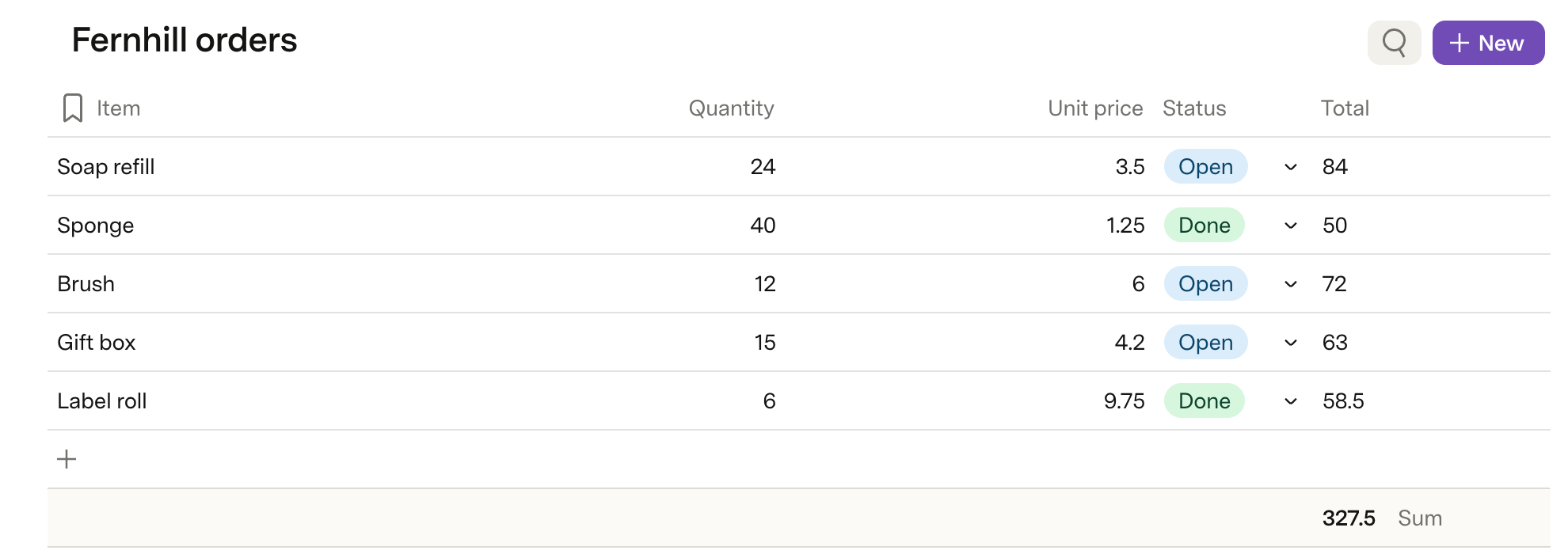
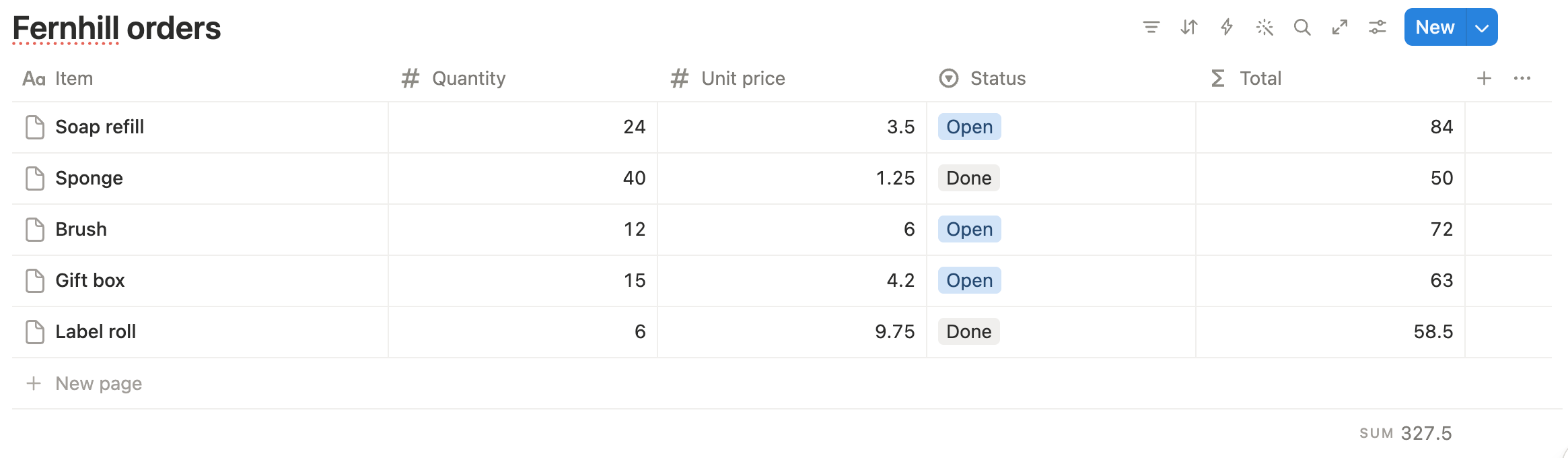
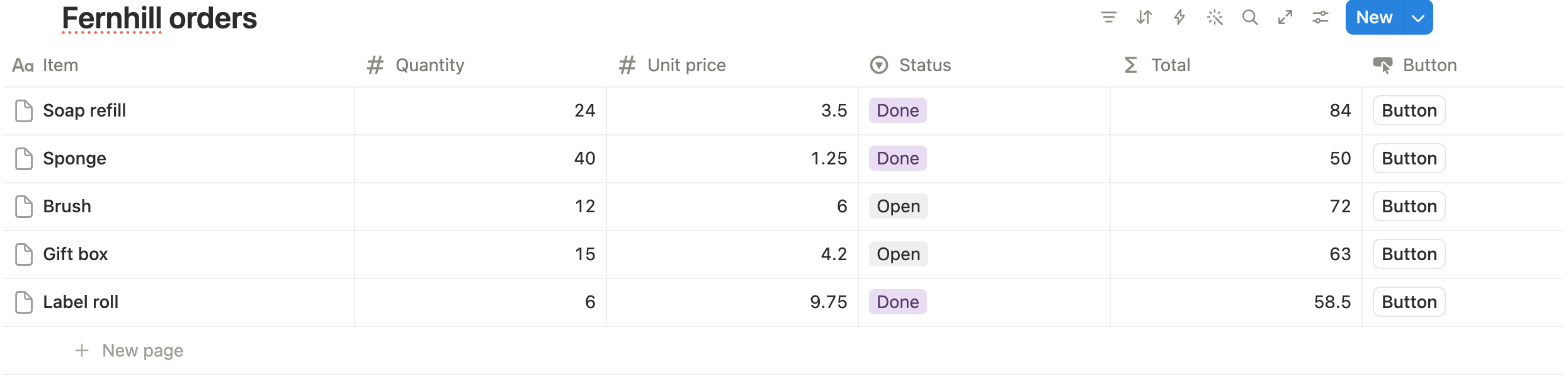
In each tool, build a table called "Fernhill orders" (FICTIONAL) with the columns Item, Quantity, Unit price, Status and Total, and enter the five rows below. Make Total calculate Quantity times Unit price by itself, then show the sum of the Total column for all rows. Use the tool's own table or database feature, starting from an empty page.
How we judged it
Pass: every row's Total is calculated, not typed (84.00, 50.00, 72.00, 63.00 and 58.50, in any number format), and the sum 327.50 is shown, within 15 minutes.
Partial: the row totals are right, but the sum is typed or needs a workaround, or it took more than 15 minutes.
Fail: Total cannot be calculated from the other two columns.
The time runs from opening the empty page until the sum is shown.
Superhuman Docs: Winner
Pass 0.61 min
From a blank table: a Formula column worked out each Total (84, 50, 72, 63, 58.5); Summarize > Sum > Show in summary row gave 327.5.
Notion
Pass 0.85 min
From an empty database: a Formula property worked out each Total, and Calculate > More options > Sum showed SUM 327.5 in the footer.
Both were scripted runs by the assistant's browser automation, with a 1-second wait each time the page, a menu, panel, dropdown or editor opened: 29 in Superhuman Docs, 43 in Notion, which opens a small editor for each cell (Tab from the automation was unreliable in its tables, so each cell was clicked). Without the waits they took about 7.5 and 7.7 seconds, so the gap is those extra steps. Notion's run was split into five scripted parts, pauses not counted; Superhuman Docs' time includes one automatic image capture of about a second.
Test 2: Add a one-click button that marks an order done
The task
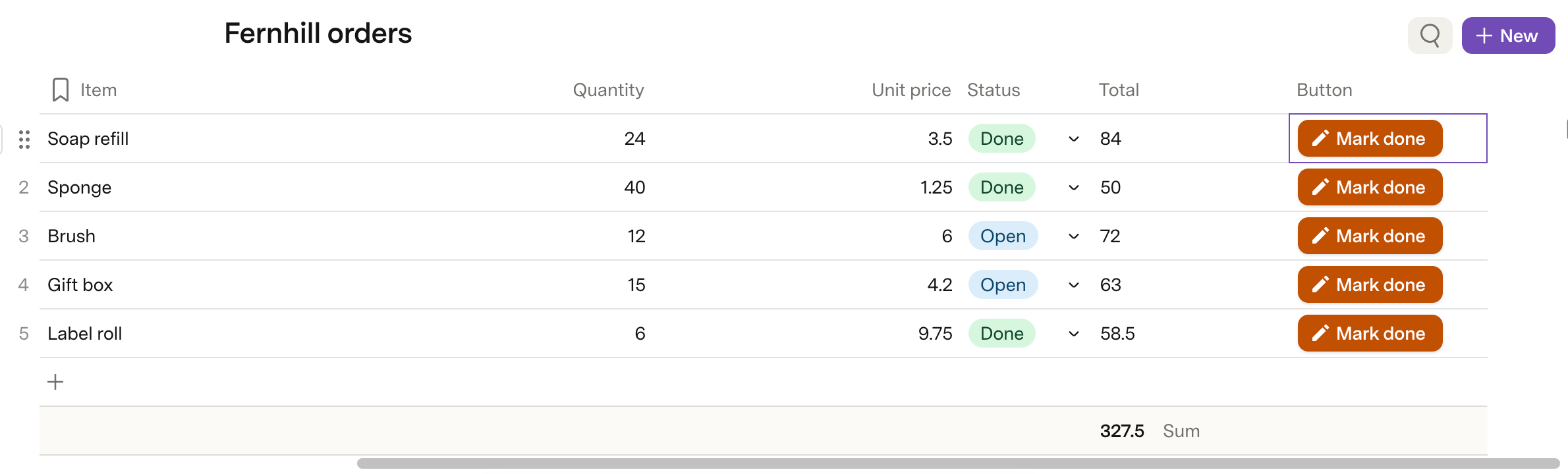
In the "Fernhill orders" table from the first test, add a button to every row that sets that row's Status to Done with one click. Use the tool's own button or automation feature, then click the button on the Soap refill row once.
How we judged it
Pass: one click on the Soap refill row's button sets its Status to Done, and no other row changes.
Partial: it works, but needs more than one click, a separate automation run, or a button outside the table.
Fail: no such button can be made on the plan used, or the click changes the wrong row.
Superhuman Docs
Pass
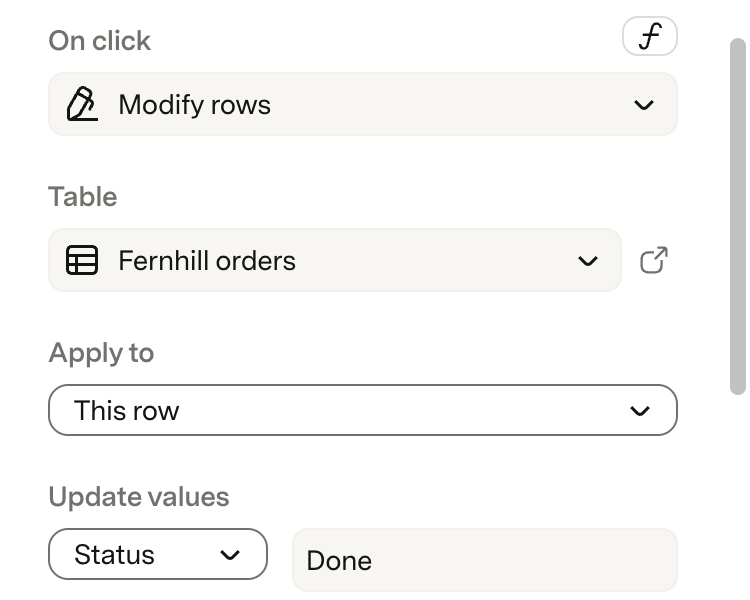
A Button column (Modify rows, This row, Status = Done) whose buttons read Mark done; one click set Soap refill to Done and left the other rows as they were.
Notion
Pass
A Button property whose action sets Status to Done; one click set Soap refill to Done ("Edited 1 page") and left the other rows as they were.
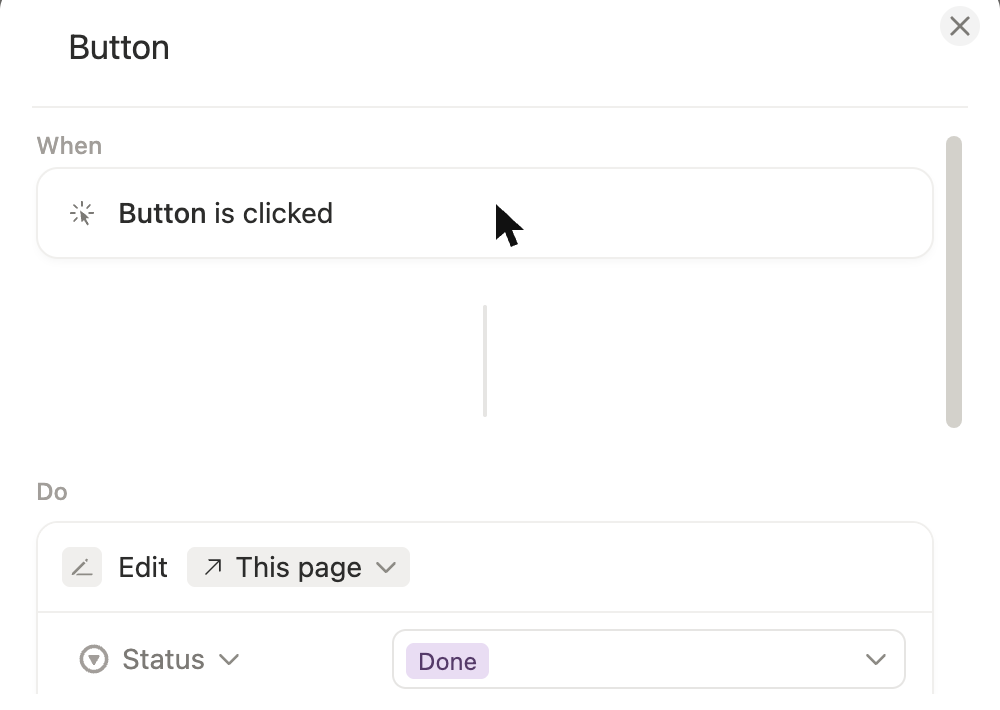
Neither needed AI or showed an upgrade prompt. Notion's button shows the property's name (here "Button"); Superhuman Docs lets you type a label.
Test 3: Link two pages and find the way back
The task
In each tool, create two pages, "Project Fernhill" and "Meeting 14 October" (FICTIONAL). In the meeting page, link to the project page by typing in the text with the tool's own mention or link feature. Then open "Project Fernhill" and look for a way to see that the meeting page links to it.
How we judged it
Pass: the link is made by typing in the text and opens the project page, and the project page lists the meeting page without extra setup.
Partial: the link works, but finding the way back needs a manual step, such as a table relation, a second link added by hand or a search.
Fail: no link to the other page can be made.
Superhuman Docs
Partial
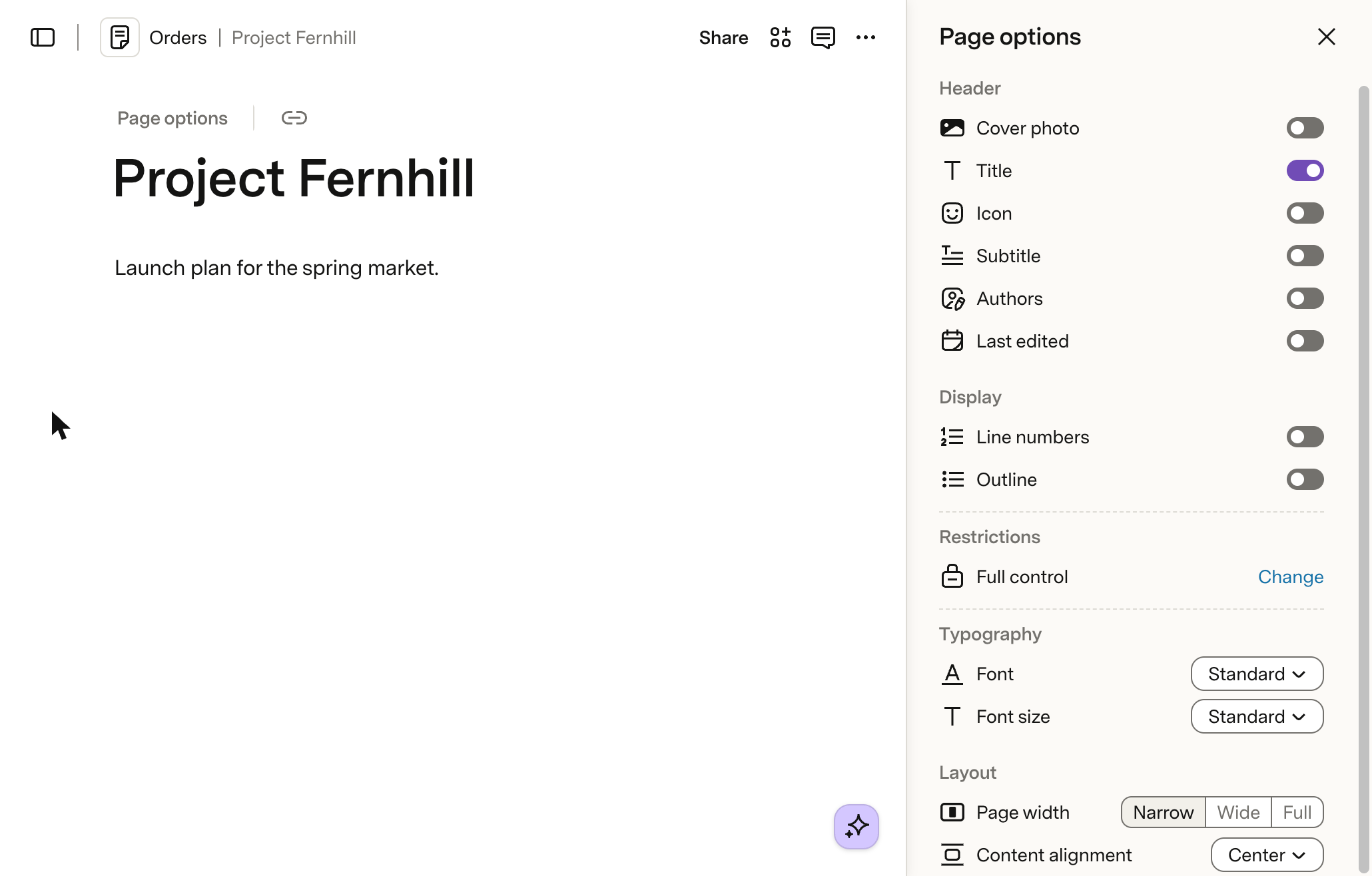
The @ mention opened Project Fernhill in one click, but that page shows no backlinks and the doc search did not list the meeting page.

Notion: Winner
Pass
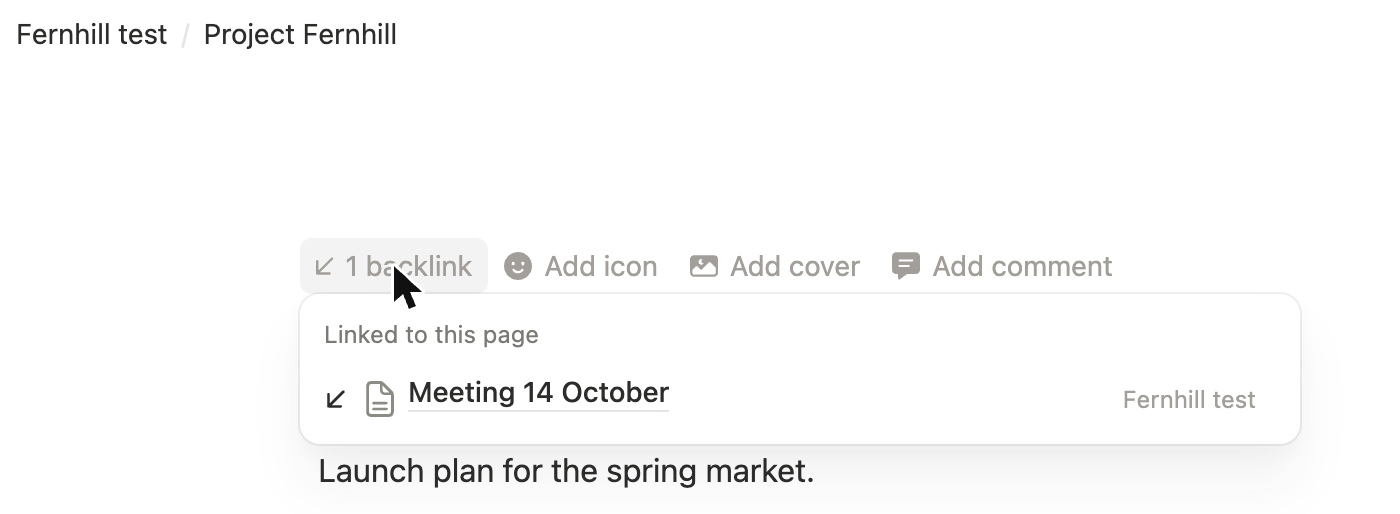
The @ mention opened Project Fernhill in one click; its header shows "1 backlink", which lists Meeting 14 October. No setup needed.
In Superhuman Docs the Page options panel and the page and doc menus have no backlinks setting, and the doc search for the title did not list the meeting page, so the way back needs a second link added by hand.
Our verdict
The deciding question is whether your team mainly builds working tools or keeps shared knowledge.
Superhuman Docs rewards teams that build. A doc mixes pages with tables that work like a database, and formulas, buttons and automations turn it into a working tracker or a small app. Billing counts only Doc Makers, so when a few people create docs and everyone else edits, you pay for those few: Pro is $12 per Doc Maker a month billed yearly, with Docs AI (beta) included. The trade-offs: on Free, a shared doc is capped at 50 objects and 1,000 rows, offline editing covers only docs already open, and exports come as PDFs, CSV tables, or .txt and .csv files.
Notion rewards teams that write and organize. Notes, wikis and databases share one workspace; Notion has formulas, buttons and forms too, and database automations on paid plans. An @-mention creates a backlink on the other page, and pages and databases export to Markdown, HTML, CSV or PDF. Plus costs $10 per member a month billed yearly, though full Notion AI waits for Business at $20 billed yearly. Offline access covers only pages downloaded in the desktop or mobile app.
For a wiki, meeting notes and project pages, start with Notion; for interactive trackers that many colleagues edit, start with Superhuman Docs.
Choose Superhuman Docs if
You want a shared doc that behaves like an app, built on tables that work like a database, with formulas, buttons and automations inside the doc. Superhuman Docs also suits teams where many people edit but only a few create docs, because only Doc Makers are billed and Editors are free, even on Enterprise. Pro at $12 per Doc Maker a month billed yearly includes Docs AI (beta), Superhuman Go and Grammarly Pro.
Choose Notion if
You want notes, documents and a team wiki in one workspace where any page can hold a database you view as a table, board, list, calendar or gallery. An @-mention adds a backlink on the page you mention. It also fits if you might leave one day, since pages and databases export to Markdown, HTML, CSV or PDF, or if you want a website through Notion Sites. Plus is $10 per member a month billed yearly, and full Notion AI starts at Business, $20 billed yearly.
Frequently asked questions
Is Coda the same product as Superhuman Docs?
Yes. Coda has been called Superhuman Docs since July 8, 2026, and it is now part of the Superhuman suite alongside Grammarly, Mail and Go, with its plans listed on superhuman.com. It is a cloud doc workspace, founded in 2014, whose docs mix pages of text with connected tables, formulas, buttons and automations that many people can edit in real time.
Which costs less for a team, Superhuman Docs or Notion?
It depends on how many people create docs. Superhuman Docs bills only Doc Makers, and Editors are free: Pro is $12 per Doc Maker a month billed yearly ($144 a year) or $15 monthly, and Business is $33 billed yearly ($396 a year) or $40 monthly. Notion bills per member, and guests, who can open only the pages they are invited to, are free: Plus is $10 a month billed yearly ($120 a year) or $12 monthly, and Business is $20 billed yearly ($240 a year) or $24 monthly. Seat for seat, Notion's prices are lower; Superhuman Docs can cost less when many people edit but only a few create docs. Monthly Pro also leaves out Grammarly Pro, a $15-a-month add-on. Both sell Enterprise plans through sales. These are the US dollar prices listed in October 2026.
How do the Superhuman Docs and Notion free plans compare?
Superhuman Docs Free includes real-time collaboration and has no object or row limits in docs you do not share. A shared doc is capped at 50 objects and 1,000 table rows, every doc at 1 GB of attachments (10 MB per file), version history goes back 7 days, and Docs AI and the MCP server come as a limited trial (MCP: 30 requests a week, 60 a month). Notion Free is meant for individuals: blocks are unlimited for one member but limited once a workspace has 2 or more members, each file upload is capped at 5 MB, page history goes back 7 days, and it includes basic web publishing and a limited trial of Notion AI.
Which plans include AI in Superhuman Docs and Notion?
Superhuman Docs includes Docs AI, still in beta, for Doc Makers on its paid plans, starting with Pro at $12 a month billed yearly; Free users and Editors get a limited trial. Notion includes Notion AI, with Notion Agent, AI Meeting Notes and Enterprise Search (beta), from the Business plan at $20 per member a month billed yearly; Free and Plus get a limited trial. Both also offer an MCP server that connects outside AI tools to your content: Superhuman Docs names Claude, ChatGPT and Cursor, and Notion hosts one for clients such as Claude Code, Cursor and Codex.
Do Superhuman Docs and Notion work offline?
Only partly. Superhuman Docs keeps working in a doc you opened while online, but you need a connection to open a doc, and changes that have not synced are lost if you reload or close it while offline. Notion works offline only in its desktop and mobile apps, for pages you download, and for a database only the first 50 rows of its first view are saved.
Compare with others
More about: Superhuman Docs · Notion · Best Notes and knowledge