
Logseq vs Obsidian: Which is better in 2026?
Both apps cost nothing for personal or work use on your own device, so the choice comes down to how you write and whether plain files matter to you.
Tested hands-on: 4 tests on a MacBook Pro (M1 Pro), October 24, 2026. How we tested
Some links on this page are affiliate links. If you buy through them we may earn a commission at no extra cost to you. This never affects our verdicts.
Quick answer
- Choose Logseq if: You want to write in outlines and keep a daily journal, with every block something you can link, tag and query.
- Choose Obsidian if: You want your notes as plain Markdown files in a folder on your own device, so they stay readable without the app.
- Price at a glance: Logseq: Free plan; paid from $5/mo · Obsidian: Free plan; paid from $5/mo
At a glance
 Logseq |  Obsidian | |
|---|---|---|
| Free plan | Yes | Yes |
| Paid plans | From $5/mo | From $5/mo |
| Our tests | Won 0 of 43 ties | Won 1 of 43 ties |
| Best for | People who think in outlines and daily journals and want private, linked notes on their own device, and who are comfortable with beta software or with the maintenance-only Markdown version, Logseq OG. | Individuals who want private, offline notes they own as plain files, and who are comfortable adding sync or plugins themselves. |
Logseq and Obsidian are both private note apps: they keep your notes on your own device, link them with backlinks and cost nothing for personal use. The real difference is how notes are written and stored. Obsidian saves each note as a plain Markdown file in a folder you choose. Logseq is an open-source outliner where every note is a list of blocks, and its current version, Logseq 2.0, is a beta that keeps each graph in a SQLite database. This comparison covers storage, linking, table views, sync, collaboration, publishing, encryption and AI, from each project's own pages as of October 2026.
Pricing
| Plan | Monthly | Yearly (12-month total) |
|---|---|---|
| Logseq | ||
| FreeDesktop and web apps; no license needed for personal or company use while data stays local and off Logseq's servers | Free Free plan | |
| Backers (Open Collective)Monthly Open Collective donation, no yearly price; early access to insider builds; Logseq Sync (still in testing) for DB graphs since July 2026 (sign in with your Open Collective email) | $5/mo | no yearly price |
| Sponsors (Open Collective)Monthly Open Collective donation, no yearly price; early access to insider builds; Logseq Sync, still in testing (first to get invites; Backers have had the same access since July 2026) | $15/mo | no yearly price |
| Obsidian | ||
| FreeFull app, no sign-up; commercial license optional | Free Free plan | |
| Sync StandardPer user/month; $4/month billed yearly ($48/year), $5 billed monthly; 1 synced vault, 1 GB, 1-month version history | $5/mo | $48/yr ($4/mo) |
| Sync PlusPer user/month; $8/month billed yearly ($96/year), $10 billed monthly; 10 synced vaults, 10 GB, 12-month version history | $10/mo | $96/yr ($8/mo) |
| PublishPer site/month add-on; $8/month billed yearly ($96/year), $10 billed monthly; hosting up to 4 GB, custom domain | $10/mo | $96/yr ($8/mo) |
Prices checked on .
Features compared
| Feature | Logseq | Obsidian |
|---|---|---|
| Offline use | Yes · Graphs are stored and run on your device | Yes · Local app, works without internet |
| Local-first files | Partial · Local SQLite database file; one-way Markdown Mirror on desktop; Markdown files only in Logseq OG | Yes · Markdown files in a local folder (vault) |
| Databases | Yes · Tags with typed properties; editable table, list and gallery views; queries | Yes · Bases core plugin: table, cards, list, kanban views; map via official Maps plugin |
| Backlinks | Yes · Linked and unlinked references on every page and block | Yes · Core plugin; linked and unlinked mentions |
| Real-time collaboration | Add-on · Live co-editing through Logseq Sync, still in testing for monthly Open Collective backers (from $5/month); can be self-hosted | Partial · Shared vaults via Sync (up to 20); no live co-editing |
| API | Yes · Plugin SDK, local HTTP API (desktop), CLI and MCP server | Partial · TypeScript plugin API and CLI; no hosted web API |
| Publish to web | Yes · Export public pages as a static site to host yourself; hosted Logseq Publish needs a Sync account | Add-on · Obsidian Publish, $8/site/month billed yearly |
| Encryption | Yes · Sync is end-to-end encrypted with a password you set on your device | Yes · AES-256 end-to-end for Sync by default; standard encryption is optional |
| AI features | Partial · MCP server for outside AI apps; opt-in on-device semantic search (needs Python) | Partial · Web Clipper Interpreter (own provider key or local Ollama); community plugins |
How we tested
We gave Logseq and Obsidian the same 4 tasks on the same MacBook Pro (M1 Pro). Each test below lists the task, how we judged it, both results and screenshots; select a screenshot to see it at full size.
- Device
- MacBook Pro (M1 Pro) · macOS 26.6.2
- Tested
- October 24, 2026
- Plans used
- Logseq: Free · Obsidian: Free
- App versions
- Logseq: Logseq 2.0.2 for Mac (DB version), [[ ]] link and references, Logseq 2.0.2 for Mac (DB version), the Book tag's table, Logseq 2.0.2 for Mac (DB version), Task page with a Status filter, Logseq 2.0.2 for Mac (DB version), Export page > Text · Obsidian: Obsidian 1.14.5 for Mac, [[ ]] link and Backlinks pane, Obsidian 1.14.5 for Mac, Bases and Properties (built in), Obsidian 1.14.5 for Mac, Search with task-todo:, Obsidian 1.14.5 for Mac, the note's stored Markdown file
| Test | Logseq | Obsidian | Winner |
|---|---|---|---|
| Find linked and unlinked mentions of a note | Pass | Pass | Tie |
| Turn three tagged notes into a sorted table (timed) | Pass0.22 min | Pass0.16 min | Obsidianby Time to a sorted, edited table |
| List the open tasks of three notes in one place | Pass | Pass | Tie |
| Get an outline note out as a Markdown file | Pass | Pass | Tie |
| Tests won | 0 | 1 | 3 ties |
Test 1: Find linked and unlinked mentions of a note
The task
In each tool, create three notes: "Project Fernhill", "Meeting 14 October" and "Supplier call". In the meeting note, link to the project note by typing. In the supplier note, write the words Project Fernhill as plain text, without a link. Then open the project note and look for both: the linked mention from the meeting note and the unlinked mention from the supplier note.
How we judged it
Pass: the link is made by typing, and the project note shows both the linked and the unlinked mention without extra setup.
Partial: both show up, but only after changing a setting, adding a plugin or another manual step.
Fail: one of the two mentions cannot be found from the project note.
Logseq
Pass
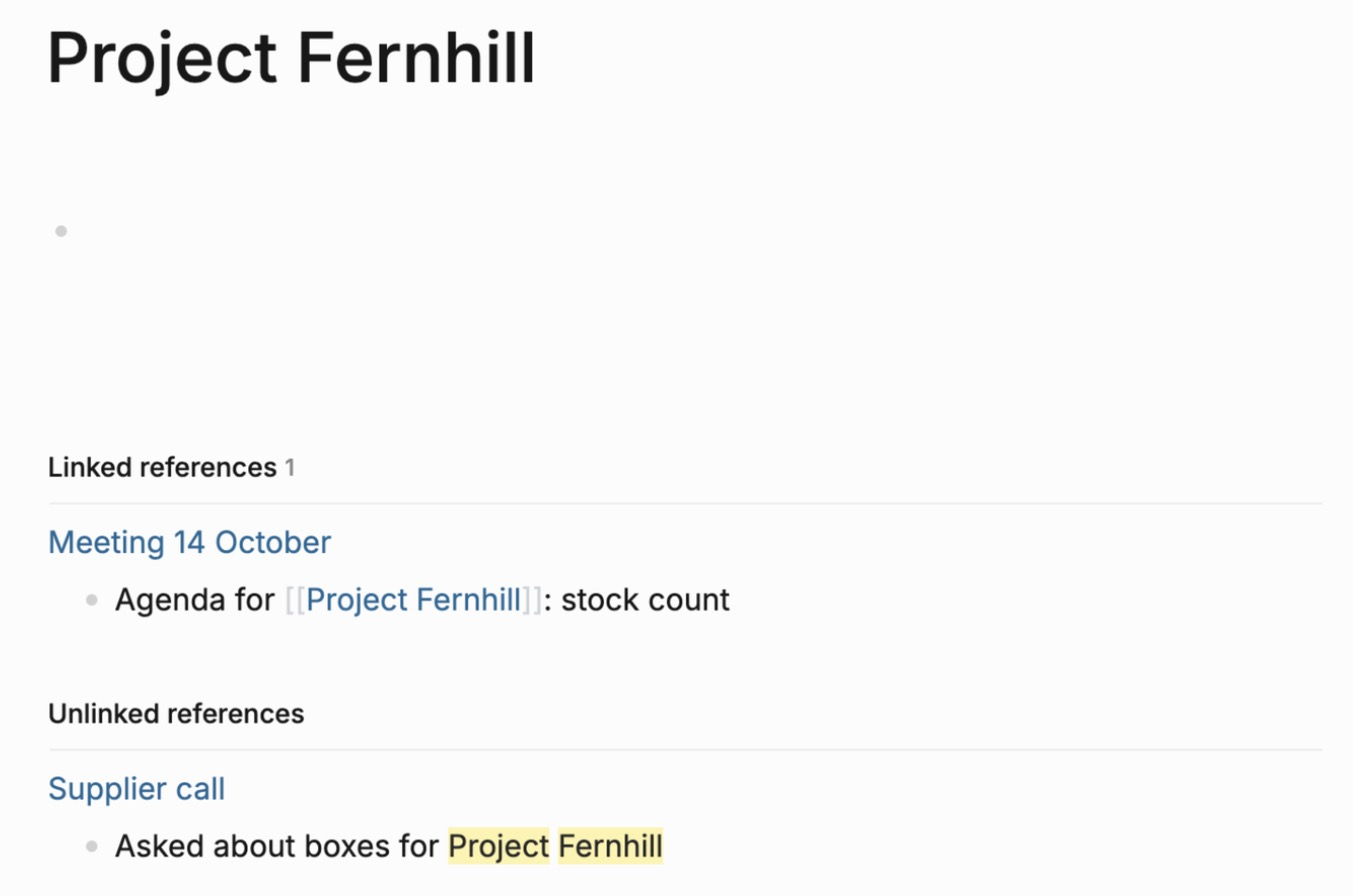
Typing [[Project Fernhill and picking the suggestion made the link; the project page lists the meeting under Linked references and the supplier call under Unlinked references.
Obsidian
Pass
Typing [[Project Fernhill and picking the suggestion made the link; the Backlinks pane, opened from the status bar, lists the meeting under Linked mentions and the supplier call under Unlinked ones.
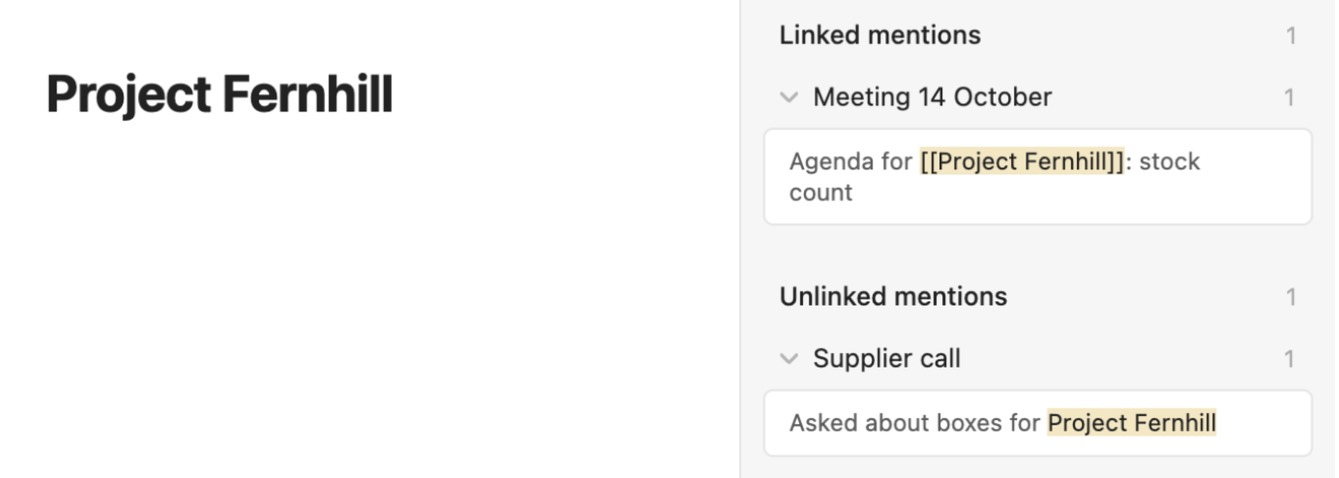
Logseq 2.0.2 is the database version (its graphs are made with Create db graph). Both used default settings. Logseq lists the references below the page; Obsidian lists them in its Backlinks pane, opened by clicking 1 backlink in the status bar. In both, unlinked mentions sit in a collapsed section that opens with one click. The Obsidian test vault was added to the app's vault list in its settings file with the app closed, because creating a vault opens the Mac folder picker, which the assistant could not operate.
Test 2: Turn three tagged notes into a sorted table (timed)
The task
In each tool, create three FICTIONAL book notes, tag each one Book and give each the same three fields: author, year and progress. Then, with the app's own features (no community plugins), make one table that lists the three books with those three columns, sort it by year, and change one book's progress from inside the table.
How we judged it
Pass: one table shows the three books with author, year and progress columns, sorted by year, built with the app's own features, and a progress value changed in the table also changes in the note.
Partial: the table works, but sorting or editing from the table is not possible, or it needs a community plugin.
Fail: no table of the three notes can be made.
The time is measured from starting the table until it is sorted and one progress value is changed.
Logseq
Pass 0.22 min
The Book tag page lists the three books in a table; adding author, year and progress as tag properties made the columns, and the table sorted by year and edited progress in place.

Obsidian: Winner
Pass 0.16 min
A new base filtered to the Book tag listed the three notes; author, year and progress were added as columns, a click sorted by year, and progress edited in the table changed in the note.
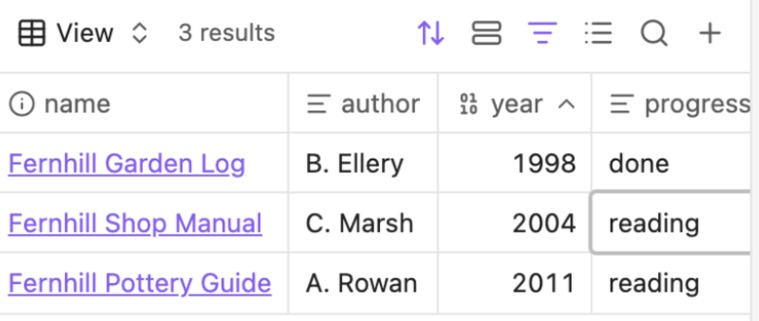
Both runs were scripted by the assistant on the quickest route found in an untimed rehearsal, with a 1-second wait each time a page, menu or editor opened or a list updated after typing: 7 in Obsidian and 11 in Logseq. Those 4 extra seconds are more than the whole 3.5-second gap, so the times count steps more than speed. Both were timed with key marks logged in the app's developer console. Before timing, Logseq's window was set to fill the screen with its sidebar closed and wide mode on, so every column fitted. Obsidian used Bases and Properties, Logseq its tag table; all are built in.
Test 3: List the open tasks of three notes in one place
The task
In each tool, create three notes with one task each: two open tasks and one marked done. Then, with the app's own features (no community plugins), show the two open tasks from all three notes together in one list, and tick one of them off.
How we judged it
Pass: one list shows exactly the two open tasks from different notes, made with the app's own features, and the ticked task leaves the list.
Partial: the list can be made, but it also shows the done task, does not update after the tick, or needs a community plugin.
Fail: the open tasks cannot be shown together in one list.
Logseq
Pass
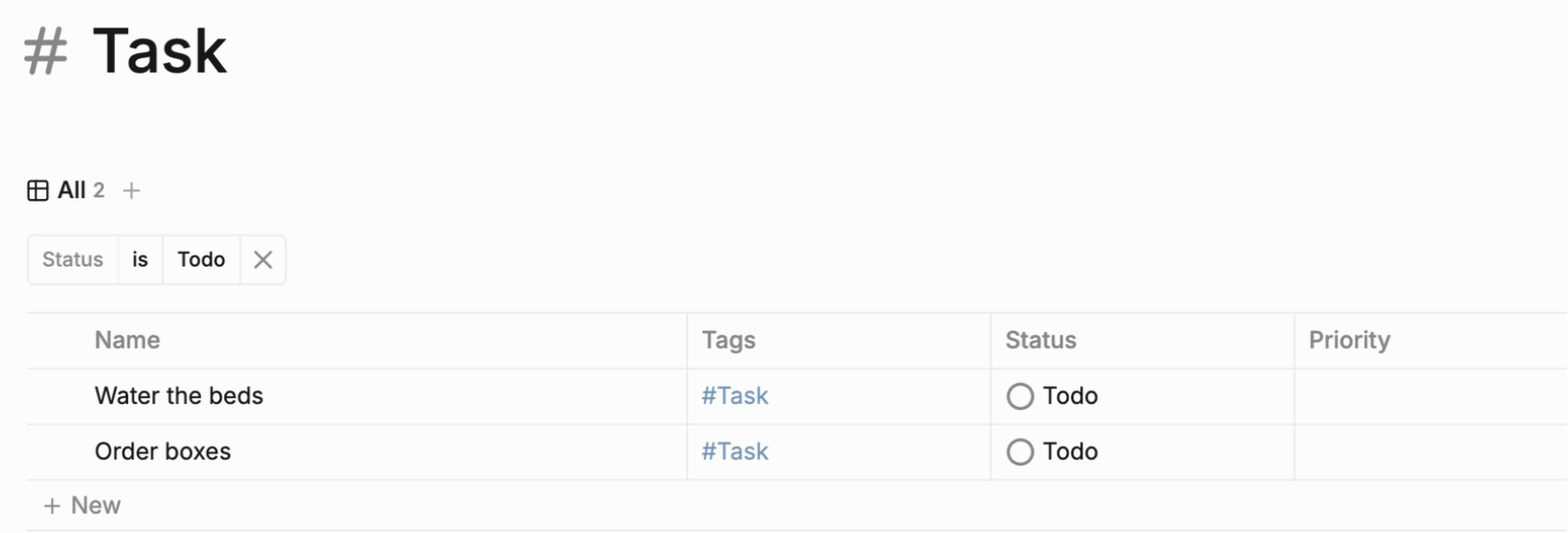
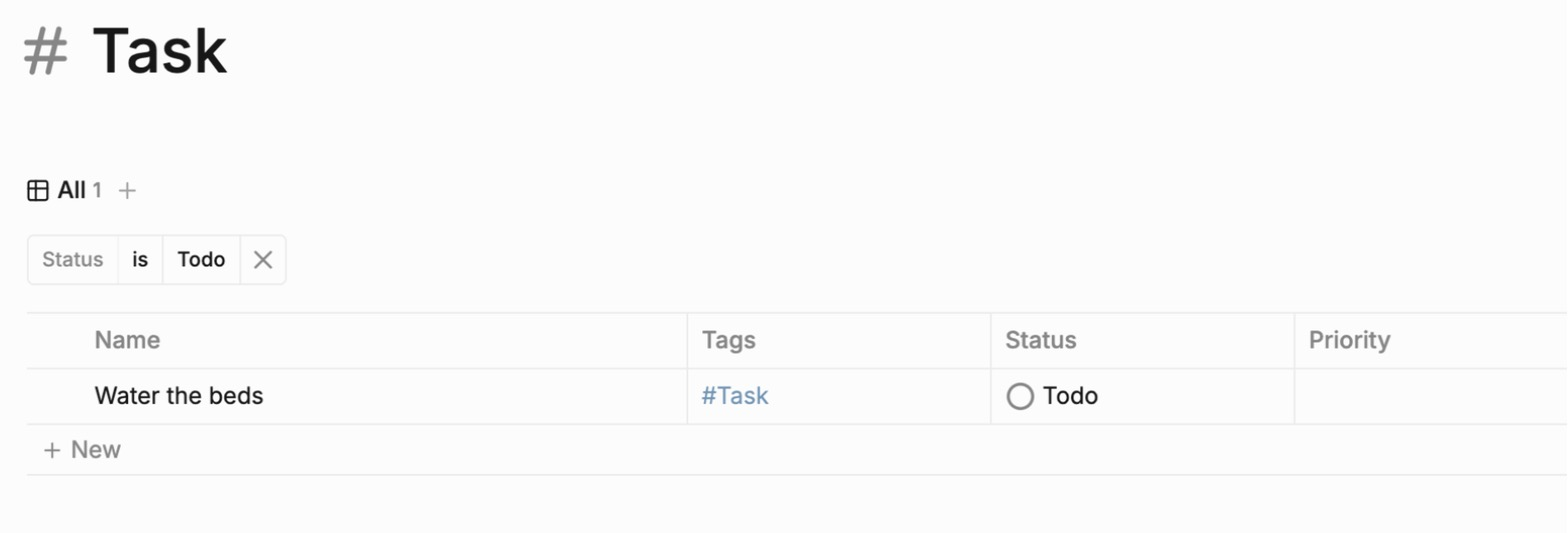
The built-in Task page, filtered to Status is Todo, listed Water the beds and Order boxes; setting Order boxes to Done in the list removed it at once.
Obsidian
Pass
A search for task-todo:/./ listed the open tasks of Garden week and Shop week; ticking Order boxes in its note removed it from the results at once.
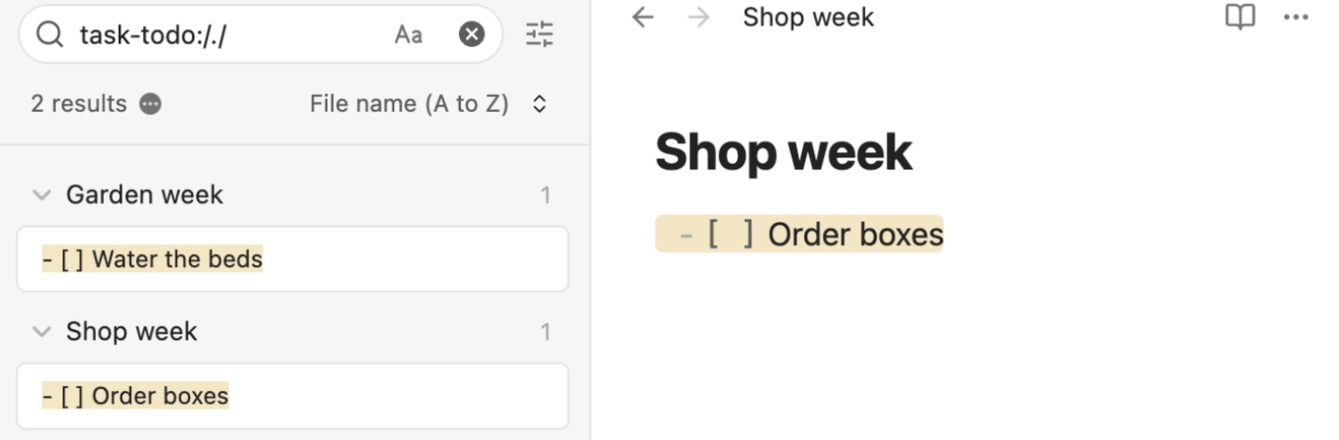
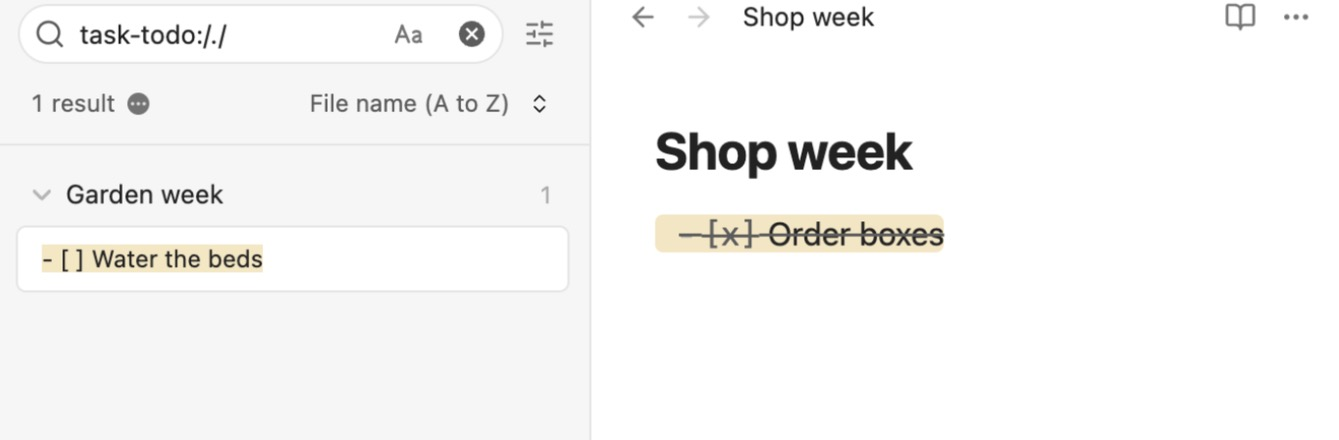
Obsidian's search needs the task-todo: operator with a pattern (task-todo:/./); an empty task-todo: found nothing. Logseq's filter Status is Todo lists Todo tasks only: tasks set to Backlog, Doing or In Review would not show in this list. In Logseq 2.0.2 typing TODO stays plain text; Cmd+Enter makes a task.
Test 4: Get an outline note out as a Markdown file
The task
In each tool, write the same short FICTIONAL outline: a note "Fernhill reading list" with three top-level items, each with one nested item, one of the nested items a task, and a link to the note "Project Fernhill". Then get the note out as a Markdown file with the tool's own features and open that file in a plain text editor.
How we judged it
Pass: the file holds all the text, the three nested items keep their nesting, the task is still marked as a task and the link still names Project Fernhill.
Partial: one of those four points changes or is lost.
Fail: no Markdown file can be made, or two or more points change or are lost.
Logseq
Pass
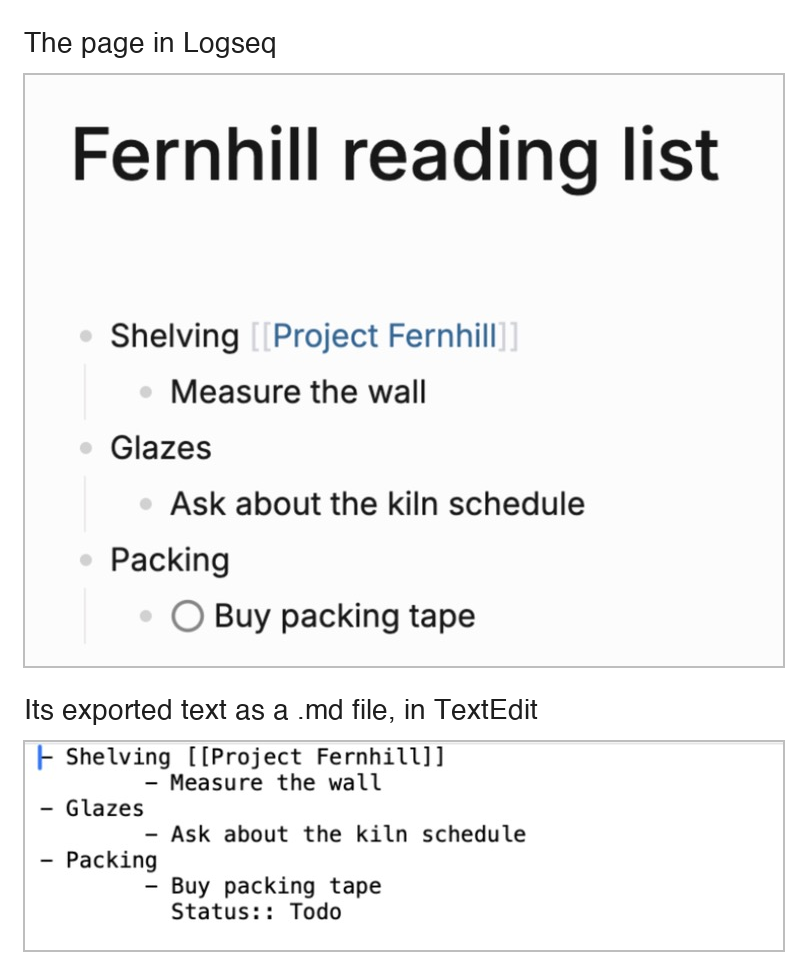
The page export gave all the text, the nesting as tab indents and the link as [[Project Fernhill]]; the task is marked by a Status:: Todo line, not a Markdown - [ ] checkbox.
Obsidian
Pass
The note's own Markdown file, opened in TextEdit, held all the text, the nesting as tab indents, the task as - [ ] and the link as [[Project Fernhill]].
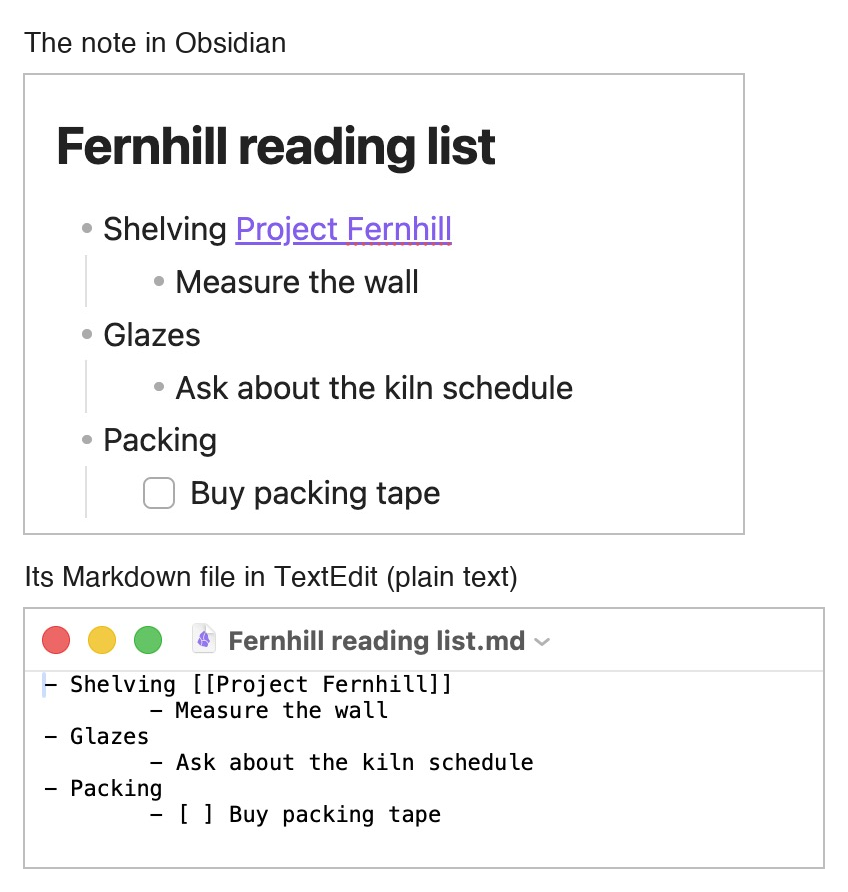
Obsidian keeps each note as a Markdown file and has no separate Markdown export, so the note's stored file was used (the test counts a stored Markdown file) and opened in TextEdit as plain text. Logseq 2.0.2 used its page menu's Export page > Text with default options and the Copy to clipboard button rather than Save to file, which may open the Mac save panel; the copied text was saved unchanged as a .md file. Logseq marks the task with a Status:: Todo line, its property syntax.
Our verdict
Both apps cost nothing for personal or work use on your own device, so the choice comes down to how you write and whether plain files matter to you.
Obsidian suits notes you want to keep as plain files for years. Each note is a Markdown file in a vault folder that opens in any text editor, and the app works offline. Backlinks list linked and unlinked mentions, and the Bases core plugin adds table, card, list and kanban views. Sync costs from $4 per user a month billed yearly, end-to-end encrypted by default, and Publish $8 per site a month billed yearly. Shared vaults sync changes, but two people cannot edit one file live.
Logseq suits people who think in outlines and daily journals. Every block can be linked, tagged and queried, tags with typed properties become editable tables, and tasks, flashcards and PDF annotation are built in. It is open source, and Logseq Sync, still in testing for monthly Open Collective backers from $5, adds encrypted live co-editing. The catch: Logseq 2.0 is a beta whose README warns of possible data loss, and it keeps notes in a SQLite database, with only a one-way Markdown copy on desktop.
For plain files that open anywhere, pick Obsidian. For outlining, journaling or co-editing, with regular backups, try Logseq.
Choose Logseq if
You want to write in outlines and keep a daily journal, with every block something you can link, tag and query. Tags with typed properties turn notes into editable table, list or gallery views, and tasks with repeats, flashcards and PDF annotation come built in. It also fits if you prefer open-source software (AGPL-3.0), want live co-editing through Logseq Sync, still in testing for monthly Open Collective backers from $5, or want a local HTTP API, CLI and MCP server for scripts and AI apps.
Choose Obsidian if
You want your notes as plain Markdown files in a folder on your own device, so they stay readable without the app. The core app is free, including for work, runs offline, and lists linked and unlinked mentions in its Backlinks plugin, while Bases adds table, card, list and kanban views. You pay only for extras: Sync from $4 per user a month billed yearly, end-to-end encrypted by default, or Publish at $8 per site a month billed yearly. A TypeScript plugin API and a command-line interface extend it.
Frequently asked questions
Is Logseq free, and what does syncing cost compared with Obsidian?
The Logseq desktop and web apps are free and open source (AGPL-3.0), and no license is needed for personal or company use while your data stays on your device. Logseq Sync, which syncs graphs between devices with end-to-end encryption and real-time collaboration, is still in testing and open to monthly Open Collective backers: the Backers tier is a $5 monthly donation and the Sponsors tier $15, with no yearly price, and the sync server can also be self-hosted. Obsidian's core app is free as well. Obsidian Sync Standard costs $4 per user a month billed yearly ($5 monthly) for 1 vault and 1 GB, and Sync Plus $8 ($10 monthly) for 10 vaults and 10 GB.
Does Logseq store notes as Markdown files like Obsidian?
Logseq 2.0 does not. The current download on logseq.com is a beta that keeps each graph in a SQLite database on your device. On desktop, its Markdown Mirror can write a one-way Markdown copy of your notes, and the older Markdown-based app continues as Logseq OG, with maintenance updates only. Obsidian stores every note as a plain Markdown file in a folder on your device, called a vault, so the same files open in any text editor.
Can several people edit the same notes at once?
In Logseq, yes, through Logseq Sync, which supports real-time collaboration between users. It is still in testing: it is open to monthly Open Collective backers (from $5 a month), or you can run a sync server yourself. Obsidian lets up to 20 users share a vault through Sync, and every collaborator needs their own active Sync subscription. Changes are synced, but Obsidian does not yet support live editing of the same file.
How do Logseq and Obsidian protect my notes against loss?
Both keep notes on your device. Logseq's own README says its database version (Logseq 2.0) is in beta and that data loss is possible, and it recommends backups; the desktop app backs up each graph automatically to a backups folder inside the graph's folder and keeps the last 12 backups. Obsidian's notes are ordinary Markdown files, and its help suggests copying the vault folder to an external drive or using a backup tool such as Time Machine. It also says sync services, Obsidian Sync included, are not designed for backups, although Obsidian Sync keeps version history for 1 month on Standard and 12 months on Plus. Both sync services use end-to-end encryption, Obsidian Sync by default.
Can I publish my notes as a website?
Yes, with either. Logseq can export public pages as a static website that you host yourself, and its hosted Logseq Publish needs a Sync account. Obsidian Publish is a paid add-on at $8 per site a month billed yearly ($10 monthly), with up to 4 GB of hosting and a custom domain.
Compare with others
More about: Logseq · Obsidian · Best Notes and knowledge