
Goodnotes vs Notability: Which is better in 2026?
Both apps cover handwriting, typing, PDF markup and audio recording, so pick by how you record, which devices you use and how you pay.
Tested hands-on: 3 tests on a MacBook Pro (M1 Pro), October 24, 2026. How we tested
Some links on this page are affiliate links. If you buy through them we may earn a commission at no extra cost to you. This never affects our verdicts.
Quick answer
- Choose Goodnotes if: You want to write by hand and mark up PDFs while keeping the yearly cost low.
- Choose Notability if: You want lecture or meeting recordings and your notes in one place: on iOS and Android, tapping a word plays what was said when you wrote it.
- Price at a glance: Goodnotes: Free plan; paid from $1/mo, billed yearly · Notability: Free plan; paid from $3.99/mo
At a glance
 Goodnotes |  Notability | |
|---|---|---|
| Free plan | Yes | Yes |
| Paid plans | From $1/mo, billed yearly | From $3.99/mo |
| Our tests | Won 0 of 31 tie | Won 2 of 31 tie |
| Best for | Students and professionals who write by hand on an iPad or another tablet, mark up PDFs, and want searchable handwritten notes, with paid plans from $11.99 a year. | Students and professionals who write by hand on an iPad and want lecture or meeting recordings, PDF markup and AI study tools in one app, rather than a linked knowledge base or a database workspace. |
Goodnotes and Notability are both handwriting-first note apps that began on the iPad: Notability in 2010, Goodnotes in 2011. Both now also run on iPhone, Mac, Android, Windows and the web, and both let you write by hand, type, import and mark up PDFs, and record audio. The differences lie in the plans: how much the free tier holds, whether you can pay monthly, which plan syncs one library across Apple and non-Apple devices, how live collaboration works and how far the AI study tools go. This comparison sets out US prices, plan limits and features from each company's own pricing, help center and App Store pages as of October 2026.
Pricing
| Plan | Monthly | Yearly (12-month total) |
|---|---|---|
| Goodnotes | ||
| Free3 notebooks, 3 text documents, 3 whiteboards; 100 MB storage; 5 MB imports; watermarked exports; 10 AI credits a month | Free Free plan | |
| EssentialBilled yearly only ($11.99/year); unlimited files, 5 GB storage, basic Goodnotes AI; 7-day free trial; AI Pass add-on +$9.99/month | no monthly price | $11.99/yr, billed yearly ($1/mo) |
| ProBilled yearly only ($35.99/year); hosts real-time collaboration, private link sharing, Goodnotes Cloud sync (rolling out gradually), Create Mode, Meeting AI; 7-day free trial | no monthly price | $35.99/yr, billed yearly ($3/mo) |
| TeamsPer seat, billed yearly only ($120/seat/year); admin console, SAML SSO, domain control, consolidated billing; 30-day free trial | no monthly price | $120/yr, billed yearly ($10/mo) |
| EnterpriseCustom price; contact sales; for 25 seats and up; AI permissions, Microsoft Intune App SDK, custom contract | Custom | |
| Notability | ||
| Starter5 notes, all editing tools, PDF and document import, 20,000+ templates, 7-day version history | Free Free plan | |
| LiteWebsite sale price (list $14.99/yr, $4.99/mo): $11.99 billed yearly, $3.99 monthly; unlimited notes, third-party backup (iOS only), 7-day history | $3.99/mo | $11.99/yr ($1/mo) |
| PlusWebsite sale price (list $19.99/yr, $7.99/mo): $15.99 billed yearly, $5.99 monthly; limited AI (Learn), handwriting search and conversion, 30-day history | $5.99/mo | $15.99/yr ($1.33/mo) |
| ProWebsite sale price (list $99.99/yr, $19.99/mo): $79.99 billed yearly, $15.99 monthly; unlimited AI, live transcription, chat with your notes, 90-day history | $15.99/mo | $79.99/yr ($6.67/mo) |
| BusinessPer user; $60/year billed yearly, $6 billed monthly; 30-day free trial; Shared Libraries, admin controls, limited AI, 30-day history | $6/mo | $60/yr ($5/mo) |
| Business ProPer user; $180/year billed yearly, $18 billed monthly; 30-day free trial; unlimited AI, chat with your notes, audit log, Intune MAM, 90-day history | $18/mo | $180/yr ($15/mo) |
| Custom ContractTalk to sales; custom payment terms, dedicated support | Custom | |
Prices checked on .
Features compared
| Feature | Goodnotes | Notability |
|---|---|---|
| Offline use | Yes · Notebooks live on the device on Apple; Android, Windows and Web keep a limited set of recent documents (last 30 days) offline | Yes · Edit offline, sync when back online |
| Local-first files | Partial · Library kept inside the app, not as browsable files; export to .goodnotes or PDF; Auto Backup copies to cloud storage on iPhone and iPad | No · Notes in the app and Notability Cloud; export or one-way backup as PDF or Notability files |
| Databases | No · Tables in Text Documents; no database feature documented | No · Nested folders (up to six levels); no database or table views |
| Backlinks | No · One-way links from typed text to a notebook or whiteboard page; no backlinks documented | No · No note-to-note links documented; links are web hyperlinks and share links |
| Real-time collaboration | Yes · Live cursors for up to 50 people at once; needs one Pro subscriber in the document | Yes · Live co-editing on Notability Cloud; every participant needs an account; Shared Libraries on Business |
| API | No · No public API documented; the ChatGPT app and Claude connector only create new documents | No · No public API; Zapier, n8n and IFTTT listed only as possible future integrations |
| Publish to web | Partial · Public share link: anyone with it can view and comment in a browser; Essential and up | Partial · Share links open in any browser; Publish to Gallery for the public community |
| Encryption | Partial · Encryption at rest and in transit (no detail given); Password Protection does not encrypt notebooks | not listed |
| AI features | Yes · Goodnotes AI on every plan (10 credits a month on Free); Create Mode and Meeting AI on Pro or AI Pass | Yes · Learn: summaries, quizzes, flashcards, transcription; limited on Plus, unlimited plus chat on Pro |
How we tested
We gave Goodnotes and Notability the same 3 tasks on the same MacBook Pro (M1 Pro). Each test below lists the task, how we judged it, both results and screenshots; select a screenshot to see it at full size.
- Device
- MacBook Pro (M1 Pro) · macOS 26.6.2
- Tested
- October 24, 2026
- Plans used
- Goodnotes: Free · Notability: Starter (free)
- App versions
- Goodnotes: Goodnotes for Mac, Open With import, Highlighter, Pen and Text tools, Goodnotes for Mac, library search, Goodnotes for Mac, Share and Export > Export All > PDF · Notability: Notability for Mac, Open With import, Highlighter, Pen and Text tools, Notability for Mac, library search, Notability for Mac, File > Export > PDF
| Test | Goodnotes | Notability | Winner |
|---|---|---|---|
| Import a one-page PDF and mark it up (timed) | Pass33.4 s | Pass31.5 s | Notabilityby Time to import and mark up |
| Find a printed, a typed and a handwritten word with search | Partial2 of 3 | Partial2 of 3 | Tie |
| Export the marked-up PDF and check it in a PDF viewer | Partial | Pass | Notability |
| Tests won | 0 | 2 | 1 tie |
Test 1: Import a one-page PDF and mark it up (timed)
The task
In each tool's web app, import the same FICTIONAL one-page PDF (fernhill-handbook.pdf, text below) as a new document or note. Then mark it up with the tool's own tools: highlight the sentence "The shop is closed on Sundays.", write the word COURIER by hand in the right margin with the pen tool, and add a typed text box that says "Print new labels". Reload the page and check that all three marks are still there.
Fernhill Goods: shop handbook
Opening hours are 9 to 5 on weekdays and 10 to 2 on Saturdays. The shop is closed on Sundays.
Refills are stored on shelf A. Check the stock sheet every Monday and order more boxes when fewer than ten are left.
The pottery class uses the kiln on Friday afternoons. Keep the back door clear on those days.
How we judged it
Pass: the PDF imports, and the highlight, the handwritten word and the typed text box are all in place after the reload.
Partial: one of the three marks is missing or moved after the reload, or needed a workaround (write down which).
Fail: the PDF does not import, or two or more marks cannot be made or are lost.
The time is measured from choosing the file to import until the third mark is made.
Goodnotes
Pass 33.4 s
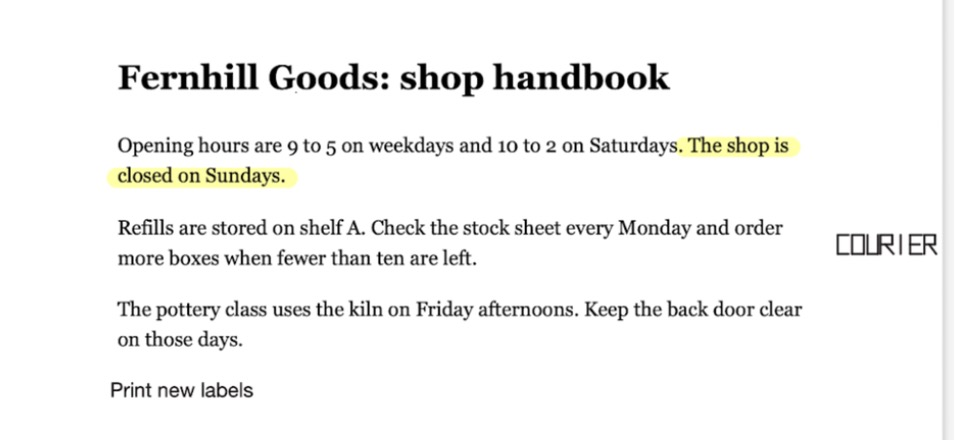
Open With imported the PDF as a new document; the highlight, COURIER written in the margin with the pen and a Print new labels text box were all there after quitting and reopening the app.
Notability: Winner
Pass 31.5 s
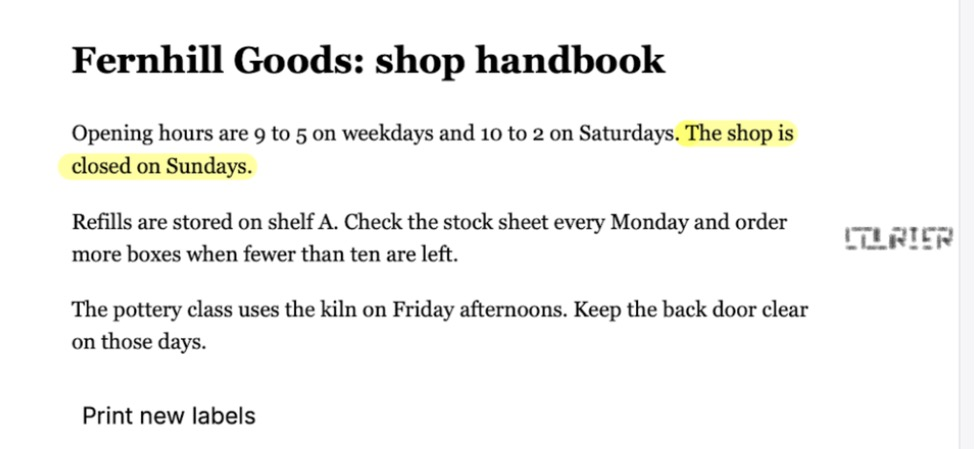
Open With imported the PDF as a new note; the highlight, the pen-drawn COURIER (its strokes came out with gaps) and a Print new labels text box were all there after quitting and reopening the app.
Run in the Mac apps, not the web apps the plan names (Goodnotes web was at its 3-document free limit), by the assistant with the mouse: the PDF was opened with Finder's Open With, and COURIER was drawn as square capitals 0.16 inch tall, as an inch-tall word does not fit the 1-inch margin. The times count steps more than speed: each has 11.6 s of 0.2 s pen holds and fixed waits, 8 in Goodnotes, 6 in Notability. Goodnotes' 2 extra (its text bar and an unneeded one after its highlighter key) are more than the whole 1.9 s gap. Import timed up to the Import button; reload = quit and reopen.
Test 2: Find a printed, a typed and a handwritten word with search
The task
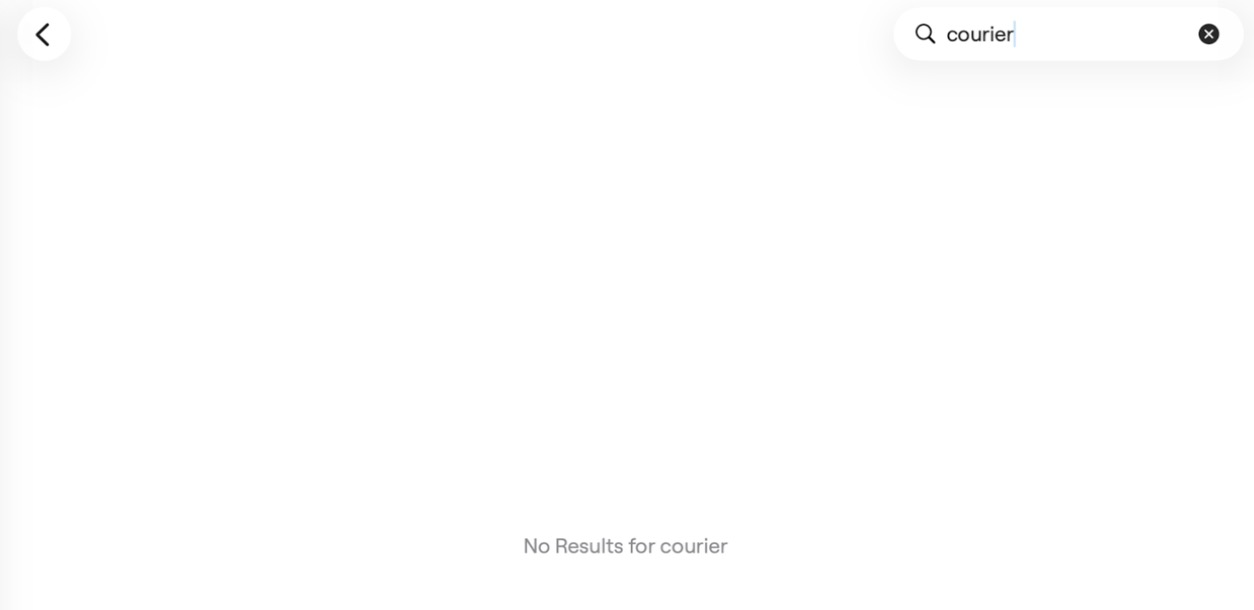
In each tool's web app, close the marked-up document from the first test and use the tool's main search to look for three words, one at a time: "kiln" (printed in the PDF), "labels" (only in the typed text box) and "courier" (only in the handwriting). Record which searches list the document and open it at the matching spot.
How we judged it
A word counts when the search lists the document and opening the result shows the page with that word.
Pass: all three words are found.
Partial: one or two are found.
Fail: none is found, or the plan used has no search across documents.
Goodnotes
Partial 2 of 3
The library search found kiln (in the PDF) and labels (in the text box) and opened the page at each word; courier, written by hand, gave No Results.
Notability
Partial 2 of 3
The library search listed the note for kiln and labels, and the page search marked each word; courier, written by hand, gave No search results (Starter does not list handwriting search).
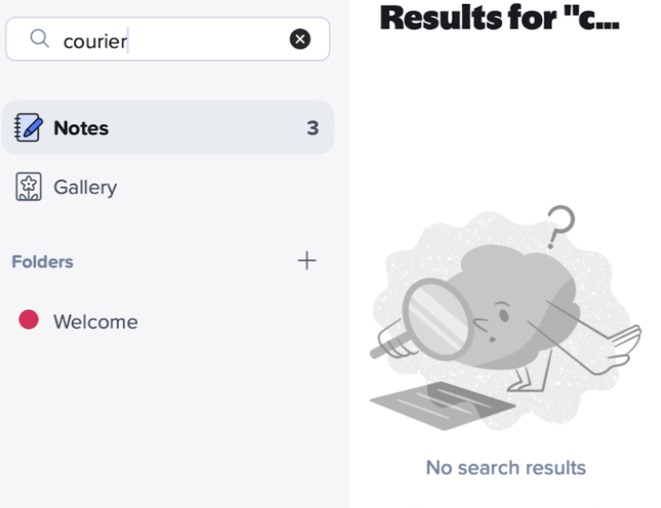
Searched with each app's library search box, 13 to 15 minutes after the marks, with the rehearsal copies in each app's trash: Goodnotes held only the test document, Notability also 2 notes of its own (one is Getting Started). Goodnotes Free lists handwriting search, yet neither its library search nor the search inside the document found COURIER (small square capitals, see test 1). Notability lists handwriting search from Plus up, not on Starter, the plan used; its pen also drew the strokes with gaps.
Test 3: Export the marked-up PDF and check it in a PDF viewer
The task
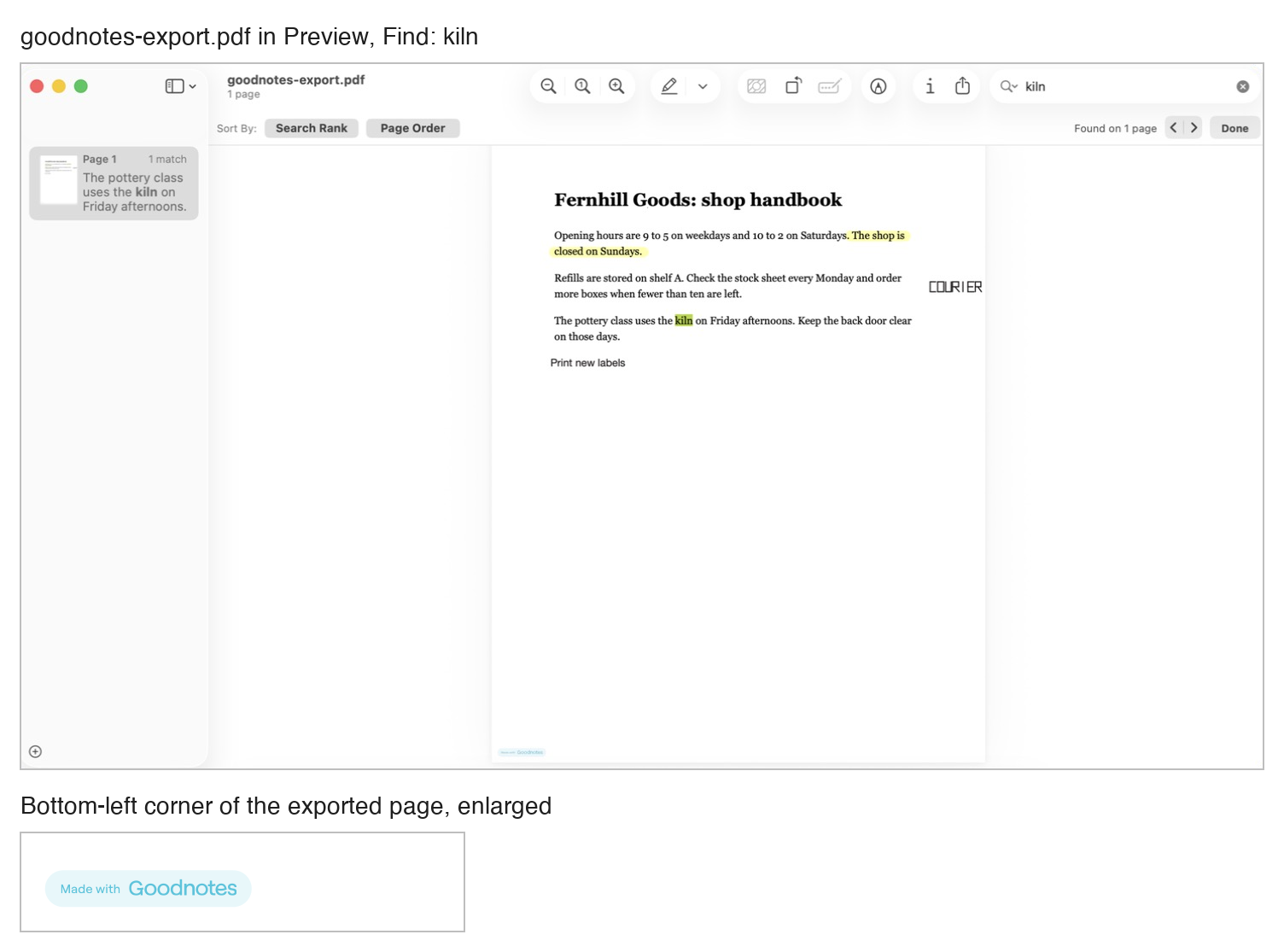
Export the marked-up document from the first test as a PDF with each tool's own export, open the file in Preview or another PDF viewer, and check what came through: the highlight, the handwritten COURIER, the typed text box, whether the printed text can still be searched (find "kiln"), and whether anything was added to the page.
How we judged it
Pass: all three marks are there, the viewer finds "kiln", and nothing was added to the page.
Partial: one problem: a mark is missing, the printed text can no longer be searched, or something was added to the page (for example a logo, a watermark or a footer).
Fail: the export is not possible on the plan used, or there are two or more problems.
Goodnotes
Partial
The PDF kept the highlight, COURIER and the text box, and Preview found kiln; Goodnotes added a Made with Goodnotes badge at the bottom left of the page.
Notability: Winner
Pass
The PDF kept the highlight, COURIER and the text box, Preview found kiln, and nothing was added to the page.
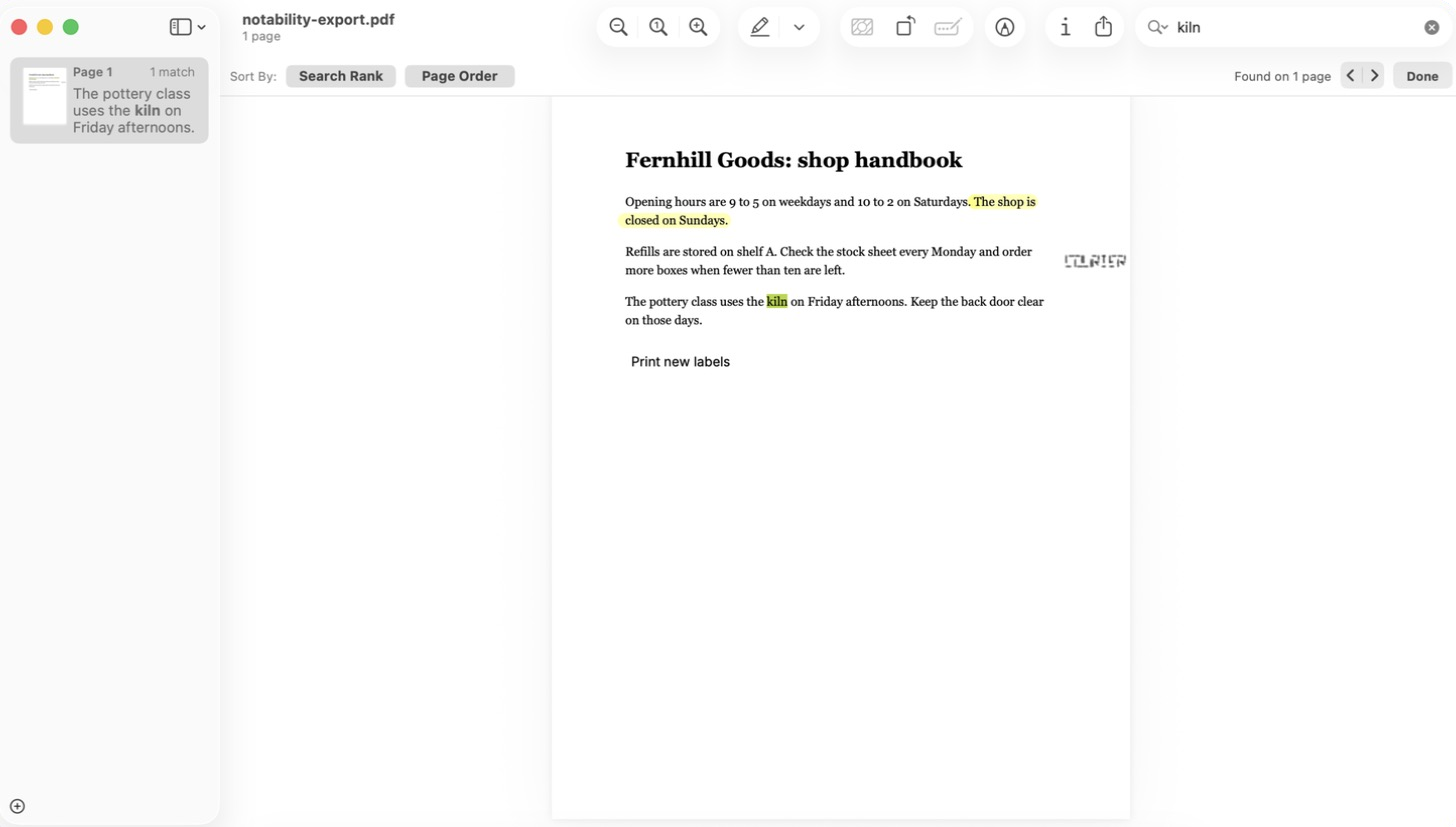
Both PDFs were saved through the Mac save panel and opened in Preview: Goodnotes from Share and Export > Export All > PDF, Notability from File > Export > PDF (its note menu's Export as... ends in a share sheet with no save option). Default options in both. Goodnotes' export dialog says to upgrade to remove the watermark.
Our verdict
Both apps cover handwriting, typing, PDF markup and audio recording, so pick by how you record, which devices you use and how you pay.
Notability is built around recorded classes and meetings. Recordings are linked to your notes, so on iOS and Android tapping a word plays what was said at that moment. Notability Cloud sync and live co-editing come with every plan, and you can pay monthly. The catches: Starter holds only five notes, handwriting search and conversion come with Plus ($15.99 a year on the website, on sale from $19.99), and unlimited AI with chat about your notes needs Pro at $79.99 a year. App Store prices are higher.
Goodnotes fits writing and PDF markup on a smaller budget. Free allows up to three notebooks and already includes handwriting search and spellcheck, Math Assist, and AI Q&A and quizzes five times a month each, but it watermarks exports. Essential, at $11.99 a year, lifts those limits. Pro costs $35.99 a year, less than half of Notability Pro, and adds Create Mode, cloud meeting transcription and hosting live sessions for up to 50 people. Plans are billed yearly only, and one library across Apple and non-Apple devices needs Pro.
Record most lectures? Start with Notability. Mostly write and annotate? Start with Goodnotes.
Choose Goodnotes if
You want to write by hand and mark up PDFs while keeping the yearly cost low. The Free plan already includes handwriting search and spellcheck, Math Assist, and AI Q&A and quizzes five times a month each, alongside whiteboards and typed Text Documents. Essential costs $11.99 a year for unlimited files, and Pro, at $35.99 a year, adds Create Mode, cloud meeting transcription with live summaries, one library across Apple and non-Apple devices (still rolling out), and hosting live collaboration for up to 50 people at once.
Choose Notability if
You want lecture or meeting recordings and your notes in one place: on iOS and Android, tapping a word plays what was said when you wrote it. Notability Cloud sync is free on every plan, live co-editing works with anyone who has a Notability account, and you can pay monthly. At the website's sale prices, Plus at $15.99 a year adds handwriting search and conversion and limited AI study tools, and Pro at $79.99 a year makes transcription, quizzes and flashcards unlimited and adds chat with your notes.
Frequently asked questions
Which costs less, Goodnotes or Notability?
Both have free plans. Goodnotes Free allows up to 3 notebooks (its pricing page counts whiteboards and text documents toward a 3-file total, its help center allows 3 of each), with 100 MB of storage and watermarked exports; Notability Starter holds 5 notes. Goodnotes bills its paid plans yearly only: Essential costs $11.99 a year and Pro $35.99 a year, and the optional AI Pass adds $9.99 a month. On notability.com, during a sale, Lite costs $11.99 a year or $3.99 a month (list $14.99 or $4.99), Plus $15.99 or $5.99 (list $19.99 or $7.99) and Pro $79.99 or $15.99 (list $99.99 or $19.99). Notability's US App Store listing shows higher in-app prices, such as $19.99 for Plus and $99.99 for Pro. For a one-time purchase, Notability Classic costs $39.99 on the website and $49.99 in the App Store, and Goodnotes sells a Special Edition on Apple devices where available ($35.99 in the US App Store).
Can both apps search and convert handwriting?
Yes, under different plan rules. Goodnotes' pricing page lists handwriting search and handwriting-to-text conversion on every plan, Free included. Its help center says search also covers typed text and the text of PDFs that already have a text layer, and conversion works through the Lasso tool. Notability lists handwriting search and handwriting recognition (converting handwriting to text) from its Plus plan up and in the one-time Classic purchase, not on Starter or Lite, and its plan comparison marks recognition as iOS and Android only.
Which is better for recording lectures?
Notability is built around it: recordings are linked to what you write, so on iOS and Android tapping a word plays what was said at that moment, and recordings sync to your other devices through Notability Cloud. Plus adds limited automatic transcription, and Pro unlimited live transcription with AI summaries in real time. Goodnotes also records audio: Free allows 20 minutes per notebook and Essential removes that limit. Free and Essential transcribe meetings on the device (currently on iOS only), Essential adds a basic summary, and Pro adds cloud transcription with live meeting summaries.
Do my notes sync between an iPad, an Android device and the web?
In Goodnotes, iCloud syncs your library between Apple devices. One library across Apple and non-Apple devices needs Goodnotes Cloud, which is included with Pro ($35.99 a year) but not with Essential or Special Edition, and is still rolling out gradually. Notability Cloud is free for all users, whatever their plan, and Ginger Labs lists iOS, Android, Mac and the web as its platforms; you can edit offline and sync when you are back online. Existing Notability users who sync through iCloud move over through an in-app prompt or an iPad-only invite link, and Ginger Labs says the Mac stays on iCloud sync until a Mac update is available.
Can several people edit the same note at once?
Yes, in both. In Goodnotes, real-time collaboration with live cursors works for up to 50 people at once, but a session starts only when someone with Goodnotes Pro opens the shared document, and the others need at least Essential to join. From Essential up, you can also share a public link that anyone can open in a browser to view and comment. In Notability, live collaboration through Notability Cloud is available on every plan, but every participant needs a Notability account; share links open in any browser, with up to 10 shared notes on Starter and 100 on Plus, and Business adds Shared Libraries for teams.
Compare with others
More about: Goodnotes · Notability · Best Notes and knowledge