
Brevo vs Mailchimp: Which is better in 2026?
For a list you email a few times a month, Brevo costs less, and its lead grows with the list.
Tested hands-on: 3 tests on a MacBook Pro (M1 Pro), October 30, 2026. How we tested
Some links on this page are affiliate links. If you buy through them we may earn a commission at no extra cost to you. This never affects our verdicts.
Quick answer
- Choose Brevo if: You want to keep a large list without paying for every contact.
- Choose Mailchimp if: You want landing pages, pop-up forms and room for a team without moving to a top plan.
- Price at a glance: Brevo: Free plan; paid from $9/mo · Mailchimp: Free plan; paid from $13/mo
At a glance
 Brevo |  Mailchimp | |
|---|---|---|
| Free plan | Yes | Yes |
| Paid plans | From $9/mo | From $13/mo |
| Our tests | Won 2 of 3 | Won 1 of 3 |
| Best for | Small businesses and online stores that want email, SMS and transactional email in one account from $9 a month, especially those with a large list and modest monthly sending. | Small and midsize businesses, especially online stores, that want email, landing pages, SMS and a large integration catalog from one vendor and will use Standard-plan features such as predictive segments. |
Brevo, called Sendinblue until 2023, and Mailchimp, owned by Intuit since 2021, both run email campaigns, automations and signup forms, but they bill for different things. Mailchimp prices each plan by the contacts you keep, and unsubscribed and non-subscribed contacts count toward that total. Brevo prices by the emails you send each month, and on Starter and Standard the tier also caps stored contacts. The free plans show the gap: Brevo's stores up to 100,000 contacts and sends 300 emails a day, while Mailchimp's stops at 250 contacts and 500 emails a month. Below are their plans, US list prices at several list sizes and eight features, from each vendor's own pages as of October 2026.
Pricing
| Plan | Monthly | Yearly (12-month total) |
|---|---|---|
| Brevo | ||
| FreeUp to 100,000 contacts; 300 emails/day; 1 user; Brevo branding on emails | Free Free plan | |
| StarterFrom $9/month for 5,000 emails and up to 500 contacts ($97 billed yearly); price rises with email volume, up to 100,000/month; 1 user | $9/mo | $97/yr ($8.08/mo) |
| StandardFrom $18/month for 5,000 emails and up to 500 contacts ($194 billed yearly); up to 500,000 emails/month; up to 3 users with add-on | $18/mo | $194/yr ($16.17/mo) |
| ProfessionalFrom $499/month for 150,000 emails and up to 2 million contacts ($5,389 billed yearly); up to 10 million emails/month; 10 seats (more with add-on) | $499/mo | $5,389/yr ($449.08/mo) |
| EnterpriseCustom sending volume; unlimited contacts and users; 1 dedicated IP and SAML SSO included; contact sales | Custom | |
| Mailchimp | ||
| FreeUp to 250 contacts; max 500 emails/month or 250/day; 1 seat, 1 audience | Free Free plan | |
| EssentialsFrom $13/month for 500 contacts; price rises with contacts; sends 10x contacts/month; 3 seats; billed monthly | $13/mo | no yearly price |
| StandardFrom $20/month for 500 contacts; sends 12x contacts/month; 5 seats; annual billing only at 10,000+ contacts via sales | $20/mo | no yearly price |
| PremiumFrom $350/month for 10,000 contacts; sends 15x contacts/month; unlimited seats; annual billing via sales | $350/mo | no yearly price |
Prices checked on .
Features compared
| Feature | Brevo | Mailchimp |
|---|---|---|
| Free tier size | Yes · Up to 100,000 contacts; 300 emails/day; 1 user; Brevo branding | Yes · 250 contacts, 500 emails/month (250/day) |
| Automations | Yes · Free and Starter: up to 2,000 unique contacts in active automations; Standard and up: unlimited | Yes · Essentials: flows up to 4 steps; Standard/Premium: flows up to 200 steps with branching; Free: preview only |
| Landing pages | Yes · Standard: 1; Professional: 10 (50 more per add-on, up to 110); Enterprise: custom; none on Free or Starter | Yes · All plans, including Free |
| Paid newsletters | No · No paid newsletter subscriptions; Brevo Payments (payment links, euros only) is available only to users in France | No · No native paid subscriptions; Mailchimp points to partner payment apps |
| Segmentation | Yes · Advanced segmentation on all plans; AI segmentation and contact scoring on Professional and Enterprise | Yes · Basic on Free/Essentials; advanced and predictive on Standard/Premium |
| Referral program | Partial · No newsletter referral program; Brevo Loyalty gives customers shareable referral links, Enterprise plan only (an add-on priced by sales) | No · No built-in subscriber referral program listed |
| API | Yes · REST API, SMTP relay and outbound webhooks on all plans, including Free; MCP server for AI assistants | Yes · Marketing API; Transactional email add-on on Standard/Premium (demo only on Free/Essentials) |
| Deliverability tools | Yes · Domain authentication (DKIM, DMARC); dedicated IP add-on on Professional, 1 included on Enterprise; deliverability specialist 3 h/year on Professional and Enterprise | Yes · Domain authentication (DKIM, DMARC); Inbox Preview on paid plans (25 tokens/month) |
How we tested
We gave Brevo and Mailchimp the same 3 tasks on the same MacBook Pro (M1 Pro). Each test below lists the task, how we judged it, both results and screenshots; select a screenshot to see it at full size.
- Device
- MacBook Pro (M1 Pro) · macOS 26.6.2 · Chrome 156
- Tested
- October 30, 2026
- Plans used
- Brevo: Free · Mailchimp: Free
- App versions
- Brevo: Email campaign editor (web), drag-and-drop, Default template, Contact attributes and Contacts > Segments (web), Automations (web), Create from scratch · Mailchimp: Email campaign editor (web), drag-and-drop, Basic layout Minimal, Audience fields and merge tags, Segments (web), Automations flow builder (web), Build from scratch
| Test | Brevo | Mailchimp | Winner |
|---|---|---|---|
| Build the same newsletter from a fixed brief (timed) | Pass0.51 min | Pass0.21 min | Mailchimpby Time to build the email |
| Save a segment with a custom field, a date rule and an either-or group | Partial3 of 3 | Partial2 of 3 | Brevoby Parts in the saved segment |
| Build a three-email welcome series on the free plan | Pass6 of 6 | Partial6 of 6 | Brevo |
| Tests won | 2 | 1 | 0 ties |
Test 1: Build the same newsletter from a fixed brief (timed)
The task
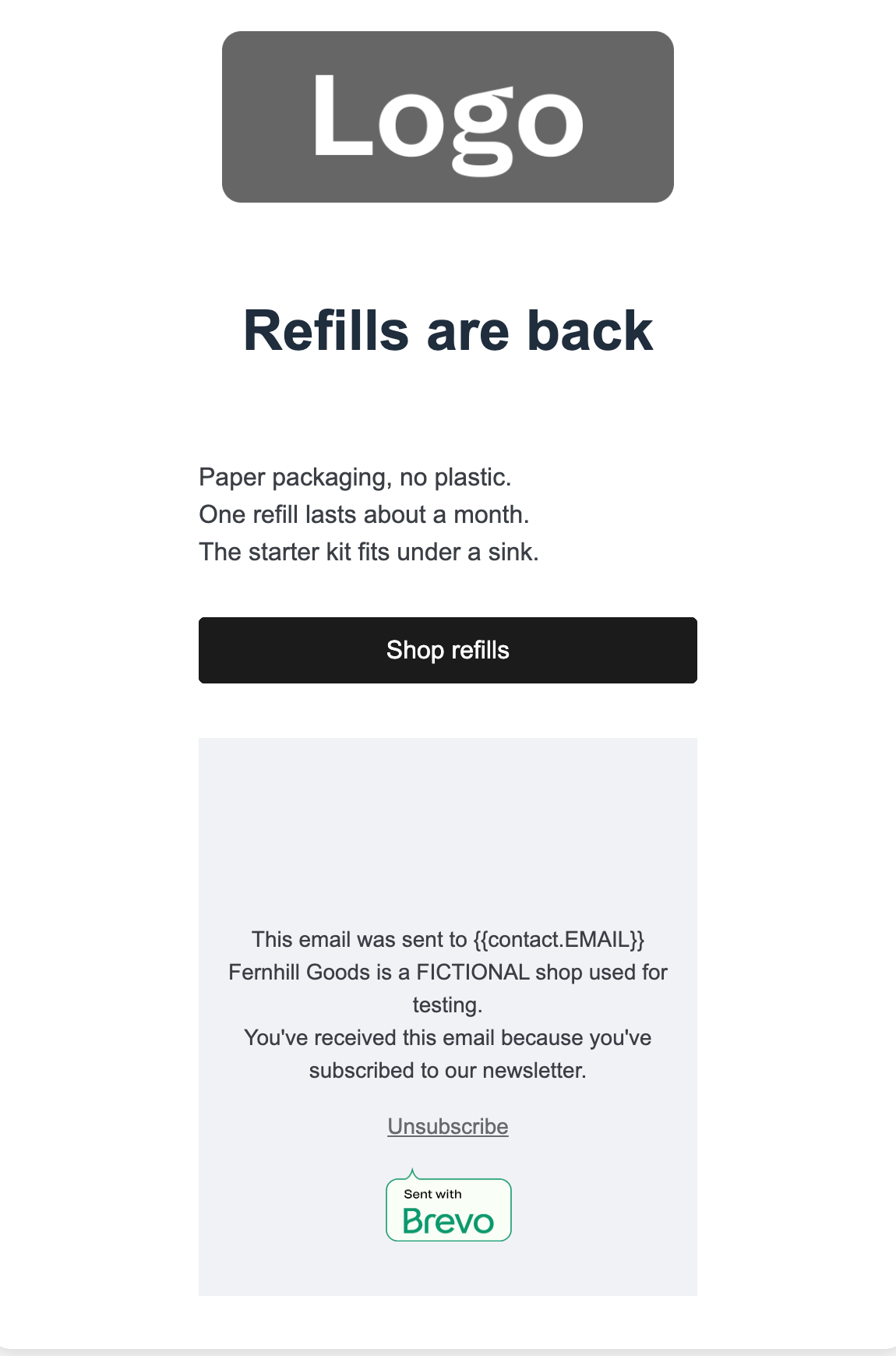
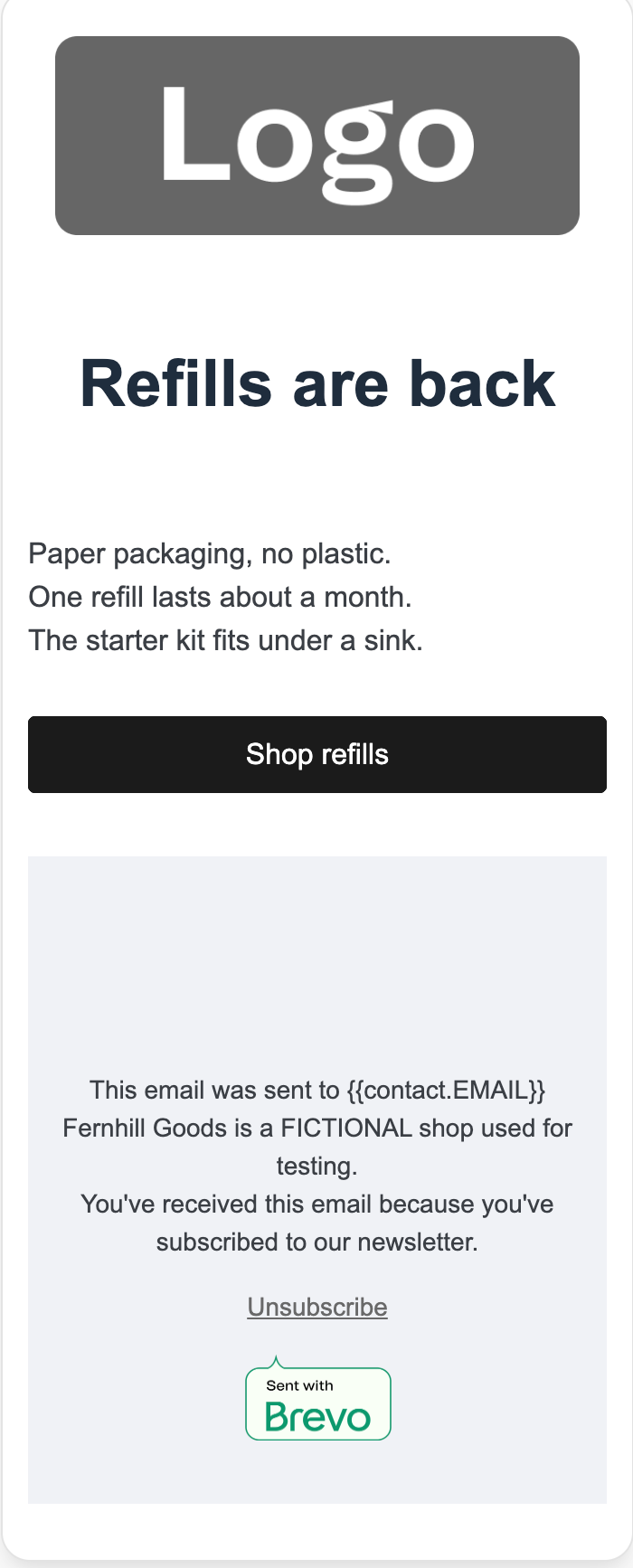
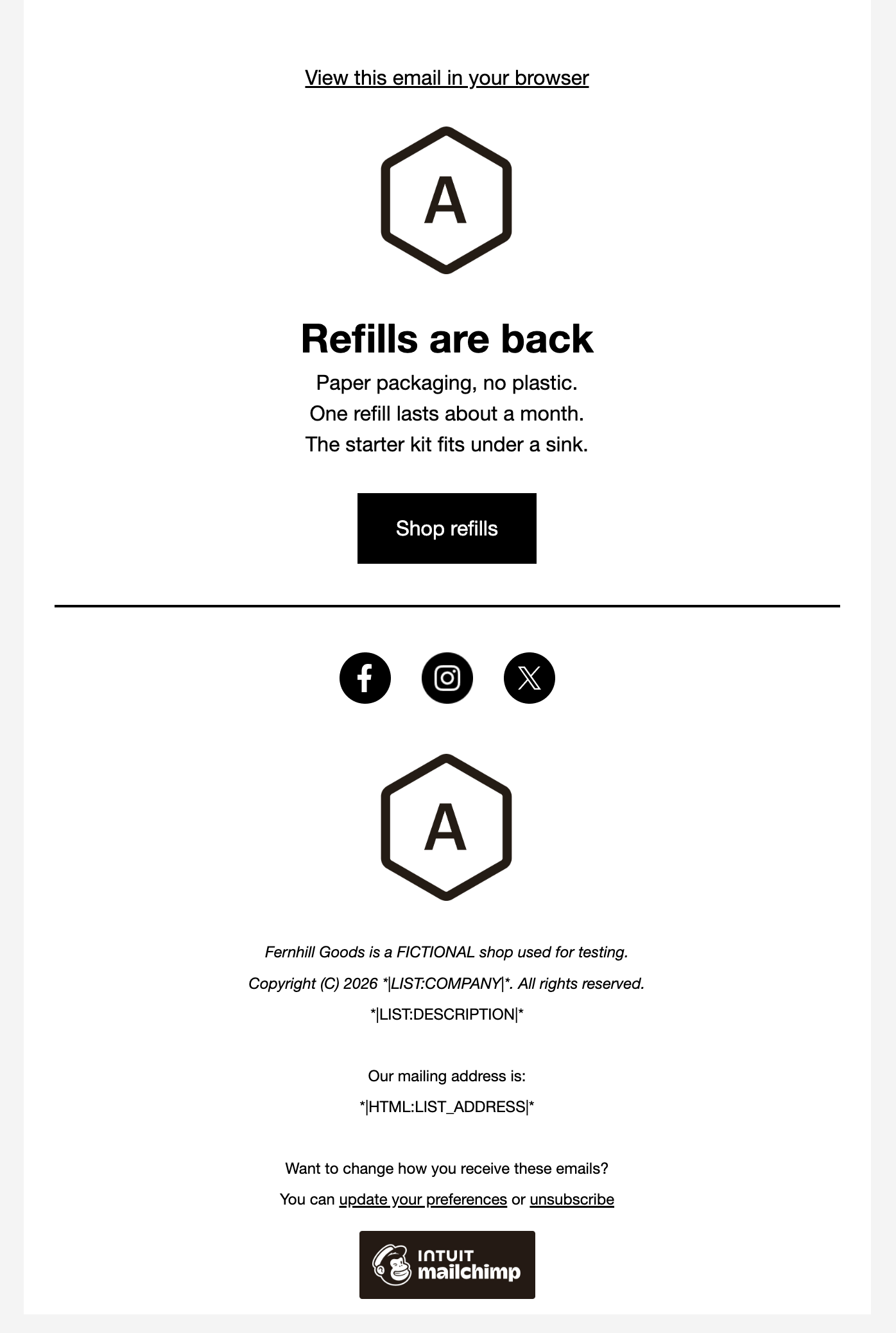
In each tool's drag-and-drop email editor, build a newsletter for Fernhill Goods (FICTIONAL): a logo area, the headline "Refills are back", three short sections, one button "Shop refills" and a footer line.
How we judged it
Pass: every element of the brief is there and looks finished, within 20 minutes.
Partial: one element missing or unfinished, or it took more than 20 minutes.
Fail: two or more elements missing.
The time is measured from opening the editor until the last element is done.
Brevo
Pass 0.51 min
Started from the Default template: headline, text and button rewritten, its three product images and a second title removed, footer line added; every element of the brief is there.
Mailchimp: Winner
Pass 0.21 min
Started from the Minimal layout: heading, text and button rewritten, its empty image block removed, footer line added; logo placeholder, headline, three lines, button and footer all there.
Run by the assistant in the owner's Chrome, signed in: one scripted pass per tool on a route found in an untimed rehearsal, the run each tool's other newsletter comparisons use. Opening the editor and looks between parts are not timed; fixed waits and script checks are; no void attempts. Sections are three paragraphs. Mailchimp (Minimal layout): 8 parts, 8 fixed 1 s waits, 12 checks. Brevo (Default template, three images and a title removed): 14 parts, 16 fixed 1-2 s waits (26 s), 19 checks. Its 18 s of extra waits exceed the whole 17.8 s gap: the times count steps more than speed.
Test 2: Save a segment with a custom field, a date rule and an either-or group
The task
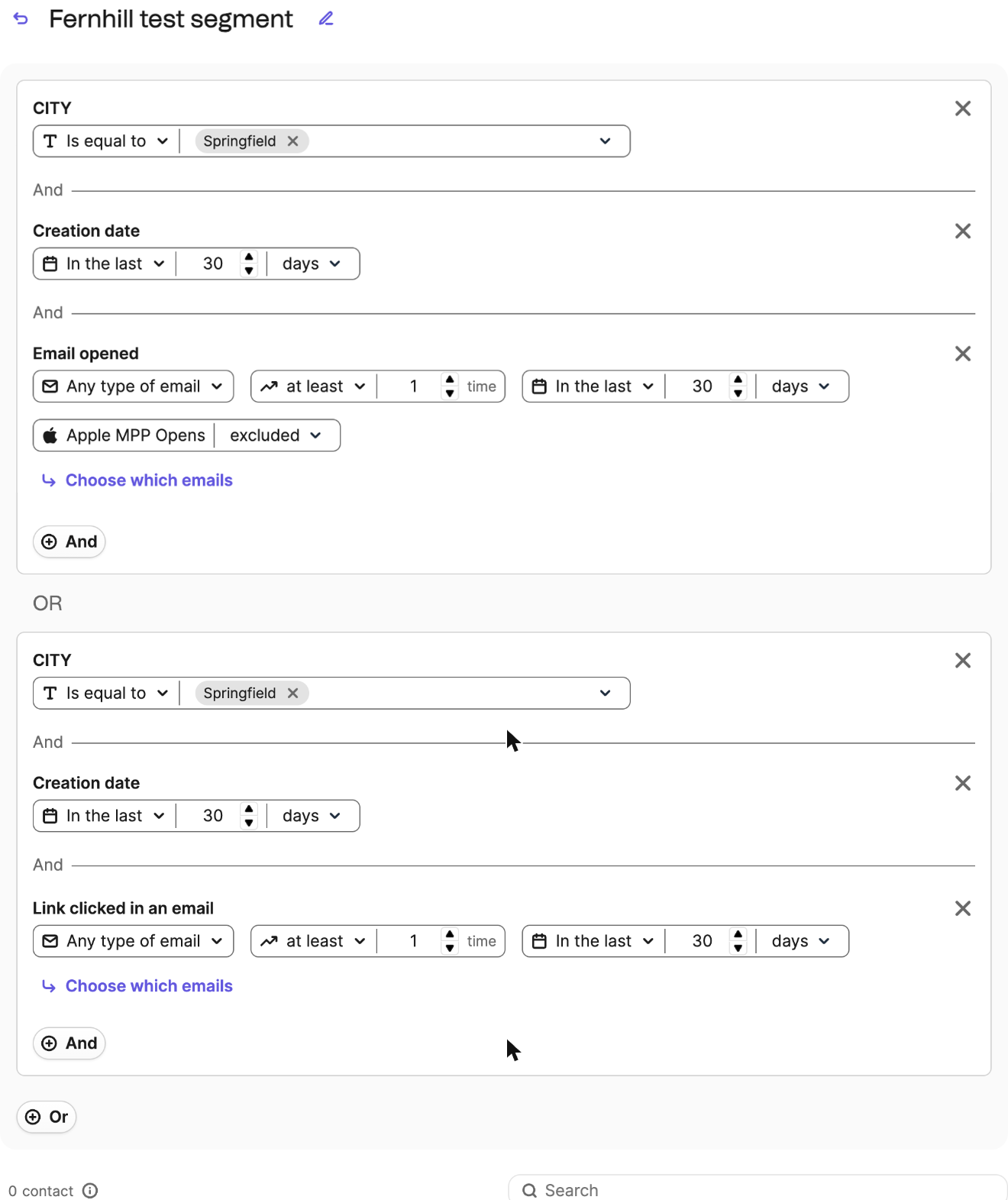
On each tool's free plan, without adding any contacts, create a text field "City" and save one segment for contacts whose City is "Springfield" AND who were added in the last 30 days AND who opened OR clicked any email campaign in the last 30 days. Then reopen the saved segment and check its rules.
How we judged it
The segment has three parts: the City rule, the date-added rule and the opened-or-clicked group.
Pass: all three parts in one saved segment on the free plan, with the OR group inside the AND rules.
Partial: it saves, but the OR group cannot sit inside the AND rules (all rules must match, or any), or one part needs a workaround.
Fail: the free plan cannot save a segment with two or more rules, or asks for an upgrade first.
Brevo: Winner
Partial 3 of 3
A City attribute and a segment that matches the brief only by a workaround: Or joins groups, not rules, so City and the 30-day creation date repeat in two groups, with Email opened and Link clicked.
Mailchimp
Partial 2 of 3
A City field and a saved segment: City, Email Subscription Date within 30 days, opened and clicked. Choosing Or set every toggle to Or, so it was saved with And throughout.
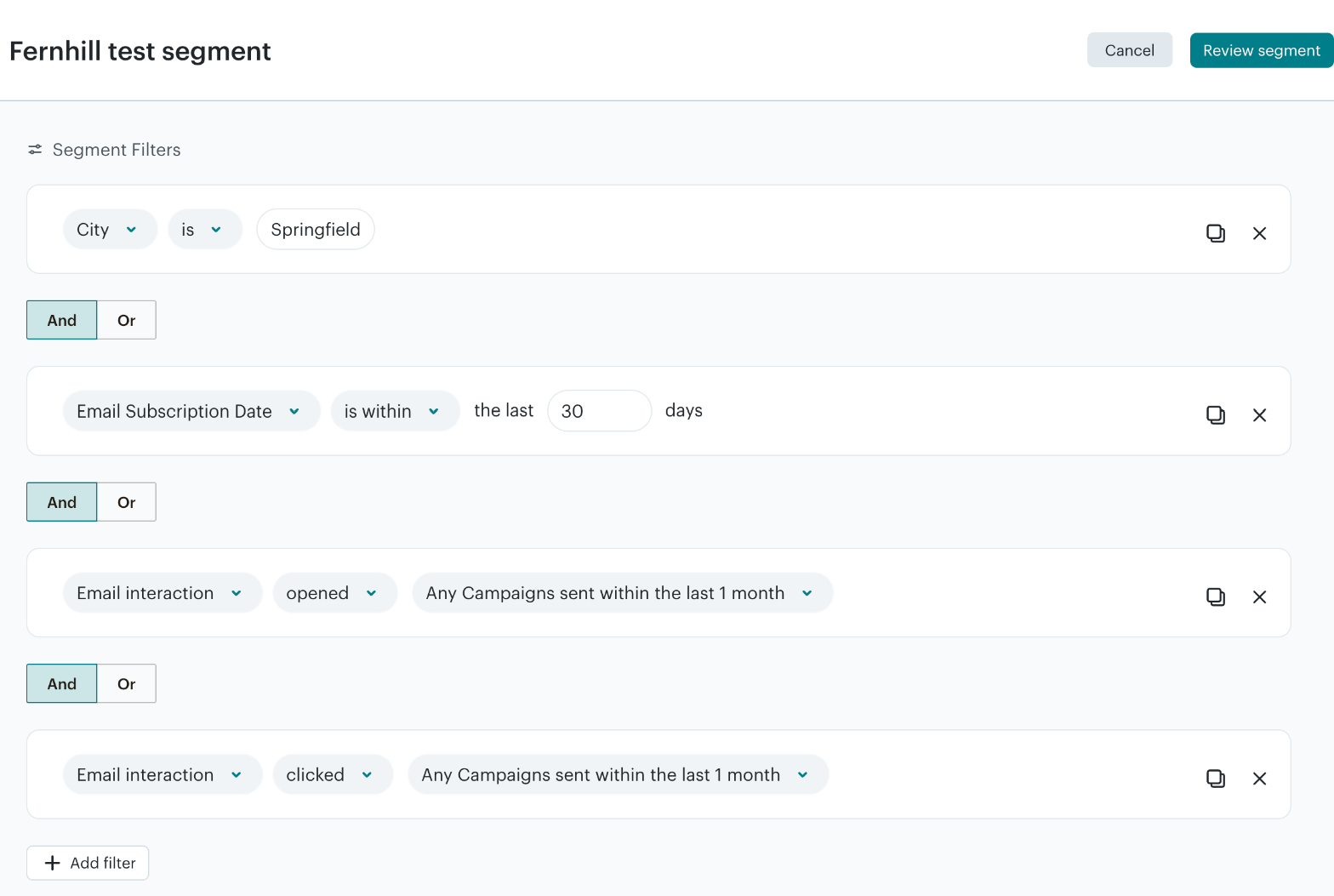
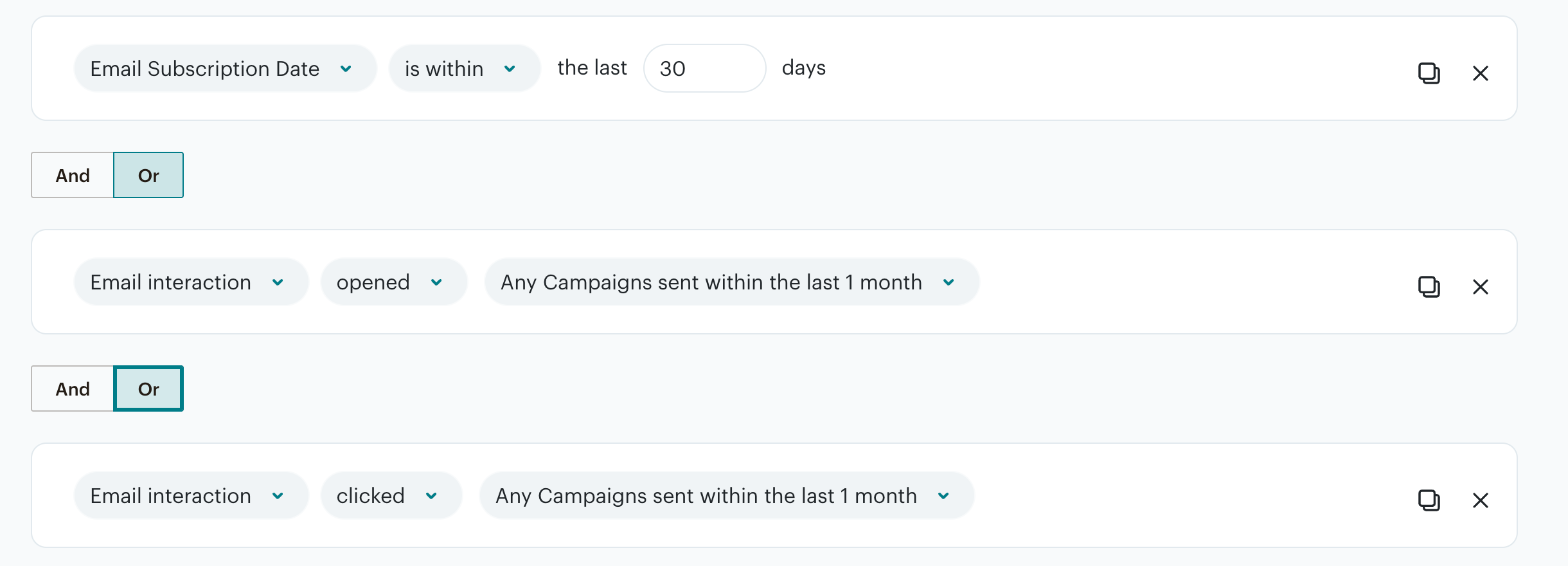
Run by the assistant in the owner's Chrome, signed in, not timed; no contacts were added or changed, and neither tool showed an upgrade prompt or a locked option. Brevo joins rules with And inside a group and Or only between groups, so the City and date rules were repeated in two groups, one with Email opened (Apple MPP opens excluded by default), one with Link clicked: the same contacts, by a workaround. In Mailchimp the And/Or toggles act as one setting (choosing Or turned all of them to Or), so the segment was saved with And throughout; its email activity rules offer 1 month, not 30 days.
Test 3: Build a three-email welcome series on the free plan
The task
On each tool's free plan, set up a welcome series that starts when a contact joins a new, empty "Fernhill test" list or tag: email 1 at once, a 1-day wait, email 2, a 2-day wait, then email 3. Use the tool's own automation builder and leave the series switched off.
How we judged it
The series has six parts: the trigger, three emails and two waits.
Pass: all six parts in one series on the free plan, without an upgrade prompt.
Partial: some parts can be built on the free plan, or it needs a workaround such as two separate automations.
Fail: the free plan cannot build any of it, or asks for an upgrade before you can start.
Brevo: Winner
Pass 6 of 6
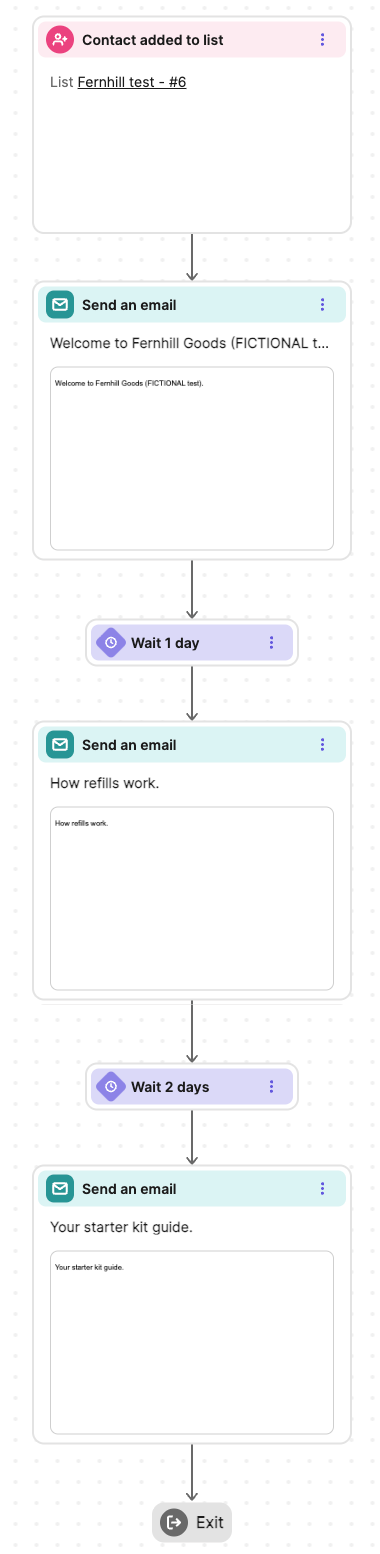
One automation: Contact added to list Fernhill test, email 1, Wait 1 day, email 2, Wait 2 days, email 3; no upgrade prompt or limit message; saved inactive.
Mailchimp
Partial 6 of 6
One draft flow: Contact tagged Fernhill test, email 1, 1 day delay, email 2, 2 day delay, email 3. Upgrade to continue showed throughout (activating needs an upgrade); building was not blocked.
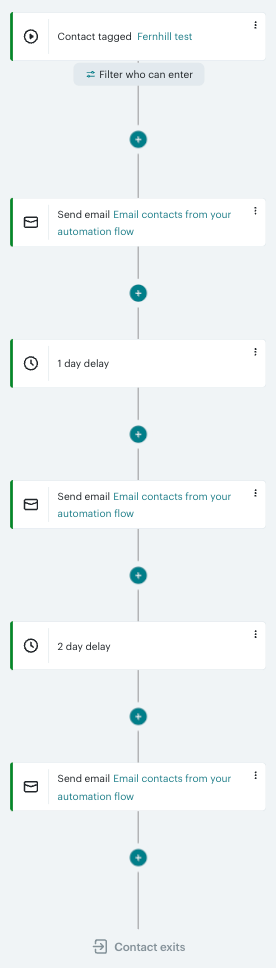
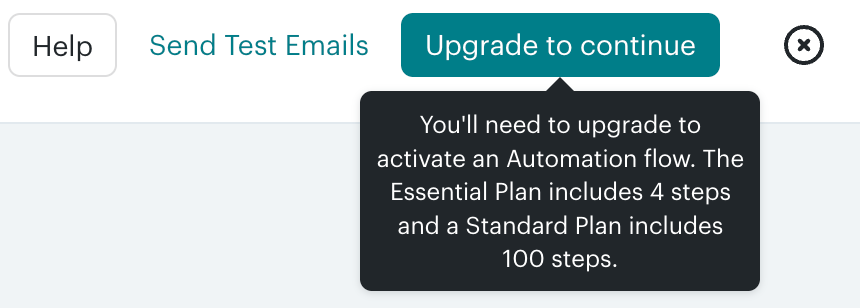
Run by the assistant in the owner's Chrome, signed in, not timed; no trial in either account; no contacts added. Brevo: a new, empty Fernhill test list as trigger, three emails in its simple editor with the line as subject and text; no upgrade prompt or limit message; saved inactive. Mailchimp: the empty Fernhill test tag from a landing-page test as trigger. Upgrade to continue showed from the start: activating needs an upgrade (Essential Plan: 4 steps, Standard: 100); building not blocked. Each email has its line as subject and text in the Minimal layout, placeholders kept. Kept as a draft.
Our verdict
For a list you email a few times a month, Brevo costs less, and its lead grows with the list.
Brevo charges mainly for sending. Its Free plan keeps up to 100,000 contacts, with automations for up to 2,000 of them, transactional email and the API, but sends only 300 emails a day, each with Brevo branding. Four campaigns a month to 5,000 contacts take 20,000 emails: $32 a month on Starter or $69 on Standard, against $75 and $100 for Mailchimp Essentials and Standard. The catches: smaller tiers cap stored contacts at 500, 1,500 or 2,500; Starter has one user and keeps the Brevo logo unless you buy an add-on; Standard includes one landing page.
Mailchimp puts landing pages and pop-up forms on every plan, gives Essentials 3 seats and Standard 5, and lists more than 300 integrations. Standard adds predictive segments, dynamic content and branching flows of up to 200 steps; Premium adds unlimited seats, phone support and enterprise SSO. But the price climbs with each contact tier, unsubscribed contacts included, and Essentials flows stop at 4 steps.
Pick Brevo for a large list, a tight budget or transactional email, and Mailchimp Standard for a team that wants landing pages, seats and predictive tools in one plan.
Choose Brevo if
You want to keep a large list without paying for every contact. Brevo prices by emails sent: the Free plan stores up to 100,000 contacts, and from the 20,000-email tier Starter ($32 a month) and Standard ($69) store up to 500,000. Every plan, Free included, has transactional email through the API and SMTP relay, and SMS is sold as prepaid credits. Standard adds unlimited automation contacts, A/B testing and AI send-time optimization. Yearly billing saves 10% on Starter, Standard and Professional.
Choose Mailchimp if
You want landing pages, pop-up forms and room for a team without moving to a top plan. Mailchimp includes landing pages on every plan, Free too, gives Essentials 3 seats and Standard 5, and lists more than 300 integrations. Standard, from $20 a month for 500 contacts, adds predictive and advanced segmentation, dynamic content and branching automation flows of up to 200 steps. Premium, from $350 a month for 10,000 contacts, brings unlimited seats, phone and priority support and enterprise SSO.
Frequently asked questions
Is Brevo cheaper than Mailchimp?
For most lists, yes, though the two price different things. Mailchimp charges by contacts: Essentials costs $13 a month for 500, $45 for 2,500, $75 for 5,000 and $110 for 10,000, and Standard $20, $60, $100 and $135. Brevo charges by emails a month, and on Starter and Standard each tier also caps stored contacts: Starter is $9 for 5,000 emails (500 contacts), $25 for 15,000 (2,500 contacts) and $32 for 20,000 (up to 500,000 contacts); Standard is $18, $49 and $69. Four campaigns a month to 10,000 contacts take 40,000 emails: $46 on Starter or $89 on Standard. Email that list ten times a month and Standard costs about the same at both: $139 at Brevo, $135 at Mailchimp. Brevo takes 10% off yearly billing; Mailchimp offers yearly billing only on Standard and Premium at 10,000+ contacts, through sales. US list prices as of October 2026.
How do the Brevo and Mailchimp free plans compare?
Brevo's Free plan stores up to 100,000 contacts and sends up to 300 emails a day, with one user and Brevo branding on every email. It includes automations for up to 2,000 contacts, transactional email, the API and advanced segmentation, but no landing pages. Mailchimp's Free plan allows 250 contacts and 500 emails a month (250 a day), one seat and one audience, with Mailchimp branding and no email scheduling. It includes landing pages, pop-up forms and basic segmentation, while automation flows are a preview only.
Can Brevo or Mailchimp send transactional emails and SMS?
Brevo includes transactional email on every plan, Free too, through its REST API and SMTP relay, with outbound webhooks, and a plan's email allowance covers both marketing and transactional emails. Mailchimp sells transactional email as an add-on for Standard and Premium; on Free and Essentials it is a demo only. Both sell SMS on top of email: Brevo through prepaid credits, Mailchimp as an add-on for paid plans in select countries.
How many users do Brevo and Mailchimp include?
Mailchimp includes more seats on its lower plans: 1 on Free, 3 on Essentials, 5 on Standard and unlimited on Premium, which also adds phone and priority support and enterprise SSO. Brevo's Free and Starter plans have one user, Standard allows up to 3 with an add-on, Professional includes 10 seats (more with an add-on) and Enterprise has unlimited users with SAML SSO included. Professional starts at $499 a month for 150,000 emails and up to 2 million contacts, against $350 a month for Mailchimp Premium at 10,000 contacts, which also allows 150,000 sends a month.
Which has better deliverability tools?
Both support domain authentication with DKIM and DMARC, and Brevo says it can in most cases set this up automatically through your domain provider. Brevo sells a dedicated IP as an add-on on Professional, includes one on Enterprise and gives both plans 3 hours a year with a deliverability specialist. Mailchimp's paid plans include Inbox Preview, with 25 tokens a month. Neither lists built-in paid newsletter subscriptions, and Mailchimp lists no subscriber referral program; Brevo's customer referral links come only with its Loyalty add-on on Enterprise.
Compare with others
More about: Brevo · Mailchimp · Best Email marketing