
ChatGPT vs Microsoft Copilot: Which is better in 2026?
The deciding question is whether you use Microsoft 365.
Tested hands-on: 4 tests on a MacBook Pro (M1 Pro), October 21, 2026. How we tested
Some links on this page are affiliate links. If you buy through them we may earn a commission at no extra cost to you. This never affects our verdicts.
Quick answer
- Choose ChatGPT if: You want a standalone assistant that does not depend on an office suite.
- Choose Microsoft Copilot if: You already work in Word, Excel, PowerPoint and Outlook and want the assistant inside them.
- Price at a glance: ChatGPT: Free plan; paid from $8/mo · Microsoft Copilot: Free plan; paid from $9.99/mo
At a glance
 ChatGPT |  Microsoft Copilot | |
|---|---|---|
| Free plan | Yes | Yes |
| Paid plans | From $8/mo | From $9.99/mo |
| Our tests | Won 1 of 43 ties | Won 0 of 43 ties |
| Best for | People who want one assistant for writing, research, images and voice, with room to move from Free to Go, Plus or a Pro tier as their use grows. | People and teams who already work in Word, Excel, Outlook and Teams and want an AI assistant built into those apps, or a free assistant with a Microsoft account. |
ChatGPT, from OpenAI, and Microsoft Copilot cover the same everyday jobs: answering questions, drafting text, searching the web, reading uploaded files and creating images, on the web, on the desktop and on iOS and Android. Both have a free version. The paid plans are built differently, though. ChatGPT sells the assistant on its own, from Go at $8 a month to Pro tiers of up to $500, while Copilot's paid plans for individuals are Microsoft 365 subscriptions from $9.99 a month that add Copilot in Word, Excel, PowerPoint and Outlook, plus OneDrive storage. This comparison sets out plans, features and privacy terms side by side, using each vendor's own pricing and help pages.
Pricing
| Plan | Monthly | Yearly (12-month total) |
|---|---|---|
| ChatGPT | ||
| FreeUnlimited text chats subject to abuse guardrails; limited uploads, image creation, voice and deep research | Free Free plan | |
| GoBilled monthly only; may include ads | $8/mo | no yearly price |
| PlusBilled monthly only | $20/mo | no yearly price |
| Pro 100Billed monthly only | $100/mo | no yearly price |
| Pro 200Billed monthly only; more usage than Pro 100 | $200/mo | no yearly price |
| Pro 500Billed monthly only; highest usage, includes Ultrafast | $500/mo | no yearly price |
| Business (Standard seat)Per user/month; $20 per user/month billed annually; minimum 2 seats | $25/mo | $240/yr ($20/mo) |
| Business (Premium seat)Per user/month; $100 per user/month billed annually; 5x Standard usage | $125/mo | $1,200/yr ($100/mo) |
| EnterpriseContact sales | Custom | |
| Microsoft Copilot | ||
| FreeWith a Microsoft account; usage limits; may show ads without a Microsoft 365 subscription | Free Free plan | |
| Microsoft 365 Personal1 person; 1 TB storage; Copilot in Word, Excel, PowerPoint and Outlook; $99.99 billed yearly | $9.99/mo | $99.99/yr ($8.33/mo) |
| Microsoft 365 FamilyUp to 6 people, Copilot for the subscription owner only; 2 TB shared storage; $129.99 billed yearly | $12.99/mo | $129.99/yr ($10.83/mo) |
| Microsoft 365 PremiumUp to 6 people, Copilot for the owner only; adds Researcher, Analyst and Cowork (preview); $199.99 billed yearly | $19.99/mo | $199.99/yr ($16.67/mo) |
| Microsoft 365 ProBilled monthly only; highest Copilot usage; 5 TB shared storage | $99.99/mo | no yearly price |
| Microsoft 365 Copilot Business (add-on)Per user/month; $21 per user/month billed yearly; needs an eligible Microsoft 365 Business plan; up to 300 users per tenant | $25.20/mo | $252/yr ($21/mo) |
| Microsoft 365 Copilot (add-on)Enterprise; per user, $30 a month paid yearly; needs a qualifying Microsoft 365 plan | no monthly price | $360/yr, billed yearly ($30/mo) |
Prices checked on .
Features compared
| Feature | ChatGPT | Microsoft Copilot |
|---|---|---|
| Free tier | Yes · Unlimited text chats; limited uploads, images and voice | Yes · Free with a Microsoft account; usage limits; may show ads |
| File upload | Yes · Limited on Free; more on paid plans | Yes · Word, Excel, PowerPoint, PDF and image files; Microsoft says upload limits apply but gives no figures |
| Web search | Yes · All plans, even signed out | Yes · Searches the web for current answers; can be turned off in settings |
| Image generation | Yes · Limited on Free | Yes · Limited on Free; more on Microsoft 365 plans |
| Voice mode | Yes · Limited on Free | Yes · Copilot Voice on Microsoft 365 plans and licensed work accounts; Microsoft says voice needs an eligible subscription |
| Memory/projects | Yes · Memory and projects on all plans; memory limited on Free | Yes · Saved memories; Notebooks on Microsoft 365 plans and work accounts |
| API access | Add-on · OpenAI API, billed separately | Partial · No Copilot Chat API; Microsoft 365 Copilot APIs need a Copilot license (Chat API in preview) |
| Mobile apps | Yes · iOS and Android | Yes · Microsoft Copilot app for iOS and Android |
| Team plan | Yes · Business from $25/user/mo ($20 billed yearly), 2+ seats | Yes · Copilot Business $21/user/mo billed yearly, up to 300 users; needs a Microsoft 365 Business plan |
| Training opt-out | Yes · All individual plans; Business not used for training by default | Yes · Chats and files in the updated Copilot app not used to train foundation models; same for work accounts |
How we tested
We gave ChatGPT and Microsoft Copilot the same 4 tasks on the same MacBook Pro (M1 Pro). Each test below lists the task, how we judged it, both results and screenshots; select a screenshot to see it at full size.
- Device
- MacBook Pro (M1 Pro) · macOS 26.6.2 · Chrome 155
- Tested
- October 21, 2026
- Plans used
- ChatGPT: Free · Microsoft Copilot: Free (personal Microsoft account)
- App versions
- ChatGPT: chatgpt.com, Temporary Chat, chatgpt.com, regular chat (Temporary Chat cannot make images) · Microsoft Copilot: copilot.microsoft.com, Auto mode
| Test | ChatGPT | Microsoft Copilot | Winner |
|---|---|---|---|
| Find the federal minimum wage on the web with a source (timed) | Pass10 s | Pass14 s | ChatGPTby Time to a finished answer |
| Total a small sales table and write one Excel formula | Pass3 of 3 | Pass3 of 3 | Tie |
| Turn rough call notes into an action-item table | Pass12 of 12 | Pass12 of 12 | Tie |
| Create a shop-front image with exact sign text | Pass | Pass | Tie |
| Tests won | 1 | 0 | 3 ties |
Test 1: Find the federal minimum wage on the web with a source (timed)
The task
Send this prompt in a new chat:
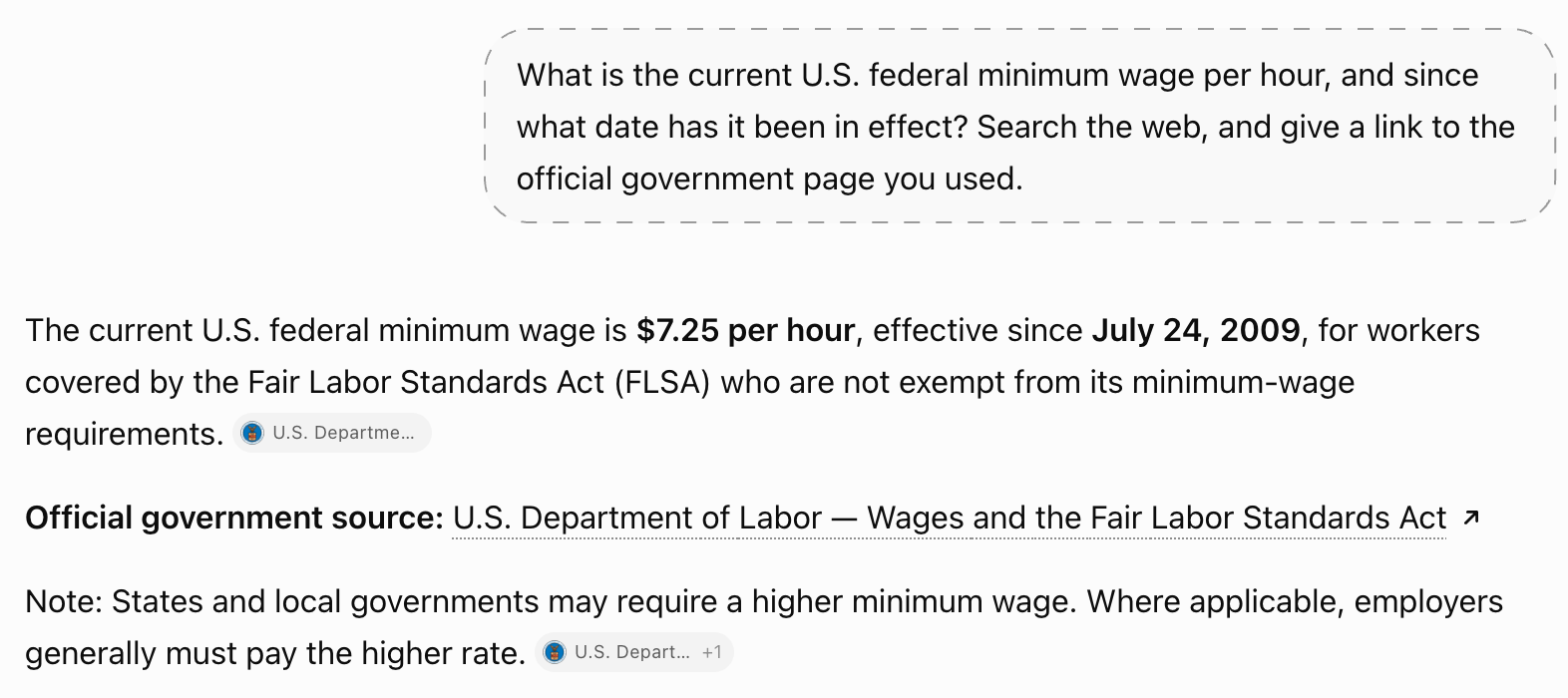
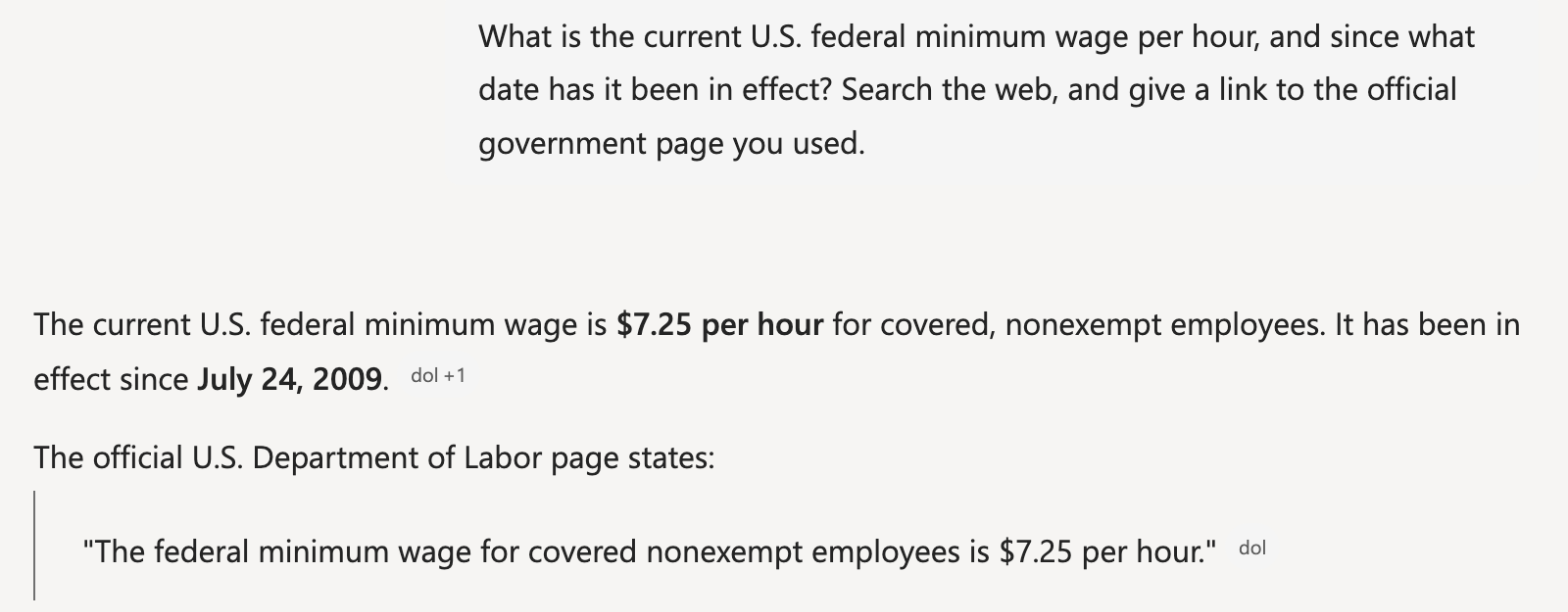
What is the current U.S. federal minimum wage per hour, and since what date has it been in effect? Search the web, and give a link to the official government page you used.
How we judged it
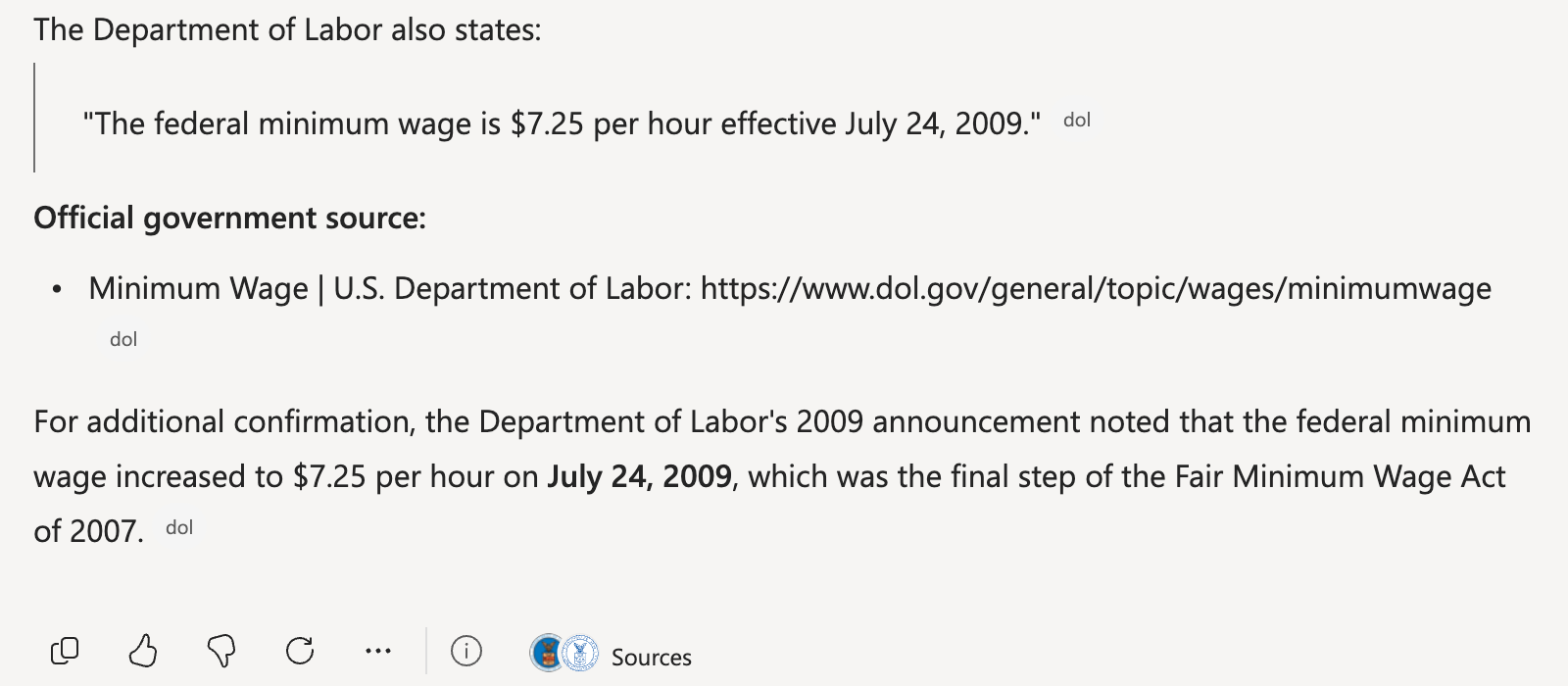
The right answer on 2026-10-19: $7.25 an hour, in effect since July 24, 2009 (U.S. Department of Labor).
Pass: the wage and the date right, with a link to an official .gov page.
Partial: the wage right, but the date missing or wrong, or no .gov link.
Fail: a wrong wage, a state or city minimum given as the federal one, or no answer.
The time is measured from sending the prompt until the answer stops appearing.
ChatGPT: Winner
Pass 10 s
$7.25 an hour since July 24, 2009, linking the Department of Labor FLSA page, which states both.
Microsoft Copilot
Pass 14 s
$7.25 an hour since July 24, 2009, linking dol.gov's Minimum Wage page, which states the wage; the date came from a second DOL page it cited.
Run signed in to both tools on their free plans: a ChatGPT Temporary Chat (no memory) and a new Copilot chat on a personal Microsoft account with no custom instructions or saved memories, each in its default mode. Each prompt was sent once. Every link was opened and checked. Times run from pressing Enter until the answer stopped changing, measured in the browser and rounded to the nearest second. Copilot's first try stopped at a verification check; the timed run is a fresh chat.
Test 2: Total a small sales table and write one Excel formula
The task
Send this prompt in a new chat, with the table exactly as written:
Here are three months of online orders for a small shop, Fernhill Goods. Price is in US dollars per unit.
| Month | Product | Units | Price |
|---|---|---|---|
| Jan | Candles | 40 | 12.50 |
| Jan | Mugs | 25 | 9.00 |
| Feb | Candles | 32 | 12.50 |
| Feb | Mugs | 30 | 9.00 |
| Mar | Candles | 45 | 12.50 |
| Mar | Mugs | 20 | 9.00 |
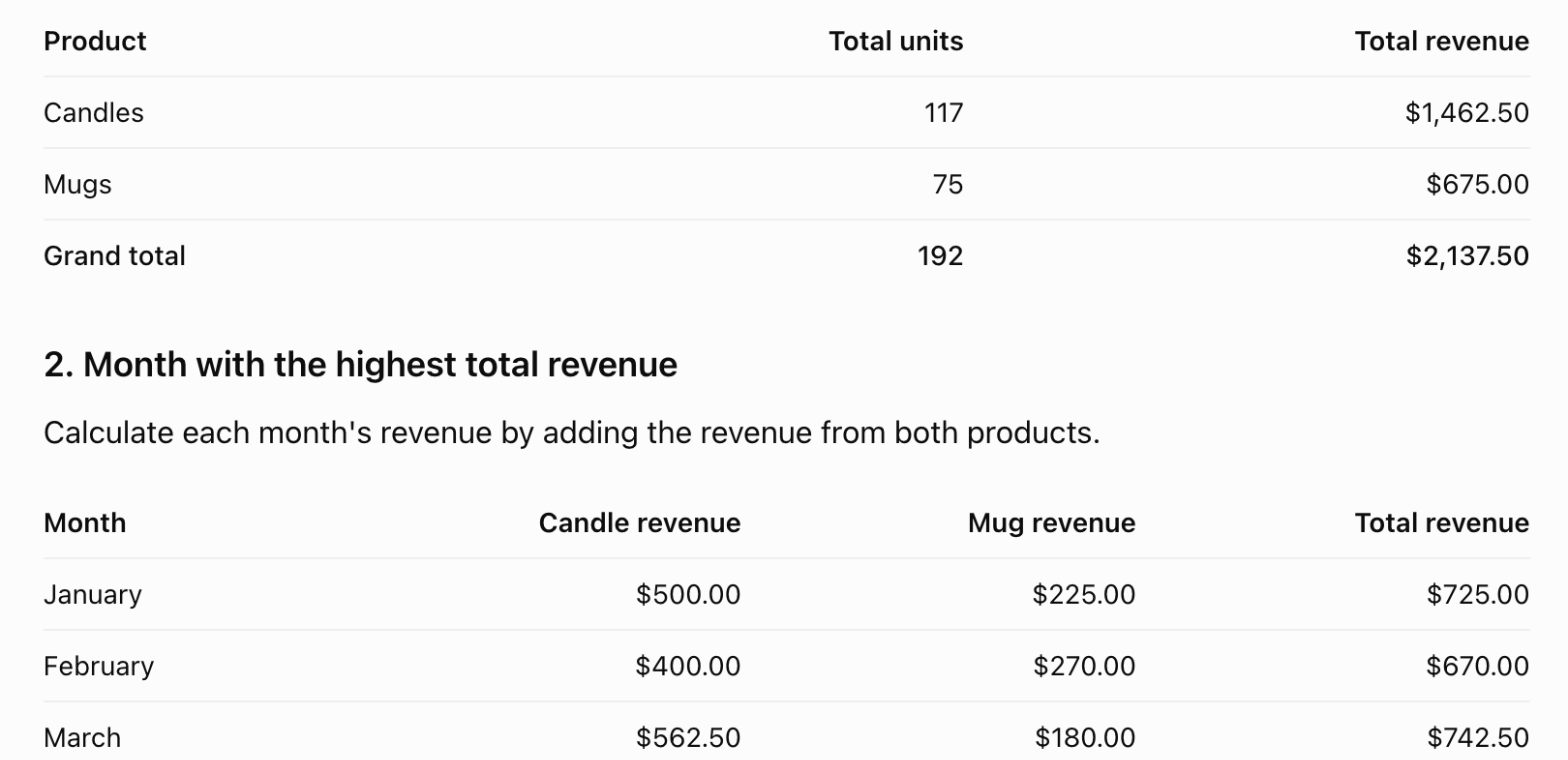
- What was the total revenue for each product over the three months?
- Which month had the highest total revenue, and how much was it?
- If this table is in Excel cells A1:D7, with the headers in row 1, write one formula that returns the total candle revenue without adding a column.
How we judged it
The right answers: 1. Candles $1,462.50, Mugs $675.00; 2. March, $742.50 (January $725.00, February $670.00); 3. a single formula that returns 1462.5, for example =SUMPRODUCT((B2:B7="Candles")*C2:C7*D2:D7).
Pass: all three parts right.
Partial: two of the three parts right.
Fail: one part or none right.
A formula that needs an extra column counts as a wrong part 3.
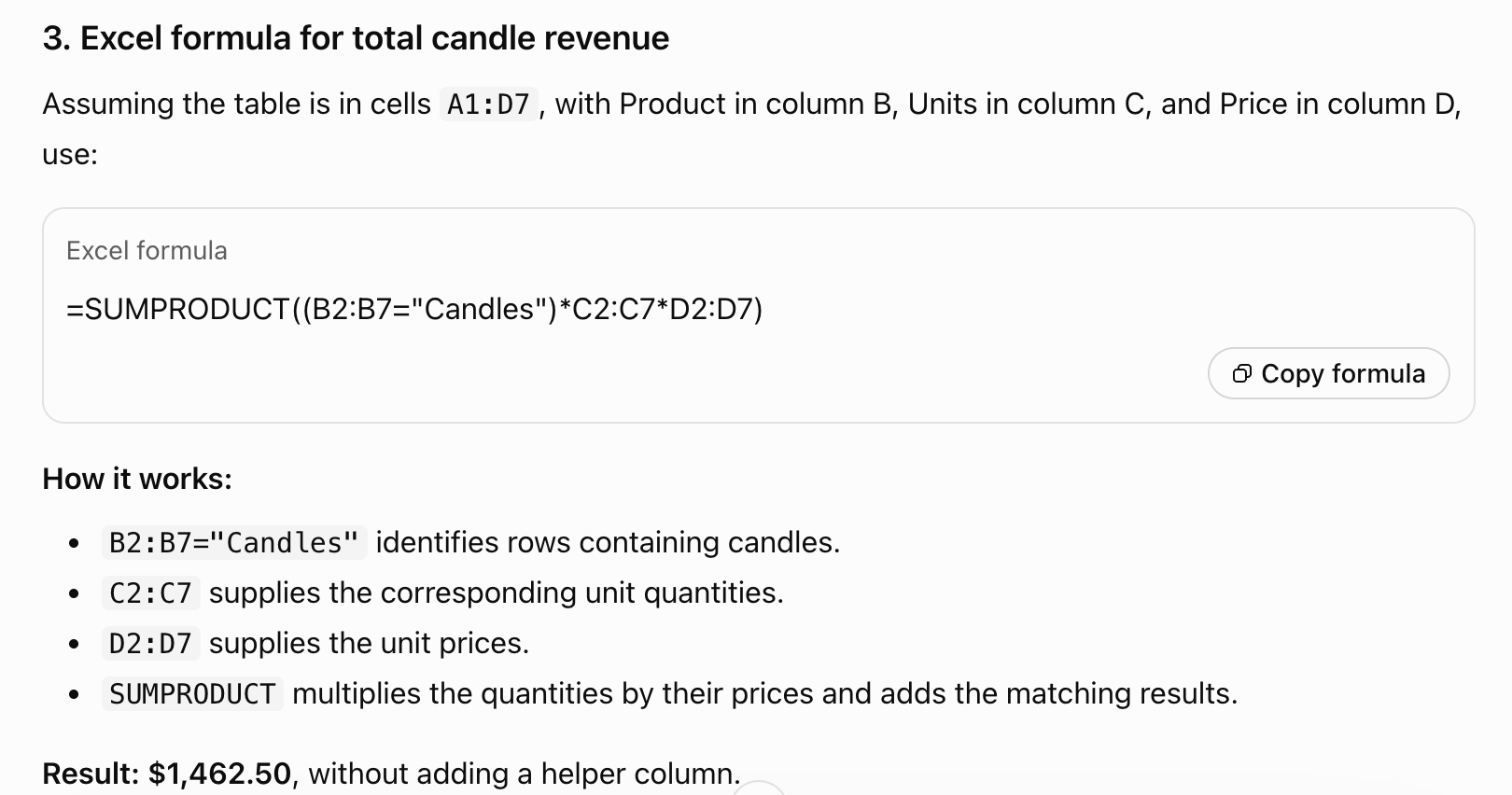
ChatGPT
Pass 3 of 3
Candles $1,462.50, Mugs $675.00; March highest at $742.50; =SUMPRODUCT((B2:B7="Candles")*C2:C7*D2:D7) returns 1462.5.
Microsoft Copilot
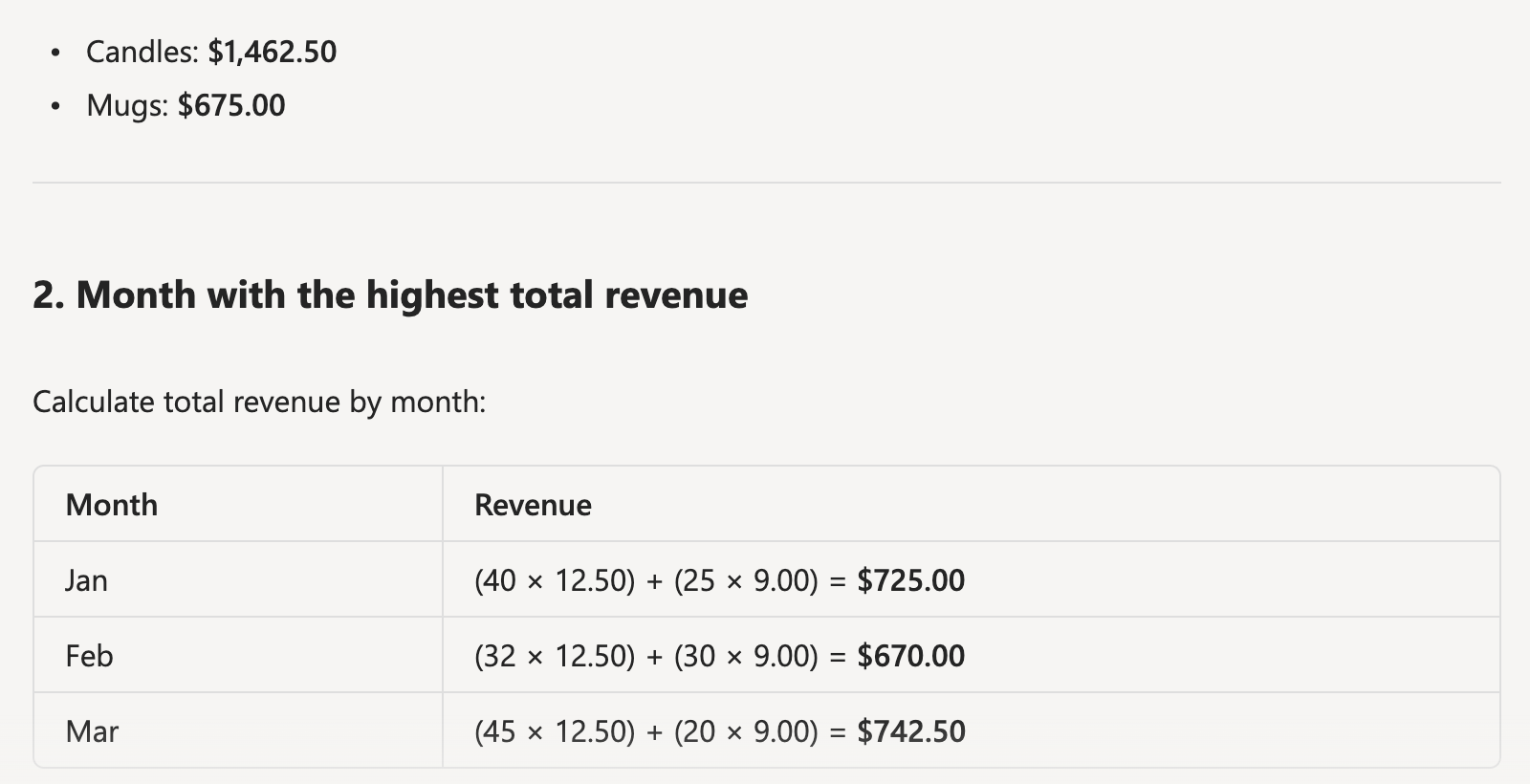
Pass 3 of 3
Candles $1,462.50, Mugs $675.00; March highest at $742.50; =SUMPRODUCT((B2:B7="Candles")*C2:C7*D2:D7) returns 1462.5.
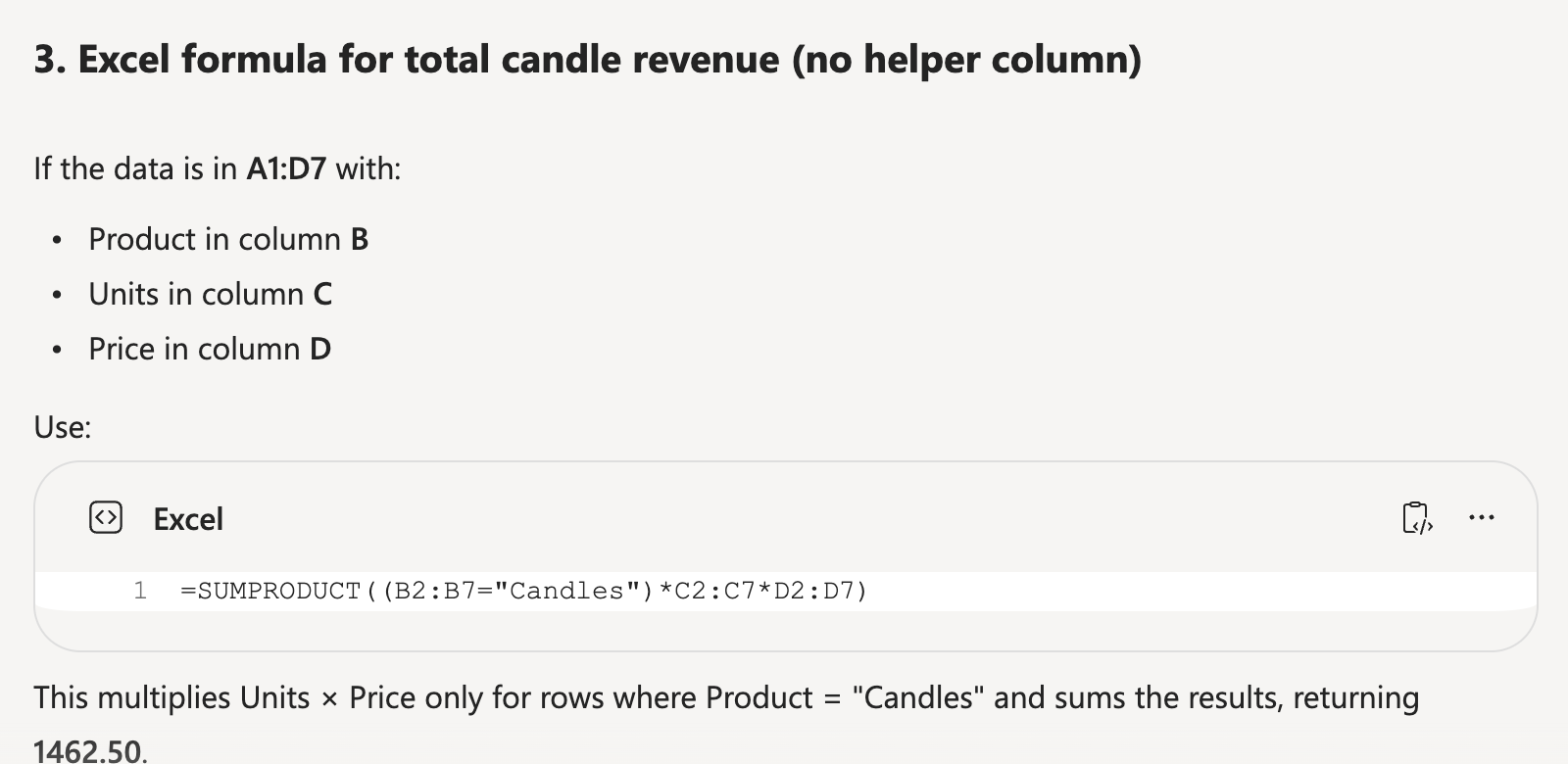
Run signed in to both tools on their free plans: a ChatGPT Temporary Chat (no memory) and a new Copilot chat on a personal Microsoft account with no custom instructions or saved memories, each in its default mode. Each prompt was sent once. Both formulas were checked in LibreOffice Calc on the same table in A1:D7; each returned 1462.5.
Test 3: Turn rough call notes into an action-item table
The task
Send this prompt in a new chat:
Turn these call notes into a table of action items with the columns Task, Owner and Due date. Write "Not set" where the notes give no owner or no date. Do not add tasks that are not in the notes. Below the table, list any decisions separately.
Fernhill Goods team call, Tuesday. Priya will order 200 more candle jars by Friday. Sam is updating the shipping page with the new rates, no date yet. Lee takes the holiday catalog photos, due October 30. Someone needs to ask the printer for a quote; nobody took it. We agreed to move the next call to Thursday at 10 a.m.
How we judged it
The four tasks: order 200 candle jars (Priya, Friday); update the shipping page with the new rates (Sam, Not set); the holiday catalog photos (Lee, October 30); ask the printer for a quote (Not set, Not set). The decision: the next call moves to Thursday at 10 a.m. Any wording of a task counts.
Pass: all 12 table cells right, and the call change listed below the table as a decision.
Partial: one mistake: one wrong cell, or the call change missing or listed as a task.
Fail: one of the four tasks missing, an invented task (the call change aside), or two or more mistakes.
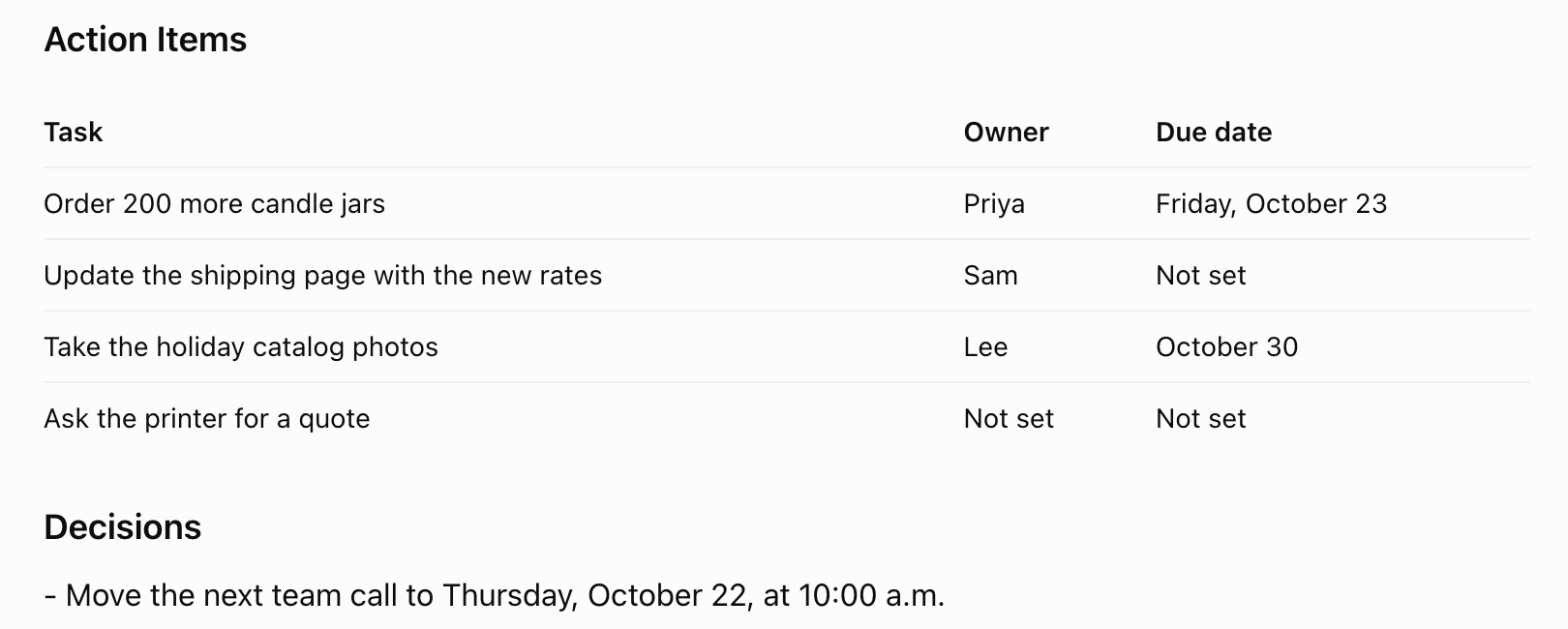
ChatGPT
Pass 12 of 12
All four tasks with the right owners and dates, the printer quote Not set twice, and the call change under Decisions; it added the dates Oct 23 and Oct 22 itself.
Microsoft Copilot
Pass 12 of 12
All four tasks with the right owners and dates, the printer quote Not set twice, and the call change under Decisions; nothing added.
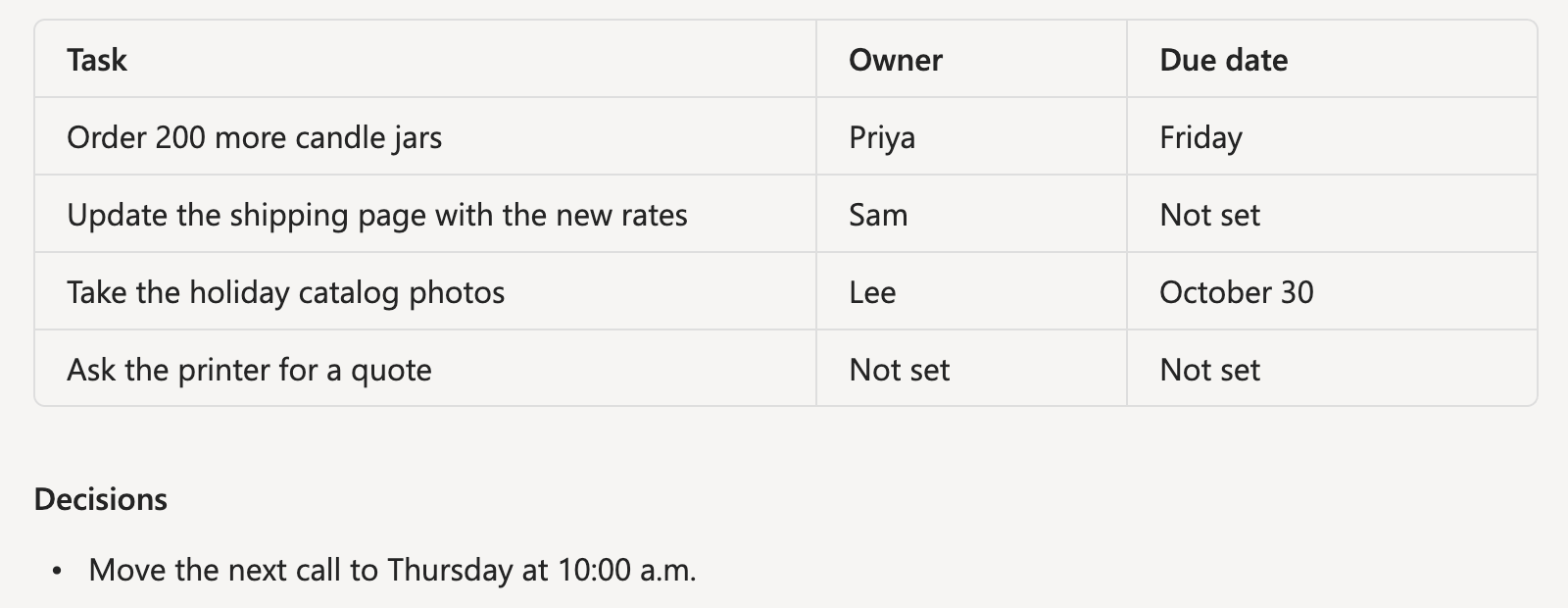
Run signed in to both tools on their free plans: a ChatGPT Temporary Chat (no memory) and a new Copilot chat on a personal Microsoft account with no custom instructions or saved memories, each in its default mode. Each prompt was sent once. ChatGPT turned Friday and Thursday into dates (October 23 and 22) from the day of the test; the cells still name the right days.
Test 4: Create a shop-front image with exact sign text
The task
Send this prompt in a new chat:
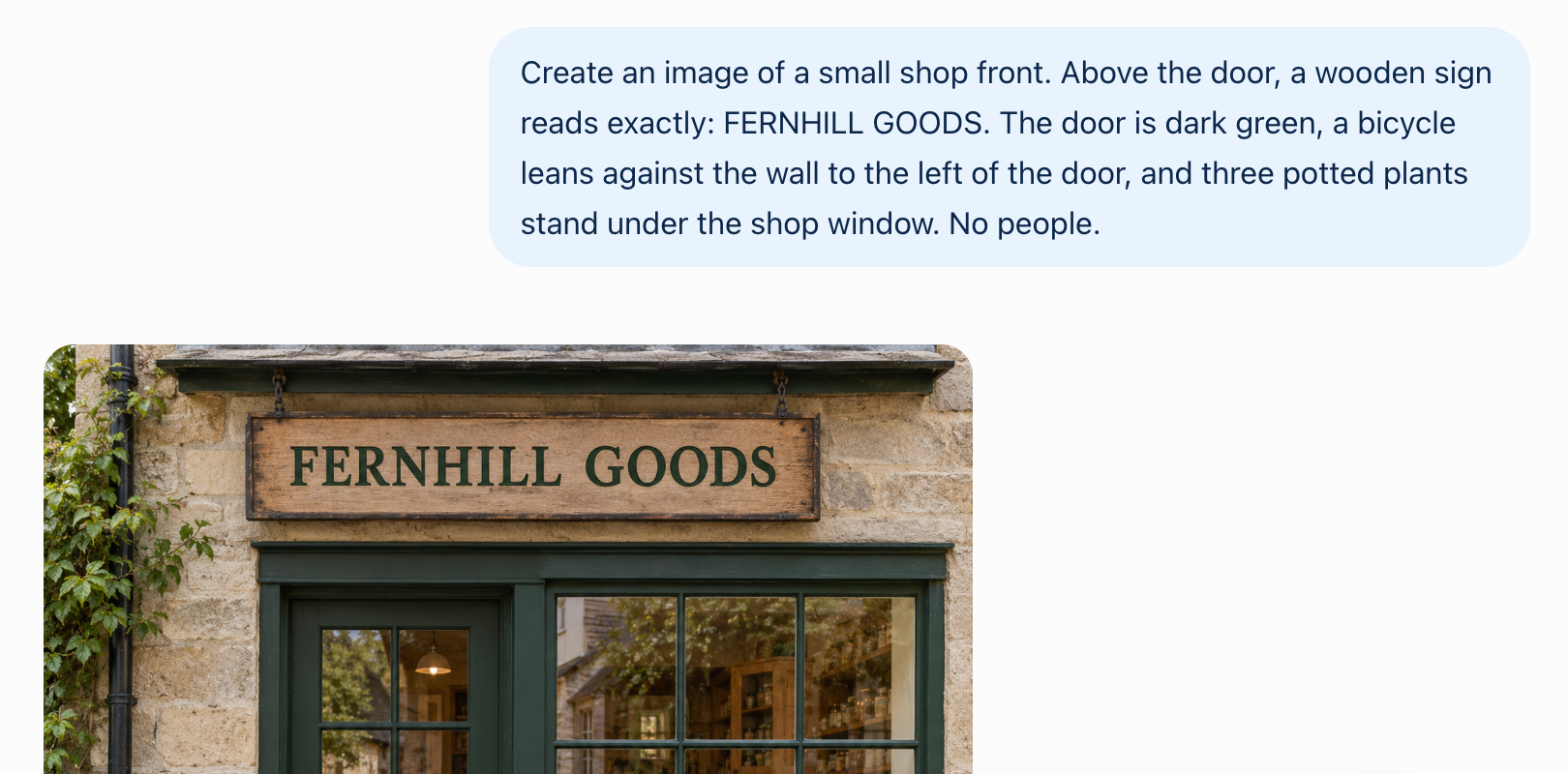
Create an image of a small shop front. Above the door, a wooden sign reads exactly: FERNHILL GOODS. The door is dark green, a bicycle leans against the wall to the left of the door, and three potted plants stand under the shop window. No people.
How we judged it
Count the mistakes: each wrong, missing or extra letter on the sign, and each of the four details (dark green door, bicycle left of the door, three potted plants under the window, no people) that is wrong or missing.
Pass: an image with no mistakes.
Partial: an image with one mistake.
Fail: two or more mistakes, or no image.
ChatGPT
Pass
One square image (1254 x 1254) with no mistakes: the sign reads FERNHILL GOODS, a dark green door, a bicycle to its left, three potted plants, no people.

Microsoft Copilot
Pass
One image (1536 x 1024) with no mistakes: FERNHILL GOODS, a dark green door, a bicycle to its left, three potted plants, no people; it added a chalkboard and a window poster with words.


Run signed in to both tools on their free plans: a regular ChatGPT chat (Temporary Chat cannot make images; memory was empty) and a new Copilot chat on a personal Microsoft account with no custom instructions or saved memories, each in its default mode. Each prompt was sent once. Each tool made one image, judged at full size.
Our verdict
The deciding question is whether you use Microsoft 365.
Microsoft Copilot suits you if you work in Word, Excel and Outlook. Microsoft 365 Personal costs $9.99 a month or $99.99 a year and puts Copilot inside those apps, with 1 TB of OneDrive storage, and Premium, at $19.99 a month or $199.99 a year, adds Researcher, Analyst and the Cowork preview. ChatGPT Go and Plus have no yearly price. Microsoft says prompts, responses and files in the Copilot app are not used to train foundation models. Two catches: on Family and Premium only the subscription owner gets the AI features, and the free version may show ads without a Microsoft 365 subscription.
ChatGPT suits you if you want a standalone assistant. Its Free plan includes projects and voice chats, with limits, and Go at $8 a month is the cheaper first paid step, though OpenAI says it may show ads; Plus at $20 adds advanced reasoning models and expanded deep research, and Pro tiers at $100, $200 and $500 cover heavy use. Any individual plan lets you switch off model training and keep your chat history.
For companies, Copilot Chat comes at no extra cost with eligible Microsoft 365 work subscriptions, while ChatGPT Business costs $25 per user a month, or $20 billed annually, with a two-seat minimum.
Choose ChatGPT if
You want a standalone assistant that does not depend on an office suite. The Free plan already includes web search, projects, file uploads, image creation and voice chats, with limits. Go costs $8 a month for higher limits, Plus at $20 adds advanced reasoning models and expanded deep research, and Pro tiers at $100, $200 or $500 a month cover heavy daily use. You can also switch off model training on any individual plan and still keep your chat history.
Choose Microsoft Copilot if
You already work in Word, Excel, PowerPoint and Outlook and want the assistant inside them. Microsoft 365 Personal costs $9.99 a month or $99.99 a year and adds Copilot to those apps with 1 TB of OneDrive storage; Premium, at $19.99 a month or $199.99 a year, adds Researcher, Analyst and the Cowork preview. The free version is available with a Microsoft account, and Microsoft says prompts, responses and files in the Copilot app are not used to train foundation models.
Frequently asked questions
Is ChatGPT or Microsoft Copilot cheaper?
Both have a free version; Copilot's is available with a Microsoft account. ChatGPT Go, at $8 a month, is the cheapest paid plan of the two. Copilot's paid plans for individuals are Microsoft 365 subscriptions: Personal at $9.99 a month or $99.99 a year, Family at $12.99 or $129.99, Premium at $19.99 or $199.99, and Pro at $99.99 a month, billed monthly only. ChatGPT Plus costs $20 a month and Pro $100, $200 or $500, and ChatGPT's Go, Plus and Pro plans are billed monthly only, with no yearly price. The Microsoft 365 plans also pair Copilot with Word, Excel, PowerPoint, Outlook and OneDrive storage.
Do ChatGPT and Microsoft Copilot use my chats to train their models?
ChatGPT lets you opt out on every individual plan: turn off “Improve the model for everyone” in Data controls, and your new chats are not used for training but still appear in your history (a conversation you rate with a thumbs up or down may still be used). OpenAI says it does not train on ChatGPT Business workspace data by default. Microsoft says prompts, responses and your file contents in the Microsoft Copilot app are not used to train foundation models, and it makes the same commitment for Copilot Chat on work accounts.
Can I talk to ChatGPT and Microsoft Copilot by voice?
Yes. OpenAI's pricing page lists voice chats on ChatGPT's Free plan, with limits. Microsoft lists Copilot Voice with its Microsoft 365 Personal, Family, Premium and Pro plans, with more usage on Premium and the most on Pro, and real-time voice for licensed work accounts. Microsoft's pages disagree on the free version: its voice guide says voice features require an eligible Microsoft subscription, while its overview of the Copilot versions lists voice interactions among the benefits of signing in with a personal account. Check the app before you count on voice without a subscription.
Do ChatGPT or Microsoft Copilot show ads?
They can, on some plans. OpenAI's pricing page says the ChatGPT Go plan may include ads. Microsoft says that if you use Copilot without a Microsoft 365 subscription, you might see advertising in Copilot.
What do ChatGPT and Microsoft Copilot cost for a business?
If your company already pays for Microsoft 365, the cheapest start is Copilot Chat, which Microsoft says comes at no extra cost with eligible work subscriptions. On top of that, Copilot Business costs $21 per user a month billed yearly (an offer through December 31, 2026 cuts the first year to $18) or $25.20 billed monthly, for up to 300 users with an eligible Microsoft 365 Business plan, and Microsoft 365 Copilot costs $30 per user a month, paid yearly, with a qualifying Microsoft 365 plan. ChatGPT Business is a separate subscription at $25 per user a month, or $20 billed annually, with a two-seat minimum; ChatGPT Enterprise is sold through OpenAI's sales team.
Compare with others
More about: ChatGPT · Microsoft Copilot · Best AI chat assistants