
ProWritingAid vs Quillbot: Which is better in 2026?
Pick by the kind of help you want: feedback on your own prose, or a tool that rewrites it.
Tested hands-on: 3 tests on a MacBook Pro (M1 Pro), October 23, 2026. How we tested
Some links on this page are affiliate links. If you buy through them we may earn a commission at no extra cost to you. This never affects our verdicts.
Quick answer
- Choose ProWritingAid if: You write fiction or other long-form work and want an editor, not a ghostwriter.
- Choose Quillbot if: You mostly rework text you already have, such as essays, reports and emails, and want a low-cost plan with a plagiarism checker included.
- Price at a glance: ProWritingAid: Free plan; paid from $30/mo · Quillbot: Free plan; paid from $19.95/mo
At a glance
 ProWritingAid |  Quillbot | |
|---|---|---|
| Free plan | Yes | Yes |
| Paid plans | From $30/mo | From $19.95/mo |
| Our tests | Won 1 of 32 ties | Won 0 of 32 ties |
| Best for | Novelists and other fiction writers who want detailed line editing and AI feedback on chapters and full manuscripts, rather than an AI that drafts marketing copy for them. | Students, professionals and content creators who mainly rewrite, polish and check their own writing and want a low-cost plan with a plagiarism checker, rather than a marketing content platform. |
ProWritingAid and Quillbot both include a grammar checker and both work in Word, Google Docs and Chrome, yet they were built for different jobs. ProWritingAid, around since 2013, is an editing assistant for storytellers: 25+ line-editing reports plus AI feedback on chapters and whole manuscripts, and it says it will never write your story for you. Quillbot began in 2017 as a Paraphraser and has grown into a toolkit with an AI Detector, AI Humanizer, plagiarism checker, summarizer and citation generator. Below are their US prices, free plans, plagiarism checks, privacy terms and apps, from each vendor's own pages as of October 2026.
Pricing
| Plan | Monthly | Yearly (12-month total) |
|---|---|---|
| ProWritingAid | ||
| Free500 words at a time; 2 runs per report a day, 10 Rephrases and 3 Sparks a day; no Chapter Critique | Free Free plan | |
| Premium$10/mo billed yearly ($120/yr); lifetime license $399 one-time; 3-day refund on yearly and lifetime only | $30/mo | $120/yr ($10/mo) |
| Premium Pro$12/mo billed yearly ($144/yr); lifetime license $699 one-time; 30 Chapter Critiques/day (Premium: 1) and live workshops | $36/mo | $144/yr ($12/mo) |
| TeamsPer user, billed yearly only ($12/user/mo); 2 to 100 users; style guide rules, term base, team analytics | no monthly price | $144/yr, billed yearly ($12/mo) |
| EnterpriseCustom package via sales for 100+ users; adds SSO, on-premise options, custom integrations, account management | Custom | |
| Quillbot | ||
| FreeParaphrases up to 125 words at a time in 2 modes; basic grammar checks; 1,200-word summaries; limited AI Chat; no plagiarism checker | Free Free plan | |
| Premium1 user; $8.33/mo billed yearly ($99.95/yr); a quarterly plan ($39.95) is also offered; prices may vary by region | $19.95/mo | $99.95/yr ($8.33/mo) |
| Team PlanPer seat, billed every 12 months: $89.95 (2-10 seats), $79.95 (11-50 seats), $69.95 (51+ seats); all Premium features plus admin tools | no monthly price | $89.95/yr, billed yearly ($7.50/mo) |
Prices checked on .
Features compared
| Feature | ProWritingAid | Quillbot |
|---|---|---|
| Brand voice | Partial · Custom style guide on Premium; Teams get 1,000 style rules and term base items | Partial · Premium Custom modes set a paraphrasing style from a guiding word such as 'friendly'; no brand voice profiles |
| SEO mode | No · No SEO tools on the pricing or features pages | No · No SEO mode or keyword research; only single-purpose generators for meta descriptions, SEO titles and SEO meta tags |
| Plagiarism check | Add-on · Bought separately (2 free at sign-up): 10 checks for $10 up to 1,000 for $200; 2,000 words per check | Yes · Premium only: 25,000 words a month; extra packs from $2.45 for 6,250 words |
| Templates | No · No content templates; 40+ document types tune its suggestions | Yes · More than 25 single-purpose generators (email, cover letter, copywriter, captions, titles, job descriptions); design templates too |
| Team seats | Yes · Teams for 2 to 100 users at $12/user/mo billed yearly; Enterprise for 100+ | Yes · Premium is 1 user; Team Plans from 2 seats, $69.95-$89.95 per seat a year |
| API | No · Retired: the help center says it no longer offers an API | No · No B2B or B2C API, per the help center |
| Word limits | Yes · 500 words at a time on Free; unlimited on Premium and Premium Pro | Yes · Paraphraser: 125 words at a time free, no limit on Premium; Summarizer: 1,200 or 6,000 words |
| Free trial | Partial · Free plan instead of a trial; 3-day refund on yearly and lifetime plans | No · No Premium trial listed; free plan instead; fees nonrefundable unless the law requires |
| Integrations | Yes · Word, Google Docs, Scrivener; Chrome, Edge, Firefox; Windows and Mac apps | Yes · Chrome (incl. Google Docs), Edge, Safari, Word add-in; macOS, Windows, iOS and Android apps |
How we tested
We gave ProWritingAid and Quillbot the same 3 tasks on the same MacBook Pro (M1 Pro). Each test below lists the task, how we judged it, both results and screenshots; select a screenshot to see it at full size.
- Device
- MacBook Pro (M1 Pro) · macOS 26.6.2 · Chrome 155
- Tested
- October 23, 2026
- Plans used
- ProWritingAid: Free · Quillbot: Free
- App versions
- ProWritingAid: Web editor, Web editor, Rephrase (Standard) · Quillbot: Grammar Checker (web), Paraphraser, Standard mode
| Test | ProWritingAid | Quillbot | Winner |
|---|---|---|---|
| Fix 10 planted grammar and spelling errors | Pass9 of 10 | Partial9 of 10 | ProWritingAid |
| Punctuate dialogue in a short fiction scene | Partial4 of 6 | Partial4 of 6 | Tie |
| Rewrite a wordy notice in plain English | Pass | Pass | Tie |
| Tests won | 1 | 0 | 2 ties |
Test 1: Fix 10 planted grammar and spelling errors
The task
Paste this FICTIONAL paragraph, which has 10 planted errors, into each tool's grammar checker and accept its grammar and spelling fixes:
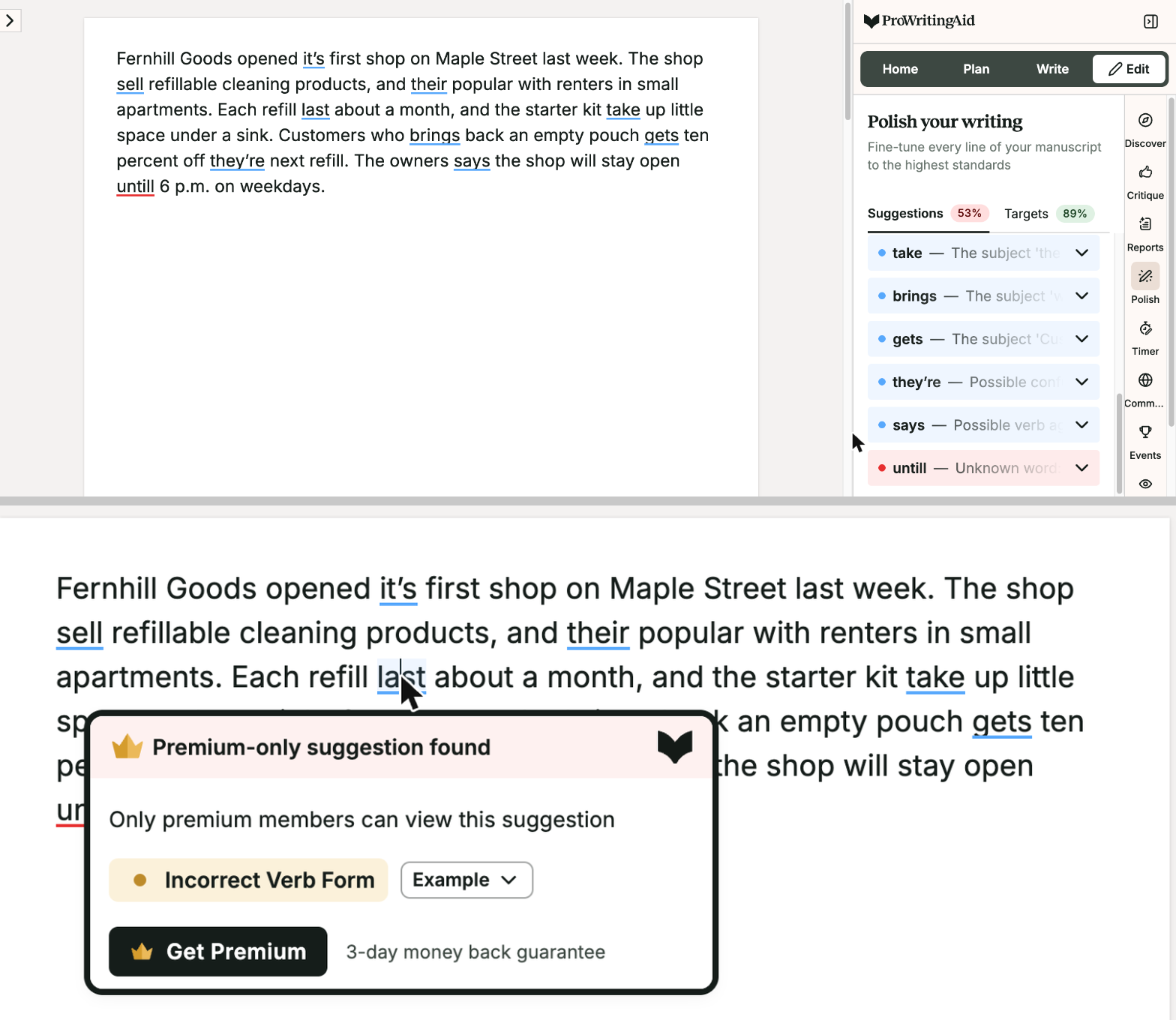
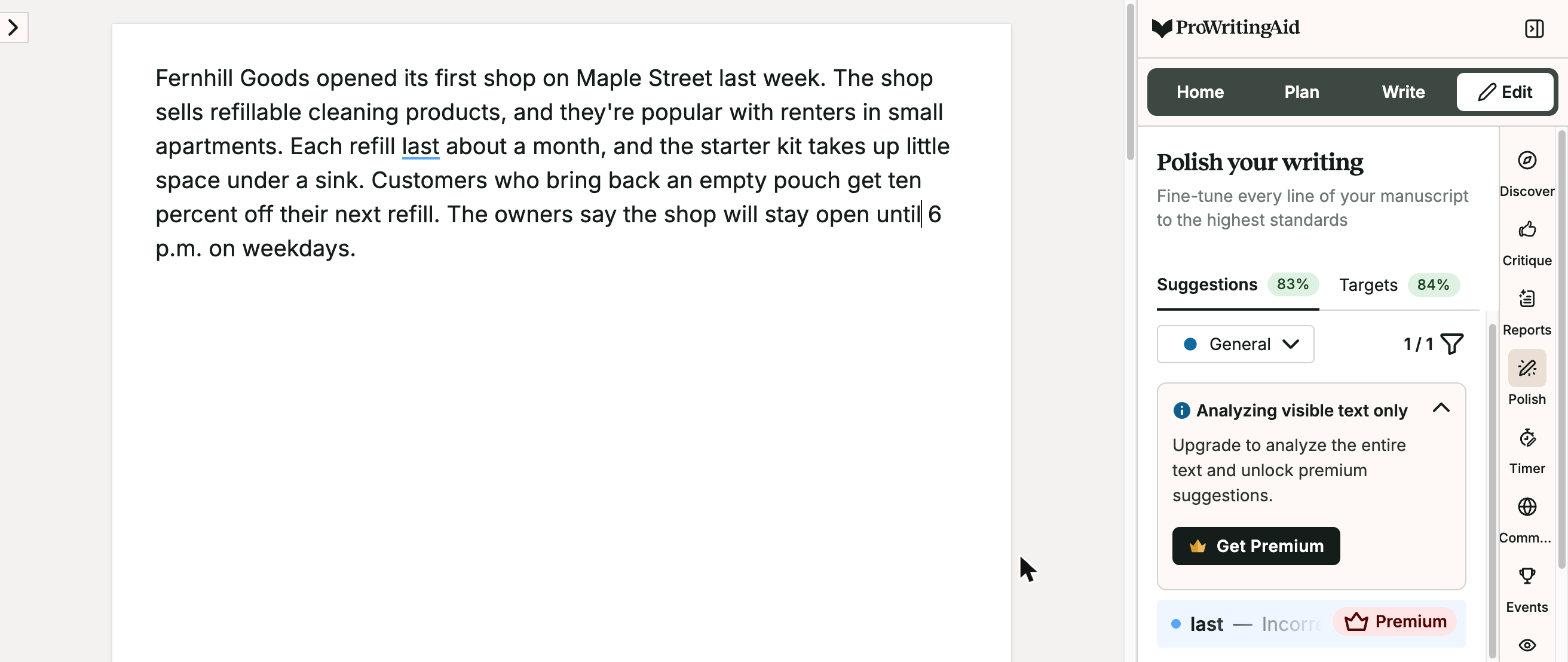
Fernhill Goods opened it's first shop on Maple Street last week. The shop sell refillable cleaning products, and their popular with renters in small apartments. Each refill last about a month, and the starter kit take up little space under a sink. Customers who brings back an empty pouch gets ten percent off they're next refill. The owners says the shop will stay open untill 6 p.m. on weekdays.
How we judged it
An error counts as fixed when the tool flags it and its suggestion gives the right form (the list is in the steps).
Pass: 9 or 10 fixed, and no correct word made wrong.
Partial: 6 to 8 fixed, or 9 or 10 with one correct word made wrong.
Fail: 5 or fewer fixed, or two or more correct words made wrong.
ProWritingAid: Winner
Pass 9 of 10
9 of 10 fixed; the fix for "last" (lasts) is Premium-only on the free plan. No correct word changed.
Quillbot
Partial 9 of 10
Fixed 9 of 10, but changed "The owners says" to "The owner says" instead of "say", making a correct word wrong.
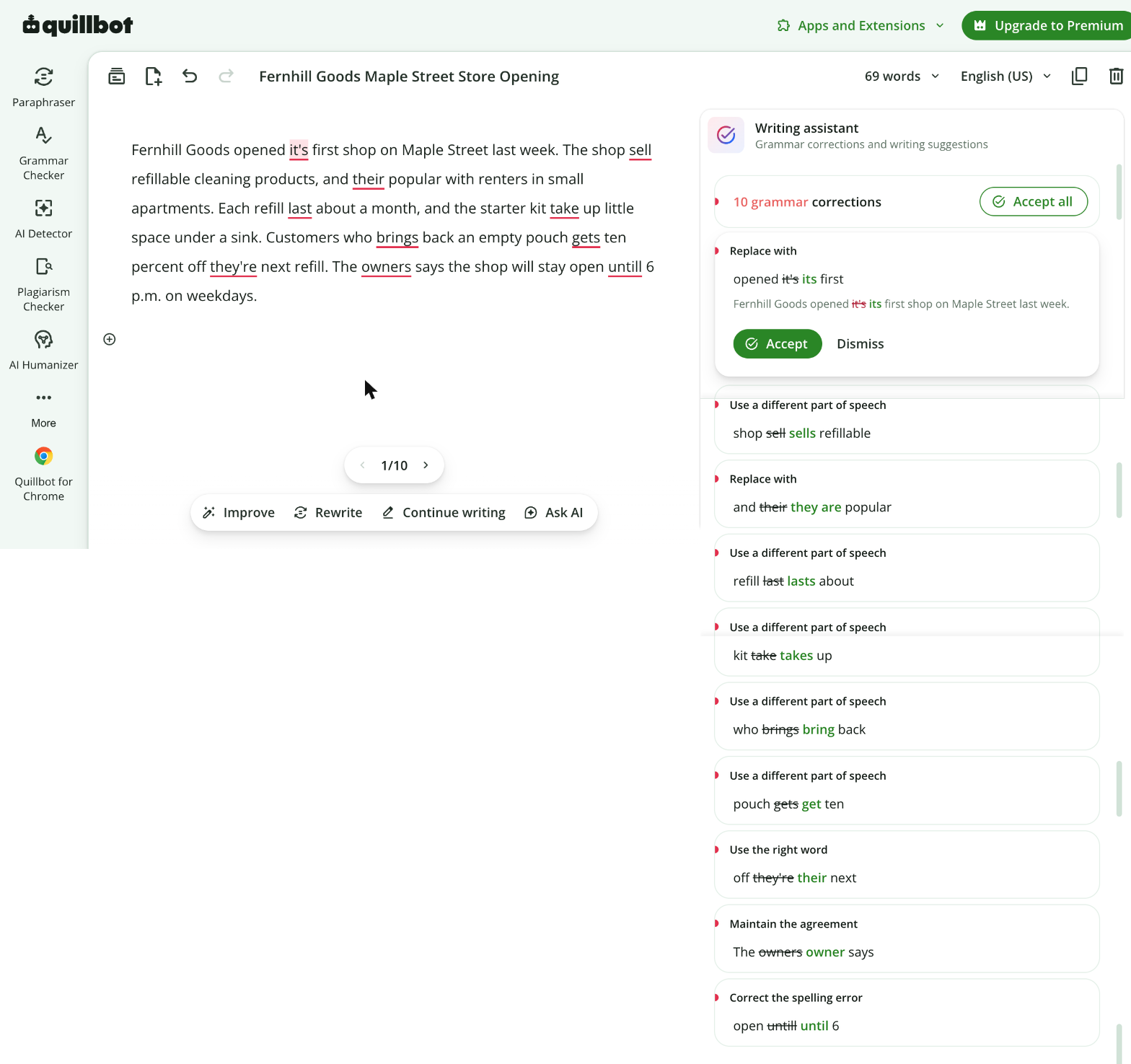
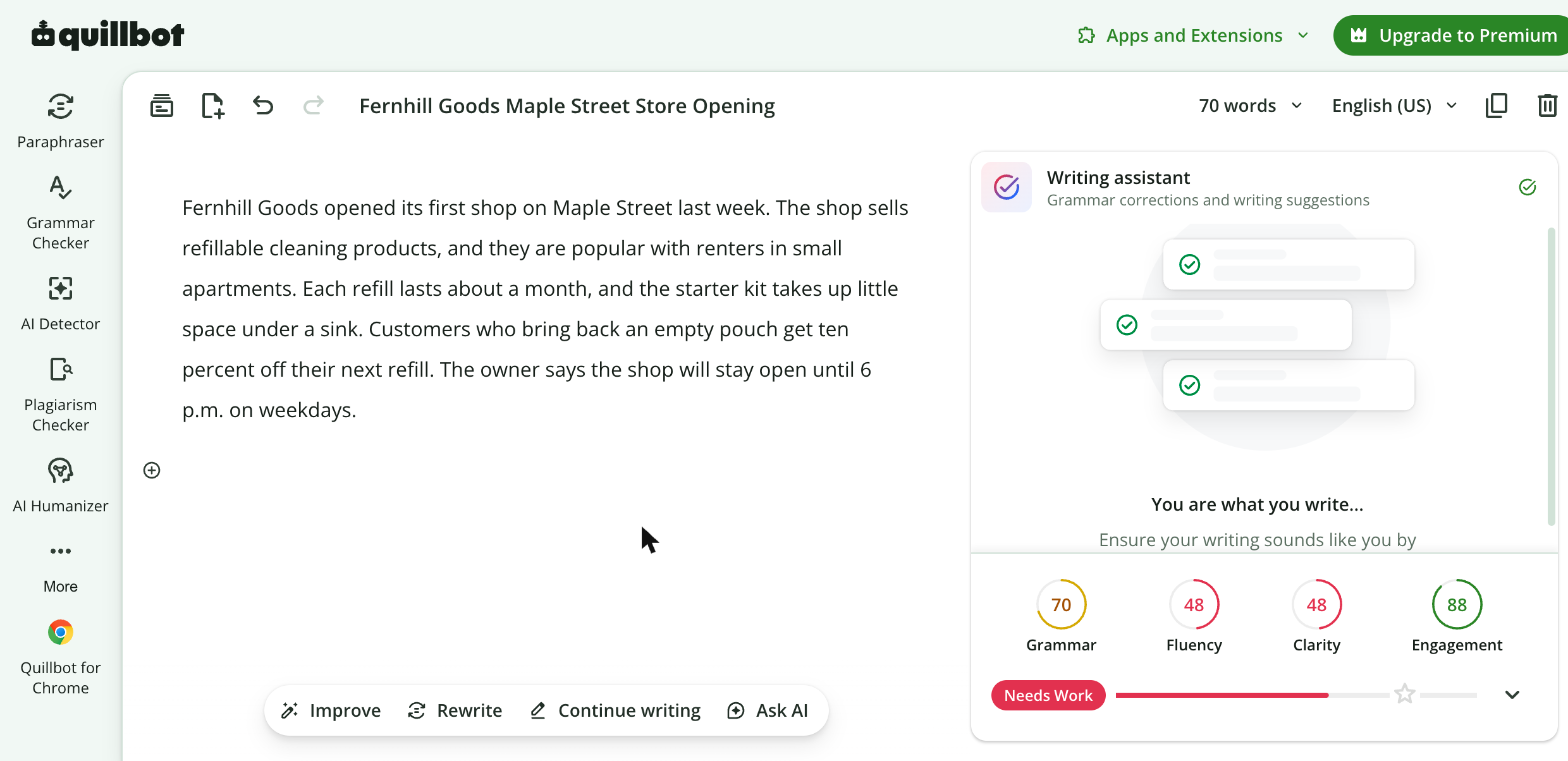
Quillbot's one wrong change: "The owners says" became "The owner says".
Test 2: Punctuate dialogue in a short fiction scene
The task
Paste this FICTIONAL scene, which has 6 planted punctuation and spelling errors in its dialogue, into each tool's grammar checker and accept its spelling, grammar and punctuation fixes:
"Its getting late" Mara said. "We should go."
"Wait," Tom called, "Take the map with you."
"Are you sure?," she asked.
"Yes." he said. "I don't need it."
Mara folded the map into her pocket. "Thanks Tom."
How we judged it
An error counts as fixed when the tool flags it and its suggestion gives a correct form (the list is in the steps).
Pass: all 6 fixed, and no correct line made wrong.
Partial: 3 to 5 fixed, or all 6 with one correct line made wrong.
Fail: 2 or fewer fixed, or two or more correct lines made wrong.
ProWritingAid
Partial 4 of 6
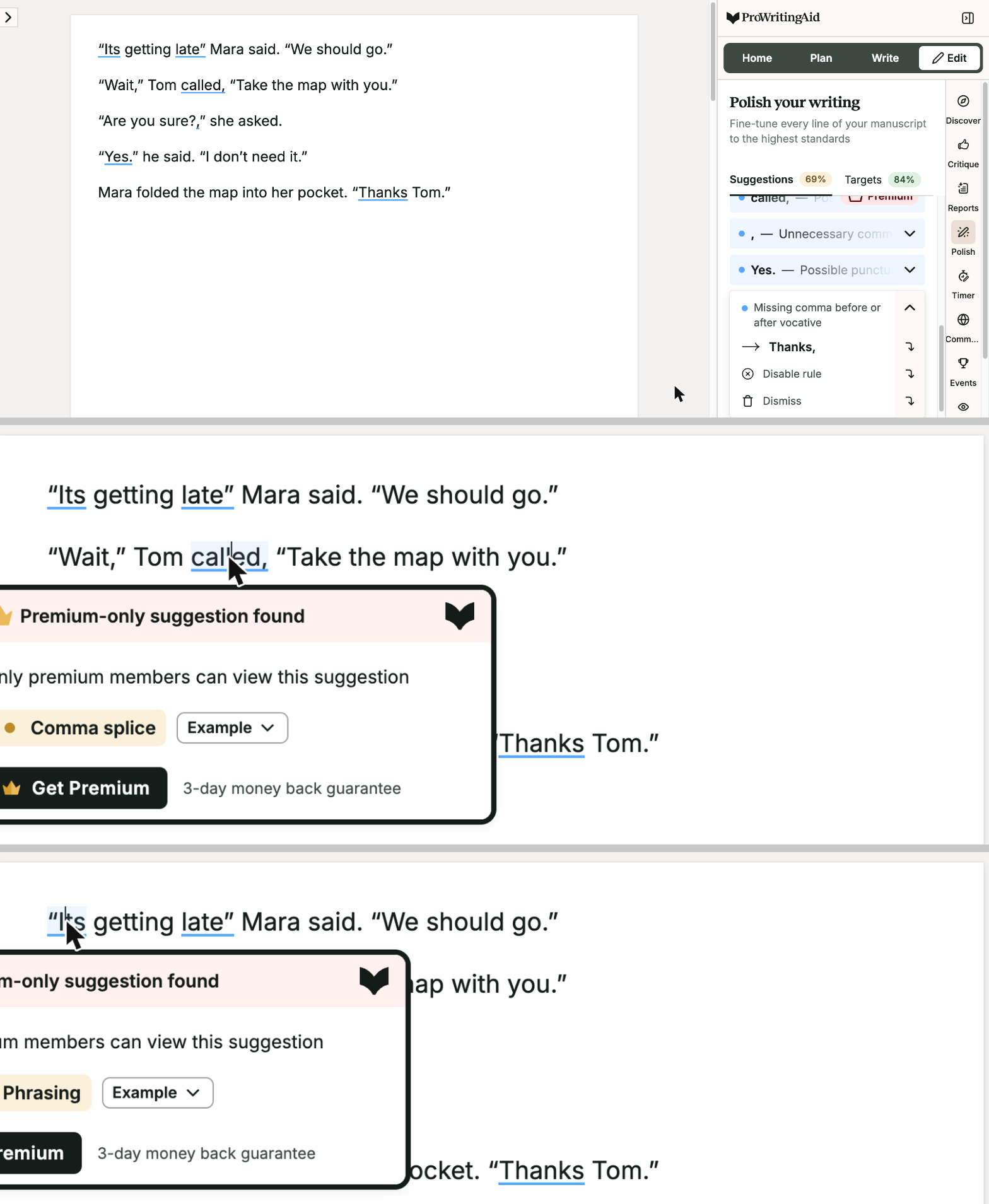
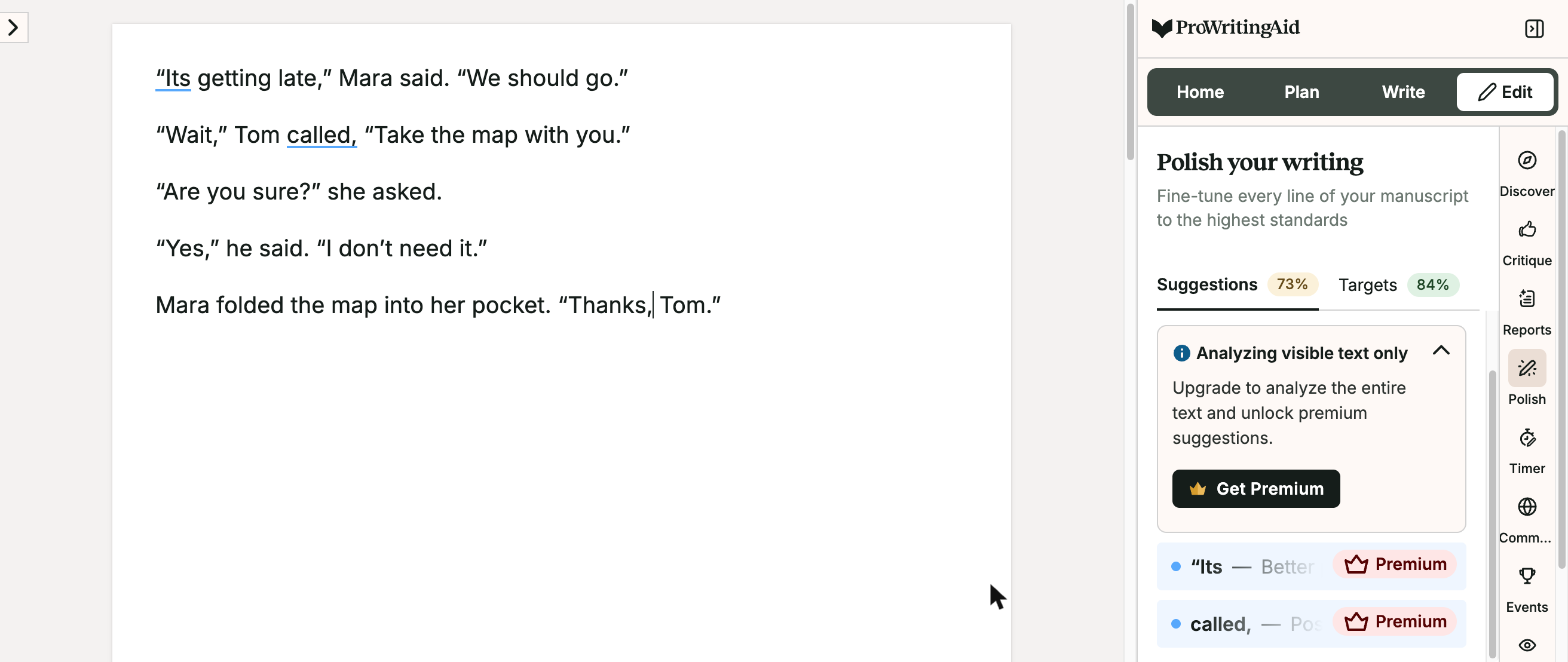
Fixed "late,", "Are you sure?", "Yes," and "Thanks, Tom"; the marks on "Its" and on the comma before "Take" are Premium-only.
Quillbot
Partial 4 of 6
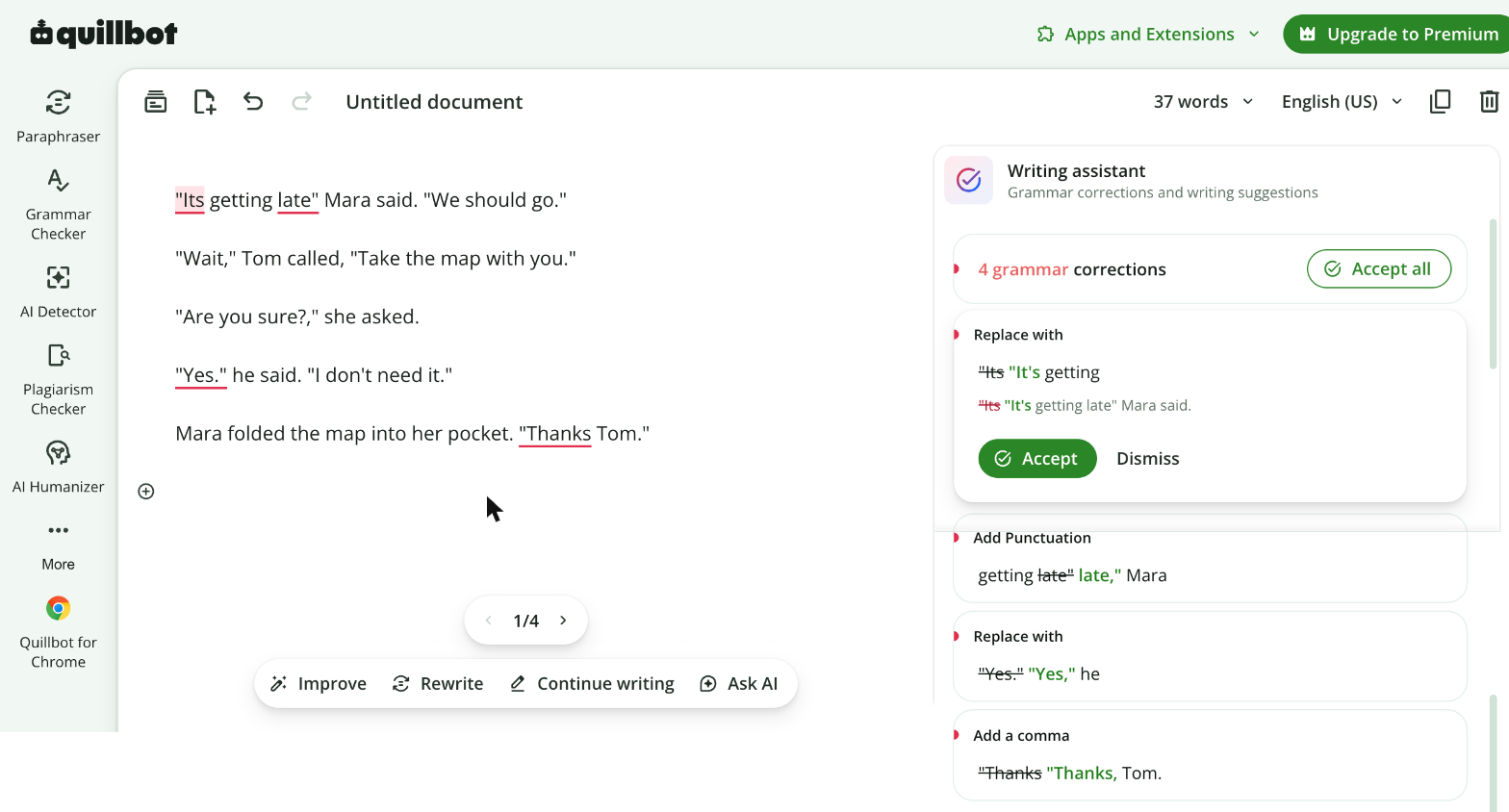
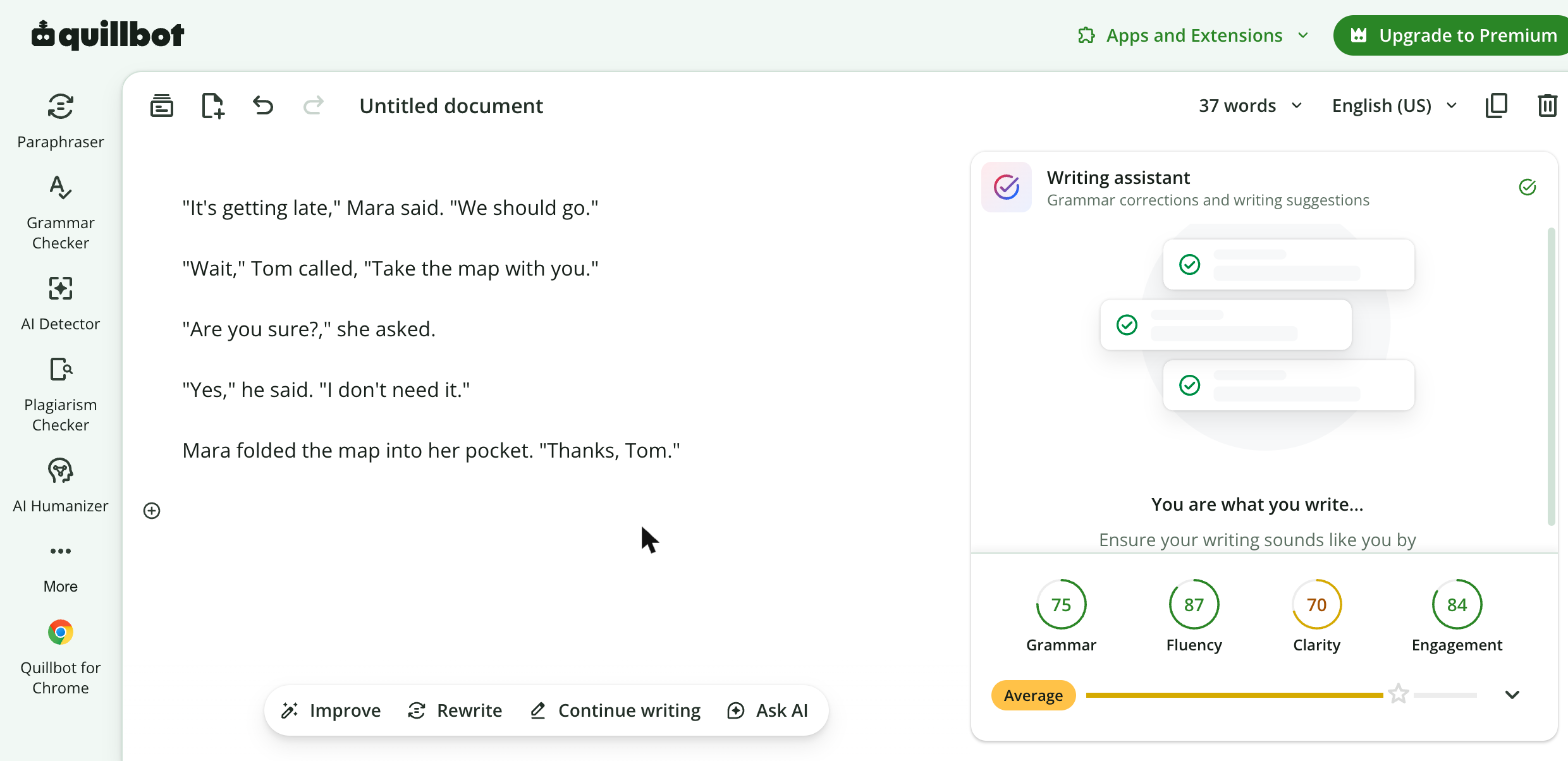
Fixed "It's", "late,", "Yes," and "Thanks, Tom"; it did not flag "Take" after "Tom called," or the "?," in "Are you sure?,".
ProWritingAid turned the straight quotation marks into curly ones on paste.
Test 3: Rewrite a wordy notice in plain English
The task
Use each tool's rewriting feature (ProWritingAid: Rephrase; Quillbot: the Paraphraser) to make this FICTIONAL notice shorter and easier to read, keeping every fact:
Please be advised that the Fernhill community garden will be closed for the purpose of maintenance on Saturday, May 9. Members who have not yet collected their seed packets are kindly requested to do so prior to Friday, May 8, at 5 p.m. Any tools that are left in the shed after that time will be relocated to the office in order to keep them safe.
How we judged it
The three facts: the garden is closed for maintenance on Saturday, May 9; seed packets must be collected before 5 p.m. on Friday, May 8; tools left in the shed after that time are moved to the office to keep them safe.
Pass: all three facts with their dates and time unchanged, fewer words than the original, and nothing added.
Partial: all three facts kept, but the rewrite is not shorter.
Fail: a fact, date or time lost or changed, or anything added that is not in the notice.
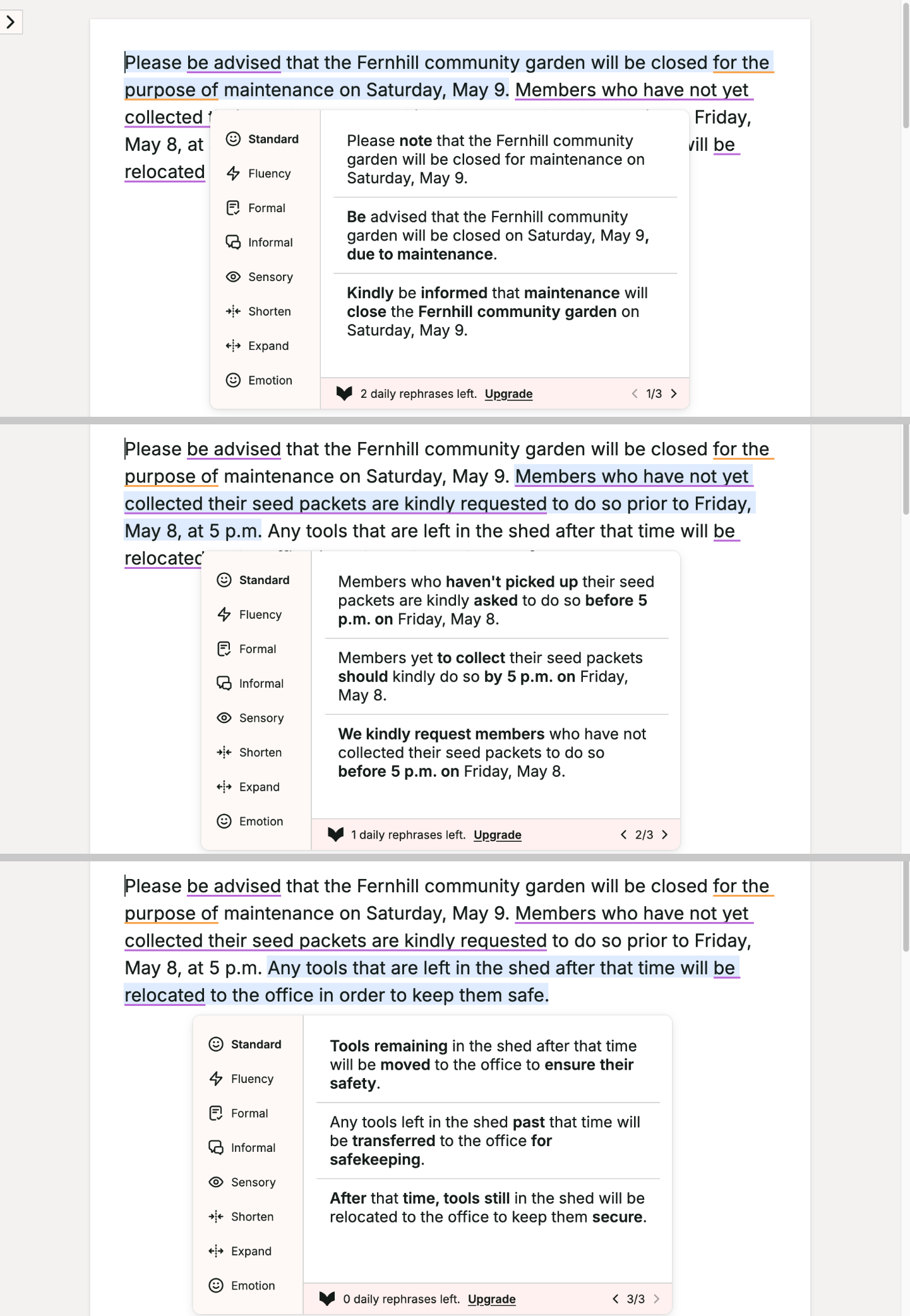
ProWritingAid
Pass
Rephrase, one sentence at a time: 55 words (from 66), with the closing, the seed-packet deadline and the tool move kept with their dates and time.
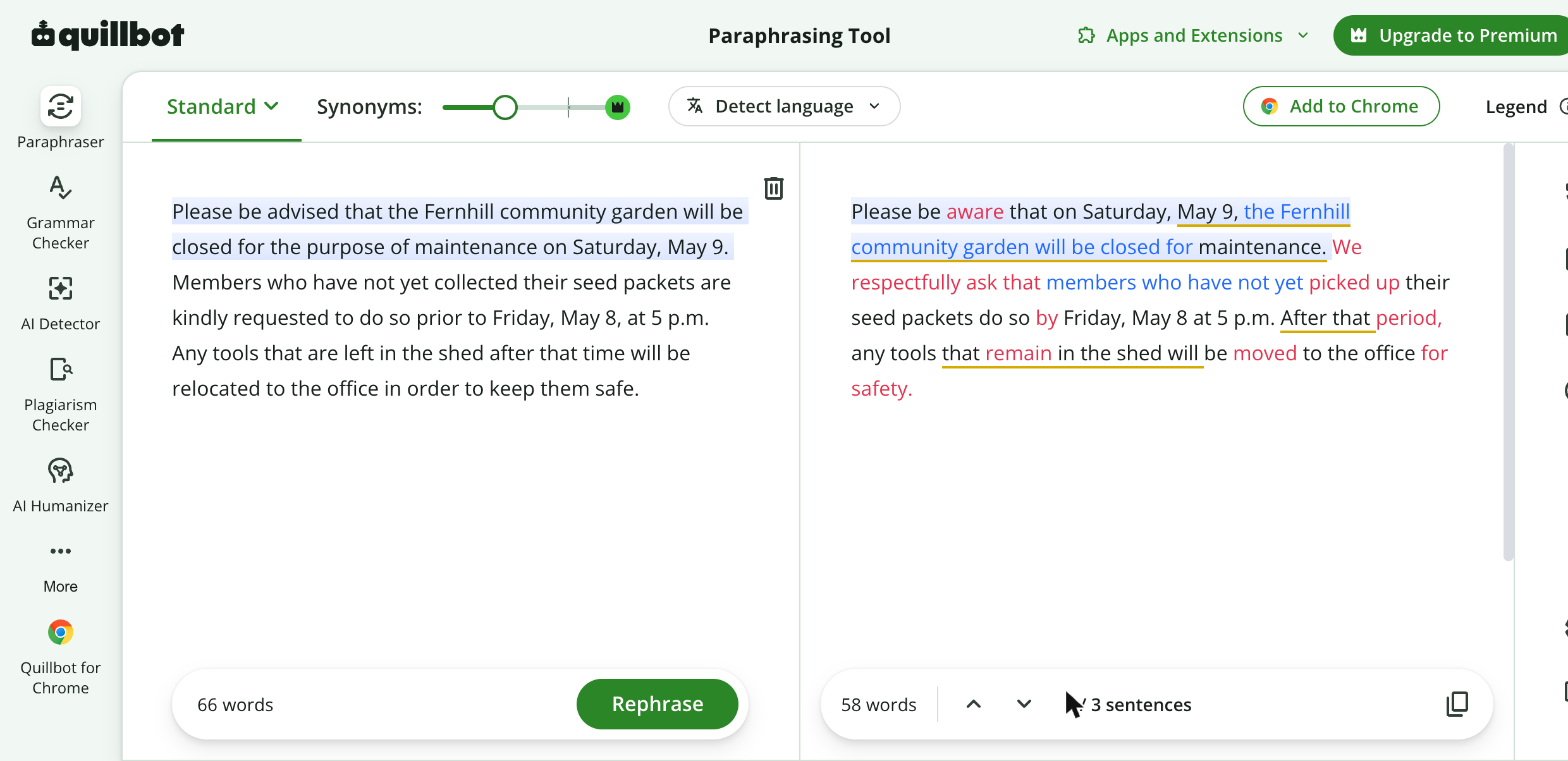
Quillbot
Pass
58 words (from 66); the closing on Saturday, May 9, the 5 p.m. Friday, May 8 deadline and the tool move are all kept, and nothing is added.
ProWritingAid's Rephrase works one sentence at a time; the first suggestion was taken for each.
Our verdict
Pick by the kind of help you want: feedback on your own prose, or a tool that rewrites it.
ProWritingAid suits fiction writers and anyone revising long drafts. Its 25+ reports cover pacing, dialogue, sticky sentences and echoes, Premium Pro raises Chapter Critiques from 1 a day to 30, and it plugs into Scrivener as well as Word and Google Docs. Premium costs $120 a year, $30 a month or $399 once for a lifetime license. It also says it never uses your writing to train its AI, which matters while a manuscript is unpublished. Budget extra for plagiarism checks and for whole-manuscript analyses, which use Story Credits at $30 to $35 each on Premium.
Quillbot suits students and professionals who mostly paraphrase and check everyday writing. Premium costs $99.95 a year ($8.33 a month) or $19.95 a month, lifts the Paraphraser's 125-word limit, unlocks all nine modes and includes 25,000 words of plagiarism checks a month. The same account brings an AI Detector, summarizer and citation generator, plus iOS and Android apps. Note that Quillbot uses your text to train its models unless you opt out, and that its fees are nonrefundable unless the law requires a refund.
Both free plans are enough for a first look: ProWritingAid checks 500 words at a time, Quillbot paraphrases 125.
Choose ProWritingAid if
You write fiction or other long-form work and want an editor, not a ghostwriter. ProWritingAid's 25+ reports flag pacing, dialogue, sticky sentences and repeated words, and Premium Pro, at $144 a year, raises Chapter Critiques from 1 a day to 30 and adds live workshops. It runs inside Scrivener, Word and Google Docs and as desktop apps for Windows and Mac, sells lifetime licenses from $399, and says it never uses your writing to train its AI.
Choose Quillbot if
You mostly rework text you already have, such as essays, reports and emails, and want a low-cost plan with a plagiarism checker included. Quillbot Premium costs $99.95 a year, removes the Paraphraser's word limit, adds Custom modes and checks 25,000 words a month for plagiarism in 100+ languages. You also get an AI Detector, AI Humanizer, summarizer and citation generator, and it runs in Chrome, Word and Google Docs, with apps for iOS and Android.
Frequently asked questions
Which is cheaper, ProWritingAid or Quillbot?
Quillbot, on both monthly and yearly billing. Quillbot Premium costs $19.95 a month or $99.95 a year ($8.33 a month). ProWritingAid Premium costs $30 a month or $120 a year ($10 a month), and Premium Pro $36 a month or $144 a year. ProWritingAid also sells lifetime licenses: $399 for Premium and $699 for Premium Pro. For teams, Quillbot charges $69.95 to $89.95 per seat a year, depending on team size, while ProWritingAid Teams costs $12 per user a month, billed yearly ($144 per user a year).
Do ProWritingAid and Quillbot include a plagiarism checker?
Quillbot includes one with Premium: 25,000 words a month in 100+ languages, with extra word packs from $2.45 for 6,250 words. Its free plan has no plagiarism checker. ProWritingAid sells plagiarism checks separately from its subscriptions: you get 2 free checks at sign-up, then packs from 10 checks for $10 up to 1,000 checks for $200, each check covering up to 2,000 words.
Can ProWritingAid or Quillbot write text for me?
Quillbot goes further. Its Paraphraser rewrites your text in Standard and Fluency modes for free, and Premium adds modes such as Formal, Academic, Simple, Expand and Shorten. Quillbot also offers AI chat and more than 25 single-purpose generators for jobs such as emails, cover letters and captions. ProWritingAid says it will never write your story for you: its help center names Rephrase and Sparks as its only generative AI tools, and Sparks is capped at 3 a day on Free and 5 on Premium. Its AI gives feedback instead, through Chapter Critique, the Virtual Beta Reader and its plot and character analyses.
Do ProWritingAid and Quillbot use my writing to train AI?
ProWritingAid says it never uses your writing to train its AI, and it states SOC 2 compliance with EU and US hosting options. Quillbot uses your text to train its models unless you opt out, which you do in its browser extension's settings. Text on Team Plans is not used for training.
Do ProWritingAid and Quillbot have free plans or refunds?
Both have free plans, and neither lists a free trial of its paid plans. ProWritingAid Free checks 500 words at a time, with 2 runs of each report, 10 Rephrases and 3 Sparks a day, but no Chapter Critique. Quillbot Free paraphrases up to 125 words at a time in two modes, with basic grammar checks, 1,200-word summaries, limited AI chat and the citation generator, but no plagiarism checker. ProWritingAid refunds yearly and lifetime plans within 3 days, but not monthly ones; Quillbot's fees are nonrefundable unless the law requires a refund.
Compare with others
- Grammarly vs ProWritingAid
- Grammarly vs Quillbot
- Hemingway Editor vs ProWritingAid
- LanguageTool vs Quillbot
More about: ProWritingAid · Quillbot · Best AI writing tools