
Hemingway Editor vs ProWritingAid: Which is better in 2026?
The choice turns on what you write and how much feedback you want.
Tested hands-on: 4 tests on a MacBook Pro (M1 Pro), October 23 – November 1, 2026. How we tested
Some links on this page are affiliate links. If you buy through them we may earn a commission at no extra cost to you. This never affects our verdicts.
Quick answer
- Choose Hemingway Editor if: You write nonfiction, such as blog posts, reports, emails or help articles, and want it shorter and easier to read.
- Choose ProWritingAid if: Your project is a novel or another long manuscript, and you want feedback on more than sentence clarity.
- Price at a glance: Hemingway Editor: Free plan; paid from $25/mo · ProWritingAid: Free plan; paid from $30/mo
At a glance
 Hemingway Editor |  ProWritingAid | |
|---|---|---|
| Free plan | Yes | Yes |
| Paid plans | From $25/mo | From $30/mo |
| Our tests | Won 2 of 4 | Won 2 of 4 |
| Best for | Writers and teams who draft their own text and want it shorter, plainer and easier to read, with optional AI fixes, rather than an AI that writes marketing copy from a brief. | Novelists and other fiction writers who want detailed line editing and AI feedback on chapters and full manuscripts, rather than an AI that drafts marketing copy for them. |
Hemingway Editor and ProWritingAid both date from 2013, and both focus on improving writing you already have rather than drafting it for you. Hemingway's free online editor scores readability and highlights hard-to-read sentences, passive voice and words with simpler alternatives; its paid Plus plans add AI rewrites, grammar fixes and tone changes. ProWritingAid is a toolkit for storytellers: a grammar checker, 25+ line-editing reports and AI feedback on chapters and whole manuscripts. Below are their US prices, free tiers, trials, integrations, add-on costs and privacy statements, taken from each vendor's own pages as of October 2026.
Pricing
| Plan | Monthly | Yearly (12-month total) |
|---|---|---|
| Hemingway Editor | ||
| FreeFree online editor: readability score and highlights; AI rewrites, advanced grammar fixes and file import need Editor Plus | Free Free plan | |
| Individual 5K1 user, 5,000 AI sentences/mo; $8.33/mo billed yearly ($100/yr); $25 is the price under the page's Monthly toggle | $25/mo | $100/yr ($8.33/mo) |
| Individual 10K1 user, 10,000 AI sentences/mo; $12.50/mo billed yearly ($150/yr); $30 is the price under the page's Monthly toggle | $30/mo | $150/yr ($12.50/mo) |
| Team 10KPer user/month, up to 50 users, 10,000 AI sentences per user/mo; $150/user/yr billed yearly; Admin Only members use no seat | $30/mo | $150/yr ($12.50/mo) |
| EnterpriseCustom pricing via support; unlimited users, 20,000 AI sentences per user/mo; SSO is an optional add-on | Custom | |
| ProWritingAid | ||
| Free500 words at a time; 2 runs per report a day, 10 Rephrases and 3 Sparks a day; no Chapter Critique | Free Free plan | |
| Premium$10/mo billed yearly ($120/yr); lifetime license $399 one-time; 3-day refund on yearly and lifetime only | $30/mo | $120/yr ($10/mo) |
| Premium Pro$12/mo billed yearly ($144/yr); lifetime license $699 one-time; 30 Chapter Critiques/day (Premium: 1) and live workshops | $36/mo | $144/yr ($12/mo) |
| TeamsPer user, billed yearly only ($12/user/mo); 2 to 100 users; style guide rules, term base, team analytics | no monthly price | $144/yr, billed yearly ($12/mo) |
| EnterpriseCustom package via sales for 100+ users; adds SSO, on-premise options, custom integrations, account management | Custom | |
Prices checked on .
Features compared
| Feature | Hemingway Editor | ProWritingAid |
|---|---|---|
| Brand voice | Partial · No saved brand voice listed; rewrites aim to match your tone and word choice, with style presets and custom instructions | Partial · Custom style guide on Premium; Teams get 1,000 style rules and term base items |
| SEO mode | No · No SEO tools listed; it scores readability by grade level instead | No · No SEO tools on the pricing or features pages |
| Plagiarism check | No · No plagiarism checker among the listed features | Add-on · Bought separately (2 free at sign-up): 10 checks for $10 up to 1,000 for $200; 2,000 words per check |
| Templates | No · No templates; AI tools rewrite text you select | No · No content templates; 40+ document types tune its suggestions |
| Team seats | Yes · Team 10K up to 50 users; Enterprise unlimited; Admin Only members use no seat | Yes · Teams for 2 to 100 users at $12/user/mo billed yearly; Enterprise for 100+ |
| API | No · No public API listed; the Terms allow automated access only where Hemingway documents or agrees to it | No · Retired: the help center says it no longer offers an API |
| Word limits | Yes · 5,000 or 10,000 AI sentences/mo (20,000 per user on Enterprise), reset monthly; grammar fixes unlimited | Yes · 500 words at a time on Free; unlimited on Premium and Premium Pro |
| Free trial | Yes · 14 days, up to 200 AI sentences, no credit card; ends without charging | Partial · Free plan instead of a trial; 3-day refund on yearly and lifetime plans |
| Integrations | Partial · Microsoft Word add-in; .docx, Markdown and HTML import/export; WordPress publishing only in the separate $19.99 Classic desktop app | Yes · Word, Google Docs, Scrivener; Chrome, Edge, Firefox; Windows and Mac apps |
How we tested
We gave Hemingway Editor and ProWritingAid the same 4 tasks on the same MacBook Pro (M1 Pro). Each test below lists the task, how we judged it, both results and screenshots; select a screenshot to see it at full size.
- Device
- MacBook Pro (M1 Pro) · macOS 26.6.2 · Chrome 155, Chrome 155 and 156
- Tested
- October 23 – November 1, 2026
- Plans used
- Hemingway Editor: Editor Plus (14-day trial) · ProWritingAid: Free
- App versions
- Hemingway Editor: Web editor (hemingwayapp.com), Web editor, Simplify it for me · ProWritingAid: Web editor; Readability, Style, Sticky Sentences reports, Web editor, Readability report, Web editor, Web editor, Rephrase (Standard)
| Test | Hemingway Editor | ProWritingAid | Winner |
|---|---|---|---|
| Flag 8 planted readability problems in a FICTIONAL notice | Partial5 of 8 | Partial6 of 8 | ProWritingAidby Planted problems flagged |
| Score the readability of the Gettysburg Address | Pass | Partial | Hemingway Editor |
| Fix 10 planted grammar and spelling errors in a club notice | Pass9 of 10 | Partial8 of 10 | Hemingway Editor |
| Rewrite two long sentences in plain English with AI | Partial18 words | Pass38 words | ProWritingAid |
| Tests won | 2 | 2 | 0 ties |
Test 1: Flag 8 planted readability problems in a FICTIONAL notice
The task
Paste this FICTIONAL notice, which has 8 planted readability problems, into each tool on its free plan and record which problems it flags:
The Fernhill community garden closes for repairs on Saturday, May 9. The gate locks were replaced by the council last week. New keys will be handed out by the office on Monday. Members who have not yet picked up their seed packets from the shed next to the greenhouse should collect them before five o'clock on Friday, May 8, because after that time the volunteers need the whole shed for the spring repairs and the new shelves. Tools left in the shed after that time will be moved to the office. We will utilize the empty shed for seed storage. Volunteers will commence work at 8 a.m. The office is open for approximately four hours a day. If you need a key and you cannot come to the office during its opening hours on a weekday, you can send a message to the garden secretary, who will try to find a time that suits you and meet you at the gate on a weekend morning instead.
How we judged it
A problem counts as flagged when a highlight or a report suggestion points at it (the 8 are listed in the steps). A flag shown only behind a paid-plan lock counts as not flagged.
Pass: 7 or 8 flagged.
Partial: 4 to 6 flagged.
Fail: 3 or fewer flagged.
Hemingway Editor
Partial 5 of 8
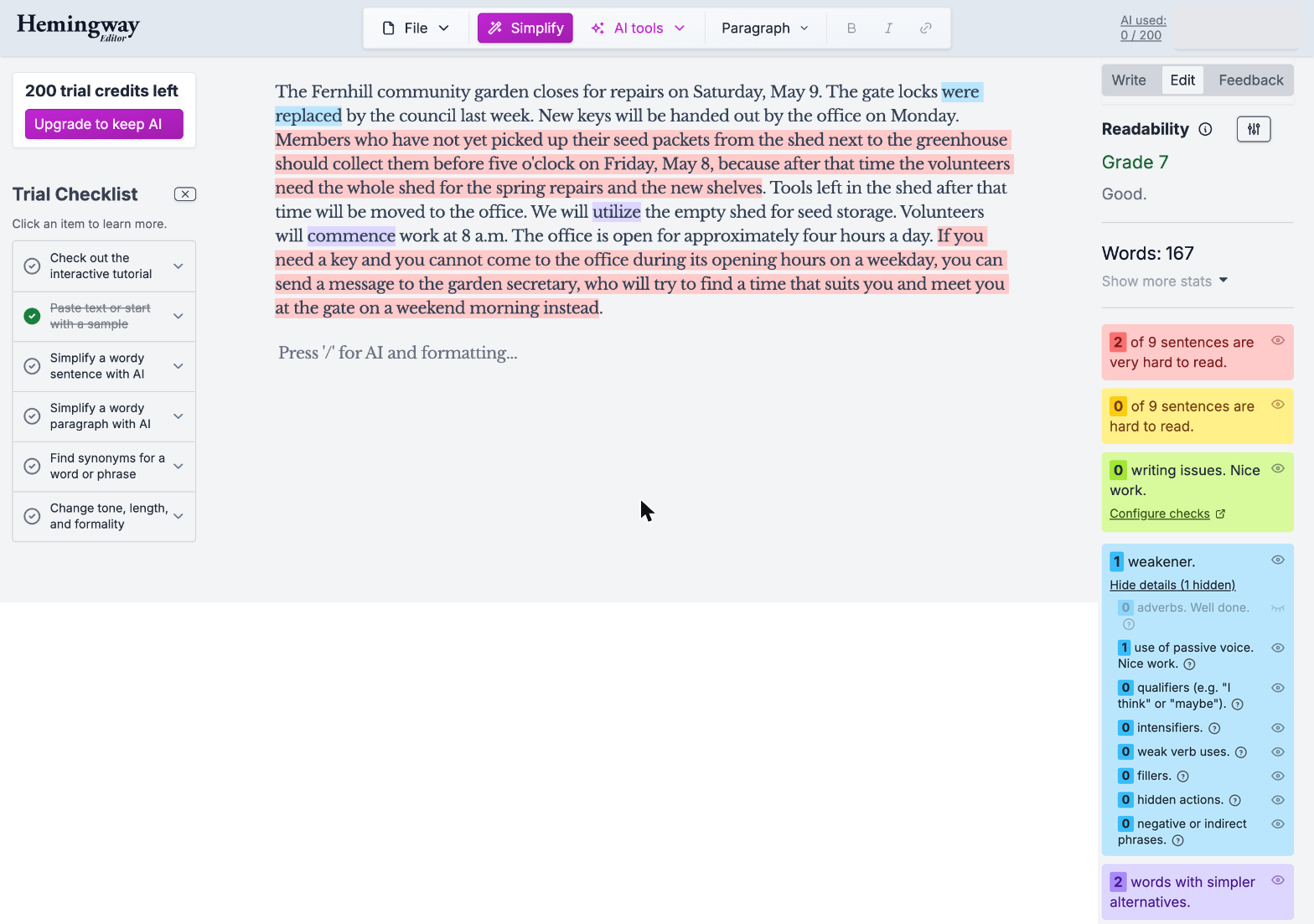
Flagged both long sentences, "were replaced", "utilize" and "commence"; missed two of the three passives and "approximately". Grade 7.
ProWritingAid: Winner
Partial 6 of 8
6 of 8: the Style report marks all 3 passives, "approximately" and the long "If" clause; Sticky Sentences marks both long sentences; missed "utilize" and "commence".
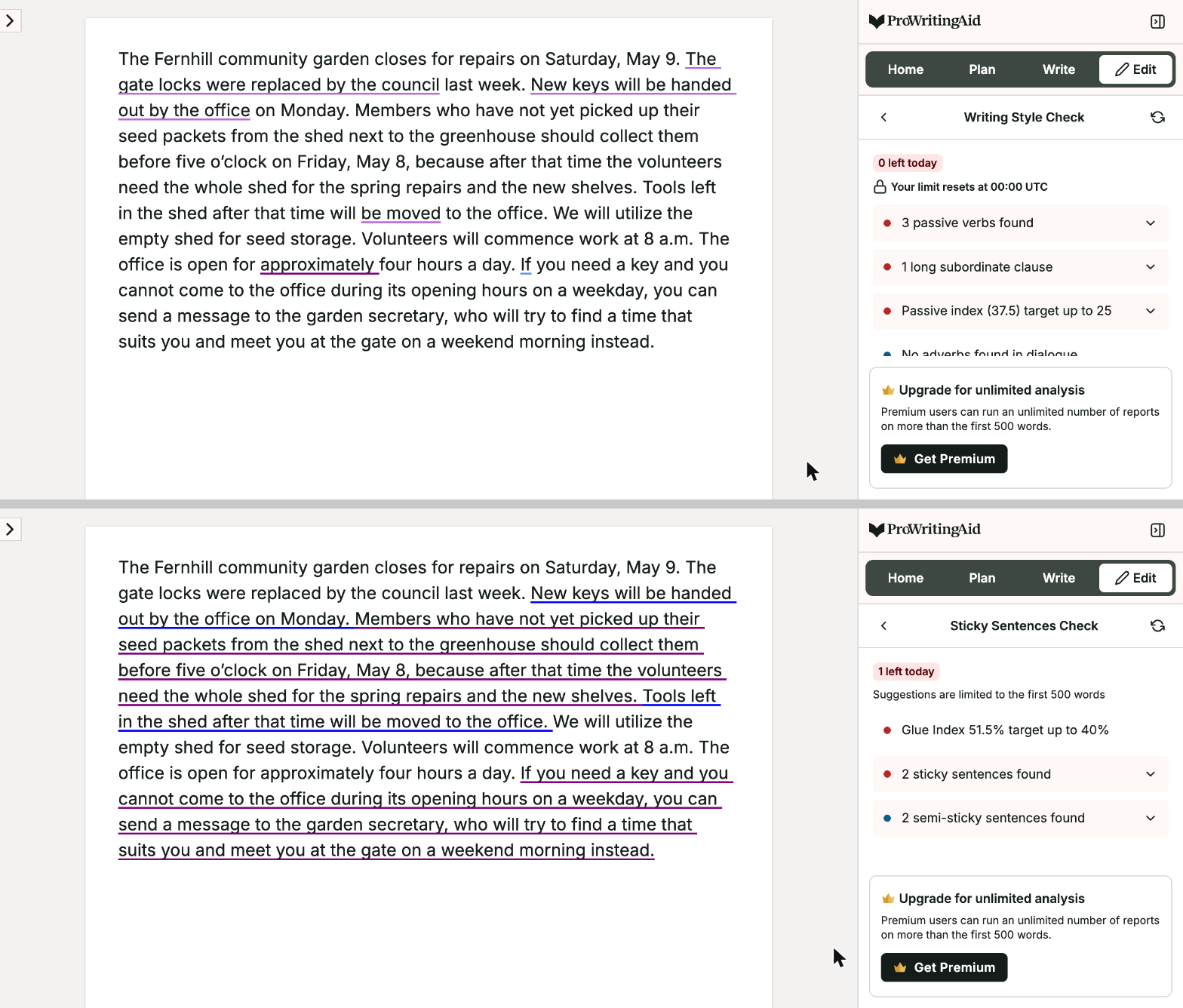
Hemingway ran on the account's Editor Plus trial (the highlights are the free editor's). ProWritingAid reports used: Readability, Style and Sticky Sentences; the long "Members who..." sentence is marked as a sticky sentence.
Test 2: Score the readability of the Gettysburg Address
The task
Paste the Bliss copy of Abraham Lincoln's Gettysburg Address (the text at abrahamlincolnonline.org, the first copy on the page) into each tool on its free plan, and record the readability result it gives for the whole text and the sentences it marks as hard to read.
How we judged it
Pass: a readability score or grade level for the whole text, and the hardest sentences marked in the text.
Partial: only one of the two: a score without marked sentences, or marked sentences without a score.
Fail: neither on the free plan.
Hemingway Editor: Winner
Pass
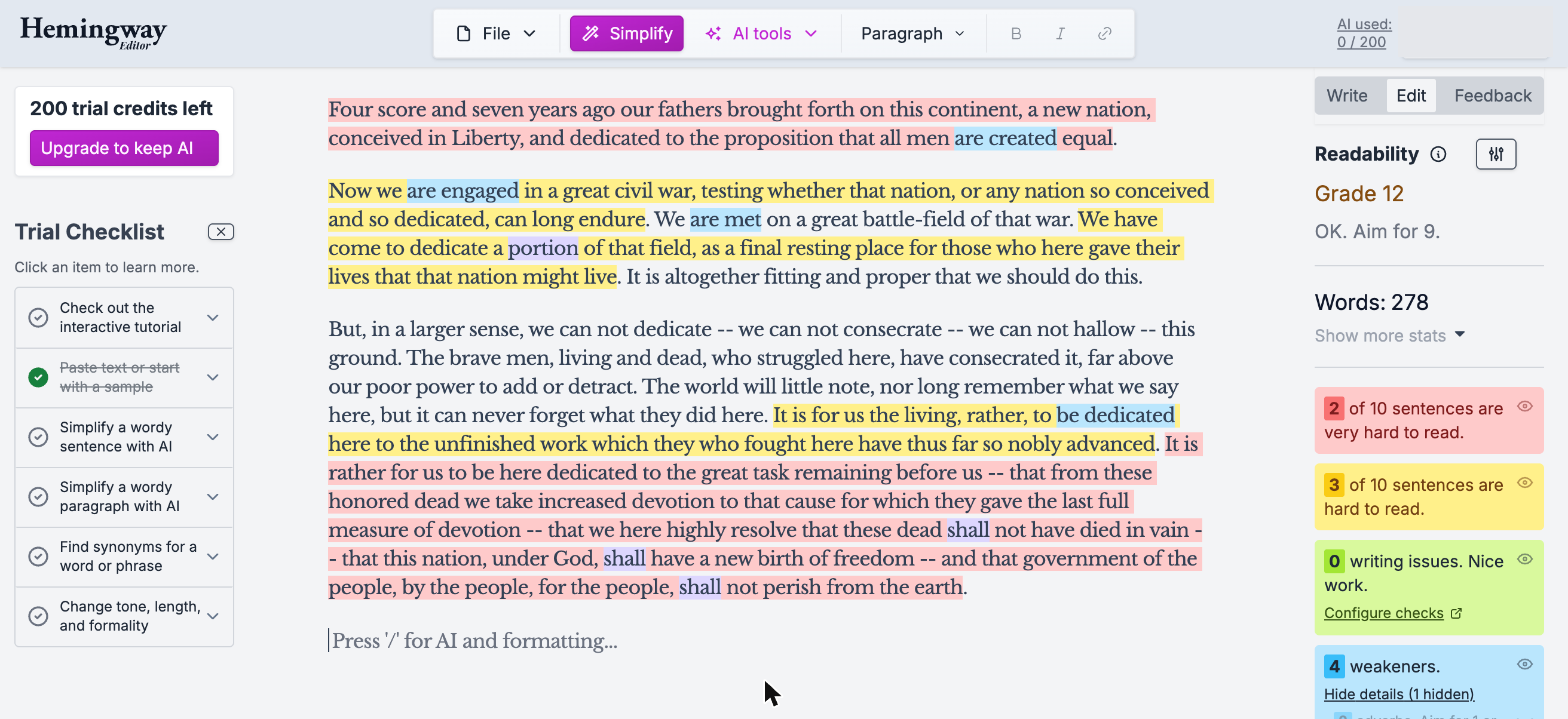
Grade 12 ("OK. Aim for 9"); marks 2 of 10 sentences as very hard and 3 as hard to read in the text.
ProWritingAid
Partial
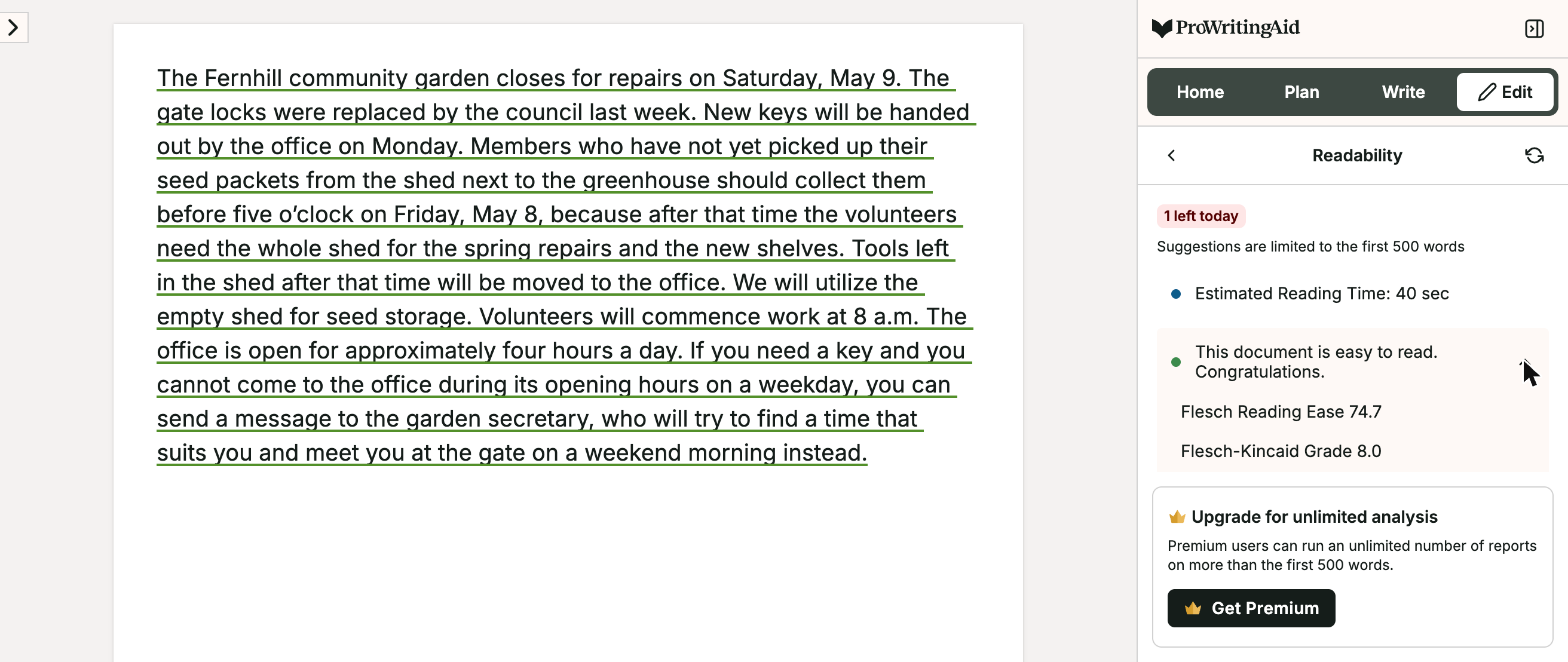
Flesch Reading Ease 67.9 and Flesch-Kincaid Grade 10.5, but no sentence is marked hard; it rates two paragraphs as easy to read.
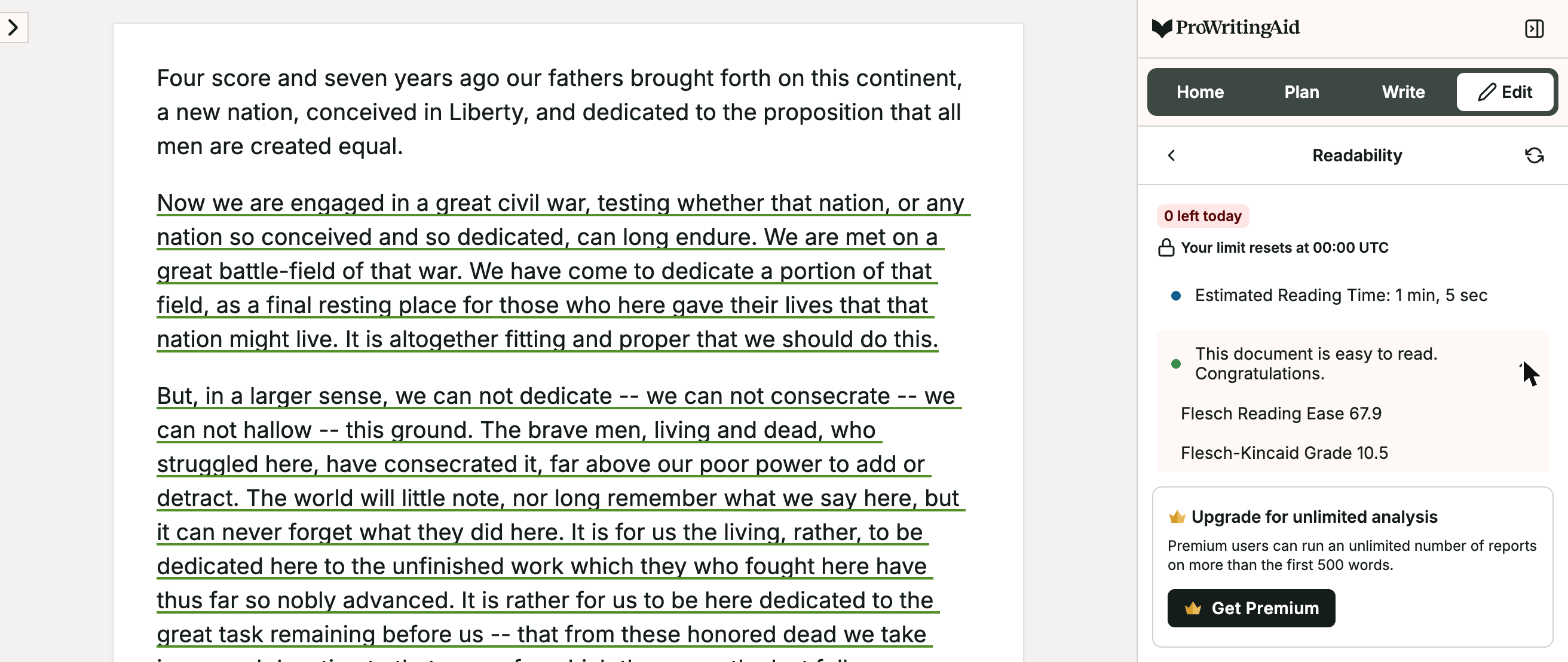
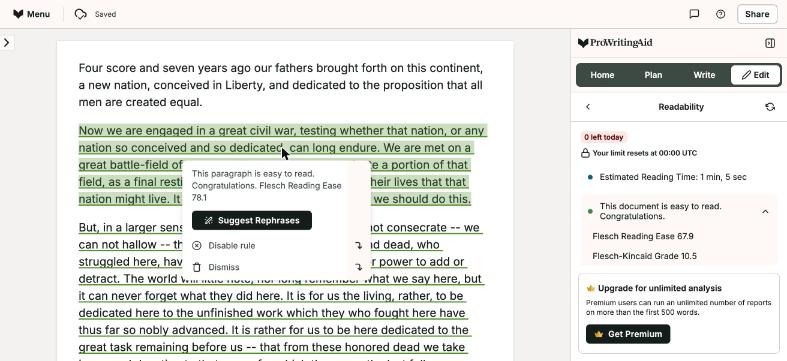
Speech text of the Bliss copy (278 words). ProWritingAid scores paragraphs, not sentences.
Test 3: Fix 10 planted grammar and spelling errors in a club notice
The task
Paste this FICTIONAL paragraph, which has 10 planted errors, into each tool and accept its grammar and spelling fixes:
The Fernhill book club meet on the first Tuesday of every month. This month we are reading a novel about a lighthouse keeper and his daugther. Everyone are welcome, even if you hasn't finished the book. Please bring you're own cup; the library dont provide them anymore. Last month, twelve people come to the meeting, which was more then we expected. Their will be tea and biscuits, and the meeting end at 8 p.m.
How we judged it
An error counts as fixed when the tool flags it and its suggestion gives the right form (the list is in the steps).
Pass: 9 or 10 fixed, and no correct word made wrong.
Partial: 6 to 8 fixed, or 9 or 10 with one correct word made wrong.
Fail: 5 or fewer fixed, or two or more correct words made wrong.
Hemingway Editor: Winner
Pass 9 of 10
9 of 10 fixed; for "dont" it suggested "don't", not "doesn't". No correct word changed.
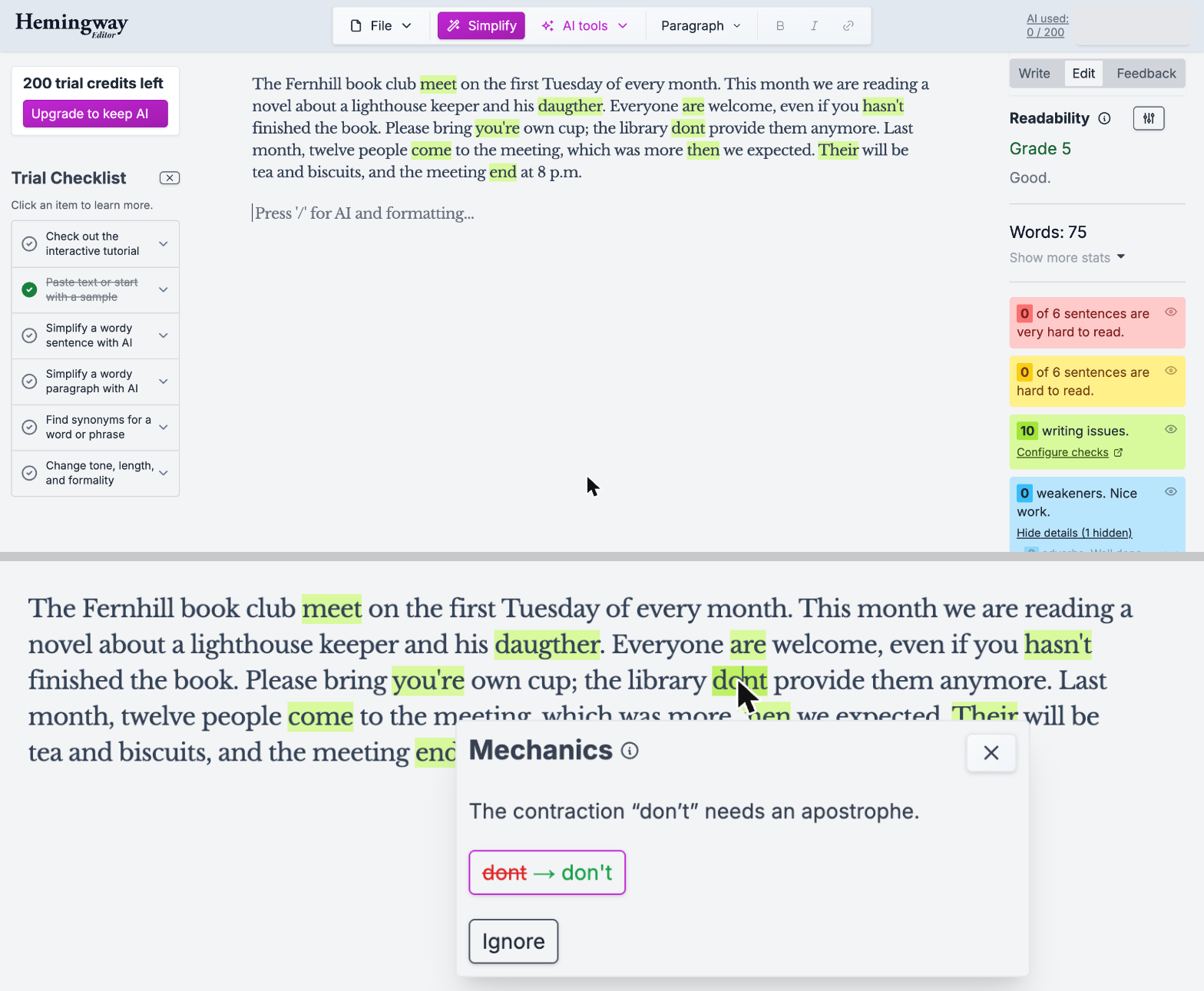
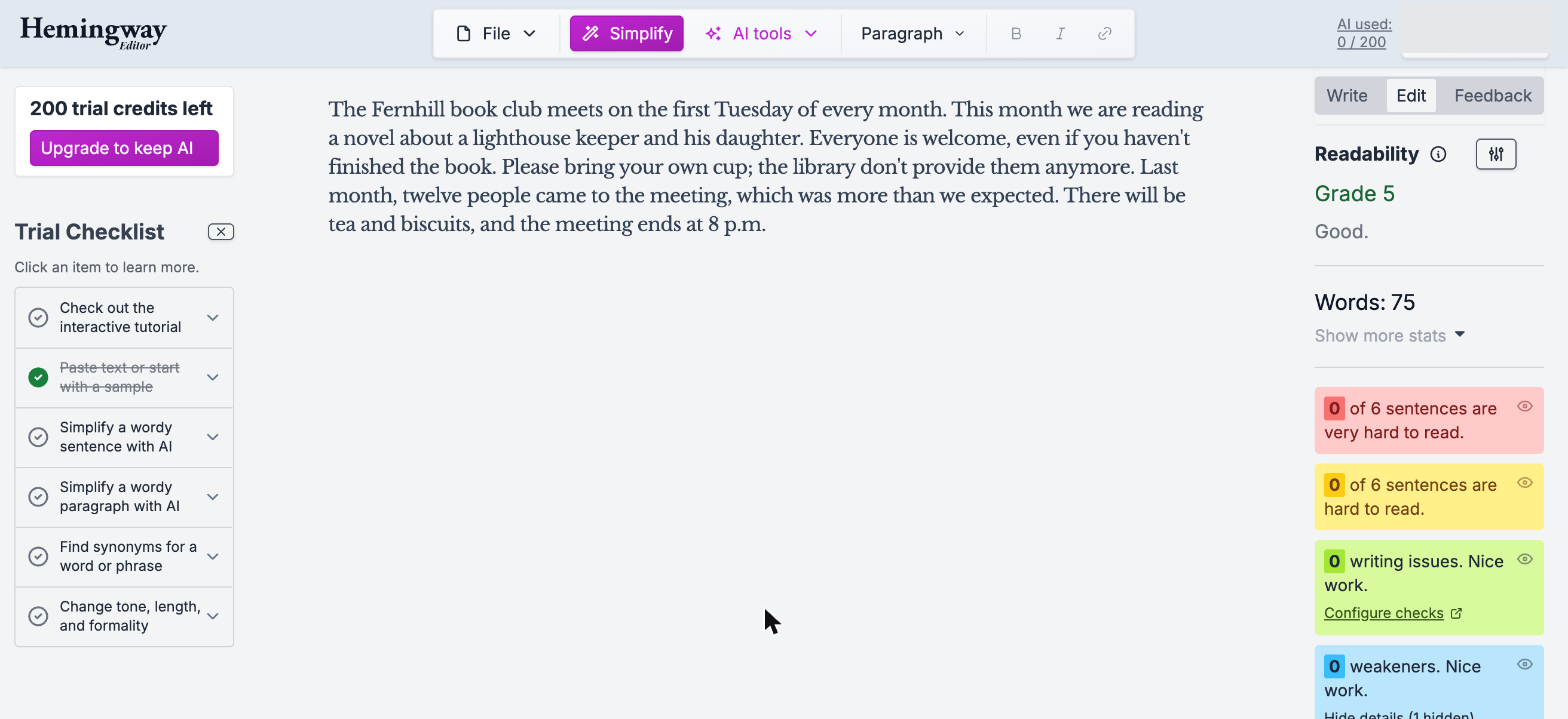
ProWritingAid
Partial 8 of 10
8 of 10 fixed ("dont" took two steps, to don't and then doesn't); the fixes for "come" and "end" are Premium-only.
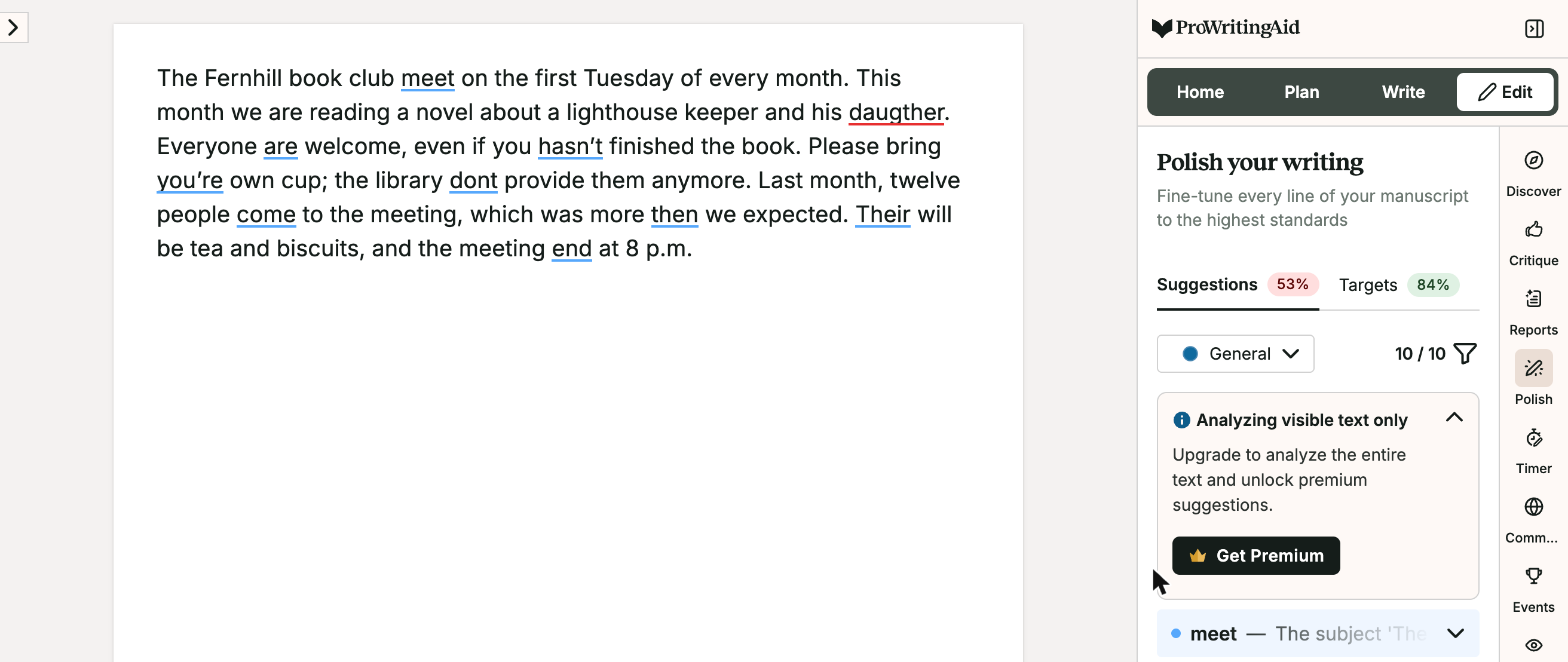
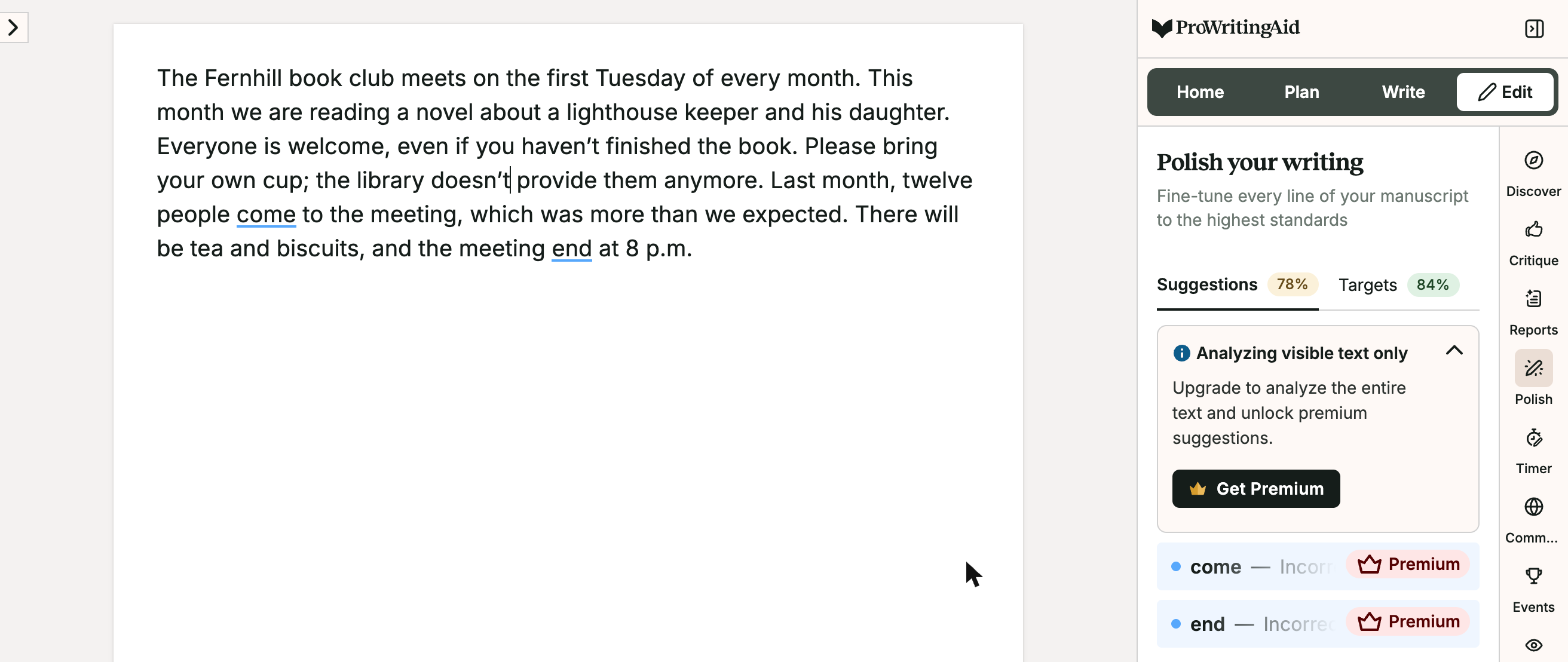
Hemingway checks grammar only on Editor Plus (here its 14-day trial); ProWritingAid ran on its free plan, where two of its fixes are Premium-only. ProWritingAid fixed "dont" in two steps: first "don't", then a second mark offered "doesn't".
Test 4: Rewrite two long sentences in plain English with AI
The task
Use each tool's AI rewriting feature on the two long FICTIONAL sentences from the first test, one at a time, to make them easier to read without changing the facts:
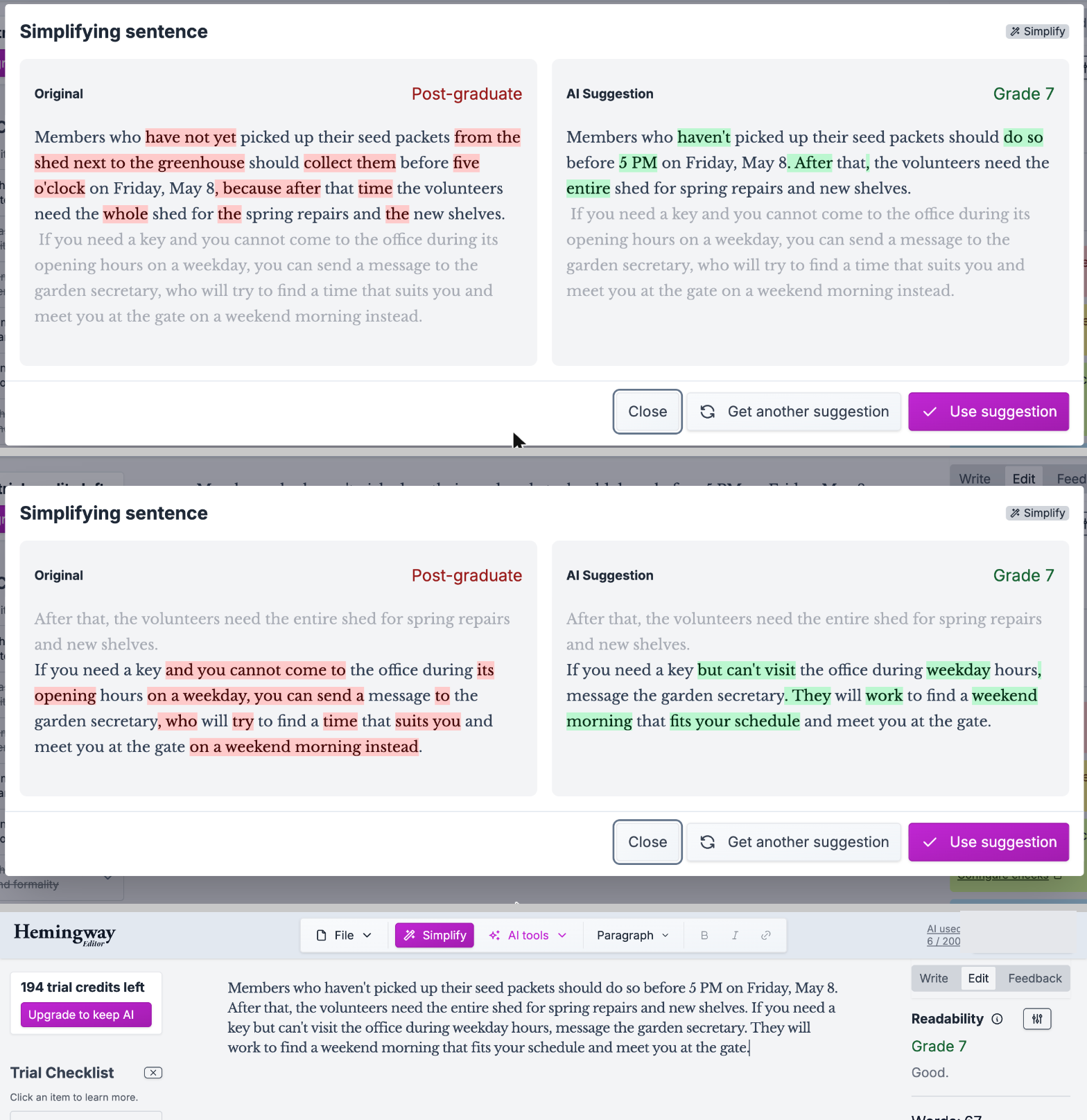
Members who have not yet picked up their seed packets from the shed next to the greenhouse should collect them before five o'clock on Friday, May 8, because after that time the volunteers need the whole shed for the spring repairs and the new shelves.
If you need a key and you cannot come to the office during its opening hours on a weekday, you can send a message to the garden secretary, who will try to find a time that suits you and meet you at the gate on a weekend morning instead.
How we judged it
The facts: collect the seed packets from the shed by the greenhouse before 5 p.m. on Friday, May 8, as the volunteers need the shed for repairs and new shelves; anyone who cannot reach the office on a weekday can message the garden secretary, who will try to meet them at the gate on a weekend morning.
Pass: both rewrites keep every fact, add nothing, and have a shorter longest sentence than the original.
Partial: one rewrite drops a detail or is not shorter.
Fail: both do, or either adds a fact.
Hemingway Editor
Partial 18 words
Longest rewritten sentence 18 words (from 45 and 49), but the first rewrite drops where to collect the packets: the shed by the greenhouse.
ProWritingAid: Winner
Pass 38 words
Longest rewritten sentence 38 words (from 45 and 49); both rewrites keep every fact, including the shed beside the greenhouse, and add nothing, but each stays one long sentence.
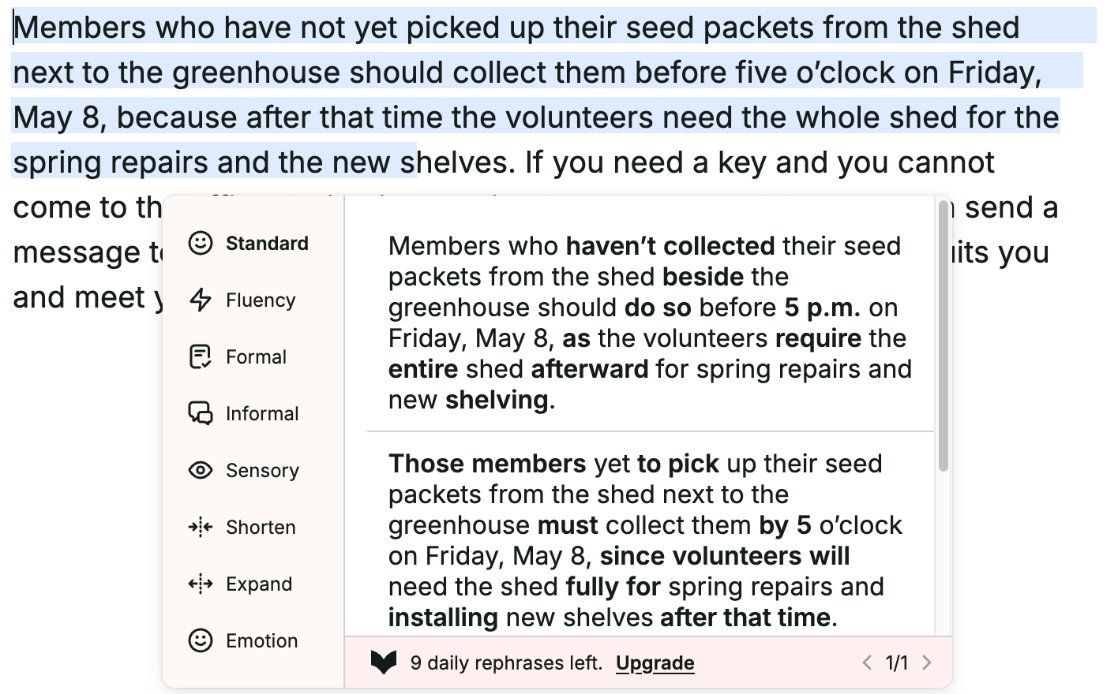
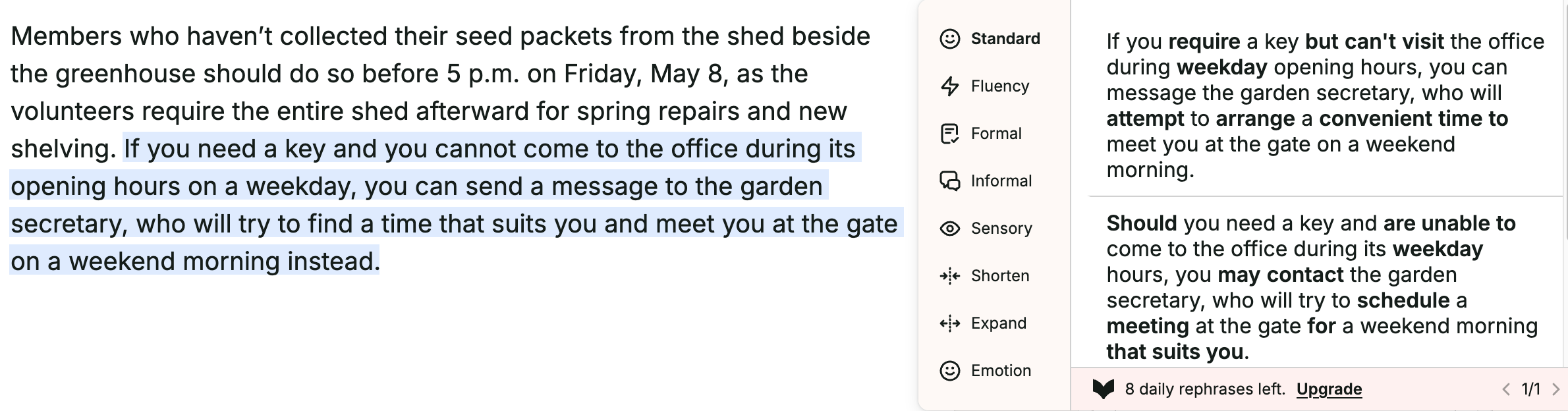
Run by the assistant in the owner's Chrome, signed in: Hemingway on its Editor Plus trial on October 23 and ProWritingAid Free on November 1, 2026 (its 10 free Rephrases a day had run out on October 23). ProWritingAid's Rephrase opened in its default Standard mode, and the first suggestion was used for each sentence. Hemingway split each sentence in two (longest 18 words); ProWritingAid kept each as one sentence (37 and 38 words). Both rewrites are shorter than the originals, which is all the length rule asks; Hemingway's first rewrite dropped the shed.
Our verdict
The choice turns on what you write and how much feedback you want.
Hemingway Editor is the simpler tool for clear, plain prose. Its free online editor already scores readability and highlights hard-to-read sentences, passive voice and words with simpler alternatives, and it costs nothing. Plus adds AI rewrites of those sentences, grammar fixes and written feedback for $100 a year with 5,000 AI sentences a month, or $150 with 10,000, and its 14-day trial asks for no credit card. Hemingway also says neither it nor its AI providers train models on your writing. It lists no plagiarism checker, unused AI credits do not roll over, and its security page says it does not yet have SOC 2 or ISO certification.
ProWritingAid goes deeper, and it is built for fiction. A grammar checker and 25+ reports cover pacing, dialogue, sticky sentences and echoes, and it works in Word, Google Docs, Scrivener, three browsers and its own Windows and Mac apps. Premium is $120 a year or $399 for a lifetime license and includes 1 Chapter Critique a day; Premium Pro allows 30 a day for $144 a year. Plagiarism checks and whole-manuscript analyses cost extra.
For nonfiction, start with Hemingway's free editor. For a novel in progress, ProWritingAid is the better investment.
Choose Hemingway Editor if
You write nonfiction, such as blog posts, reports, emails or help articles, and want it shorter and easier to read. Hemingway's free online editor scores readability and highlights dense sentences, passive voice and words with simpler alternatives, and Plus adds AI rewrites, tone changes and unlimited grammar fixes from $100 a year. You can test Plus for 14 days without a credit card, and Hemingway says neither it nor its AI providers train models on your writing.
Choose ProWritingAid if
Your project is a novel or another long manuscript, and you want feedback on more than sentence clarity. ProWritingAid pairs a grammar checker with 25+ reports, among them pacing, dialogue and echoes, and its AI critiques whole chapters: 1 a day on Premium and 30 a day on Premium Pro, at $144 a year. It plugs into Scrivener and Google Docs as well as Word, and lifetime licenses start at $399. The Free plan lets you try the reports on 500 words at a time.
Frequently asked questions
Which is cheaper, Hemingway Editor or ProWritingAid?
It depends on the tier and the billing. Billed yearly, Hemingway Individual 5K (5,000 AI sentences a month) costs $100, against $120 for ProWritingAid Premium, while Individual 10K costs $150, against $144 for Premium Pro. Billed monthly, Hemingway costs $25 or $30 and ProWritingAid $30 or $36. ProWritingAid also sells lifetime licenses: $399 for Premium and $699 for Premium Pro. For teams, Hemingway Team 10K costs $30 per user a month or $150 per user a year, for up to 50 users; ProWritingAid Teams costs $12 per user a month, billed yearly only, for 2 to 100 users. Both have a free tier.
Does Hemingway Editor check grammar and spelling?
Hemingway's own pages disagree. Its help center says you need Editor Plus to see grammar, spelling and punctuation highlights, and its pricing page lists unlimited advanced grammar fixes, which use no AI credits, on every Plus plan. Its grammar-checker page, though, advertises a free grammar and spelling checker. The free online editor is built around readability: it scores your text and flags hard-to-read sentences, passive voice and words with simpler alternatives. ProWritingAid's Free plan lists grammar, spelling and punctuation checks, on 500 words at a time, along with 2 runs a day of each report.
Which is better for writing a novel?
ProWritingAid. It presents itself as a toolkit for storytellers: its reports cover pacing, dialogue, echoes and sticky sentences, Premium includes 1 Chapter Critique a day and Premium Pro 30, and Story Credits pay for Manuscript, Plot, Character and Marketability analyses and the Virtual Beta Reader; one credit costs $50 at full price, $35 on Premium and $25 on Premium Pro. It also works inside Scrivener. Hemingway focuses on readability: it flags dense sentences and passive voice and, on Plus, rewrites them or gives written feedback on a draft.
Do Hemingway Editor and ProWritingAid use my writing to train AI?
Both say no. Hemingway says neither it nor its AI providers train AI models on your writing, and that it does not store your documents; its security page says it has no SOC 2 or ISO certification yet. ProWritingAid says it never uses your writing to train its AI, and it states SOC 2 compliance, with EU and US hosting options.
Can I try Hemingway Editor Plus or ProWritingAid Premium for free?
Hemingway offers a 14-day trial of Plus with up to 200 AI sentences and no credit card, and the trial ends without charging you; the online editor itself stays free. ProWritingAid offers a Free plan instead of a timed trial: it checks 500 words at a time, with 2 runs of each report, 10 Rephrases and 3 Sparks a day, but no Chapter Critique. Its 3-day money-back guarantee covers yearly and lifetime plans; monthly plans are not refundable.
Compare with others
More about: Hemingway Editor · ProWritingAid · Best AI writing tools