
Grammarly vs LanguageTool: Which is better in 2026?
Both tools catch mistakes in text you have already written; the choice turns on where you write, which languages you use and your budget.
Tested hands-on: 4 tests on a MacBook Pro (M1 Pro), October 23 – November 1, 2026. How we tested
Some links on this page are affiliate links. If you buy through them we may earn a commission at no extra cost to you. This never affects our verdicts.
Quick answer
- Choose Grammarly if: You write in many different apps every day, from Google Docs and Word to Gmail, Outlook, Slack and Jira, and want one assistant that follows you there.
- Choose LanguageTool if: You write in more than one language, or want grammar and style checks at a lower yearly price.
- Price at a glance: Grammarly: Free plan; paid from $30/mo · LanguageTool: Free plan; paid from $24.90/mo
At a glance
 Grammarly |  LanguageTool | |
|---|---|---|
| Free plan | Yes | Yes |
| Paid plans | From $30/mo | From $24.90/mo |
| Our tests | Won 2 of 42 ties | Won 0 of 42 ties |
| Best for | Individuals and teams of up to 149 people who write in many apps every day and want grammar, tone and clarity fixes, plagiarism checks and shared style rules, rather than long-form SEO content. | Writers and small teams who work in several languages and want grammar, style and rephrasing help on text they wrote themselves, rather than a tool that drafts articles from a prompt. |
Grammarly and LanguageTool both check grammar, spelling and style as you write, and both now offer AI rewriting on top. They come from different places. Grammarly, founded in 2009 and now part of Superhuman, works in more than 1 million apps and sites and sells Pro per member, with plagiarism checks and shared style rules for teams. LanguageTool began in 2003 as an open-source project, checks more than 30 languages and dialects and costs less per year, but its browser extension is now for Premium users only. Here is how they compare on price, free plans, languages, team tools, plagiarism checks, APIs and ways to try them.
Pricing
| Plan | Monthly | Yearly (12-month total) |
|---|---|---|
| Grammarly | ||
| FreeFor individuals; grammar and spelling checks, tone detection, 100 AI prompts a month | Free Free plan | |
| ProPer member; $12/member/mo billed yearly ($144/yr) or $30 billed monthly; 1-149 seats; 2,000 AI prompts/member/mo | $30/mo | $144/yr ($12/mo) |
| EnterpriseContact sales; available through Superhuman Go; unlimited members and AI prompts, SAML SSO, SCIM, data loss prevention | Custom | |
| LanguageTool | ||
| BasicFree; 2,000 characters per text field, 3 AI paraphrases a day, limited Picky Mode; the browser extension needs Premium | Free Free plan | |
| Premium1 user; $69.90 billed yearly; also $49.90 a quarter or $119.80 for 2 years; 150,000 characters per text field, unlimited AI paraphrasing | $24.90/mo | $69.90/yr ($5.83/mo) |
| TeamsPer user, billed yearly; $66.40 for 2-9 users ($69.90 list less 5%), 10% off from 10 users, rising to 50% at 1,000; Team Style Guide, Team Dictionary, user management | no monthly price | $66.40/yr, billed yearly ($5.53/mo) |
Prices checked on .
Features compared
| Feature | Grammarly | LanguageTool |
|---|---|---|
| Brand voice | Yes · Brand tones: 1 on Pro, unlimited on Enterprise; not on Free | Partial · Rule-based: personal Style Guide on Premium, shared Team Style Guide and Dictionary on Teams |
| SEO mode | No · No SEO or keyword features listed on any plan | No · No SEO features listed |
| Plagiarism check | Yes · In the app on Pro and Enterprise, not Free; also a web checker; 16B+ web pages and ProQuest academic papers | No · No plagiarism checker listed |
| Templates | Partial · Snippets only: shared, on-brand messaging templates on Pro and Enterprise | No · No templates; the paraphraser has five modes (general, formal, concise, fluent, simple) |
| Team seats | Yes · Pro 1 to 149 seats; Enterprise unlimited members | Yes · Teams plan from 2 users with user management; volume discounts for larger teams |
| API | Partial · Enterprise and Education admins only: analytics, license, writing score, AI and plagiarism detection (beta) APIs | Yes · Free public API (20 requests a minute per IP); paid API $39 to $550/mo by daily calls; self-hostable server |
| Word limits | Yes · AI prompts: 100/mo Free, 2,000/member/mo Pro, unlimited Enterprise | Yes · 2,000 characters per text field free, 150,000 on Premium; 3 AI paraphrases a day free, unlimited on Premium |
| Free trial | Yes · Free plan; Pro trials offered periodically (a 7-day trial on the US plans page captured 2026-10-13) | Partial · Free Basic plan; no Premium trial on the pricing page, 14-day money-back guarantee |
| Integrations | Yes · 1M+ apps and sites: Google Docs, Word, Gmail, Outlook, Slack, Salesforce, Jira and more | Yes · Extension for Chrome, Edge, Firefox, Safari, Opera (Premium only; also covers Google Docs, Gmail); Word, Thunderbird; Windows and macOS apps |
How we tested
We gave Grammarly and LanguageTool the same 4 tasks on the same MacBook Pro (M1 Pro). Each test below lists the task, how we judged it, both results and screenshots; select a screenshot to see it at full size.
- Device
- MacBook Pro (M1 Pro) · macOS 26.6.2 · Chrome 155, Chrome 155 and 156
- Tested
- October 23 – November 1, 2026
- Plans used
- Grammarly: Free · LanguageTool: Free
- App versions
- Grammarly: Web editor (Grammarly Docs), English (US), Web editor (Grammarly Docs), Spanish added in settings, Web editor, AI Chat · LanguageTool: Web editor, English (US), Web editor, Spanish, Web editor, Paraphrase (shortest option per sentence)
| Test | Grammarly | LanguageTool | Winner |
|---|---|---|---|
| Fix ten planted errors in an English paragraph | Pass10 of 10 | Pass9 of 10 | Grammarlyby Planted errors fixed by the first suggestion |
| Leave eight correct but tricky sentences alone | Pass0 of 8 | Pass0 of 8 | Tie |
| Fix five planted errors in a Spanish paragraph | Pass5 of 5 | Pass5 of 5 | Tie |
| Shorten a wordy paragraph with the AI rewrite | Pass24 words | Fail40 words | Grammarly |
| Tests won | 2 | 0 | 2 ties |
Test 1: Fix ten planted errors in an English paragraph
The task
Paste this paragraph for Fernhill Goods, a FICTIONAL online shop, into each tool's web editor. It has ten planted spelling and grammar errors:
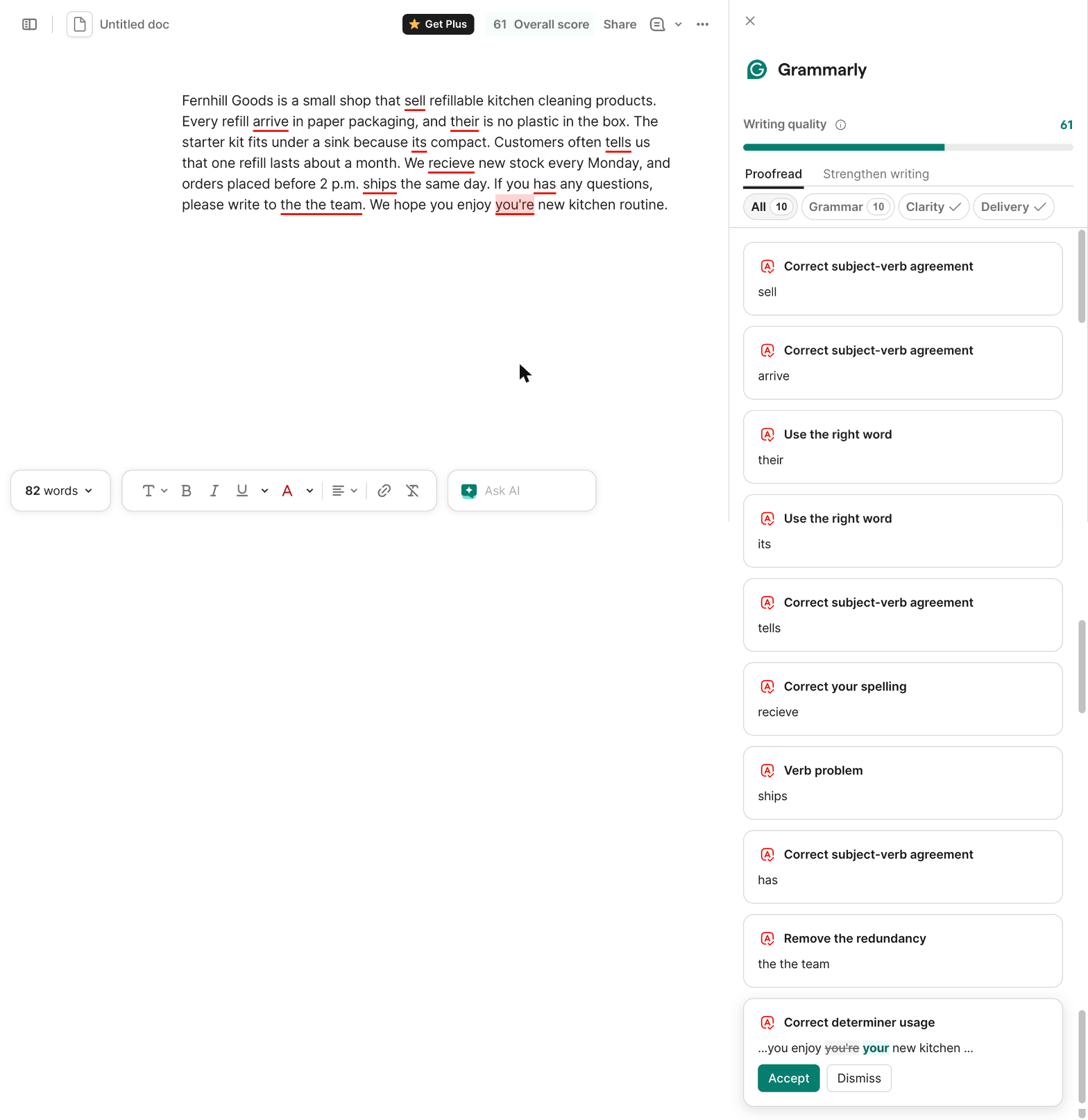
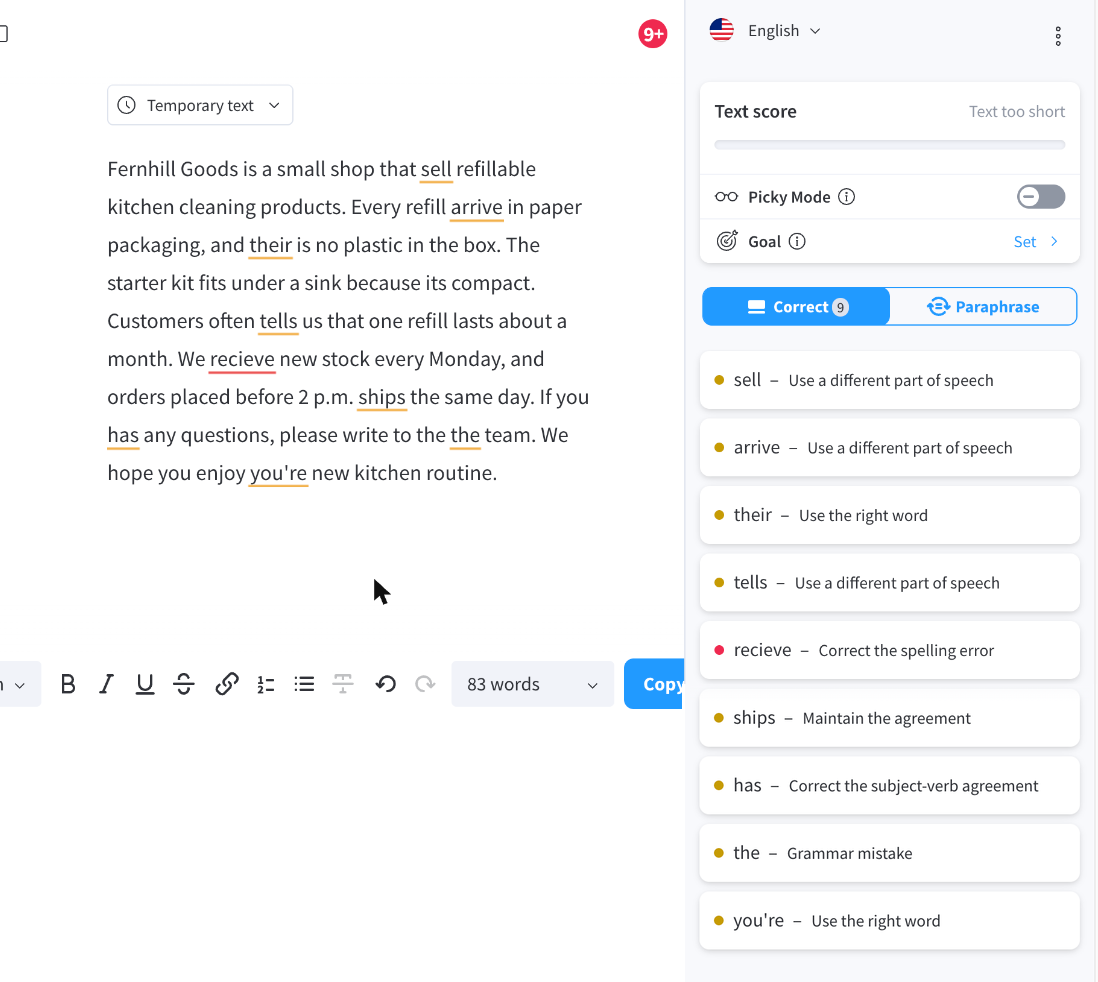
Fernhill Goods is a small shop that sell refillable kitchen cleaning products. Every refill arrive in paper packaging, and their is no plastic in the box. The starter kit fits under a sink because its compact. Customers often tells us that one refill lasts about a month. We recieve new stock every Monday, and orders placed before 2 p.m. ships the same day. If you has any questions, please write to the the team. We hope you enjoy you're new kitchen routine.
How we judged it
The ten fixes: sell → sells, arrive → arrives, their → there, its → it's, tells → tell, recieve → receive, ships → ship, has → have, "the the" → "the", you're → your. An error counts when the tool marks it and its first suggestion is that fix.
Pass: 9 or 10 fixed.
Partial: 6 to 8 fixed.
Fail: 5 or fewer, or a suggestion that would make a correct word wrong.
Grammarly: Winner
Pass 10 of 10
All 10 planted errors marked, each with the right first suggestion (sells, arrives, there, it's, tell, receive, ship, have, the, your); nothing correct flagged.
LanguageTool
Pass 9 of 10
9 of 10 with the right first suggestion; it did not flag "its compact" (it's). Nothing correct was flagged.
Test 2: Leave eight correct but tricky sentences alone
The task
Paste these eight sentences, all correct standard US English, into each tool's web editor as one paragraph:
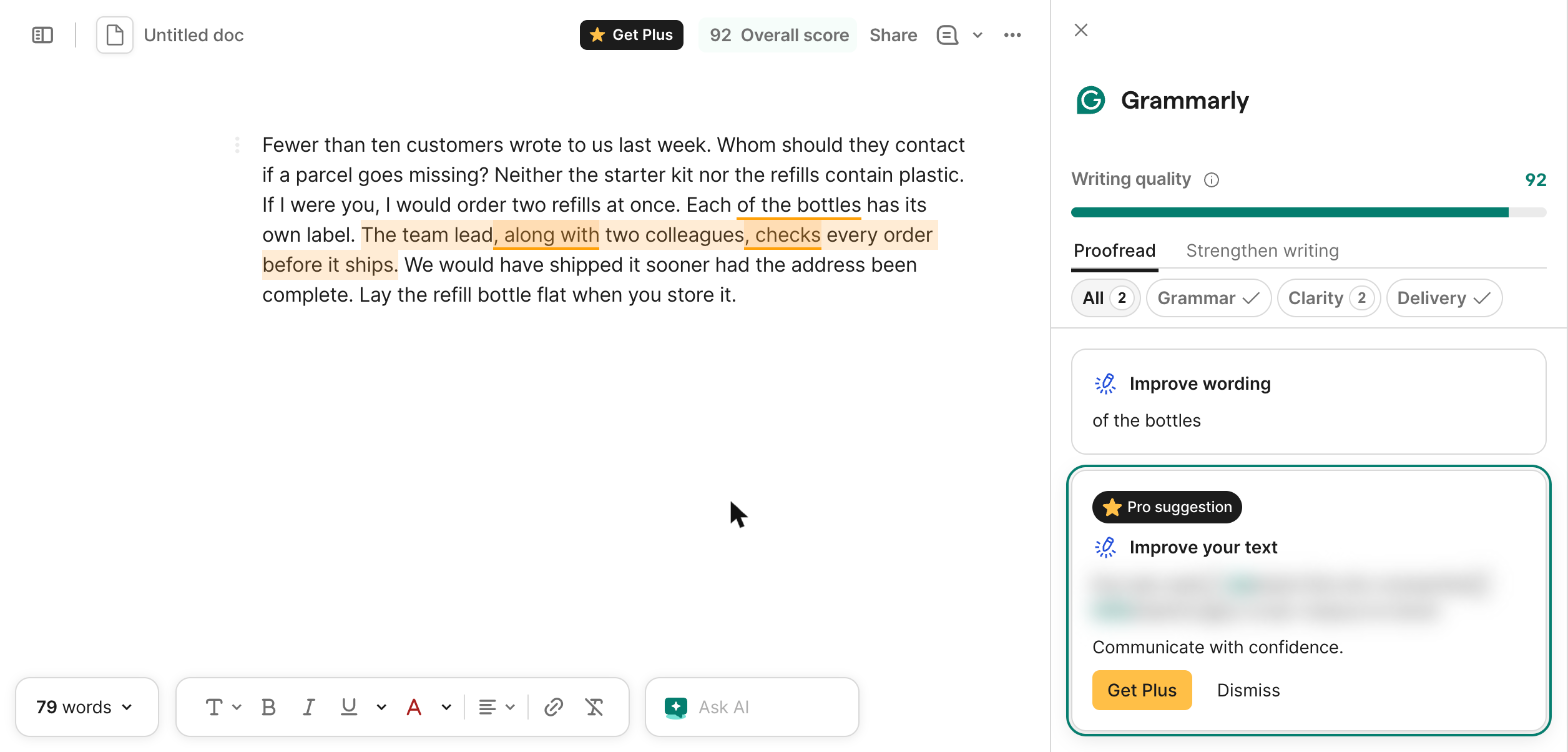
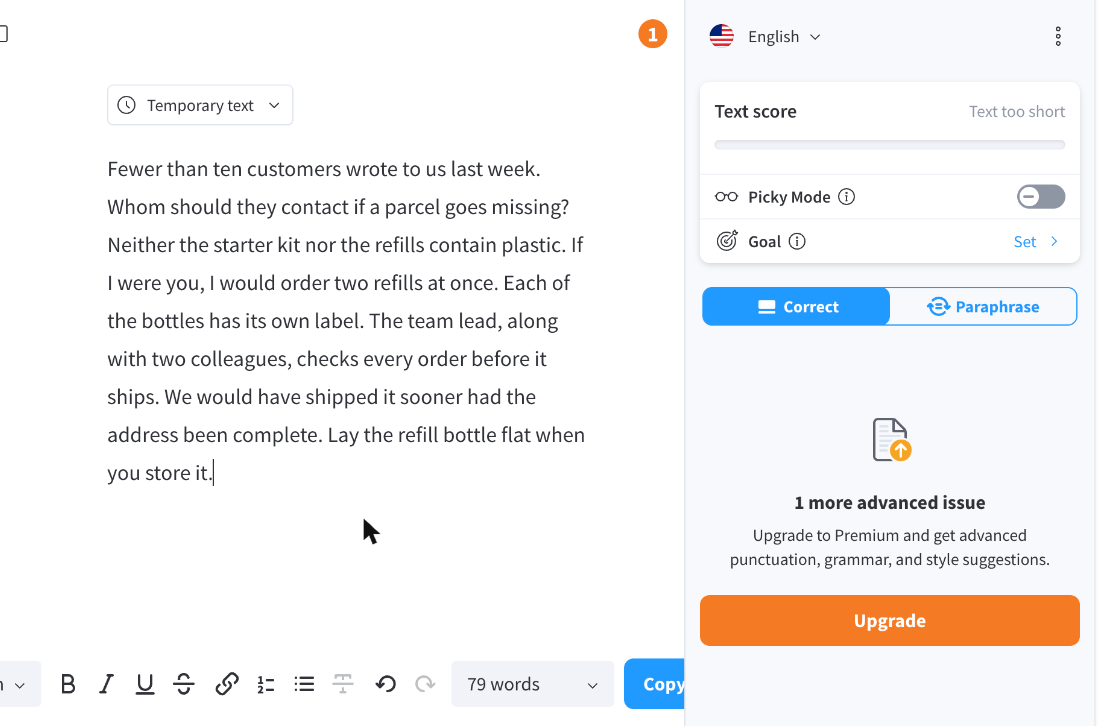
Fewer than ten customers wrote to us last week. Whom should they contact if a parcel goes missing? Neither the starter kit nor the refills contain plastic. If I were you, I would order two refills at once. Each of the bottles has its own label. The team lead, along with two colleagues, checks every order before it ships. We would have shipped it sooner had the address been complete. Lay the refill bottle flat when you store it.
How we judged it
A sentence counts as flagged when the tool marks a spelling, grammar or punctuation (correctness) issue in it. Style, clarity or tone suggestions are noted in the result line but not counted.
Pass: no sentence flagged.
Partial: one sentence flagged.
Fail: two or more sentences flagged.
Grammarly
Pass 0 of 8
No spelling, grammar or punctuation flag on any of the 8 sentences; its only two marks are clarity rewrites locked to Plus.
LanguageTool
Pass 0 of 8
No sentence flagged; it reports only "1 more advanced issue" locked to Premium, with no mark in the text.
Test 3: Fix five planted errors in a Spanish paragraph
The task
Paste this Spanish paragraph for Fernhill Goods (FICTIONAL) into each tool's web editor. It has five planted errors:
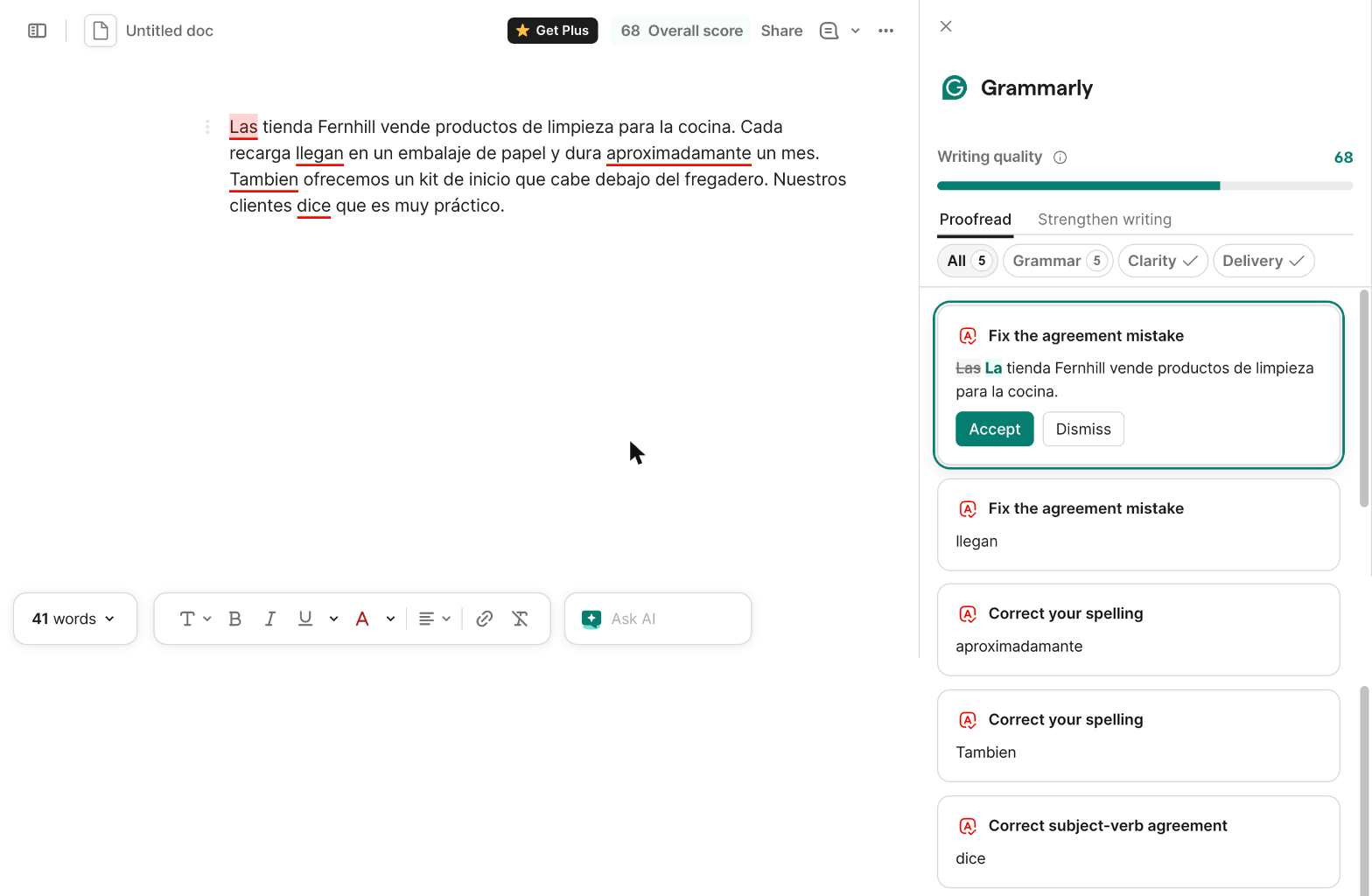
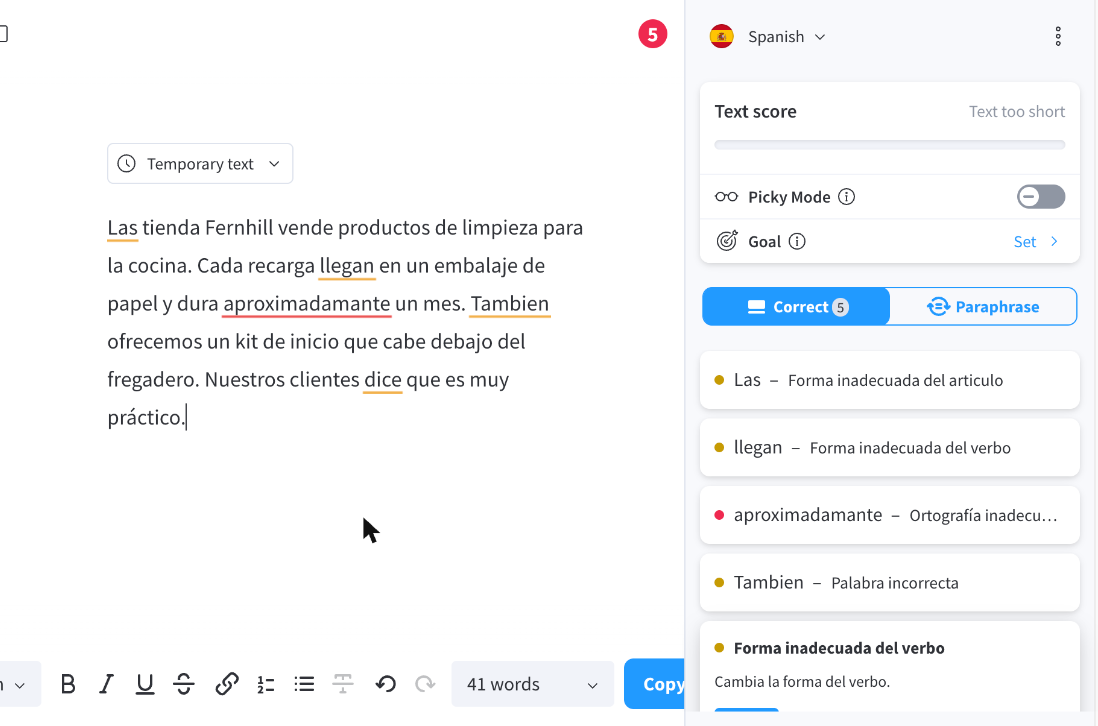
Las tienda Fernhill vende productos de limpieza para la cocina. Cada recarga llegan en un embalaje de papel y dura aproximadamante un mes. Tambien ofrecemos un kit de inicio que cabe debajo del fregadero. Nuestros clientes dice que es muy práctico.
How we judged it
The five fixes: Las → La, llegan → llega, aproximadamante → aproximadamente, Tambien → También, dice → dicen. An error counts when the tool marks it and its first suggestion is that fix.
Pass: all five fixed.
Partial: three or four fixed.
Fail: two or fewer, or the tool does not check the text as Spanish.
Grammarly
Pass 5 of 5
With Spanish added to its languages, all 5 fixed with the right first suggestion (La, llega, aproximadamente, También, dicen).
LanguageTool
Pass 5 of 5
Language set to Spanish; all 5 fixed with the right first suggestion (La, llega, aproximadamente, También, dicen).
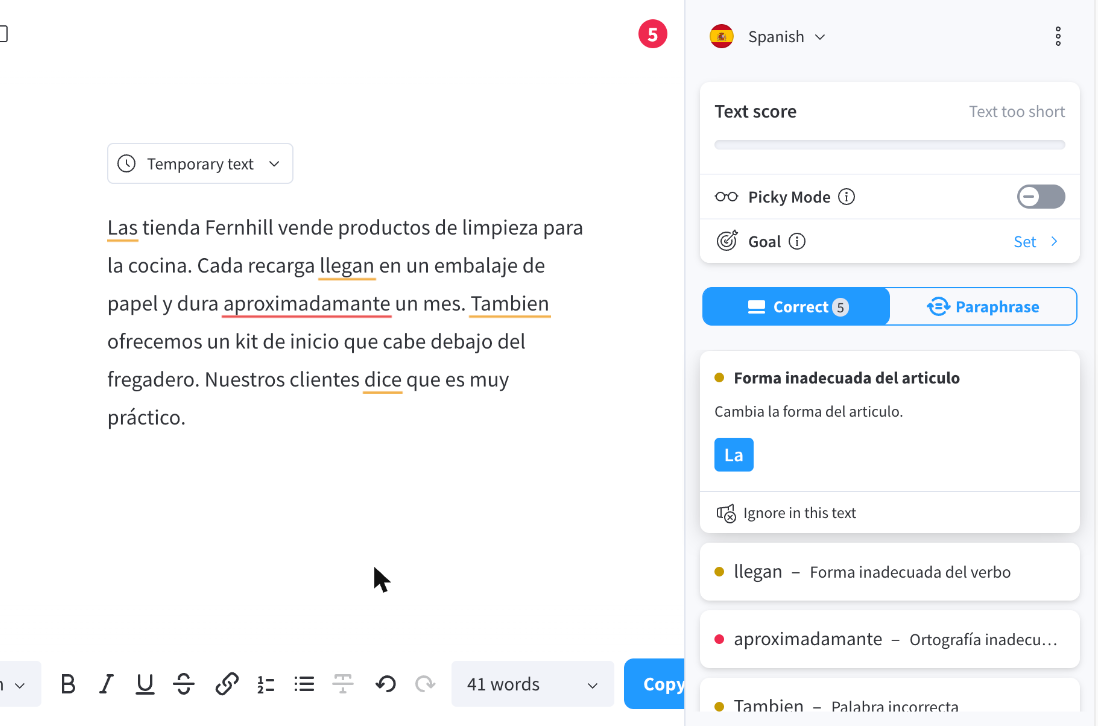
Grammarly has no language menu in a document: Spanish was added under its language settings for this test and removed afterwards.
Test 4: Shorten a wordy paragraph with the AI rewrite
The task
Ask each tool's AI rewrite feature (Grammarly's AI prompt, LanguageTool's paraphraser) to shorten this paragraph to at most 35 words without changing its meaning:
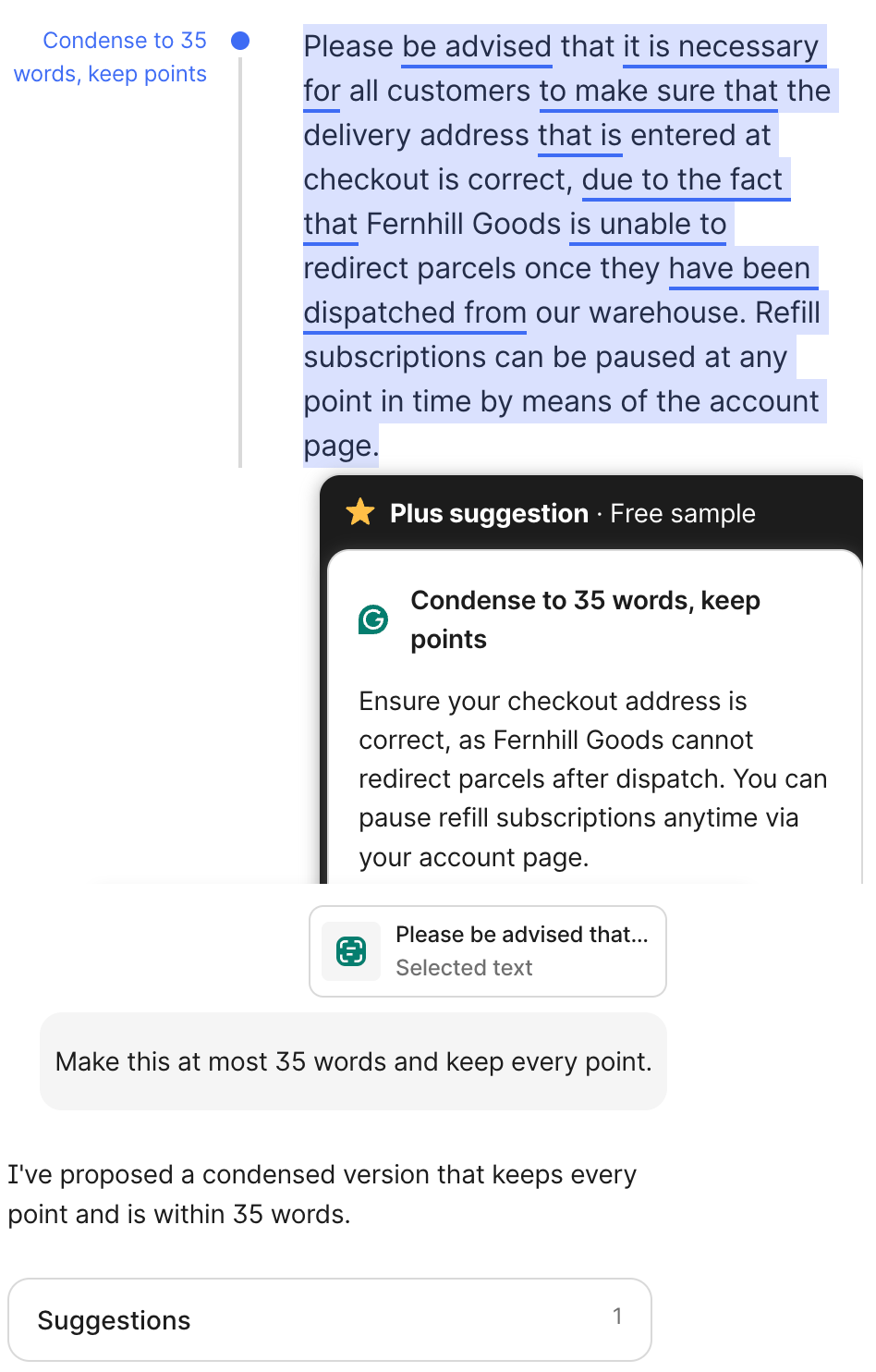
Please be advised that it is necessary for all customers to make sure that the delivery address that is entered at checkout is correct, due to the fact that Fernhill Goods is unable to redirect parcels once they have been dispatched from our warehouse. Refill subscriptions can be paused at any point in time by means of the account page.
How we judged it
The three points: check the delivery address at checkout; parcels cannot be redirected after dispatch; refill subscriptions can be paused on the account page.
Pass: all three points kept, 35 words or fewer, and nothing new promised.
Partial: all three kept but over 35 words, or one point weakened.
Fail: a point lost or changed, or a new promise added.
Grammarly: Winner
Pass 24 words
24 words in two sentences keep all three points ("checkout address" for the delivery address, no redirecting after dispatch, pause refills on the account page) and promise nothing new.
LanguageTool
Fail 40 words
No instruction box; the first shortest option per sentence makes 40 words, and they change two points: "cannot change packages" and "stop" for "pause".
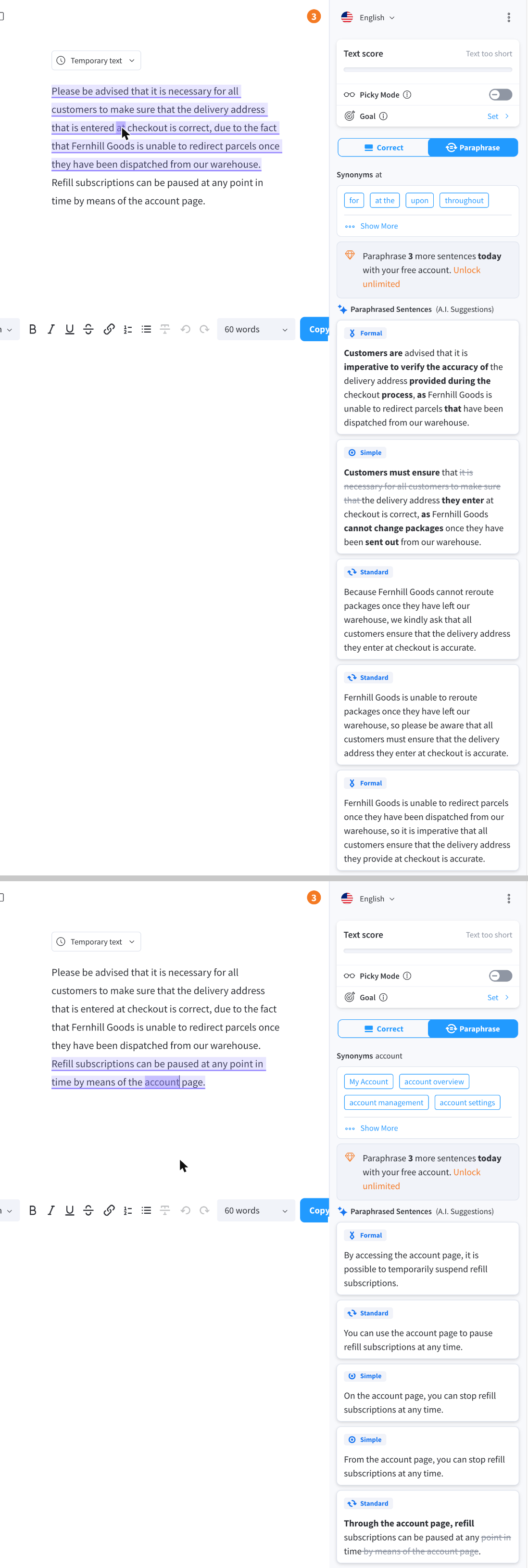
Run by the assistant in the owner's Chrome, signed in: LanguageTool Free on October 23 and Grammarly Free on November 1, 2026 (on October 23 Grammarly's free AI answers came back blurred). The test's instruction was typed into Grammarly's AI Chat, and the answer came as a "Plus suggestion · Free sample". LanguageTool's free plan has no instruction box, so its shortest option for each sentence was used. Words were counted as a word counter counts them.
Our verdict
Both tools catch mistakes in text you have already written; the choice turns on where you write, which languages you use and your budget.
Grammarly is the better fit if you write in many apps and want more AI help. It works in more than 1 million apps and sites. Pro adds full-sentence rewrites, tone adjustment, 2,000 AI prompts per member a month and a plagiarism checker that compares text with over 16 billion web pages and ProQuest's academic papers. Teams of up to 149 share one style guide, one brand tone and snippets. You pay for that: $144 per member a year, or $30 month to month, and SAML SSO needs Enterprise.
LanguageTool is the better value for multilingual writers and tight budgets. It checks more than 30 languages and dialects, and Premium costs $69.90 a year, less than half of Grammarly Pro billed yearly, with 150,000 characters per text field and unlimited paraphrasing. Its open-source core can run on your own server, and developers get a free public API. The trade-offs: the browser extension now needs Premium, the free plan stops at 2,000 characters per field, and no plagiarism checker is listed.
Pick Grammarly for plagiarism checks and AI-text detection; pick LanguageTool for several languages, self-hosting or the lower yearly price.
Choose Grammarly if
You write in many different apps every day, from Google Docs and Word to Gmail, Outlook, Slack and Jira, and want one assistant that follows you there. Pro adds full-sentence rewrites, tone adjustment, AI-text detection and a plagiarism checker that compares your text with over 16 billion web pages and ProQuest's academic papers. It also suits teams of up to 149 people that want one shared style guide, one brand tone and snippets, at $12 per member a month billed yearly.
Choose LanguageTool if
You write in more than one language, or want grammar and style checks at a lower yearly price. LanguageTool checks more than 30 languages and dialects, and Premium costs $69.90 a year with 150,000 characters per text field, unlimited AI paraphrasing and a personal Style Guide. It also fits developers and teams that want to self-host: the open-source core can run on your own server, the free public API allows 20 requests a minute, and every Premium package has a 14-day money-back guarantee.
Frequently asked questions
Is LanguageTool cheaper than Grammarly?
Yes, for one person and for teams. LanguageTool Premium costs $24.90 billed monthly or $69.90 a year, less than three months at the monthly price. Grammarly Pro costs $30 billed monthly or $144 a year ($12 a month). For teams, LanguageTool Teams is billed yearly at $66.40 per user for two to nine users, with discounts from 10% at 10 users up to 50% at 1,000; Grammarly Pro stays $144 per member a year for 1 to 149 seats. These are US list prices as of October 2026.
Which free plan is better, Grammarly Free or LanguageTool Basic?
It depends on where you write. Grammarly Free fixes mistakes, shows your tone and includes 100 AI prompts a month, and Grammarly's browser extension page marks the download as free. LanguageTool Basic checks up to 2,000 characters per text field, allows three AI paraphrases a day and a limited Picky Mode; its browser extension, which also handles Google Docs and Gmail, now needs Premium, though the website stays free. For the paid plans, Grammarly offers Pro trials from time to time, while LanguageTool's pricing page lists no Premium trial; every Premium package has a 14-day money-back guarantee.
Which one supports more languages?
By each vendor's own count, LanguageTool. It checks more than 30 languages and dialects, with over 20,000 extra Premium checks in seven of them, and its AI paraphraser covers six. Grammarly says it works in over 20 languages, with spelling and basic grammar suggestions in all of them; its advanced grammar, clarity and tone suggestions cover six: English, Spanish, French, German, Portuguese and Italian.
Do Grammarly and LanguageTool check for plagiarism?
Grammarly does, on Pro and Enterprise: its checker compares text with over 16 billion web pages and academic papers in ProQuest's databases, and Pro also detects AI-generated text. Grammarly also runs a separate plagiarism checker on its website. LanguageTool lists no plagiarism checker on any plan.
Can developers use Grammarly or LanguageTool through an API?
LanguageTool is the more open choice. Its public API is free at 20 requests a minute per IP address, paid API plans cost $39 to $550 a month depending on daily calls, and its open-source core (LGPL 2.1 or later) can run on your own server. Grammarly's APIs are only for Enterprise and Education admins and cover analytics, licenses, writing scores and, in beta, AI and plagiarism detection.
Compare with others
- Grammarly vs Hemingway Editor
- Grammarly vs ProWritingAid
- Grammarly vs Quillbot
- LanguageTool vs Quillbot
More about: Grammarly · LanguageTool · Best AI writing tools