
beehiiv vs Substack: Which is better in 2026?
It comes down to how you would rather pay: a monthly plan, or a share of reader payments.
Tested hands-on: 3 tests on a MacBook Pro (M1 Pro), October 30, 2026. How we tested
Some links on this page are affiliate links. If you buy through them we may earn a commission at no extra cost to you. This never affects our verdicts.
Quick answer
- Choose beehiiv if: You want to keep all of your subscription and digital product revenue, minus Stripe's fee, and would rather pay a monthly price than a 10% share.
- Choose Substack if: You want to publish for free with no subscriber limit and pay Substack only its 10% share of paid subscriptions, plus a one-time $50 if you want a custom domain.
- Price at a glance: beehiiv: Free plan; paid from $59/mo · Substack: Free
At a glance
 beehiiv |  Substack | |
|---|---|---|
| Free plan | Yes | Yes |
| Paid plans | From $59/mo | No paid plans |
| Our tests | Won 2 of 3 | Won 1 of 3 |
| Best for | Newsletter writers and publishers who want to grow through referrals and recommendations and earn from ads, paid subscriptions or digital products, with no platform fee on subscription and product sales. | Writers, journalists, podcasters and video creators who want to start free, charge for subscriptions and grow through Substack's reader network, and who accept a 10% revenue share instead of a monthly fee. |
beehiiv and Substack are two newsletter platforms that writers often weigh against each other, and they charge in opposite ways. beehiiv sells plans: its Free plan covers up to 2,500 subscribers, and paid subscriptions, automations and a custom sending domain start with Lite at $59 a month for up to 1,000 subscribers ($49 a month billed yearly), with no cut of your subscription sales. Substack has no plans: publishing is free with unlimited subscribers, and it keeps 10% of each paid subscription payment. This comparison sets their fees, US prices and eight features side by side, as of October 2026, from each company's own pricing and help pages.
Pricing
| Plan | Monthly | Yearly (12-month total) |
|---|---|---|
| beehiiv | ||
| FreeUp to 2,500 subscribers; unlimited sends; 1 team seat, 1 publication; no automations or paid subscriptions | Free Free plan | |
| LiteFrom $59/month for up to 1,000 subscribers ($49/month billed yearly); price rises with list size up to 100,000; 2 seats | $59/mo | $588/yr ($49/mo) |
| ProFrom $109/month for up to 1,000 subscribers ($95/month billed yearly); up to 250,000 subscribers; 10 seats | $109/mo | $1,140/yr ($95/mo) |
| EnterpriseCustom pricing at any list size; SSO/SAML, dedicated IPs and a customer success manager | Custom | |
| Substack | ||
| FreeFree to publish, unlimited subscribers; on paid subscriptions Substack keeps 10%, plus Stripe 2.9% + $0.30 per US card payment and 0.7% Billing | Free Free plan | |
Prices checked on .
Features compared
| Feature | beehiiv | Substack |
|---|---|---|
| Free tier size | Yes · Up to 2,500 subscribers, unlimited email sends | Yes · Unlimited subscribers; publishing is free; Substack's 10% applies only to paid subscriptions |
| Automations | Yes · Lite: 10 live automations; Pro: unlimited, adds click triggers and A/B splits; Free: welcome email only | Partial · Welcome emails per subscriber type (free, paid, imported, founding); feature guide lists drip sequences on lifecycle triggers (new free or paid sub, founding upgrade, churn) |
| Landing pages | Yes · Website builder on all plans; custom pages: Free 1, Lite 5, Pro unlimited | Partial · Automatic welcome page (fixed design, editable content), a custom subscribe page, static pages and an embeddable signup form |
| Paid newsletters | Yes · Lite (1 paid tier) and Pro (unlimited tiers); 0% platform fee, Stripe 2.9% + $0.30; not on Free | Yes · Monthly, annual and founding member prices; Substack keeps 10%, plus Stripe fees |
| Segmentation | Yes · Segments on all plans (Free 3, Lite 10, Pro unlimited); sending to a segment needs a paid plan | Yes · Saved, self-updating segments (tag, country, activity, paid status, signup date) for direct emails or segment-only post sends; private subscriber tags |
| Referral program | Yes · Built in on Lite (3 reward milestones) and Pro (unlimited); not on Free | Yes · Subscriber referrals with custom reward tiers (default for paid publications: comp subscriptions at 2, 10 and 25 referrals); not on private publications |
| API | Yes · API on all plans: 30 requests/min on Free, 180 on Lite, 500 on Pro; Send API on Pro and Enterprise | Partial · Read-only MCP server for Bestseller publications (dashboard metrics, traffic, publication settings); it cannot publish posts or change the account |
| Deliverability tools | Yes · Custom sending domain with SPF, DKIM and required DMARC on paid plans; DMARC wizard; dedicated IPs on Enterprise | Partial · Sent by Substack from [subdomain]@substack.com, even with a custom domain; optional double opt-in; opt-in review of imports; pruning of inactive imported readers when flagged |
How we tested
We gave beehiiv and Substack the same 3 tasks on the same MacBook Pro (M1 Pro). Each test below lists the task, how we judged it, both results and screenshots; select a screenshot to see it at full size.
- Device
- MacBook Pro (M1 Pro) · macOS 26.6.2 · Chrome 156
- Tested
- October 30, 2026
- Plans used
- beehiiv: Free (Pro features trial running) · Substack: Free
- App versions
- beehiiv: Post editor (web), Markdown shortcuts, /button, Preview > Email, Settings > Emails > Welcome email (web), editor, Publish and Preview, Audience > Subscribers > Segmentation (web), Dynamic segment · Substack: Article editor (web), Markdown shortcuts, Button > Custom..., Preview > Email, Settings > Emails > Welcome email to new subscribers (web), editor, Audience > Segments (web), Start from scratch
| Test | beehiiv | Substack | Winner |
|---|---|---|---|
| Write the same post from a fixed brief and preview the email (timed) | Pass0.28 min | Pass0.21 min | Substackby Time to write and preview the post |
| Set up the welcome email for new free subscribers | Pass | Partial | beehiiv |
| Save a segment of new, engaged subscribers | Pass | Partial | beehiiv |
| Tests won | 2 | 1 | 0 ties |
Test 1: Write the same post from a fixed brief and preview the email (timed)
The task
In each tool's post editor, write the same post for Fernhill Notes, a FICTIONAL newsletter: the title "Refills are back", a subtitle, three short sections with headings, a three-item bulleted list, one button "Read the refill guide" and a closing line. Then open the tool's email preview.
How we judged it
Pass: every element of the brief shows correctly in the email preview, within 15 minutes.
Partial: one element is missing or looks wrong in the preview, or it takes more than 15 minutes.
Fail: two or more elements are missing, or the plan used has no email preview.
The time is measured from opening a new post until the last element shows in the preview.
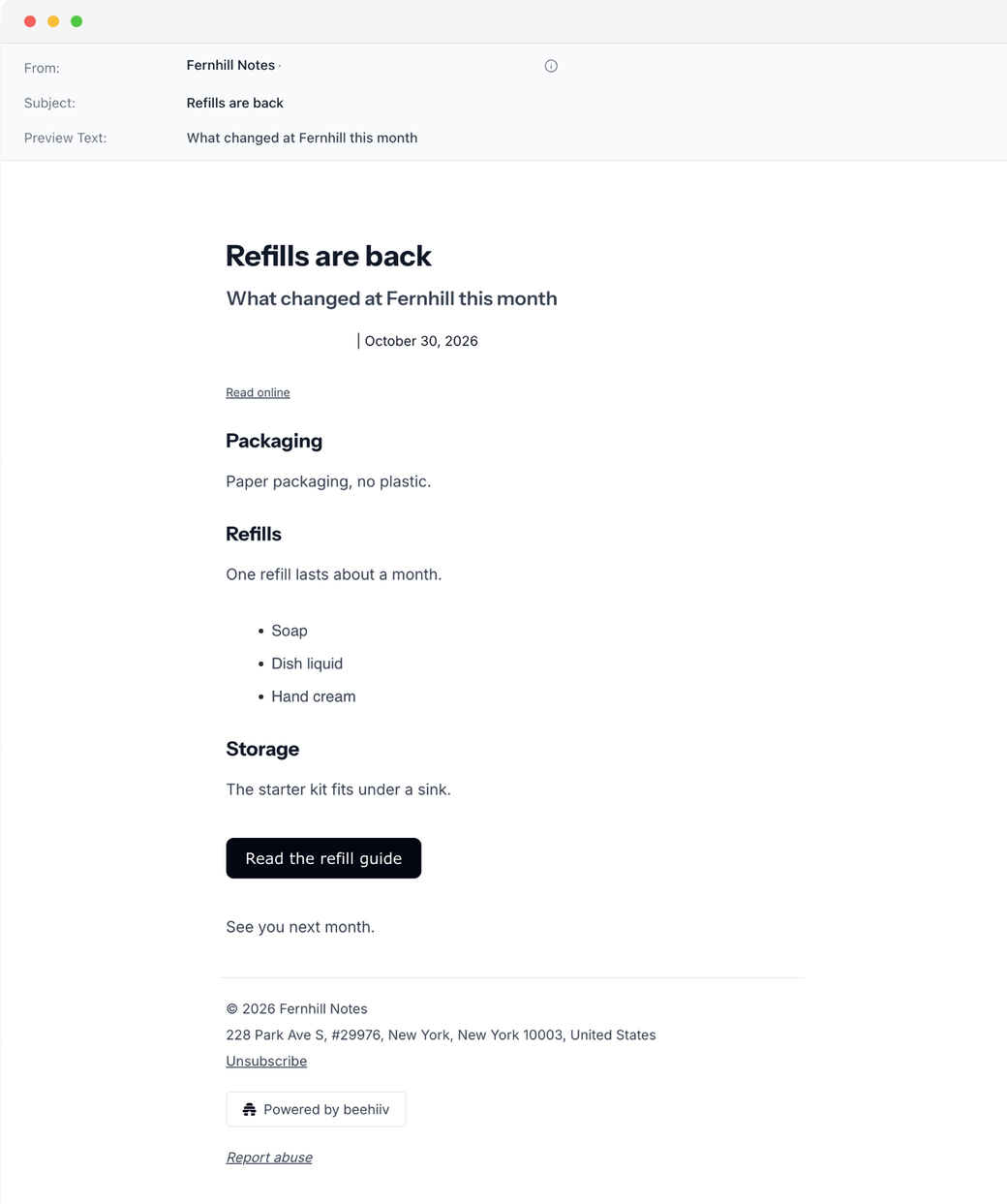
beehiiv
Pass 0.28 min
A blank post built with ## headings, a - list, /button > Custom and the closing line; the Email preview showed every element, with the title as subject and the subtitle as preview text.
Substack: Winner
Pass 0.21 min
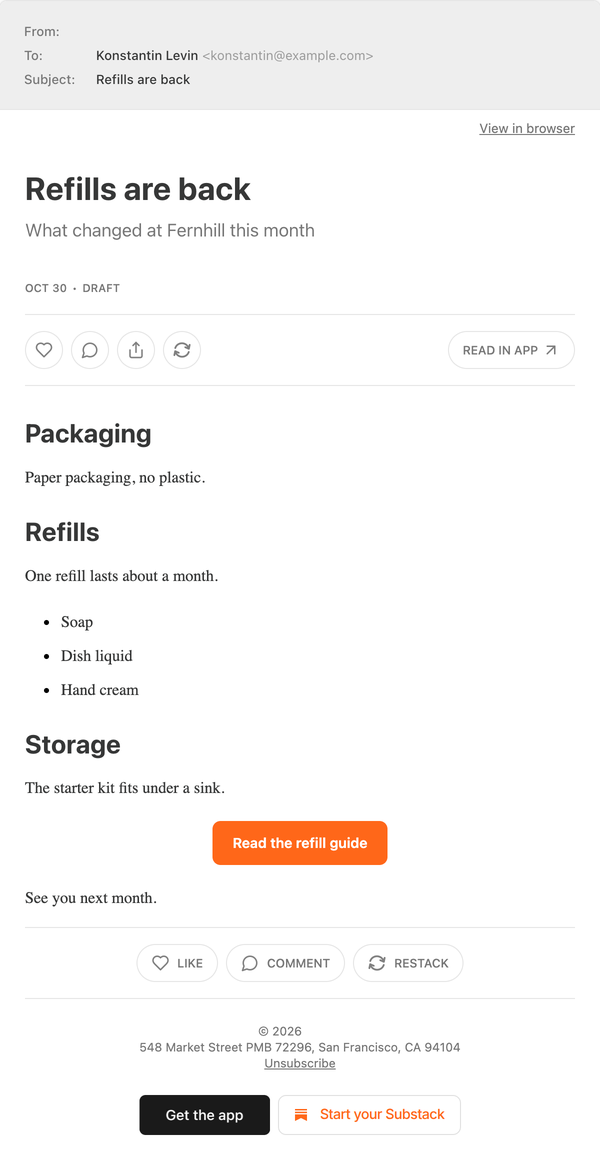
A new article built with ## headings, a - list and Button > Custom...; the Email preview showed every element, plus Substack's like, comment and restack buttons and app links.
Run by the assistant in the owner's Chrome, signed in: one scripted pass per tool on a route from an untimed rehearsal; opening the post and looks between timed parts are not counted. Counted: beehiiv 11 s of fixed waits, 7 script checks and 2.4 s for its preview; Substack 9 s, 6 checks and 0.6 s (its framed preview read from the frame's own address). beehiiv had 5 void attempts (a stray toolbar click, a list split by fast typing, a Preview click and a check made too early, a script error); Substack none. beehiiv had a Pro trial on; nothing used was marked Pro, so its effect is unknown.
Test 2: Set up the welcome email for new free subscribers
The task
In each tool, set up the welcome email that new free subscribers receive, with the subject "Welcome to Fernhill Notes" and a three-line body, and open its preview. Add no subscribers and send nothing.
How we judged it
Pass: the subject and the body are saved for new free subscribers on the plan used, and the preview shows both.
Partial: it saves, but the subject cannot be changed, there is no preview, or it needs a step outside the tool's own settings.
Fail: no welcome email can be set up on the plan used.
beehiiv: Winner
Pass
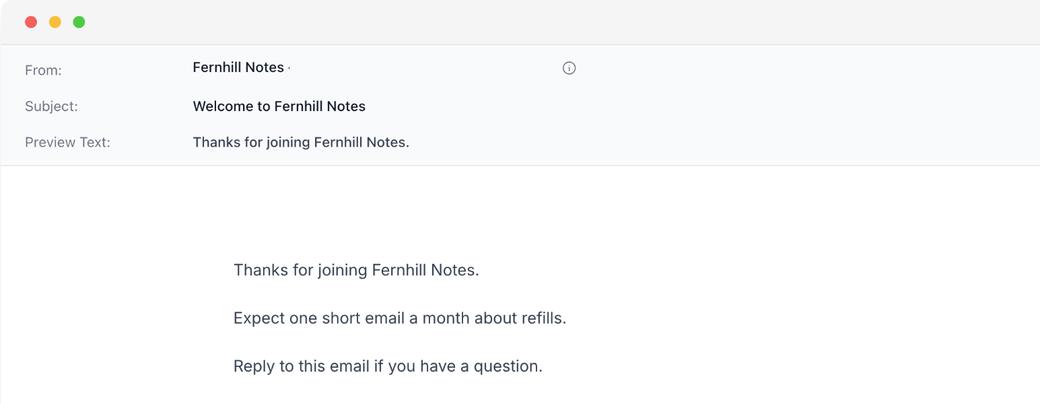
Subject and three-line body saved for new subscribers and shown in the preview; the subject was kept only after Publish, which also needs a preview text. The email stayed switched off.
Substack
Partial
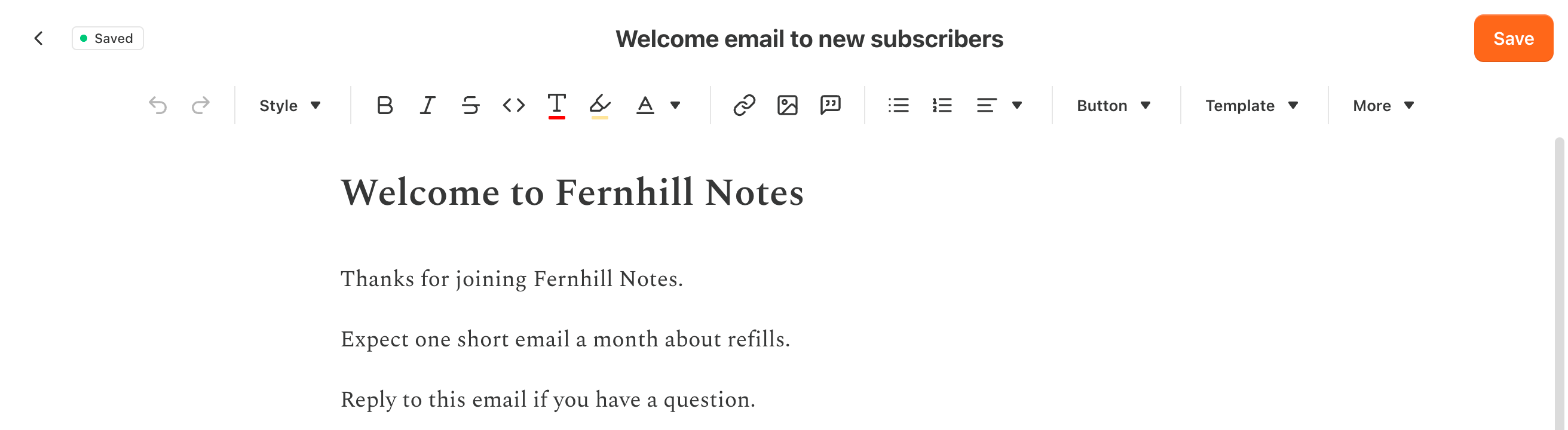
Subject Welcome to Fernhill Notes and the three-line body were saved and kept after reopening; the editor has no preview, and the email has no on/off switch.
Run by the assistant in Chrome, signed in; nothing sent, no subscribers added. beehiiv (Free with its Pro trial running; no upgrade prompt, so the trial's effect is unknown): the body saved on its own, but the subject only with Publish, which also needs a preview text (the first body line was used); the email stayed off. Substack (free): Edit stayed disabled until the owner accepted its publisher terms; the subject is the editor's title line and Save keeps both. No preview, test send or on/off switch was found: it goes to every new subscriber. Its default text was put back afterwards.
Test 3: Save a segment of new, engaged subscribers
The task
In each tool, save a subscriber segment named "Fernhill new and engaged" with two conditions: signed up in the last 30 days, and opened at least one email in that time. Reopen it to check that both conditions were kept. Send nothing to it.
How we judged it
Pass: both conditions are set in the tool's own segment builder and the segment is saved on the plan used (a count of 0 is fine).
Partial: it saves with only one of the two conditions, or only with a stand-in for the open condition (another activity condition, or tags added by hand).
Fail: no segment can be saved on the plan used.
beehiiv: Winner
Pass
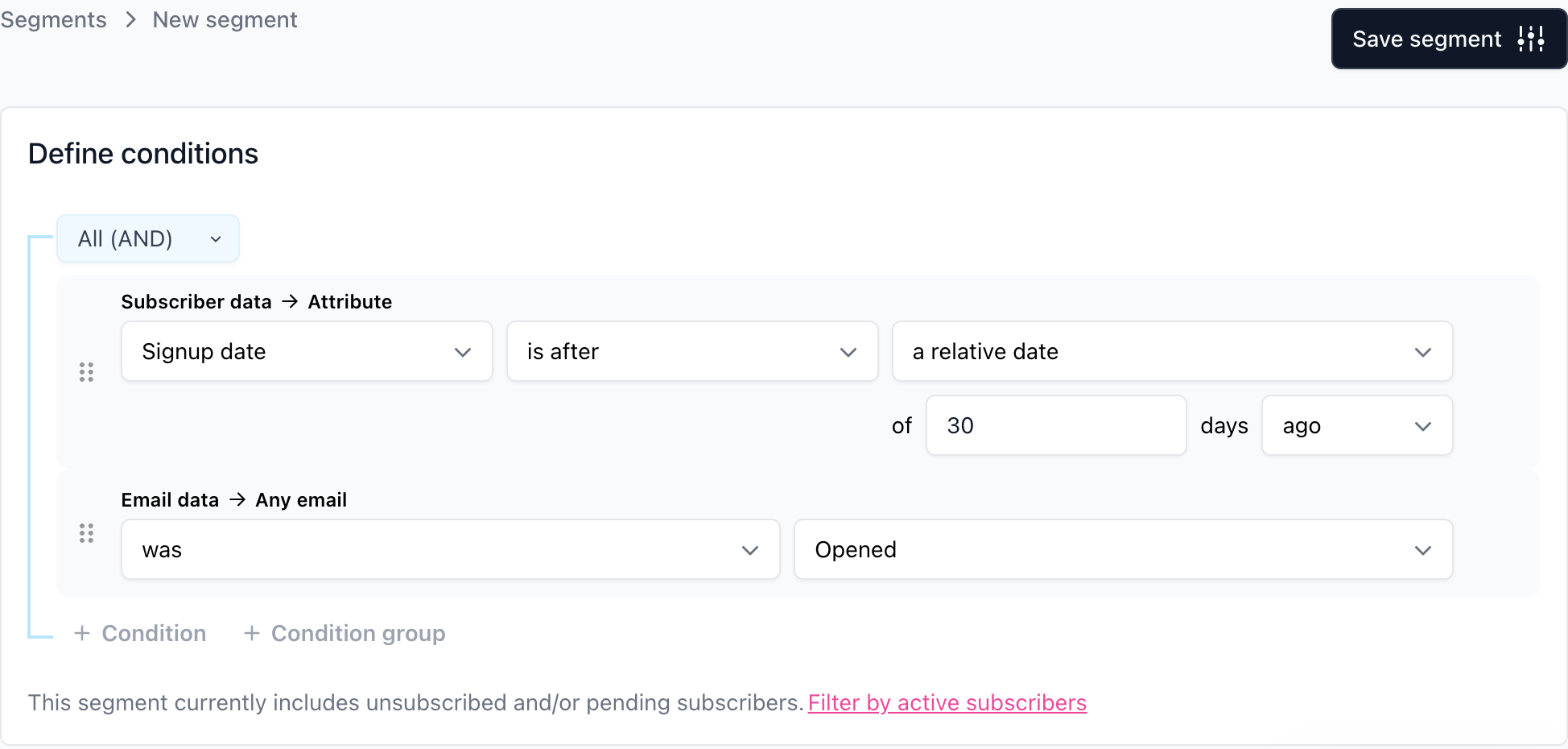
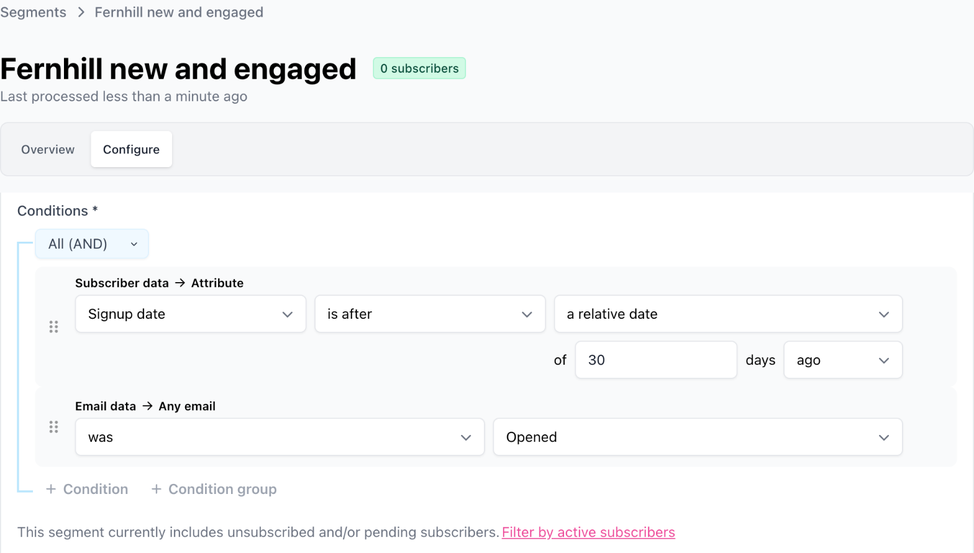
A Dynamic segment with Signup date after 30 days ago AND Any email was Opened saved with 0 subscribers; reopened from the list, both conditions were still there.
Substack
Partial
Saved with Emails opened (30d) at least 1, but signup takes only a fixed date (Start date on or after Sep 30, 2026), true to the last 30 days only on the day saved; reopened, both kept, 0 subscribers.
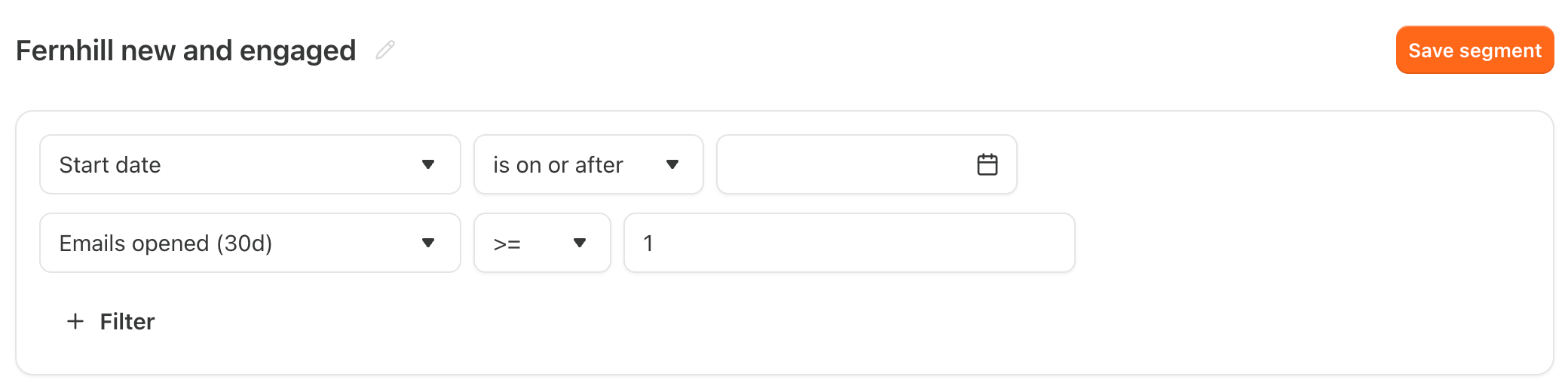
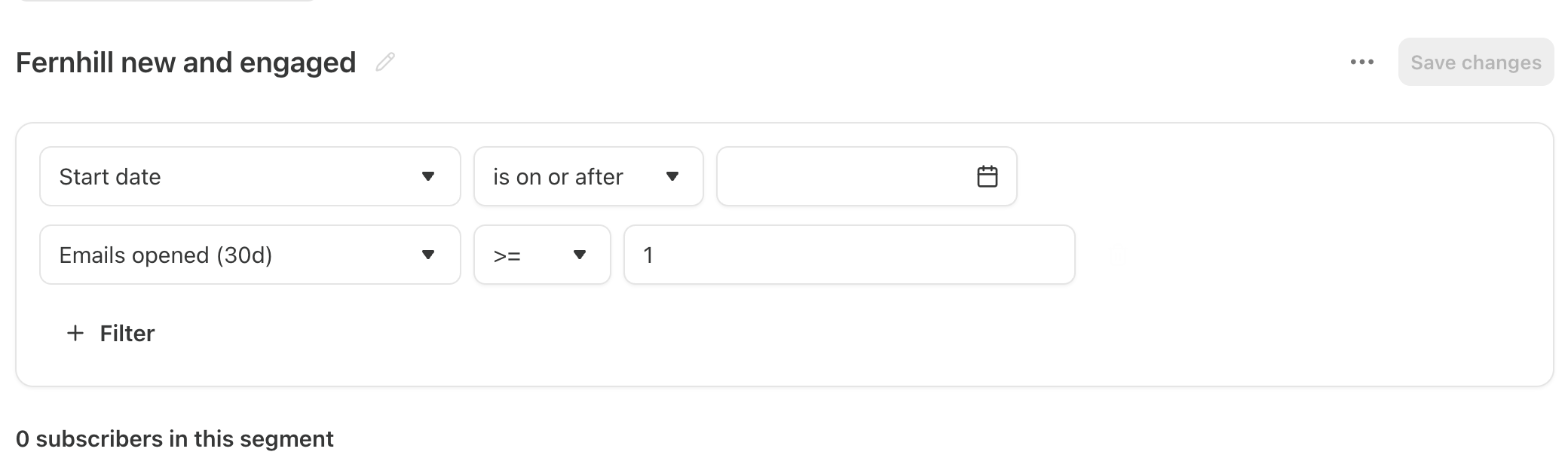
Run by the assistant in Chrome, signed in; nothing sent. beehiiv (Free with its Pro trial running; no upgrade notice, so the trial's effect is unknown): a Dynamic segment with a rolling signup date; its open rule (Any email was Opened) has no time window, but any open it counts comes after a signup in the last 30 days. Substack (free): its Start date rule takes fixed dates only, so on or after Sep 30, 2026 matches the last 30 days only around the run day; Emails opened (30d) keeps its own window; the rules combine with AND. Both counts were 0.
Our verdict
It comes down to how you would rather pay: a monthly plan, or a share of reader payments.
Substack is the easier start if you want to begin free and charge later. Publishing costs nothing at any list size, and paid subscriptions come with monthly, annual and founding prices, free trials, gifts and group plans. Its app, Notes, recommendations and leaderboards can bring in readers. The trade-offs: Substack keeps 10% of every subscription payment, emails always come from a substack.com address, and the only API access in its help center is a read-only MCP server for Bestseller publications.
beehiiv fits a newsletter you want to send from your own domain and automate. It takes no cut of subscriptions or digital products; its paid plans add a custom sending domain with SPF, DKIM and DMARC, automations, A/B tests and a referral program; every plan includes an API and a website builder. The cost is a monthly fee that grows with your list.
With up to 1,000 subscribers, Lite's $588 a year equals Substack's 10% of $5,880 in yearly subscription revenue, before Stripe's fees on both. Below that revenue Substack costs less, and above it beehiiv Lite does. A free newsletter costs nothing on either up to 2,500 subscribers, and Substack has no cap.
Choose beehiiv if
You want to keep all of your subscription and digital product revenue, minus Stripe's fee, and would rather pay a monthly price than a 10% share. Lite, from $59 a month for up to 1,000 subscribers ($49 a month billed yearly), adds paid subscriptions, up to 10 live automations, A/B tests, a referral program and sending from your own domain. It also fits if you want an API, a website with custom pages, or a free plan with unlimited sends for up to 2,500 subscribers.
Choose Substack if
You want to publish for free with no subscriber limit and pay Substack only its 10% share of paid subscriptions, plus a one-time $50 if you want a custom domain. It suits writers, podcasters and video creators who want monthly, annual and founding prices, free trials, gifts and group plans built in, and who hope to be found through the Substack app, Notes, recommendations and leaderboards. It also fits if you can accept emails sent from a substack.com address and a welcome page with a fixed design.
Frequently asked questions
Is beehiiv or Substack cheaper for a paid newsletter?
It depends on your revenue and your list size. Substack charges no monthly fee and keeps 10% of each paid subscription payment. beehiiv takes no share, but paid subscriptions need a paid plan: Lite costs $59 a month for up to 1,000 subscribers, or $588 a year ($49 a month) billed yearly, and its price rises as your list grows. At that size, Lite billed yearly costs the same as Substack's share of $5,880 a year in subscription revenue, or $490 a month; billed monthly, the break-even point is $590 a month. Stripe's processing fees apply on both: Substack lists 2.9% plus $0.30 per US card payment and a 0.7% billing fee, and beehiiv lists Stripe's 2.9% plus 30 cents. On Substack, readers who subscribe in the iOS app may pay more to cover Apple's fees.
Can I start a newsletter for free on beehiiv or Substack?
Yes, on both. Substack is free to publish on with unlimited subscribers, and its 10% applies only once you charge for subscriptions. beehiiv's Free plan covers up to 2,500 subscribers with unlimited sends, 1 team seat and 1 publication, and it includes the website builder, podcast hosting, a community space and digital product sales. It has no automations beyond a welcome email, no paid subscriptions and no custom domain, and while you can create up to 3 segments on Free, sending to a segment needs a paid plan.
Can I send my newsletter from my own domain?
Only on beehiiv's paid plans. From Lite up, you can set up a custom sending domain authenticated with SPF, DKIM and a required DMARC record, and beehiiv has a DMARC setup wizard; dedicated IPs are Enterprise-only. On Substack, a custom domain costs a one-time $50, but newsletters are still sent from your publication's substack.com address. Branding is a separate question: beehiiv branding stays on Free and Lite, and removing it needs Pro, from $95 a month billed yearly.
How do beehiiv and Substack help a newsletter find new readers?
Substack's discovery runs through its app, Notes, recommendations and category leaderboards, and its subscriber referral program has custom reward tiers; for paid publications the default rewards are complimentary subscriptions at 2, 10 and 25 referrals, and private publications cannot use it. beehiiv has a recommendation network on every plan and a referral program with reward milestones on Lite (up to 3) and Pro (unlimited), but not on Free.
Do beehiiv and Substack have an API?
beehiiv has an API on every plan, with rate limits of 30 requests a minute on Free, 180 on Lite and 500 on Pro, and a Send API on Pro and Enterprise. In Substack's help center, the only API access is a read-only MCP server for Bestseller publications: it reads dashboard metrics, traffic and publication settings, but it cannot publish posts or change the account.
Compare with others
More about: beehiiv · Substack · Best Email marketing